
Django Queries Count




A small debug tool that counts the SQL queries Django runs and prints a summary to the console — including duplicate queries (the usual sign of an N+1 problem) and the slowest ones, similar to what django-debug-toolbar shows in the browser.
Unlike most similar tools, which only ship a middleware, this one also provides a decorator. That means you can profile not just views but also management commands, Celery tasks, or any plain function — which is exactly the use case it was built for.
Example output
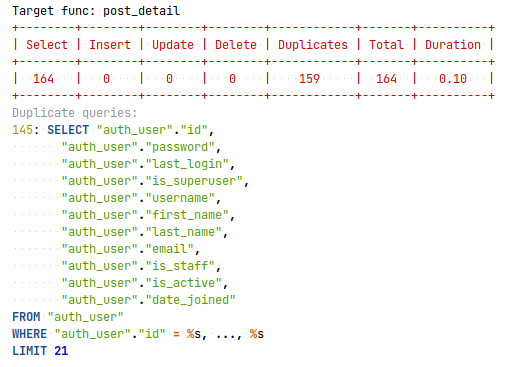
The basic idea is to count duplicate queries, like django-debug-toolbar does, and output them. The number of duplicated queries and the color of the theme can be specified in the settings. It is also possible to output all requests at once (counted if they are duplicated).
Content
Installation
It is enough to install the package and apply the decorator to the desired management command or view.
pip install django-query-counter
Please take note that the colored and reformatted SQL output depicted in the readme screenshots may not be achieved unless the specified additional packages are installed (which maybe already installed):
- colorize requires pygments
pip install Pygments
- reformat requires sqlparse
pip install sqlparse
Usage
The project can be used in two ways:
Import the decorator and apply it where you need to know the number of queries to the database.
- management command:
from django.core.management.base import BaseCommand
from query_counter.decorators import queries_counter

class Command(BaseCommand):

   @queries_counter
   def handle(self, *args, **options):
       pass
- function-based views
from query_counter.decorators import queries_counter


@queries_counter
def index(request):
    pass
- class-based views:
from django.utils.decorators import method_decorator
from query_counter.decorators import queries_counter


@method_decorator(queries_counter, name='dispatch')
class IndexView(View):
    pass
- specifying middleware in settings for all views at once.
MIDDLEWARE = [
    'query_counter.middleware.DjangoQueryCounterMiddleware',
]
Available settings
It is possible to override the default settings. To do this, you need to include the app to the INSTALLED_APPS:
INSTALLED_APPS = [
    ...,
    'query_counter',
    ...
]
Default settings:
{
    'DQC_ENABLED': True,  # set to False to disable all output (e.g. in production)
    'DQC_SLOWEST_COUNT': 5,
    'DQC_DUPLICATED_COUNT': 10,  # max number of duplicate queries to print
    'DQC_TABULATE_FMT': 'pretty',
    'DQC_SLOW_THRESHOLD': 1,  # seconds
    'DQC_INDENT_SQL': True,
    'DQC_PYGMENTS_STYLE': 'tango',
    'DQC_PRINT_ALL_QUERIES': False,
    'DQC_COUNT_QTY_MAP': {
        5: 'green',
        10: 'white',
        20: 'yellow',
        30: 'red',
    },
}
Feel free to override any of them.
Tabulate tables formats you can find here. Pygments styles available here.
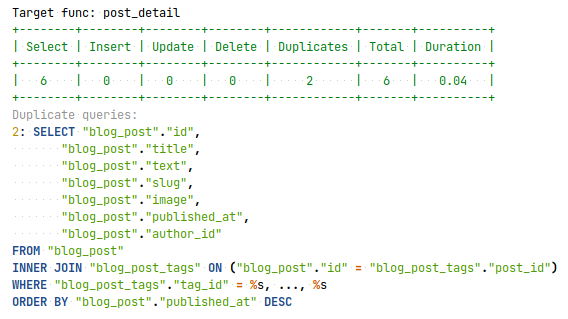
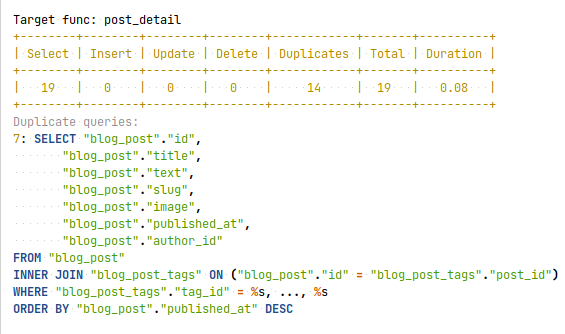
Additional screenshots
Contribute
Feel free to open an issue to report any bugs. Bug fixes and features are welcome!
1 maintainer

Release files for django-query-counter 0.6.0
For a detailed explanation of source distributions (sdists) and built distributions (wheels), please see the package formats documentation.
Source distribution (sdist)
| File | Size | Uploaded | |
|---|---|---|---|
| django_query_counter-0.6.0.tar.gz | 6.3 kB | Details |
Built distribution (wheel)
| File | Interpreter | ABI | Platform | Reset |
|---|---|---|---|---|
| django_query_counter-0.6.0-py3-none-any.whl | Python 3 | none | any | Details |
Total release size: 13.6 kB
Release files / django_query_counter-0.6.0.tar.gz
| Download URL | django_query_counter-0.6.0.tar.gz |
|---|---|
| Size | 6.3 kB |
| Tags | Source |
|
SHA-256 checksum How to use checksums |
12e41b5778f5f5843d79056eda197afcdf4b41182d3240317c214d992e3002a2
|
|
BLAKE2b-256 checksum How to use checksums |
06aadb81aa40dd3c4db86bf67889c5de46a29b0966f5d74e9c168177d26200a5
|
| Upload date | |
|
Uploaded using Trusted Publishing? What is trusted publishing? |
Yes |
| Uploaded via |
twine/6.1.0 CPython/3.13.12
|
Provenance
Provenance describes where a file came from. On PyPI, provenance is shared via attestations, which provide a verifiable record of the build or publishing details. View details, limitations and caveats.


PyPI Publish Attestation
PyPI verified that this artifact, at this checksum, originated from the publisher listed below.
Signed by GitHub Actions, verified by PyPI on May 28, 2026.
Transparency logRelease files / django_query_counter-0.6.0-py3-none-any.whl
| Download URL | django_query_counter-0.6.0-py3-none-any.whl |
|---|---|
| Size | 7.3 kB |
| Tags | Python 3 |
|
SHA-256 checksum How to use checksums |
5f10111c32f89941b80d60f928cc85b6b8f0a63fd3da0a60c02ecb97df26361c
|
|
BLAKE2b-256 checksum How to use checksums |
3c4b6597a65e13ff88f8a06cc7e1d4dc7ad6de66ae351a8ed85b8af6d84ff28b
|
| Upload date | |
|
Uploaded using Trusted Publishing? What is trusted publishing? |
Yes |
| Uploaded via |
twine/6.1.0 CPython/3.13.12
|
Provenance
Provenance describes where a file came from. On PyPI, provenance is shared via attestations, which provide a verifiable record of the build or publishing details. View details, limitations and caveats.
PyPI Publish Attestation
PyPI verified that this artifact, at this checksum, originated from the publisher listed below.
Signed by GitHub Actions, verified by PyPI on May 28, 2026.
Transparency log













