
Ray-based backend for Django Tasks with distributed execution and database-backed reliability
Verified details
These details have been verified by PyPIProject links
GitHub Statistics
Maintainers

Project description

django-ray
A Ray-based backend for Django Tasks that enables distributed task execution with database-backed reliability.




Why django-ray?
Django projects often need background task execution. While Celery has been the go-to solution for years, Ray offers a more powerful and flexible approach to distributed computing:
- True distributed computing: Ray was built for distributed workloads from the ground up, not just task queues
- Horizontal scaling: Scale from a single machine to thousands of nodes without changing your code
- Resource-aware scheduling: Request specific CPU, GPU, or memory for tasks
- Actor model support: Maintain stateful workers when needed
- Rich ecosystem: Access to Ray's ML libraries, data processing, and more
Despite Ray's capabilities, there was no straightforward way to use it with Django's built-in Tasks framework. django-ray bridges this gap, letting you leverage Ray's distributed computing power while keeping Django's familiar patterns and database-backed reliability.
Overview
django-ray bridges Django's built-in Tasks framework with Ray's distributed computing capabilities, providing:
- Database-backed reliability: Task state is tracked in your Django database, ensuring no tasks are lost
- Multiple execution modes: Sync, local Ray, Ray cluster, or Ray Job API
- Automatic retries: Failed tasks are retried with exponential backoff
- Admin visibility: Monitor and manage tasks through Django admin
- Graceful shutdown: Workers handle signals properly for clean shutdown
- Ray-native workflows: Chain, group, and dynamically fan out low-overhead internal steps behind one durable Django task
- RuntimeEnv profiles: Run versioned or lightweight Python environments on a generic Ray cluster, with immutable environment identity per durable task
- Observable workflow graphs: Track dependency edges, node progress, Ray execution identifiers, and correlated logs for custom monitoring UIs
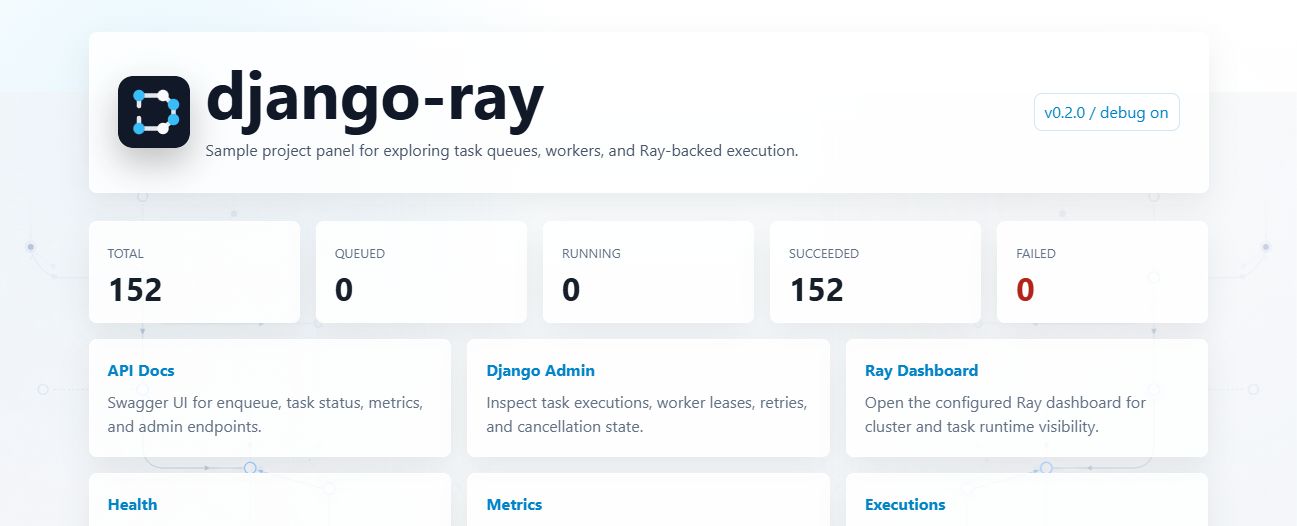
The repository includes a sample testproject/ with a small landing page for exploring the bundled API,
task stats, project links, and smoke-task trigger:
Requirements
- Python 3.12, 3.13, or 3.14
- Django 6.0+
- Ray 2.53.0+
Installation
pip install django-ray
Or with uv:
uv add django-ray
Quick Start
- Add
django_rayto yourINSTALLED_APPS:
INSTALLED_APPS = [
    # ...
    "django_ray",
]
- Configure Django Tasks and django-ray:
TASKS = {
    "default": {
        "BACKEND": "django_ray.backends.RayTaskBackend",
        "QUEUES": ["default"],
    },
}

DJANGO_RAY = {
    "RAY_ADDRESS": "auto",  # Use "ray://host:port" for a remote cluster
    "RUNNER": "ray_core",
    "DEFAULT_CONCURRENCY": 10,
    "MAX_TASK_ATTEMPTS": 3,
}
- Run migrations:
python manage.py migrate django_ray
- Start the worker:
# Local Ray (recommended for development)
python manage.py django_ray_worker --queue=default --local

# Connect to Ray cluster
python manage.py django_ray_worker --queue=default --cluster=ray://localhost:10001

# Sync mode (no Ray, for testing)
python manage.py django_ray_worker --queue=default --sync
Worker Execution Modes
| Mode | Flag | Description |
|---|---|---|
| sync | --sync |
Direct execution, no Ray (testing) |
| local | --local |
Local Ray cluster, tasks via @ray.remote |
| cluster | --cluster=<addr> |
Remote Ray cluster, tasks via @ray.remote |
| ray-job | (default) | Ray Job Submission API (process isolation) |
Configuration
| Setting | Default | Description |
|---|---|---|
RAY_ADDRESS |
None |
Must be set at runtime; use "auto" locally or "ray://host:port" for a cluster |
DEFAULT_CONCURRENCY |
10 |
Max concurrent tasks per worker |
MAX_TASK_ATTEMPTS |
3 |
Max retry attempts |
RETRY_BACKOFF_SECONDS |
60 |
Base backoff for retries |
RETRY_EXCEPTION_DENYLIST |
[] |
Exception types that skip auto-retry |
STUCK_TASK_TIMEOUT_SECONDS |
300 |
Timeout before marking tasks as LOST |
TASK_MONITOR_HEARTBEAT_SECONDS |
15 |
Database heartbeat interval for in-flight Ray Core tasks |
RUNTIME_ENV_PROFILES |
{} |
Named Ray environments for code and dependencies |
DEFAULT_RUNTIME_ENV_PROFILE |
None |
Default named environment |
See Ray-Native Workflows for low-latency chain, group,
and map_step execution.
See Runtime Environments for per-task profiles,
workflow overrides, and generic KubeRay images.
See Performance for choosing durable task boundaries,
execution modes, and useful fan-out granularity.
Development Setup
Prerequisites
- Python 3.12, 3.13, or 3.14
- uv package manager
Installation
git clone https://github.com/dariuszpanas/django-ray.git
cd django-ray
uv sync
Development Commands
Run development targets through uv run unless the virtual environment is already active. Targets
named lint, check, and ci are non-mutating; use format or fix when files should change.
make install          # Install dependencies
uv run make format    # Format code with Ruff
uv run make fix       # Format and apply safe Ruff lint fixes
uv run make lint      # Check lint without modifying files
uv run make typecheck # Type check with ty
uv run make test      # Run tests
uv run make test-cov  # Run tests with CI coverage floors
uv run make check     # Check formatting, lint, and types without changes
uv run make ci        # Check coverage, docs, and package build for this interpreter
make docs-build       # Build docs (Zensical)
make docs-build-strict # Build docs in strict mode
make docs-serve       # Serve docs locally
Django Commands
make migrate          # Run migrations
make runserver        # Start dev server
make shell            # Django shell
make createsuperuser  # Create admin user
Worker Commands
make worker           # Ray Job API mode
make worker-local     # Local Ray (recommended)
make worker-sync      # Sync mode (no Ray)
make worker-all       # All queues, local Ray
make worker-cluster   # Connect to cluster
Quick Start (End-to-End Testing)
Terminal 1 - Start Django server:
make runserver
Terminal 2 - Start worker:
make worker-all
Browser - Test via API:
- Open http://127.0.0.1:8000/api/docs (Swagger UI)
- Try
POST /api/enqueue/add/100/200 - Check
GET /api/executions- see task completed with result300 - View in Admin: http://127.0.0.1:8000/admin/django_ray/raytaskexecution/
Queue Configuration
# Single queue
python manage.py django_ray_worker --queue=default

# Multiple queues
python manage.py django_ray_worker --queue=default,high-priority,low-priority

# All configured queues
python manage.py django_ray_worker --all-queues
Docker
make docker-build

# Run modes:
docker run -p 8000:8000 django-ray:latest web          # Production
docker run -p 8000:8000 django-ray:latest web-dev      # Development
docker run django-ray:latest worker                     # Worker (local Ray)
docker run django-ray:latest worker-cluster             # Worker (cluster)
Kubernetes Deployment
Deploy using Kustomize manifests in k8s/:
# Build images
make k8s-build

# Deploy
make k8s-deploy

# Check status
make k8s-status

# With TLS enabled
make k8s-gen-tls-certs
make k8s-deploy-tls
See k8s/README.md for detailed deployment documentation.
Project Structure
django-ray/
├── src/django_ray/          # Library source code
│   ├── models.py            # RayTaskExecution, TaskWorkerLease
│   ├── admin.py             # Admin interface
│   ├── backends.py          # Django Task Backend
│   ├── conf/                # Settings
│   ├── runner/              # Task runners
│   │   ├── ray_job.py       # Ray Job Submission API
│   │   ├── ray_core.py      # Ray Core (@ray.remote)
│   │   ├── leasing.py       # Worker coordination
│   │   └── retry.py         # Retry logic
│   ├── runtime/             # Task execution
│   │   ├── entrypoint.py    # Execution entry point
│   │   ├── distributed.py   # parallel_map, scatter_gather
│   │   └── serialization.py
│   └── management/commands/
│       └── django_ray_worker.py
│
├── testproject/             # Example project (development only)
│   ├── api.py               # Example REST API
│   ├── tasks.py             # Example tasks
│   └── apps/                # Example apps
│
├── tests/                   # Test suite
├── docs/                    # Documentation
└── k8s/                     # Kubernetes manifests
Documentation
Published docs are served with Zensical at:
Agents and documentation tools can start with llms.txt. The published
documentation also serves /llms.txt.
Read the Docs builds are configured in .readthedocs.yaml. The build installs uv, runs the
strict Zensical build, and copies the generated site/ output into Read the Docs' HTML output
directory.
Source docs remain in the docs/ directory:
- Getting Started - Installation and basic setup
- Configuration - All configuration options
- Worker Modes - Execution modes explained
- Tasks - Defining and enqueueing tasks
- Queues - Working with task queues
- Retry & Error Handling - Configuring retries
Deployment
- Kubernetes - Deploy to Kubernetes
- Docker - Running with Docker
- TLS - Securing Ray communication
Reference
- CLI Reference - Command-line options
- Settings Reference - All settings
- API Reference - REST API endpoints
Contributing
See CONTRIBUTING.md for branch, commit, pull request, staging, and validation
conventions. Automated contributors must also follow AGENTS.md.
License
This project is licensed under the BSD 3-Clause License - see the LICENSE file for details.
Project details
Verified details
These details have been verified by PyPIProject links
GitHub Statistics
Maintainers


Download files
Download the file for your platform. If you're not sure which to choose, learn more about installing packages.
Source Distribution
Built Distribution
Filter files by name, interpreter, ABI, and platform.
If you're not sure about the file name format, learn more about wheel file names.
Copy a direct link to the current filters
File details
Details for the file django_ray-0.3.1.tar.gz.
File metadata
- Download URL: django_ray-0.3.1.tar.gz
- Upload date:
- Size: 936.5 kB
- Tags: Source
- Uploaded using Trusted Publishing? Yes
- Uploaded via: twine/6.1.0 CPython/3.13.13
File hashes
| Algorithm | Hash digest | |
|---|---|---|
| SHA256 |
f45df006eb346327b6775e68427c61784fd9aaf9ebab1824fb2ac2a4e44cdf24
|
|
| MD5 |
f99e83b3a22865926eb532d4182dc74e
|
|
| BLAKE2b-256 |
d3cd3a13066c786089c0ef8b36c22d159fd0fe6b09d07cc4c0fb35e5f944b58a
|
Provenance
The following attestation bundles were made for django_ray-0.3.1.tar.gz:
Publisher:
release.yml on dariuszpanas/django-ray
-
Statement:
-
Statement type:
https://in-toto.io/Statement/v1 -
Predicate type:
https://docs.pypi.org/attestations/publish/v1 -
Subject name:
django_ray-0.3.1.tar.gz -
Subject digest:
f45df006eb346327b6775e68427c61784fd9aaf9ebab1824fb2ac2a4e44cdf24 - Sigstore transparency entry: 2195678815
- Sigstore integration time:
-
Permalink:
dariuszpanas/django-ray@29dc301177b565767805e5ce1209bab59866f4dc -
Branch / Tag:
refs/tags/v0.3.1 - Owner: https://github.com/dariuszpanas
-
Access:
public
-
Token Issuer:
https://token.actions.githubusercontent.com -
Runner Environment:
github-hosted -
Publication workflow:
release.yml@29dc301177b565767805e5ce1209bab59866f4dc -
Trigger Event:
push
-
Statement type:
File details
Details for the file django_ray-0.3.1-py3-none-any.whl.
File metadata
- Download URL: django_ray-0.3.1-py3-none-any.whl
- Upload date:
- Size: 87.8 kB
- Tags: Python 3
- Uploaded using Trusted Publishing? Yes
- Uploaded via: twine/6.1.0 CPython/3.13.13
File hashes
| Algorithm | Hash digest | |
|---|---|---|
| SHA256 |
0480d4130fb2fc301263529480fed9688045bebf4986de2301556d5f2f8c5d9f
|
|
| MD5 |
b2a01ebc537c4c03d096f4fb7e83d1c1
|
|
| BLAKE2b-256 |
f317abeac03285400e5d0081883c6fe739e482076e709fac373de69ffc778104
|
Provenance
The following attestation bundles were made for django_ray-0.3.1-py3-none-any.whl:
Publisher:
release.yml on dariuszpanas/django-ray
-
Statement:
-
Statement type:
https://in-toto.io/Statement/v1 -
Predicate type:
https://docs.pypi.org/attestations/publish/v1 -
Subject name:
django_ray-0.3.1-py3-none-any.whl -
Subject digest:
0480d4130fb2fc301263529480fed9688045bebf4986de2301556d5f2f8c5d9f - Sigstore transparency entry: 2195678820
- Sigstore integration time:
-
Permalink:
dariuszpanas/django-ray@29dc301177b565767805e5ce1209bab59866f4dc -
Branch / Tag:
refs/tags/v0.3.1 - Owner: https://github.com/dariuszpanas
-
Access:
public
-
Token Issuer:
https://token.actions.githubusercontent.com -
Runner Environment:
github-hosted -
Publication workflow:
release.yml@29dc301177b565767805e5ce1209bab59866f4dc -
Trigger Event:
push
-
Statement type:






