
Django Request Logs
Django Request Logs is a reusable Django app designed to log and display HTTP requests in your project. This application allows developers to monitor incoming requests, their metadata, and responses for debugging and analysis.
Features
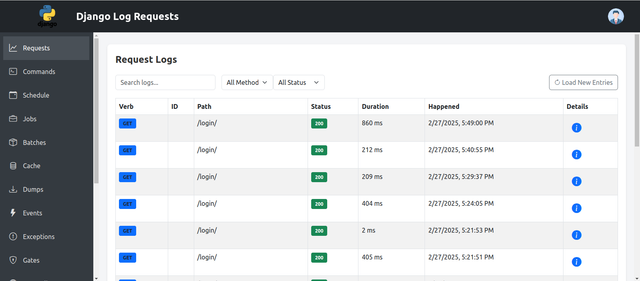
- Logs HTTP requests (method, path, status code, and duration).
- Provides middleware for lightweight logging.
- Easy-to-use admin interface to view logged requests.
- Flexible views and templates for displaying logs.
Installation
Follow these steps to install and integrate Django Request Logs into your Django project:
Step 1: Install the Package
Install the app using pip:
pip pip install django_requests_loger
Step 2: Add to INSTALLED_APPS
Update your Django settings file (settings.py) to include the app:
INSTALLED_APPS = [
    ...,
    'django_requests_loger',
]
Step 3: Add Middleware
Insert the RequestLoggingMiddleware into the MIDDLEWARE list in your settings file:
MIDDLEWARE = [
    ...,
    'django_requests_loger.middleware.RequestLoggingMiddleware',
]
Step 4: Add Url
Add the url in project urls.py file:
urlpatterns = [
    path('', include('django_requests_loger.urls')),  # Include app URLs
]
Step 5: Run Migrations
Apply database migrations to create necessary tables:
python manage.py migrate
Dynamic Login Page Customization
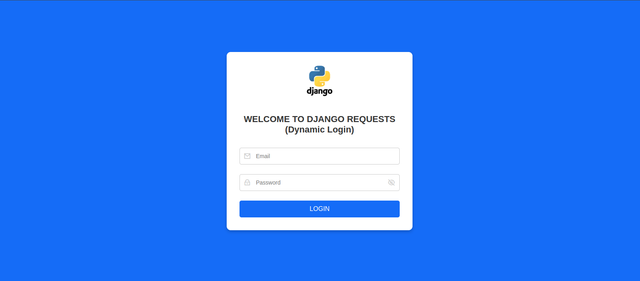
Django Request Logs also includes a dynamic login page that you can customize without modifying the template code.
- Add the Context Processor Ensure your project’s TEMPLATES configuration in settings.py includes the custom context processor:
   TEMPLATES = [
    {
        # ... other template settings ...
        "OPTIONS": {
            "context_processors": [
                # ... default context processors ...
                "django_requests_loger.context_processors.dynamic_login_settings",
                "django_requests_loger.context_processors.ui_settings",
            ],
        },
    },
]
- Override Default Values
You can override the default login page settings by adding these variables to your
settings.py:
LOGIN_PAGE_LOGO = "images/MyCustomLogo.png"  # Path to your logo in your static files
LOGIN_PAGE_HEADING = "WELCOME TO MY CUSTOM PROJECT <br>(Dynamic Login)"
If these are not set, the context processor will fall back to the default values.
- Template Usage The login template uses these context variables to display dynamic content. For example:
<img src="{% static LOGIN_PAGE_LOGO %}" alt="Logo">
<h1>{{ LOGIN_PAGE_HEADING|safe }}</h1>
The |safe filter allows HTML tags (like <br>) to be rendered correctly.
- Dynamic Request Logger Settings
You can control excluded paths, prefixes, and regex patterns for logging in
settings.py:
REQUEST_LOGGER = {
    "EXCLUDED_PATHS": [
        "/django_requests_loger/*",
        "/",
        "/django_requests_loger/",
        "/fetch-latest-logs/",
    ],
    "EXCLUDED_PREFIXES": [
        "/fetch-latest-logs/",
    ],
    "EXCLUDED_REGEX_PATTERNS": [
        r"^/django_requests_loger/\d+/$",
    ],
    # Add more keys as needed...
}
- Advanced View Configuration
DJANGO_REQUESTS_LOGER_CONFIGcontrols session timeouts, default pagination, and your “section map” for dynamic views:
DJANGO_REQUESTS_LOGER_CONFIG = {
    "SECTION_MAP": {
        "commands": "Commands",
        "schedule": "Schedule",
        "jobs": "Jobs",
        "batches": "Batches",
        "cache": "Cache",
        "dumps": "Dumps",
        "events": "Events",
        "exceptions": "Exceptions",
        "gates": "Gates",
        "http-client": "HTTP Client",
        "mail": "Mail",
        "models": "Models",
        "notifications": "Notifications",
        "queries": "Queries",
        "redis": "Redis",
        "views": "Views",
    },
    "SESSION_TIMEOUT_HOURS": 12,  # default 12 hours
    "DEFAULT_LOG_OFFSET": 0,
    "DEFAULT_LOG_LIMIT": 100,
}
- Dynamic UI Settings
django_requests_loger.context_processors.ui_settingsenables branding and sidebar customization:
DJANGO_REQUESTS_LOGER_UI = {
    "BRAND_LOGO": "images/Logo.png",  # Path in static files
    "PROJECT_NAME": "Django Log Requests",
    "SIDEBAR_LINKS": [
        {"url": "/request-logs/", "label": "Requests", "icon": "bi-graph-up"},
        {"url": "/commands/", "label": "Commands", "icon": "bi-terminal"},
        {"url": "/schedule/", "label": "Schedule", "icon": "bi-calendar-event"},
        {"url": "/jobs_view/", "label": "Jobs", "icon": "bi-briefcase"},
        {"url": "/batches/", "label": "Batches", "icon": "bi-box-seam"},
        {"url": "/cache/", "label": "Cache", "icon": "bi-database"},
        {"url": "/dumps/", "label": "Dumps", "icon": "bi-download"},
        {"url": "/events/", "label": "Events", "icon": "bi-lightning-fill"},
        {"url": "/exceptions/", "label": "Exceptions", "icon": "bi-exclamation-circle"},
        {"url": "/gates/", "label": "Gates", "icon": "bi-shield-lock"},
        {"url": "/http-client/", "label": "HTTP Client", "icon": "bi-globe"},
        {"url": "/mail/", "label": "Mail", "icon": "bi-envelope"},
        {"url": "/models/", "label": "Models", "icon": "bi-file-earmark"},
        {"url": "/notifications/", "label": "Notifications", "icon": "bi-bell"},
        {"url": "/queries/", "label": "Queries", "icon": "bi-card-list"},
        {"url": "/redis/", "label": "Redis", "icon": "bi-hdd"},
        {"url": "/views/", "label": "Views", "icon": "bi-eye"},
    ]
}
In your base template, you can reference these variables (e.g., {{ BRAND_LOGO }}, {{ PROJECT_NAME }}, SIDEBAR_LINKS) to dynamically render your sidebar or header.
Usage
Admin Panel
Logged requests can be viewed and managed through the Django admin interface:
- Navigate to
/admin/. - Look for the
Request Logssection.
Fetch Logs via API
Retrieve the latest logs using the provided API endpoint:
GET /fetch-latest-logs/
Example response:
{
  "logs": [
    {
      "id": 1,
      "method": "GET",
      "path": "/some-path/",
      "status_code": 200,
      "timestamp": "2024-11-29T12:00:00Z"
    }
  ]
}
Customizing Templates
The app includes default templates for displaying logs. These can be overridden by placing templates with the same name
in your project's templates/ directory:
request_logs.htmlrequest_log_detail.html
Development
Running Tests
Ensure the app works as expected by running the test suite:
python manage.py test django_requests_loger
Login Page:
Logs Page:
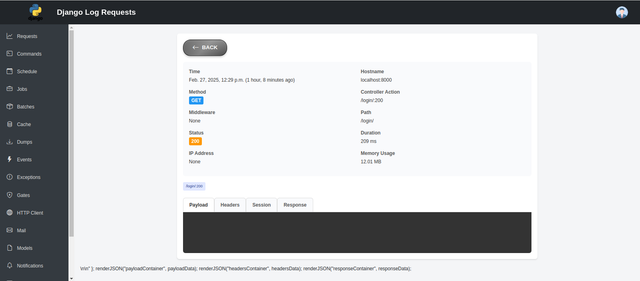
Log Detail Page:
Contributing
- Fork the repository.
- Create a feature branch:
git checkout -b feature-name
- Commit your changes and push them:
git commit -m "Add feature-name"
git push origin feature-name
- Submit a pull request.
License
This project is licensed under the MIT License. See the LICENSE file for details.
Support
For questions or support, please contact: mominalikhoker589@gmail.com.
1 maintainer

Release files for django-requests-loger 1.1.9
For a detailed explanation of source distributions (sdists) and built distributions (wheels), please see the package formats documentation.
Source distribution (sdist)
| File | Size | Uploaded | |
|---|---|---|---|
| django_requests_loger-1.1.9.tar.gz | 22.3 kB | Details |
Built distribution (wheel)
| File | Interpreter | ABI | Platform | Reset |
|---|---|---|---|---|
| django_requests_loger-1.1.9-py3-none-any.whl | Python 3 | none | any | Details |
Total release size: 48.8 kB
Release files / django_requests_loger-1.1.9.tar.gz
| Download URL | django_requests_loger-1.1.9.tar.gz |
|---|---|
| Size | 22.3 kB |
| Tags | Source |
|
SHA-256 checksum How to use checksums |
7a37c60fcfc054970e486bdd6276d90b8d4084b36953efe7046171d92f3ad340
|
|
BLAKE2b-256 checksum How to use checksums |
5ed82de73a0f3517253a38c1c1595692fcfd557a1930ae169b2f5f267563317c
|
| Upload date | |
|
Uploaded using Trusted Publishing? What is trusted publishing? |
No |
| Uploaded via |
twine/6.1.0 CPython/3.8.20
|
Release files / django_requests_loger-1.1.9-py3-none-any.whl
| Download URL | django_requests_loger-1.1.9-py3-none-any.whl |
|---|---|
| Size | 26.5 kB |
| Tags | Python 3 |
|
SHA-256 checksum How to use checksums |
133fdb1ad6a231aad8edafcd743bc8f08e79d515808630786ce0ea634ef722d4
|
|
BLAKE2b-256 checksum How to use checksums |
ea655887cf2bff74e065dfa1800bd5ea4470a04305a3c57240f3fae3c746db3f
|
| Upload date | |
|
Uploaded using Trusted Publishing? What is trusted publishing? |
No |
| Uploaded via |
twine/6.1.0 CPython/3.8.20
|














