
Define named groups of management commands in Django settings files for batched execution.
Verified details
These details have been verified by PyPIProject links
GitHub Statistics
Maintainers

Project description
django-routines











Configure batches of Django management commands in your settings files and run them all at once. For example, batch together your common database maintenance tasks, deployment routines or any other set of commands you need to run together. This helps single source general site maintenance into your settings files keeping your code base DRY.
Example
Let's define two named routines, "package" and "deploy". The package routine will be a collection of commands that we typically run to generate package artifacts (like migrations and transpiled javascript). The deploy routine will be a collection of commands we typically run when deploying the site for the first time on a new server or when we deploy version updates on the server.
Routine commands are run in the order they are registered, or by priority.
There are two types of commands, management commands and system commands. The management commands will be called in the same process space as routine unless --subprocess is specified in which case they will use the same management script as routine was invoked with or whatever value you supply to --manage-script. System commands are always invoked as subprocesses.
In our settings file we may define these routines like this:
from django_routines import (
    ManagementCommand,
    SystemCommand,
    command,
    system,
    routine
)

# register routines and their help text
routine(
    name="package",
    help_text=(
        "Generate pre-package artifacts like migrations and transpiled "
        "javascript."
    )
)
# you may register commands on a routine after defining a routine (or before!)
command("package", "makemigrations")
command("package", "renderstatic")
system("package", "poetry", "build")

routine(
    "deploy",
    "Deploy the site application into production.",

    # you may also specify commands inline using the ManagementCommand dataclass
    ManagementCommand(
        ("routine", "package"), switches=["prepare"]
    ),  # routine commands can be other routines!
    ManagementCommand("migrate"),
    ManagementCommand("collectstatic"),
    ManagementCommand(("shellcompletion", "install"), switches=["initial"]),
    ManagementCommand(("loaddata", "./fixtures/demo.json"), switches=["demo"]),
    SystemCommand(("touch", "/path/to/wsgi.py")),

    # define switches that toggle commands on and off
    prepare="Generate artifacts like migrations and transpiled javascript.",
    initial="Things to do on the very first deployment on a new server.",
    demo="Load the demo data.",
)
The routine command will read our settings file and generate two subcommands, one called deploy and one called package:
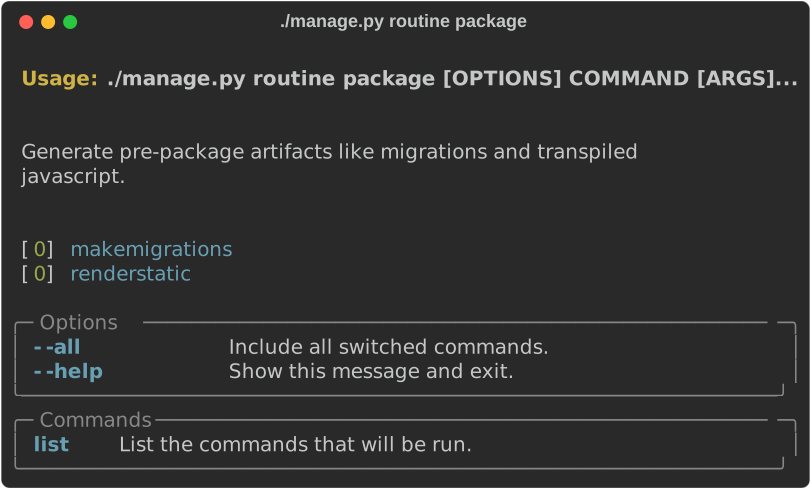
Now we can run all of our package routines with one command:
    ?> ./manage.py routine package
    makemigrations
    ...
    renderstatic
    ...
    poetry build
    ...
The deploy command has several switches that we can enable to run additional commands.
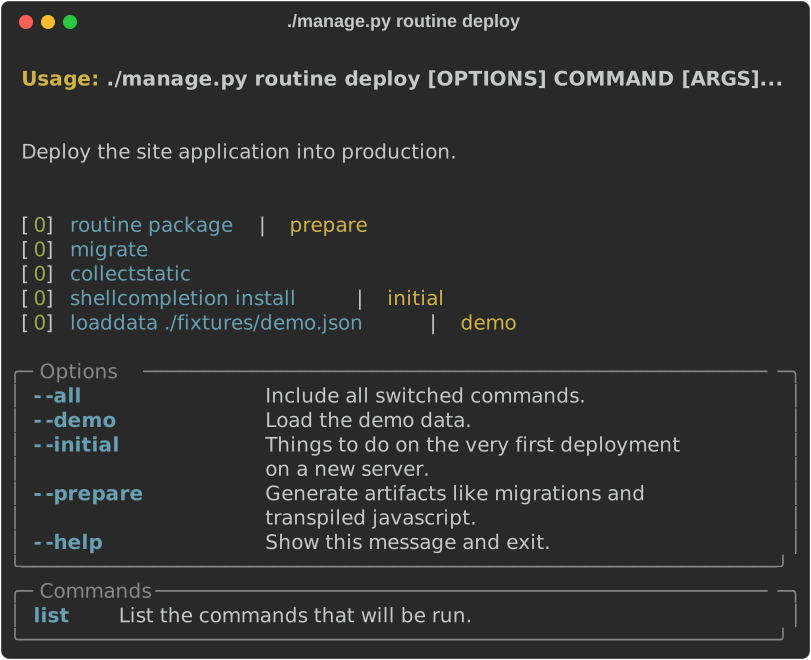
For example to deploy our demo on a new server we would run:
    ?> ./manage.py routine deploy --initial --demo
    migrate
    ...
    collectstatic
    ...
    shellcompletion install
    ...
    loaddata ./fixtures/demo.json
    ...
    touch /path/to/wsgi.py
Settings
The ManagementCommand dataclass, routine and command helper functions in the example above make it easier for us to work with the native configuration format which is a dictionary structure defined in the DJANGO_ROUTINES setting attribute. For example the above configuration is equivalent to:
DJANGO_ROUTINES = {
    "deploy": {
        "commands": [
            {"command": ("routine", "package"), "switches": ["prepare"]},
            {"command": "migrate"},
            {"command": "collectstatic"},
            {
                "command": ("shellcompletion", "install"),
                "switches": ["initial"],
            },
            {
                "command": ("loaddata", "./fixtures/demo.json"),
                "switches": ["demo"],
            },
            {"command": ("touch", "/path/to/wsgi.py"), "kind": "system"},
        ],
        "help_text": "Deploy the site application into production.",
        "name": "deploy",
        "switch_helps": {
            "demo": "Load the demo data.",
            "initial": "Things to do on the very first deployment on a new "
                       "server.",
            "prepare": "Generate artifacts like migrations and transpiled "
                       "javascript.",
        },
    },
    "package": {
        "commands": [
            {"command": "makemigrations"},
            {"command": "renderstatic"},
            {"command": ("poetry", "build"), "kind": "system"},
        ],
        "help_text": "Generate pre-package artifacts like migrations and "
                     "transpiled javascript.",
        "name": "package",
    },
}
Priorities
If you are composing settings from multiple apps or source files using a utility like django-split-settings you may not be able to define all routines at once. You can use priorities to make sure commands defined in a de-coupled way run in the correct order.
    command("deploy", "makemigrations", priority=1)
    command("deploy", "migrate", priority=2)
Options
When specifying arguments you may add them to the command tuple OR specify them as named options in the style that will be passed to call_command:
    # these two are equivalent
    command("package", "makemigrations", "--no-header")
    command("package", "makemigrations", no_header=True)
Execution Controls
There are several switches that can be used to control the execution of routines. Pass these parameters when you define the Routine.
atomic: Run the routine in a transaction.continue_on_error: Continue running the routine even if a command fails.
The default routine behavior for these execution controls can be overridden on the command line.
Installation
-
Clone django-routines from GitHub or install a release off PyPI :
pip install django-routines
rich is a powerful library for rich text and beautiful formatting in the terminal. It is not required, but highly recommended for the best experience:
pip install "django-routines[rich]"
-
Add
django_routinesto yourINSTALLED_APPSsetting:INSTALLED_APPS = [ ... 'django_routines', 'django_typer', # optional! ]
You only need to install django_typer as an app if you want to use the shellcompletion command to enable tab-completion or if you would like django-typer to install rich traceback rendering for you - which it does by default if rich is also installed.
Rationale
When does it make sense to configure routines in Django settings? Its generally convenient to group common management pathways into easily discoverable and executable aggregations of subroutines. This is usually done in supporting shell scripts or just files and in most cases that is appropriate. If your goal is to keep your Django deployment as tight and self contained as possible and the deployment is not generally very complex, using django-routines can make a lot of sense. It can eliminate extra dependencies on a shell scripting environment or just files and can keep this logic packaged with your installable wheel.
Project details
Verified details
These details have been verified by PyPIProject links
GitHub Statistics
Maintainers
Release history Release notifications | RSS feed


Download files
Download the file for your platform. If you're not sure which to choose, learn more about installing packages.
Source Distribution
Built Distribution
Filter files by name, interpreter, ABI, and platform.
If you're not sure about the file name format, learn more about wheel file names.
Copy a direct link to the current filters
File details
Details for the file django_routines-1.7.0.tar.gz.
File metadata
- Download URL: django_routines-1.7.0.tar.gz
- Upload date:
- Size: 226.5 kB
- Tags: Source
- Uploaded using Trusted Publishing? Yes
- Uploaded via: twine/6.1.0 CPython/3.13.7
File hashes
| Algorithm | Hash digest | |
|---|---|---|
| SHA256 |
66e0369c1deaec167c19eec9b3d46aa80d1bf33d7904aa278cc73fac07d3dd93
|
|
| MD5 |
85a690ad8ce17d8dd2649153a9eea39f
|
|
| BLAKE2b-256 |
c464a3594543689a0c805df226f0d0056b4164b4f37e998a77e09047ffd6e794
|
Provenance
The following attestation bundles were made for django_routines-1.7.0.tar.gz:
Publisher:
release.yml on bckohan/django-routines
-
Statement:
-
Statement type:
https://in-toto.io/Statement/v1 -
Predicate type:
https://docs.pypi.org/attestations/publish/v1 -
Subject name:
django_routines-1.7.0.tar.gz -
Subject digest:
66e0369c1deaec167c19eec9b3d46aa80d1bf33d7904aa278cc73fac07d3dd93 - Sigstore transparency entry: 715090575
- Sigstore integration time:
-
Permalink:
bckohan/django-routines@7359cb0fa2e6df0f4eb1b3e06725ac543decaa46 -
Branch / Tag:
refs/tags/v1.7.0 - Owner: https://github.com/bckohan
-
Access:
public
-
Token Issuer:
https://token.actions.githubusercontent.com -
Runner Environment:
github-hosted -
Publication workflow:
release.yml@7359cb0fa2e6df0f4eb1b3e06725ac543decaa46 -
Trigger Event:
push
-
Statement type:
File details
Details for the file django_routines-1.7.0-py3-none-any.whl.
File metadata
- Download URL: django_routines-1.7.0-py3-none-any.whl
- Upload date:
- Size: 18.9 kB
- Tags: Python 3
- Uploaded using Trusted Publishing? Yes
- Uploaded via: twine/6.1.0 CPython/3.13.7
File hashes
| Algorithm | Hash digest | |
|---|---|---|
| SHA256 |
e6cc5d8ebb8ff29b830df7648acab3c132bea4fe5e50e899680bc55e0cf11f17
|
|
| MD5 |
5c84c18a295e587a3ba9b3da4432c8a6
|
|
| BLAKE2b-256 |
1ce63e5188cd97ce7b165333331db3b78fa20ff78b43603c614bfcbe7230f822
|
Provenance
The following attestation bundles were made for django_routines-1.7.0-py3-none-any.whl:
Publisher:
release.yml on bckohan/django-routines
-
Statement:
-
Statement type:
https://in-toto.io/Statement/v1 -
Predicate type:
https://docs.pypi.org/attestations/publish/v1 -
Subject name:
django_routines-1.7.0-py3-none-any.whl -
Subject digest:
e6cc5d8ebb8ff29b830df7648acab3c132bea4fe5e50e899680bc55e0cf11f17 - Sigstore transparency entry: 715090585
- Sigstore integration time:
-
Permalink:
bckohan/django-routines@7359cb0fa2e6df0f4eb1b3e06725ac543decaa46 -
Branch / Tag:
refs/tags/v1.7.0 - Owner: https://github.com/bckohan
-
Access:
public
-
Token Issuer:
https://token.actions.githubusercontent.com -
Runner Environment:
github-hosted -
Publication workflow:
release.yml@7359cb0fa2e6df0f4eb1b3e06725ac543decaa46 -
Trigger Event:
push
-
Statement type:






