
Accessible and configurable scroll-to-top controls for Django sites and Django Admin

Project description

django-scroll-to-top
Accessible, configurable scroll-to-top control for Django sites and the Django Admin.






English · Русский
Beta (
0.x). The package is feature-complete, tested, and builds clean distributions. While the version stays in the0.xseries the public API may still change between minor releases before1.0.0.
django-scroll-to-top is a reusable Django application that adds an accessible,
configurable scroll-to-top control to application pages and the standard Django
Admin.
The developer experience is deliberately small:
- Install the package and add its Django app.
- Run migrations.
- Add one template tag to the base site template.
- Configure appearance and behavior through Django Admin.
No jQuery, external CDN, frontend framework, or mandatory frontend build step is required.
Why This Package
A basic scroll-to-top link is easy to write. A reusable production component also needs to handle:
- separate desktop and mobile presentation;
- keyboard navigation, focus, contrast, and reduced motion;
- standard Django Admin integration;
- safe custom SVG icons;
- light and dark themes;
- cookie banners, chats, sticky navigation, and other fixed elements;
- user dismissal without breaking the primary scroll action;
- strict Content Security Policy deployments;
- caching, localization, packaging, and upgrade compatibility.
This package provides those behaviors while keeping page-template changes minimal.
Features
- One template tag for public site integration.
- Independent site and standard Django Admin configurations.
- Database-backed configuration managed through Django Admin.
- Draft, publish, rollback, and configuration-copy workflows.
- Explicit desktop values and per-field mobile inheritance/overrides.
- Top-left, top-right, bottom-left, and bottom-right placement.
- Circle, square, rounded-square, pill, and icon-with-label templates.
- Solid, outline, soft, ghost, glass, and controlled gradient variants.
- Configurable colors, borders, shadows, focus rings, spacing, and sizing.
- Built-in light/dark presets and theme inheritance.
- Live desktop/mobile preview using the production renderer.
- Built-in Tabler starter icons plus developer and administrator icon sources.
- Safe SVG upload, sanitization, preview, recoloring, and license metadata.
- Scroll thresholds, short-page detection, fixed-header offsets, and optional target selectors.
- Native smooth scrolling with
prefers-reduced-motionsupport. - Collision avoidance for banners, launchers, chats, toast containers, sticky navigation, and other floating controls.
- Local/session user dismissal with expiration, reset versions, and restore UX.
- Django i18n with English canonical strings and Russian as the first bundled translation.
Installation
python -m pip install django-scroll-to-top
python manage.py migrate
Add the application and enable the required integration scopes:
INSTALLED_APPS = [
    # ...
    "django_scroll_to_top",
]

DJANGO_SCROLL_TO_TOP = {
    "SITE_ENABLED": True,
    "ADMIN_ENABLED": True,
}
Include the package URLConf so the public template tag can load its versioned same-origin stylesheet endpoint in strict-CSP deployments:
from django.urls import include, path

urlpatterns = [
    # ...
    path(
        "scroll-to-top/",
        include(
            ("django_scroll_to_top.urls", "django_scroll_to_top"),
            namespace="django_scroll_to_top",
        ),
    ),
]
The package supports and tests the standard Django Admin templates on the documented Django compatibility matrix. The integration uses documented Django extension points, preserves standard branding, and avoids monkeypatching private Django APIs.
When DJANGO_SCROLL_TO_TOP["ADMIN_ENABLED"] is true, place
"django_scroll_to_top" before "django.contrib.admin" in INSTALLED_APPS
so the package's admin/base_site.html footer override is selected through the
normal Django template resolution rules.
Custom AdminSite instances, overridden base admin templates, and third-party
admin themes are best-effort integrations and are not yet covered by the
compatibility test matrix. Projects using them should verify the integration
locally and report incompatibilities so they can be investigated and fixed
collaboratively.
No separate admin-integration app is required for the current standard-admin footer injection. If a future integration app becomes necessary, it should use its own app label instead of overloading the main package label.
Custom AdminSite Recipe
If a project overrides admin/base_site.html or uses a custom AdminSite
template tree, keep the normal branding blocks and add the package tag in the
footer block:
{% extends "admin/base.html" %}
{% load i18n scroll_to_top %}

{% block branding %}
  {{ block.super }}
{% endblock %}

{% block footer %}
  {{ block.super }}
  {% scroll_to_top scope="admin" %}
{% endblock %}
The default admin policy hides the control on anonymous auth pages such as the
login and password-reset screens. Set
DJANGO_SCROLL_TO_TOP["ADMIN_SHOW_ON_AUTH_PAGES"] = True to opt into showing it
there as well.
Template Usage
Add one tag near the end of the shared base template:
{% load scroll_to_top %}

<!-- Page content -->

{% scroll_to_top %}
The tag resolves the published site configuration, renders the selected safe
icon and controlled template variant, and loads package assets. Ordinary visual
options are not passed as template-tag arguments. Dynamic color and sizing
variables are delivered through a versioned same-origin stylesheet rather than
an inline style attribute, so the one-tag contract remains intact without
silently requiring unsafe-inline.
Projects can override documented package templates through standard Django template loaders.
Configuration Model
Django settings own installation and infrastructure choices only. Normal appearance and behavior are stored in database-backed configuration and edited through Django Admin.
Configuration scopes:
| Scope | Purpose |
|---|---|
site |
Public and application pages using the template tag |
admin |
Standard Django Admin pages |
Django Sites integration is included. When django.contrib.sites is installed,
the current Site may have a Site-specific profile with a global fallback. The
package also remains usable without the Sites Framework. Site and admin
configurations remain independent but can be copied explicitly.
Desktop values are primary. Each mobile-capable field explicitly inherits its desktop value or stores an override. The admin form shows this relationship instead of hiding inheritance behind empty values.
Visibility and Scrolling
Each revision configures when the control appears and where it scrolls:
- visibility threshold mode (
pixels,viewport, orcombined) withshow_after_px,show_after_viewports, and amin_document_height_pxfloor so short pages never show the control; - show/hide delays and a visibility direction (
always,scroll_up_only, orhide_on_scroll_down); - a page-level opt-out via a
data-scroll-top="disabled"attribute on<body>; - an optional scroll target selector with a vertical offset and an optional fixed-header selector whose height is subtracted, falling back to the top of the document when empty or not found;
smoothorinstantscrolling (reduced-motion users always get an instant jump), using nativewindow.scrollTowithout a custom animation loop.
Visual Templates and Styling
Appearance is built from controlled package CSS classes, never arbitrary templates stored in the database:
- shapes:
circle,square,rounded-square, andpill; - fill variants:
solid,outline,soft,ghost,glass(translucent with a backdrop-blur fallback), andgradient(two configured colors and an angle); - shadow presets (
none/small/medium/large), opacity, border width, focus-ring width/offset, and a backdrop-blur amount for the glass variant.
The six fill variants, shown on the default circle shape:
| Fill | Preview | Description |
|---|---|---|
solid |
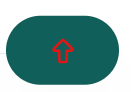 |
Opaque background |
outline |
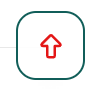 |
Border only, no fill |
soft |
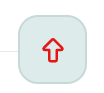 |
Soft translucent background |
ghost |
 |
Transparent; background appears on hover |
glass |
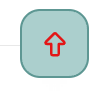 |
Glassy: translucent with a backdrop blur |
gradient |
 |
Gradient between two configured colors |
Unknown shapes, fills, or shadows fall back to safe defaults, forced-colors mode neutralizes every variant, and projects can still override the package template through standard Django template resolution.
Placement and Floating-Element Collisions
Both desktop and mobile modes support all four viewport corners, independent
offsets, safe-area insets, bounded z-index, obstacle spacing, and
fallback-corner order.
Host elements can declare themselves as obstacles:
<div data-scroll-top-obstacle>
  <!-- Cookie banner, chat launcher, sticky action, and so on -->
</div>
Administrators may also configure validated CSS selectors. The browser runtime measures visible rectangles and applies one of these policies:
- ignore obstacles;
- shift along the selected edge;
- try configured fallback corners;
- hide the control when no safe placement exists.
Cookie and chat packages remain optional. They do not become dependencies of
django-scroll-to-top.
Optional Obstacle Adapter
For cookie banners and other floating widgets that are not easy to target with a
single static selector, an optional adapter ships at
django_scroll_to_top/obstacle-adapter.js. It is never loaded by the
{% scroll_to_top %} tag; include it only where you need it:
<script src="{% static 'django_scroll_to_top/obstacle-adapter.min.js' %}" defer></script>
<script>
  document.addEventListener("DOMContentLoaded", function () {
    // Generic registration: tag selectors and recalculate on widget events.
    window.djsttObstacleAdapter.register({
      selectors: [".chat-widget", ".sticky-bottom-nav", ".toast-stack"],
      gap: 12,
      priority: 5,
      events: ["my-widget:open", "my-widget:close"]
    });

    // Or reuse the bundled django-cookies-152fz preset (panel + launcher).
    window.djsttObstacleAdapter.register(
      window.djsttObstacleAdapter.presets.djangoCookies152fz
    );
  });
</script>
The adapter tags matching markup with data-scroll-top-obstacle (including
elements inserted later, such as a compact launcher that appears after the
banner closes), and bridges the configured open/close/collapse events to
window.djstt.refresh(). The cookie banner panel and its compact launcher are
listed as separate selectors so each is measured on its own bounding rectangle
while visible. Cross-origin iframe contents are never inspected; tagging an
<iframe> makes the engine treat the iframe rectangle itself as an obstacle.
Collision avoidance and theme-aware enhancements are progressive enhancement behaviors. The no-JavaScript baseline remains a plain top-of-document link in the configured corner with the conservative built-in preset.
Icons
The unified icon catalog has three sources:
builtin: vendored Tabler starter icons;developer: icons registered by trusted project code;uploaded: SVG files uploaded and approved through Django Admin.
Built-in examples include suitable arrow, chevron, caret, circle, badge, bar, and square variants from Tabler Icons.
Icon Color Requirements
The button reads its colors from the database configuration. For an icon to pick
up the configured color, its SVG must paint with currentColor rather than a
hard-coded color — that is, use fill="currentColor" (filled icons) or
stroke="currentColor" (outline icons). The control then applies, in priority
order:
- Icon color override (
icon_color/dark_icon_color) when set; - otherwise the foreground color (
foreground_color), which is also the label color.
Multicolor/original uploaded icons keep their own colors and ignore these
fields (they do not use currentColor). Built-in Tabler icons already use
currentColor, so they recolor automatically.
Tabler Icons are distributed under the MIT License. That license permits broad use, modification, and redistribution, including commercial use, while requiring preservation of its copyright and license notice. Release artifacts include the required notice and source/version metadata.
Uploaded SVG Safety
Administrator-uploaded SVG is not rendered directly. The pipeline:
- parses SVG as XML;
- rejects DTD, entities, scripts, event handlers, external resources, embedded documents, unsafe namespaces, and excessive complexity;
- allows only documented graphical elements and attributes;
- normalizes geometry and
viewBoxdata; - stores and renders only a sanitized payload;
- supports
currentColorrecoloring for compatible icons; - preserves safe original colors only in an explicit multicolor mode.
Technical sanitization does not grant a right to use an icon. Uploaded icons carry author, source, license, copyright, and attribution metadata, plus an administrator confirmation that the project may use and distribute the file.
The package does not treat an uploaded SVG as free or open content merely because the file was accepted by the sanitizer. The site operator remains responsible for confirming usage and redistribution rights, keeping attribution data accurate, and exporting icon-attribution records when the deployment needs them.
Themes and Colors
Administrator-configured colors are delivered through a versioned same-origin
stylesheet generated by the package, without storing arbitrary CSS or requiring
unsafe-inline. The stylesheet uses the same resolved Site/profile
configuration as the component renderer and remains effective without
JavaScript.
Manual and inherited color modes are supported. Standard Django Admin
configuration can inherit supported admin theme variables and react to
light/dark changes with safe fallbacks. The built-in inherit_admin_theme
mode prefers publicly observable Django Admin variables, falls back to a neutral
preset when they are absent, and also exposes namespaced --dstt-admin-*
adapter hooks for third-party admin themes.
Colors are otherwise configured manually per revision. (The earlier browser-based page color analysis workflow was removed as unnecessary.)
User Dismissal
Persistent user dismissal is separate from temporary runtime visibility and from the administrative enable flag. Each revision configures dismissal:
allow_user_dismissalrenders a visible close control;- the storage mechanism is
local,session, a functionalcookie, ornone(in-memory only). The defaultlocalmode stores nothing until the visitor actually dismisses the control; - the duration is either
persistent(kept until the revision's configuration token ordismissal_versionchanges) or day-based viadismissal_days, which self-clears once it lapses; dismissal_requires_confirmationasks the visitor to confirm before hiding;dismissal_versionis an explicit knob to intentionally re-show the control.
Storage keys are namespaced by scope, site, configuration token, and dismissal
version, and all storage access tolerates denied or unavailable storage without
breaking the scroll action. The control can be restored programmatically with
window.djstt.restore(). Triple-click dismissal remains experimental because
the first normal click starts scrolling and may hide the control immediately; it
is not enabled by default.
Accessibility
The component targets WCAG 2.2 AA within its scope:
- accessible name independent of icon or tooltip;
- keyboard operation and visible focus;
- appropriate pointer target size;
- contrast validation for normal, hover, active, and focus states;
prefers-reduced-motionsupport;- forced-colors/high-contrast behavior;
- zoom and RTL support;
- no keyboard trap or unexpected focus movement;
- decorative SVG hidden from accessibility APIs.
The structural contract above is implemented and covered by tests: a translatable accessible name on both the control and the close control, a minimum 24x24 CSS px target floor, a no-JavaScript link fallback, no positive tabindex, visible focus-visible outlines, forced-colors and reduced-motion handling, and RTL-safe logical properties. A full WCAG 2.2 AA audit and zoom (200%/400%) verification in real browsers are tracked as later stabilization steps (see Roadmap).
Security, Privacy, and CSP
- No arbitrary HTML, JavaScript, or CSS is stored through admin forms.
- Production never renders an unsanitized original SVG upload.
- No telemetry or external network calls are enabled by default.
- Strict CSP support does not silently require
unsafe-inline. - Browser storage failures degrade safely.
- Cookie-based or authenticated database dismissal is optional and documented separately if enabled.
See SECURITY.md for the supported versions and how to report a vulnerability.
Minimal CSP Configuration
The default DJANGO_SCROLL_TO_TOP["CSP_MODE"] is "external". In that mode,
the component uses same-origin <link> and <script> tags and works with a
policy such as:
Content-Security-Policy:
  default-src 'self';
  style-src 'self';
  script-src 'self';
If the host project uses nonce-based script delivery, set
DJANGO_SCROLL_TO_TOP["CSP_MODE"] = "nonce" and provide csp_nonce in the
template context or request.csp_nonce. The package adds that nonce to its
external script tag while keeping style delivery on the same-origin stylesheet
endpoint.
Runtime Events
The browser runtime uses one documented global entrypoint, window.djstt, with
init(root?), refresh(root?), and destroy(root?) helpers for progressive
enhancement and partial-navigation integrations.
The runtime dispatches these namespaced DOM events from each component root:
djstt:showdjstt:hidedjstt:scroll-startdjstt:scroll-enddjstt:dismiss
HTMX-like fragment replacement may call window.djstt.init(fragmentRoot). Turbo
and similar full-page navigation layers may call window.djstt.refresh().
Extension Points
Optional hooks are configured in DJANGO_SCROLL_TO_TOP as a dotted path or a
callable, and a faulty hook never breaks rendering:
SITE_ID_RESOLVER(request) -> int | None— resolve the current Site id without depending ondjango.contrib.sites;PROFILE_RESOLVER(scope, site_id) -> ScrollTopProfile | None— override profile/revision selection; returnNoneto fall back to built-in resolution;OBSTACLE_SELECTORS() -> list[str]— merge extra obstacle selectors into every rendered control.
Developer icons are registered through register_developer_icon(...). The
stable public surface is window.djstt (init/refresh/destroy, version,
dismiss/restore/debug), the namespaced djstt:* DOM events, the
data-dstt-* attributes on the control wrapper, the data-scroll-top-obstacle
marker, and the django_scroll_to_top/scroll_to_top.html template. Internal
service and model APIs are not part of the public contract.
Diagnostics
System checks report common misconfigurations with stable ids and actionable hints:
dstt.W001/W002: migrations cannot be inspected, or are unapplied.dstt.W003: unsupportedCSP_MODE.dstt.W004: package URLConf is missing while site rendering is enabled.dstt.W005:django_scroll_to_topis ordered afterdjango.contrib.admin.dstt.W006: unsupportedDEFAULT_COLLISION_POLICY.dstt.W007:DJANGO_SCROLL_TO_TOPis not a dict or has unknown keys.dstt.W008:ADMIN_ENABLEDis set butdjango.contrib.adminis not installed.dstt.W009:SITES_FRAMEWORK_ENABLEDis set butdjango.contrib.sitesis not installed.dstt.W010: packaged templates or minified static assets are missing.
Two management commands help diagnose a deployment:
python manage.py scroll_to_top_diagnose        # resolved config per scope, no secrets
python manage.py scroll_to_top_check_contrast  # non-zero exit if a published revision fails
Asset Build
Release assets are minified reproducibly with:
python tools/minify_assets.py
Compatibility
The support matrix covers Django 4.2 LTS, 5.x, and 6.x with the Python versions
supported by each selected Django release. Django 4 support is scoped to 4.2 LTS
rather than the entire 4.x line. The matrix is defined in pyproject.toml and
verified in CI (tox.ini mirrors it).
The base runtime dependency set is limited to Django.
Feedback
This is an early (0.x beta) release, and real-world reports are especially
valuable. Bug reports and feedback are welcome via
GitHub issues,
particularly on:
- Admin integration — the package is tested against the standard Django
Admin templates. Custom
AdminSiteinstances, overridden base admin templates, and third-party admin themes are best-effort and not yet in the compatibility test matrix; please report what works and what does not. - Frontend behavior — collision avoidance with real cookie banners, chat launchers, sticky navigation, and toast stacks; placement across viewport sizes and safe-area insets; behavior under strict CSP; theme inheritance with custom admin themes; and partial-navigation layers such as HTMX and Turbo.
- Accessibility in real browsers — keyboard, focus, contrast, forced-colors, reduced motion, RTL, and zoom (200%/400%); see the Roadmap for the audits still in progress.
See CONTRIBUTING.md for how to file an effective report.
Roadmap
Tracked for after the initial release:
- Full WCAG 2.2 AA audit and zoom (200%/400%) verification in real browsers.
- Optional authenticated database-backed dismissal endpoint.
Project Documentation
License
The package is licensed under MIT. See LICENSE.
Third-party assets retain their own licenses. The vendored Tabler subset and its upstream MIT notice are documented in THIRD_PARTY_LICENSES.md.
Release history Release notifications | RSS feed

Download files
Download the file for your platform. If you're not sure which to choose, learn more about installing packages.
Source Distribution
Built Distribution
Filter files by name, interpreter, ABI, and platform.
If you're not sure about the file name format, learn more about wheel file names.
Copy a direct link to the current filters
File details
Details for the file django_scroll_to_top-0.1.0.tar.gz.
File metadata
- Download URL: django_scroll_to_top-0.1.0.tar.gz
- Upload date:
- Size: 158.0 kB
- Tags: Source
- Uploaded using Trusted Publishing? No
- Uploaded via: twine/6.2.0 CPython/3.12.13
File hashes
| Algorithm | Hash digest | |
|---|---|---|
| SHA256 |
94ffeec5675a29a1e7a139579ea22f01a14da0bc325a08e2fbd7f56152b75154
|
|
| MD5 |
036b95e9511607c3093bfd47e3212a36
|
|
| BLAKE2b-256 |
fef44b9ebe1c82368c66f59ed99f7676232053489c6aaf4337ebe0c64de0a79b
|
File details
Details for the file django_scroll_to_top-0.1.0-py3-none-any.whl.
File metadata
- Download URL: django_scroll_to_top-0.1.0-py3-none-any.whl
- Upload date:
- Size: 152.5 kB
- Tags: Python 3
- Uploaded using Trusted Publishing? No
- Uploaded via: twine/6.2.0 CPython/3.12.13
File hashes
| Algorithm | Hash digest | |
|---|---|---|
| SHA256 |
b947e9c1e7c611d6b9c94bb434f31c63546ea17101a971ff3ca219bc768f1671
|
|
| MD5 |
87ecadb20d8d4ae5999979e7ef6dbf74
|
|
| BLAKE2b-256 |
655fce139fcc6c2dce2ad39ef2a3374ae19664aed7458b196fd30c26119b9eda
|






