
Select multiple choices in a single Django model field

Project description
django-select-multiple-field
Store multiple choices in a single Django model field without using a many-to-many relationship.
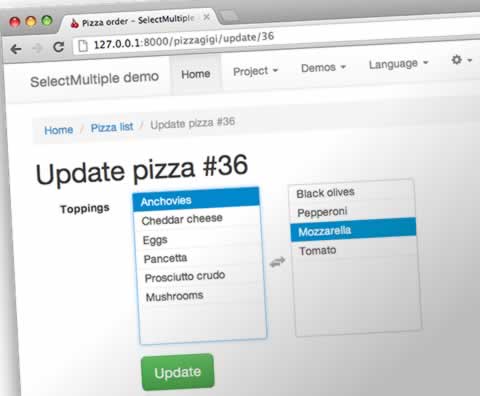
Rendered using the multiselect.js plugin for jQuery. The plugin is available here: https://github.com/lou/multi-select
Denormalization Risk (Important)
This field intentionally denormalizes data by storing multiple selected choices as comma-separated text in a single column.
Use it when:
- you want a simple schema,
- you do not need relational queries (joins),
- and you mainly read/write the selected values as a list in application code.
If you need robust querying like “find all cookies with topping X,” a normalized many-to-many model is usually the better choice.
For example, if cookies can have toppings such as chocolate, dark_chocolate, and white_chocolate, a normalized design would usually use a Topping model and a Cookie model related by a ManyToManyField. That gives you joins, indexing, and exact filtering.
With this field, you filter against the stored text value instead.
# Caution: substring search can return false positives.
Cookie.objects.filter(toppings__icontains="chocolate")
That kind of lookup can produce false positives because one encoded choice can appear inside another. For example, chocolate is a substring of dark_chocolate, so a substring search can match both.
If that risk is unacceptable for your application, use a many-to-many relation instead.
Installation
Install from PyPI:
pip install django-select-multiple-field
Quick Start
Model
You must provide either
max_lengthor bothchoicesandmax_choices
Choices must be strings, not integers.
Add the select field choices normally in your model:
# models.py

from django.db import models

from select_multiple_field.models import SelectMultipleField

class Pizza(models.Model):
    ANCHOVIES = 'a'
    BLACK_OLIVES = 'b'
    PEPPERONI = 'p'
    MOZZARELLA = 'm'
    TOPPING_CHOICES = (
        (ANCHOVIES, 'Anchovies'),
        (BLACK_OLIVES, 'Black olives'),
        (PEPPERONI, 'Pepperoni'),
        (MOZZARELLA, 'Mozzarella'),
    )
    # choices & max_choices are used to auto calc. max_length
    toppings = SelectMultipleField(
        max_choices=4,
        choices=TOPPING_CHOICES,
    )

    PLAIN = 'n'
    CHEDDAR = 'c'
    CRUST_CHOICES = (
        (PLAIN, 'Plain Crust'),
        (MOZZARELLA, 'Mozzarella Stuffed Crust'),
        (CHEDDAR, 'Cheddar Stuffed Crust'),
    )
    crust = SelectMultipleField(
        max_length=6,
        choices=CRUST_CHOICES,
    )
Encoded Length (Choose One)
Underneath this field is a CharField which takes a maximum length for the encoded string. You can choose to provide a max_length parameter or the field will calculate it from the choices and the max_choices parameters.
max_lengthis the maximum length of the encoded string of choices. You need to add the maximum allowed choices and the delimiter character (usually a comma) that separates the choices when they are encoded.max_choicesis the maximum choices that can be encoded per field.choicescan be a mapping, iterable, or callable.
Example encoded-length calculation:
- Choice keys:
a,bb,ccc,dddd max_choices=2- Longest 2 keys are
ddddandccc, so encoded value isdddd,ccc - Required
max_lengthis8
Render the form
Use a generic view or a ModelForm as usual. In your template, use a regular form tag:
<!-- template_form.html -->
<form action="" method="post">
  {% csrf_token %}
  {{ form.as_p }}
  <input type="submit" value="Submit">
</form>
This renders the following HTML:
<!-- create.html -->
<form action="" method="post">
    <p>
      <label for="id_toppings">Toppings:</label>
      <select multiple="multiple" id="id_toppings" name="toppings" class="select-multiple-field">
        <option value="a">Anchovies</option>
        <option value="b">Black olives</option>
        <option value="p">Pepperoni</option>
        <option value="m">Mozzarella</option>
      </select>
    </p>
    <input type="submit" value="Submit">
</form>
Null Handling
SelectMultipleField supports null=True, but it behaves differently from Django's standard CharField:
null |
Empty Selection in DB | to_python(None) |
from_db_value(None) |
get_prep_value([]) |
|---|---|---|---|---|
False (default) |
"" (empty string) |
[] |
[] |
"" |
True |
NULL |
[] |
[] |
None |
Key semantics:
null=Truechanges only database storage. Python API always returns[], neverNoneto_python(None)always returns[]regardless ofnullsettingfrom_db_value(None, ...)always returns[]regardless ofnullsettingget_prep_value(None)returnsNonewhennull=True, else""get_prep_value([])returnsNonewhennull=True, else""
Use null=True only when your database conventions require NULL over empty string for empty selections. For form-level optional fields, use blank=True instead.
Validators
SelectMultipleField replaces Django's built-in MaxLengthValidator with two custom validators:
MaxChoicesValidator
- Validates:
len(value) ≤ max_choices - Error code:
max_choices - Message:
"Ensure this value has at most %(limit_value)d choice(s)..."
MaxLengthValidator
- Validates:
len(encode_list_to_csv(value)) ≤ max_length - Error code:
max_length - Message:
"Ensure this value has at most %(limit_value)d character(s)..."
Both validators run during model validation. If you provide choices and max_choices but omit max_length, the field auto-calculates max_length from the longest possible encoded CSV (longest max_choices keys joined by delimiters). If you explicitly set max_length smaller than this calculated maximum, a RuntimeWarning is emitted at field instantiation.
Validation Error Codes
The field can raise the following validation errors:
| Error Code | Message Template | Triggered When |
|---|---|---|
invalid_type |
"Types passed as value must be string, list, tuple or None, not '%(value)s'." |
to_python receives non-list/tuple/str/None |
invalid_choice |
"Select a valid choice. %(value)s is not one of the available choices." |
Value not in choices |
blank |
"This field cannot be blank." |
blank=False and empty value |
null |
"This field cannot be null." |
null=False and None value |
max_choices |
"Ensure this value has at most %(limit_value)d choice(s)..." |
len(value) > max_choices |
max_length |
"Ensure this value has at most %(limit_value)d character(s)..." |
len(encoded) > max_length |
Displaying Stored Choices
To display your choices, decode the field contents. You can do this with a template tag:
# templatetags/pizza_tags.py

def decode_pie(ingredients):
    """Decode pizza pie toppings."""
    decoder = dict(Pizza.TOPPING_CHOICES)
    decoded = [decoder[t] for t in ingredients]
    decoded.sort()
    return ', '.join(decoded)

register.filter('decode_pie', decode_pie)
In your template, import the tag and use it:
{# details.html #}
{% load pizza_tags %}

{{ pizza.toppings|decode_pie }}
Encoding the Choices
The selected choices are stored as comma-delimited text. For example, a pizza with the following toppings:
- Pepperoni
- Mozzarella
would be stored as:
p,m
You can decode that string to a Python list using functions in the codecs module:
>>> from select_multiple_field.codecs import decode_csv_to_list
>>> encoded = 'a,b,c'
>>> decoded = decode_csv_to_list(encoded)
>>> print(decoded)
['a', 'b', 'c']
>>> print(type(decoded))
<class 'list'>
Custom Delimiters
The CSV delimiter is configurable via Django settings:
# settings.py
SELECTMULTIPLEFIELD_DELIMITER = "|"  # Default: ","
Constraints:
- Must be a single character
- Multi-character delimiters are not supported
- Choice values cannot contain the delimiter (e.g., if delimiter is
,, a choice like"a,b"breaks encoding)
Both encode_list_to_csv() and decode_csv_to_list() in select_multiple_field.codecs respect this setting automatically. Changing the delimiter on an existing database requires a data migration to re-encode stored values.
The encoding method may limit your ability to search for choices.
Sample Application
This repository includes sample applications under test_projects/. You can run the Django 4.2 integration app like this:
$ cd /path/to/django-select-multiple-field
$ cd test_projects/django42
$ python manage.py migrate
$ python manage.py runserver
Development server is running at http://127.0.0.1:8000/
Quit the server with CONTROL-C.
Versions
This code was tested with the following versions of Django and Python:
- Django 4.2 LTS
- Python 3.10
- Python 3.11
- Python 3.12
- Python 3.13
- Django 5.2 LTS
- Python 3.10
- Python 3.11
- Python 3.12
- Python 3.13
- Python 3.14
- Django 6.0
- Python 3.12
- Python 3.13
- Python 3.14
Testing
Django-select-multiple-field contains two test suites: one for the field itself and one for the Django integration apps.
To run the unit tests use hatch interactively:
hatch run tests  # All tests {unit, integration}
hatch run i  # Integration tests
hatch run t  # Unit tests
The dependencies are managed manually in your environment.
To run all the tests with differing Python versions and Django versions, use tox:
tox  # All tests for supported versions
tox -e py312-dj42  # All tests using Python 3.12 & Django 4.2 LTS
Bugs! Help!!
If you find any bugs in this software, please report them via the GitHub issue tracker or send an email to code@kelvinwong.ca. Any serious security bugs should be reported via email only.
Issue tracker: https://github.com/kelvinwong-ca/django-select-multiple-field/issues
Links
- https://pypi.org/project/django-select-multiple-field/
- https://github.com/kelvinwong-ca/django-select-multiple-field
Thank You
Thank you for taking the time to evaluate this software. I appreciate receiving feedback on your experiences using it, and I welcome code contributions and development ideas.
Release history Release notifications | RSS feed


Download files
Download the file for your platform. If you're not sure which to choose, learn more about installing packages.
Source Distribution
Built Distribution
Filter files by name, interpreter, ABI, and platform.
If you're not sure about the file name format, learn more about wheel file names.
Copy a direct link to the current filters
File details
Details for the file django_select_multiple_field-1.0.0rc1.tar.gz.
File metadata
- Download URL: django_select_multiple_field-1.0.0rc1.tar.gz
- Upload date:
- Size: 421.4 kB
- Tags: Source
- Uploaded using Trusted Publishing? No
- Uploaded via: Hatch/1.16.5 cpython/3.13.13 HTTPX/0.28.1
File hashes
| Algorithm | Hash digest | |
|---|---|---|
| SHA256 |
f988ae913fdb30e8be3610840be991d8360b4d9b46fc481d33adb90c00dbf3aa
|
|
| MD5 |
cb2e373a82a2a2b745bb565798cc0232
|
|
| BLAKE2b-256 |
30454de77cfa1a69291cb4745133eed50b5d9a436bdb1c03d636572edc554ed6
|
File details
Details for the file django_select_multiple_field-1.0.0rc1-py3-none-any.whl.
File metadata
- Download URL: django_select_multiple_field-1.0.0rc1-py3-none-any.whl
- Upload date:
- Size: 14.7 kB
- Tags: Python 3
- Uploaded using Trusted Publishing? No
- Uploaded via: Hatch/1.16.5 cpython/3.13.13 HTTPX/0.28.1
File hashes
| Algorithm | Hash digest | |
|---|---|---|
| SHA256 |
1dd23981cf921853152c01007e47b2a0af819578b264c9ad24c43ea8673e6e86
|
|
| MD5 |
30bc2ddfccee92041ec55bf1b2bc0a74
|
|
| BLAKE2b-256 |
50ede72ce3a6859cc25d162e3ef092e22e3832bd5b0c28bf5f82e2f7c2a0dfc2
|






