
django-silky







django-silky is a modernized-UI fork of django-silk, a live profiling and inspection tool for the Django framework.
It records the same data as django-silk (requests and responses, SQL queries, code profiles, dynamic profiling) and adds a rebuilt interface aimed at one question: what should I fix first? It groups queries by shape and by the line of your code that ran them, flags N+1 patterns with a likely fix, compares two requests or two time ranges, and filters without reloading the page. JavaScript per page is 20 to 78 KB, against 0.7 to 2.4 MB in django-silk (benchmarks).
What's different from django-silk?
| django-silk | django-silky | |
|---|---|---|
| Requests list | Slide-out filter form, full page reload per change | Filter chips with counts, top bar search, updates in place; requests open in a side panel |
| Request detail | Tables of fields | Overview with SQL versus Python time, N+1 and duplicate detection, a likely fix at the calling line, copyable curl and query-count tests |
| SQL across requests | Per request only | SQL page: every query grouped by shape, with p95, DB time per table and the requests that run it |
| Where queries come from | Stack trace per query | Hotspots page: lines of your code ranked by the DB time they cause, loops flagged |
| Summary | Counts and top-N tables | Latency over time, endpoints to fix first with the reason, scatter and heatmap per endpoint |
| Profiling | List of profiles | Grouped into code blocks; cProfile as a sortable function list; call graph loads on demand |
| Comparison | None | Compare two requests, or two time ranges such as before and after a deploy |
| Settings | Clear data | Theme and accent, editor links with path mapping, slow and N+1 thresholds, recording config with risk notes |
| Keyboard | None | Command palette (Ctrl/Cmd+K), / to search, j/k through requests, g + letter between pages |
| Assets | jQuery, Font Awesome from a CDN | No jQuery or CDN; htmx and an inline icon sprite; fonts ship with the package |
Screenshots
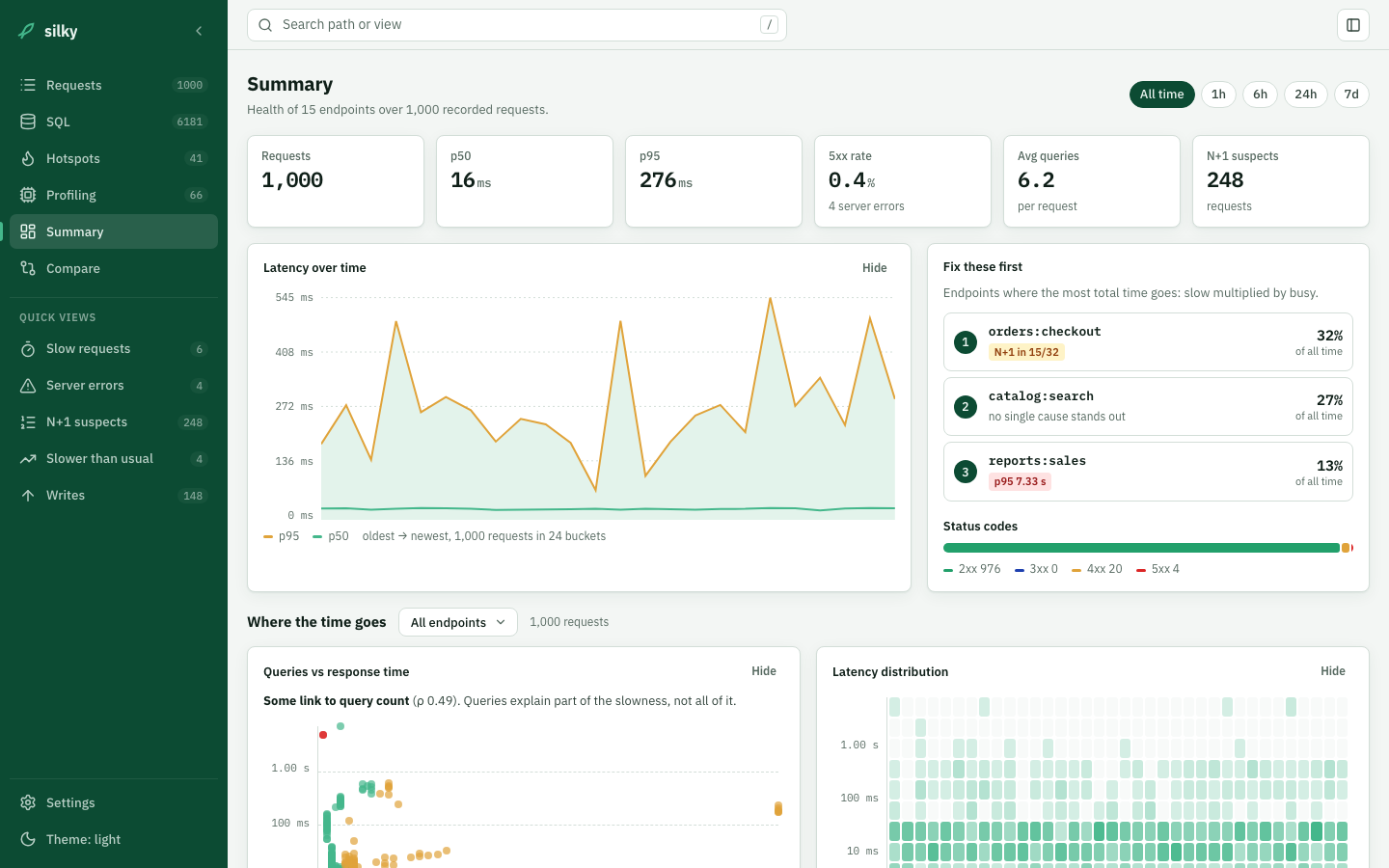 Summary: latency over time, the endpoints to fix first and why, status codes, and where the time goes |
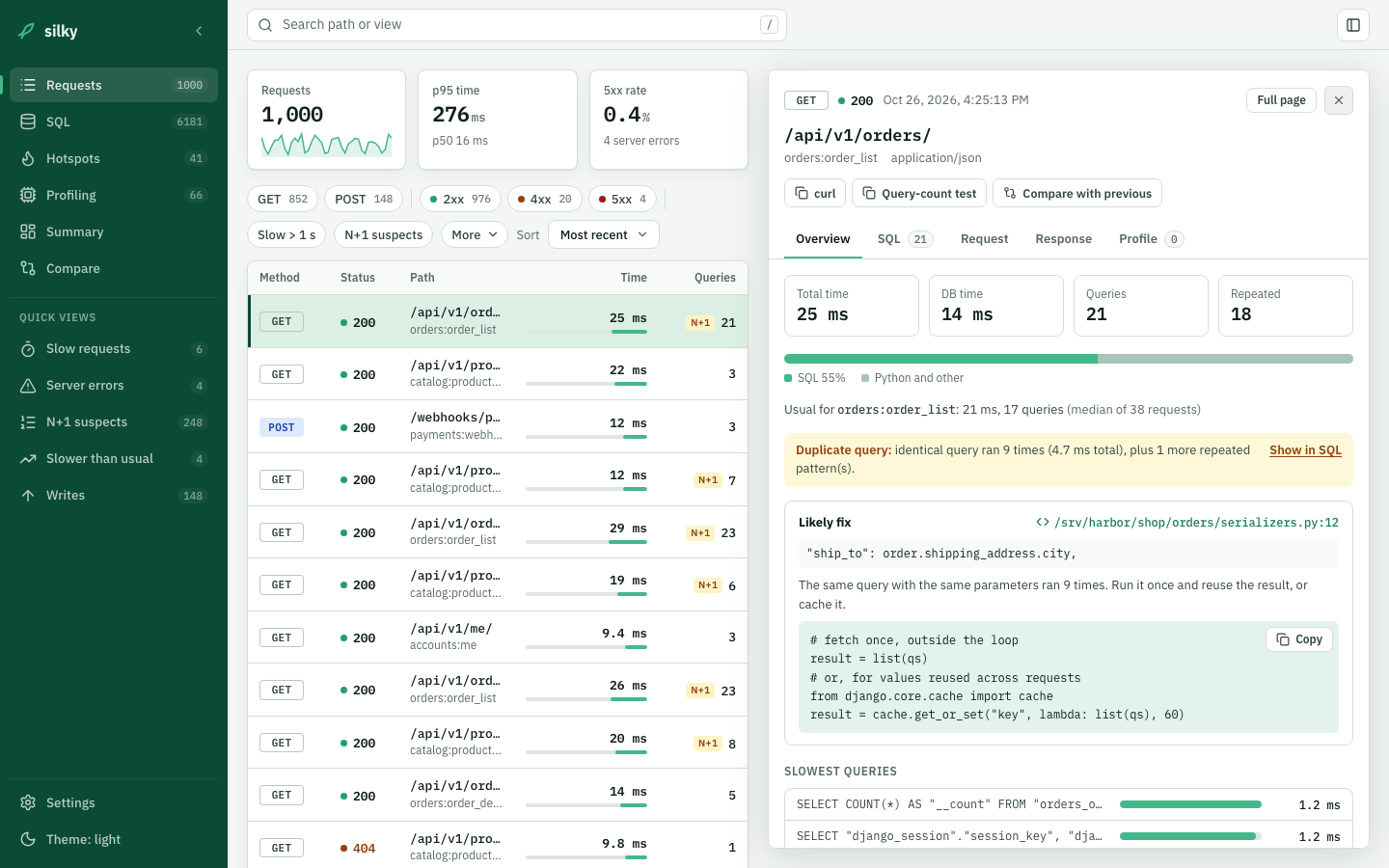 Request panel: opens beside the list; duplicate query found with the calling line and a likely fix |
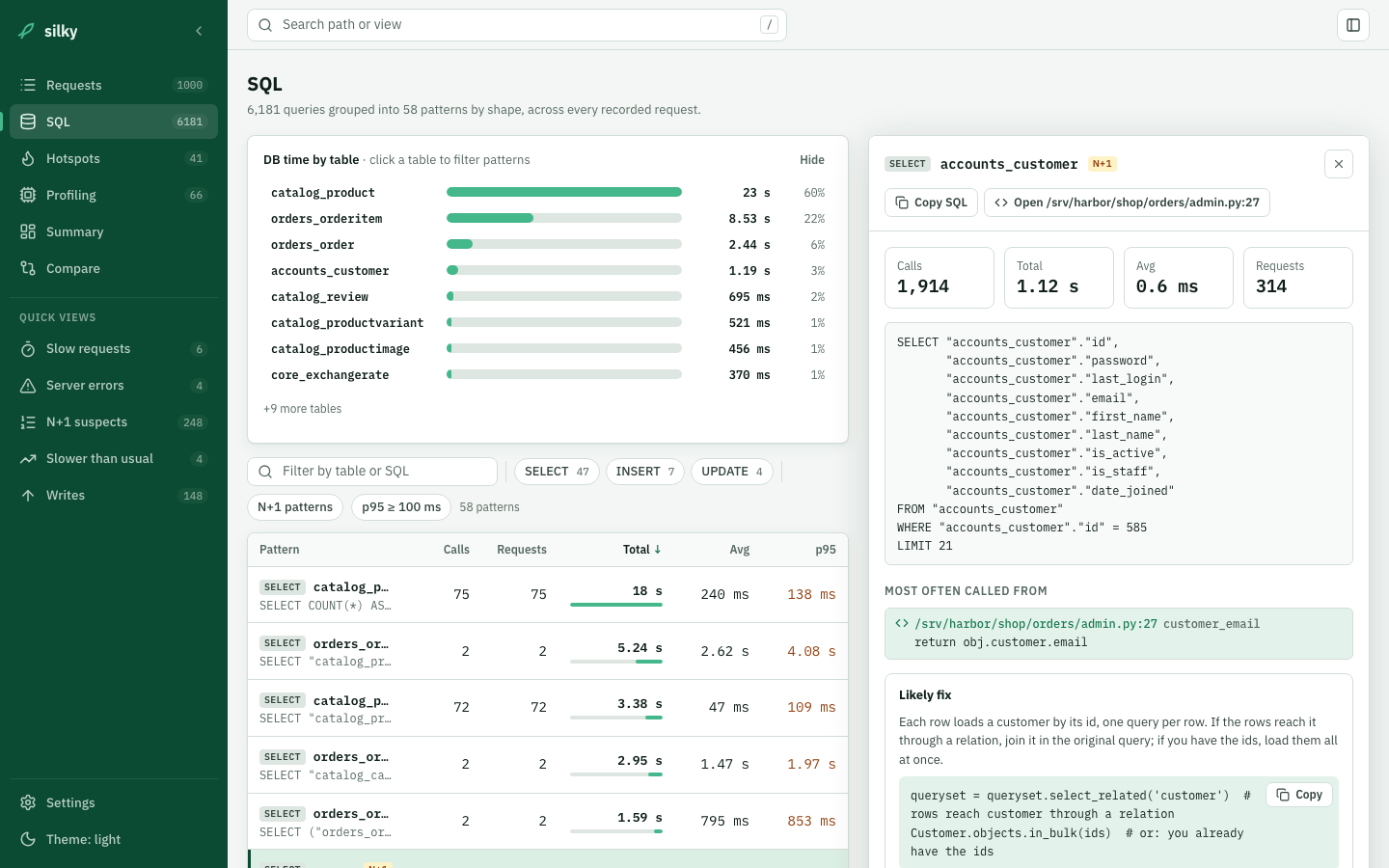 SQL: every query grouped by shape, DB time per table, and an N+1 pattern with the line that runs it |
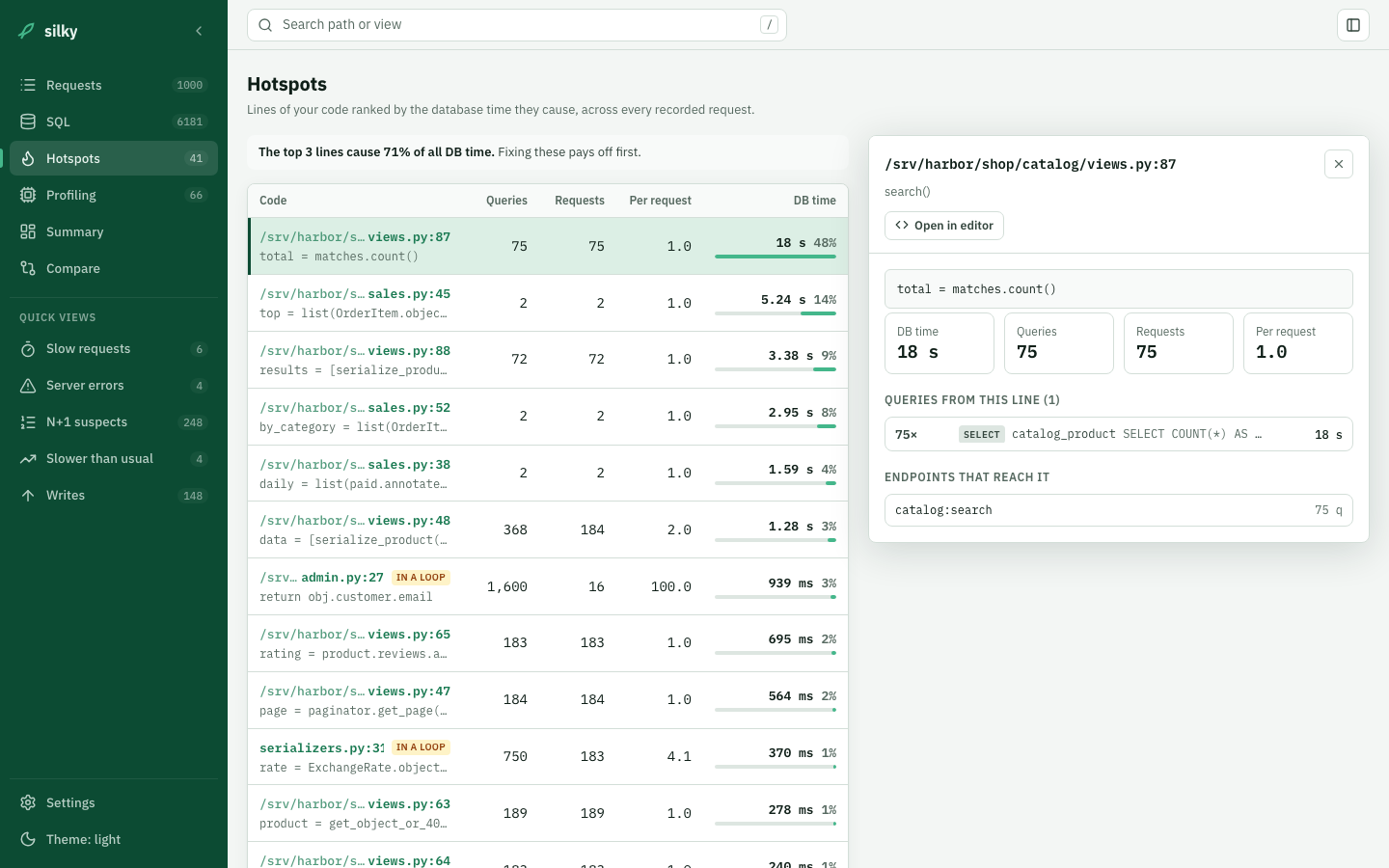 Hotspots: lines of app code ranked by the DB time they cause |
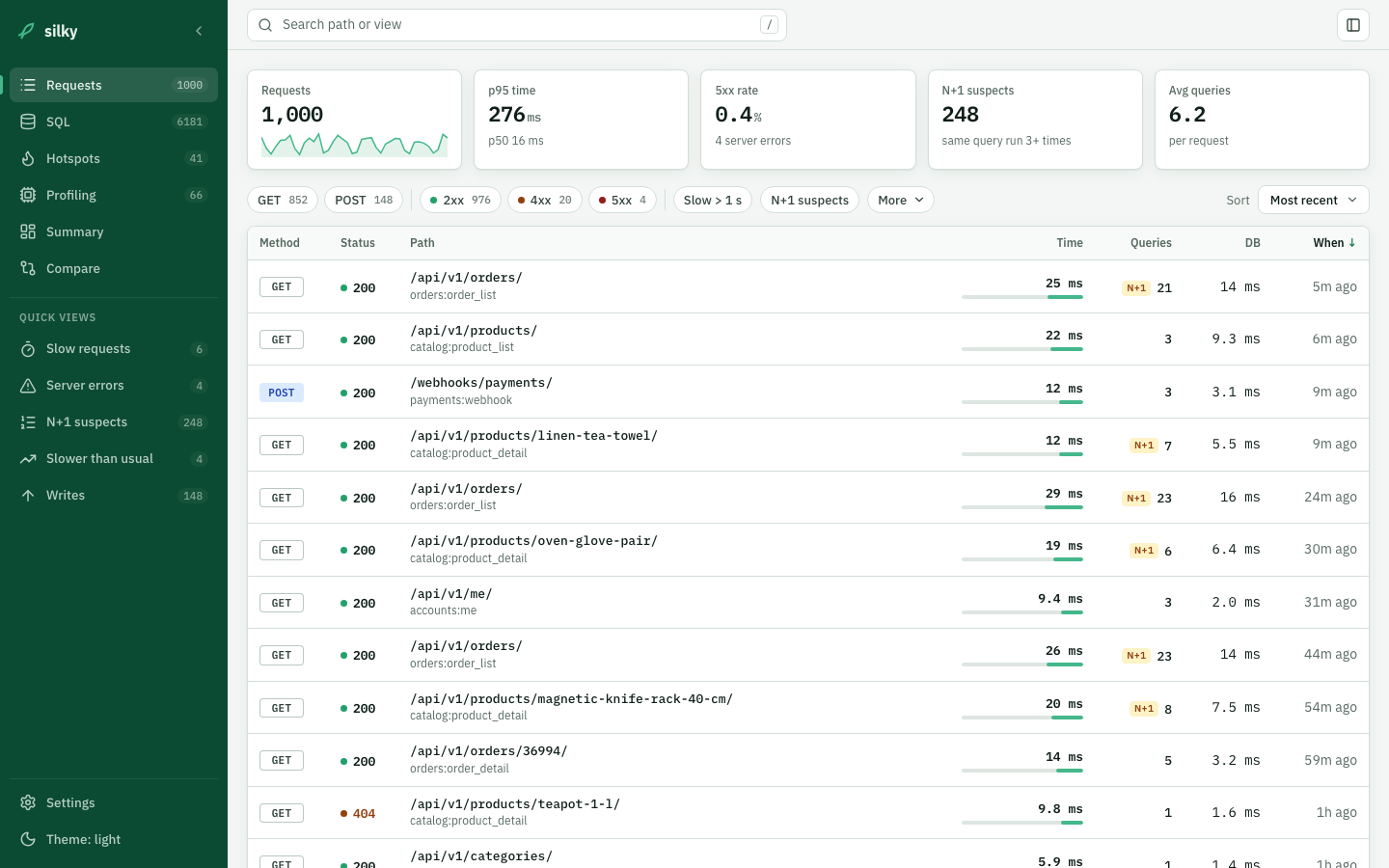 Requests: headline numbers, filter chips with counts, N+1 flags per row |
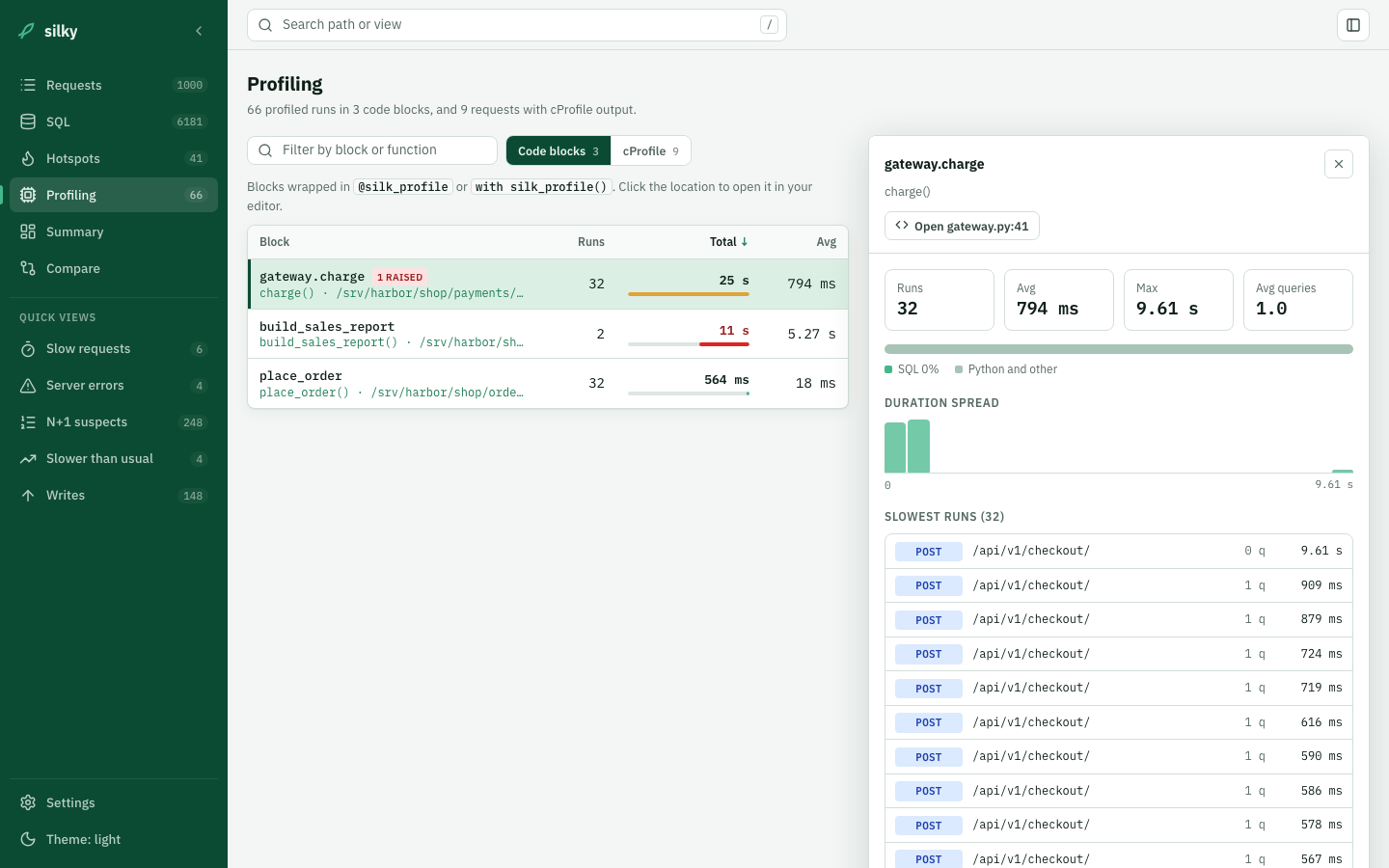 Profiling: profiles grouped into code blocks, with the spread and the slowest runs |
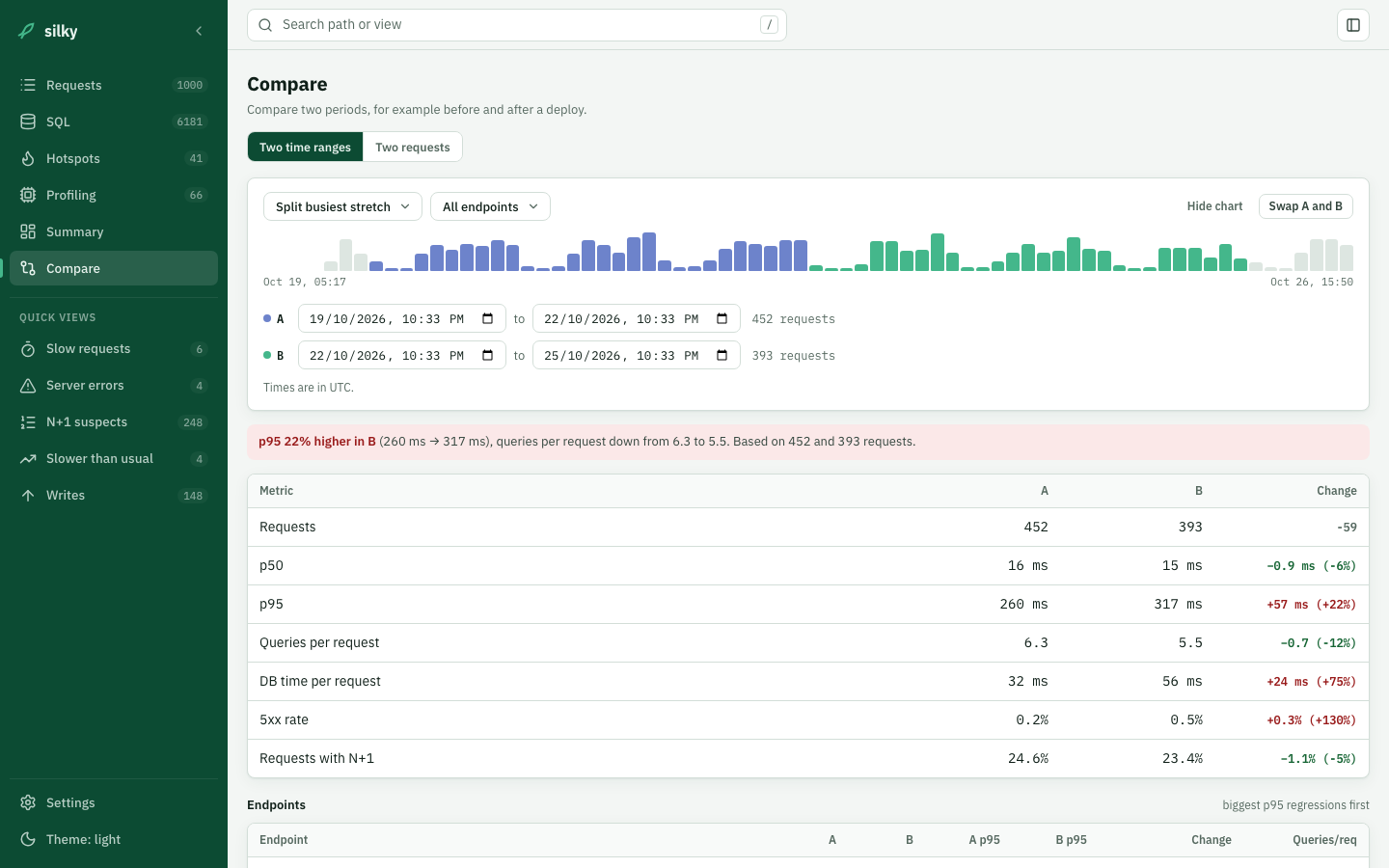 Compare: two time ranges, with the verdict and per-endpoint changes |
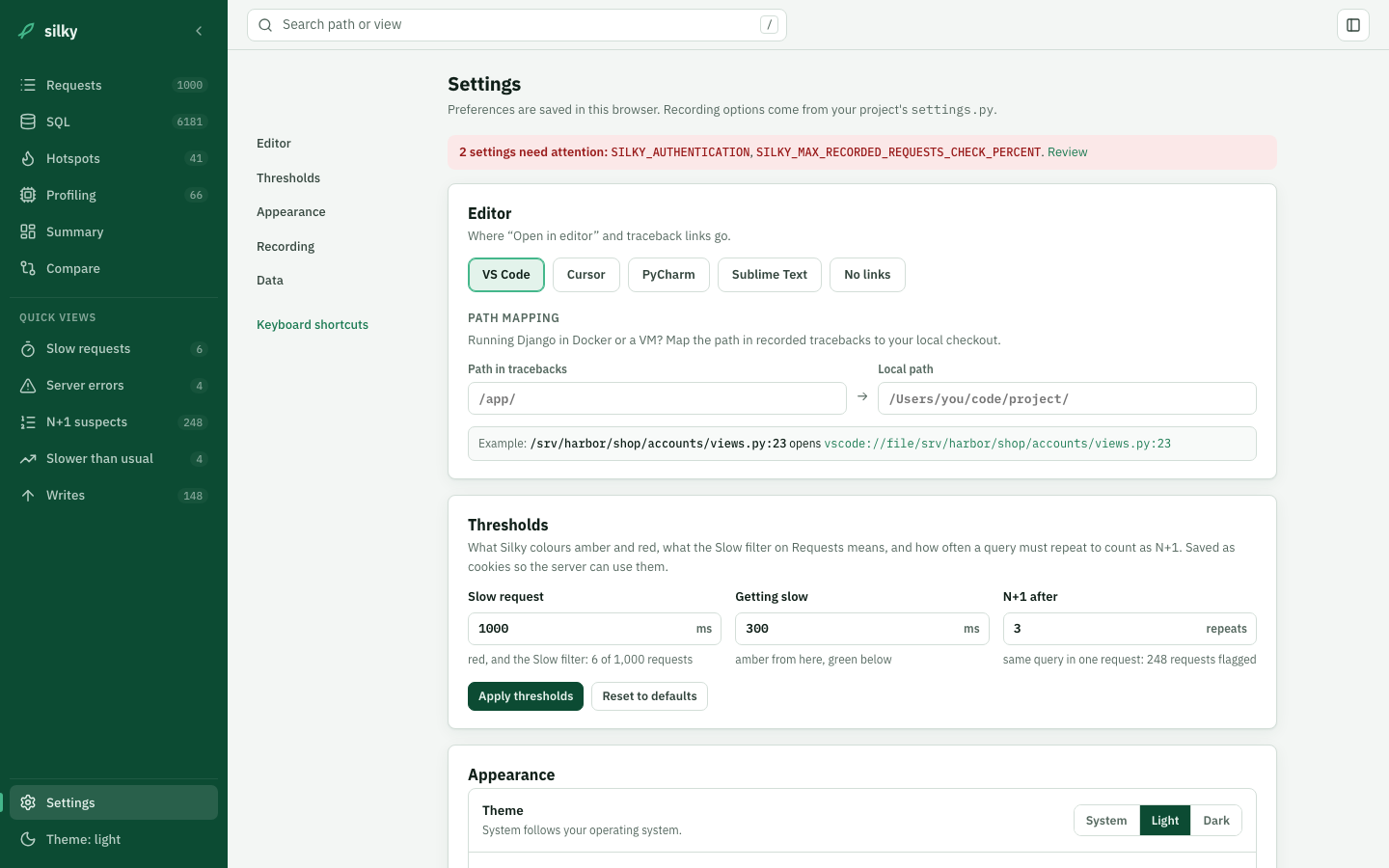 Settings: editor links with path mapping, thresholds, appearance and recording config |
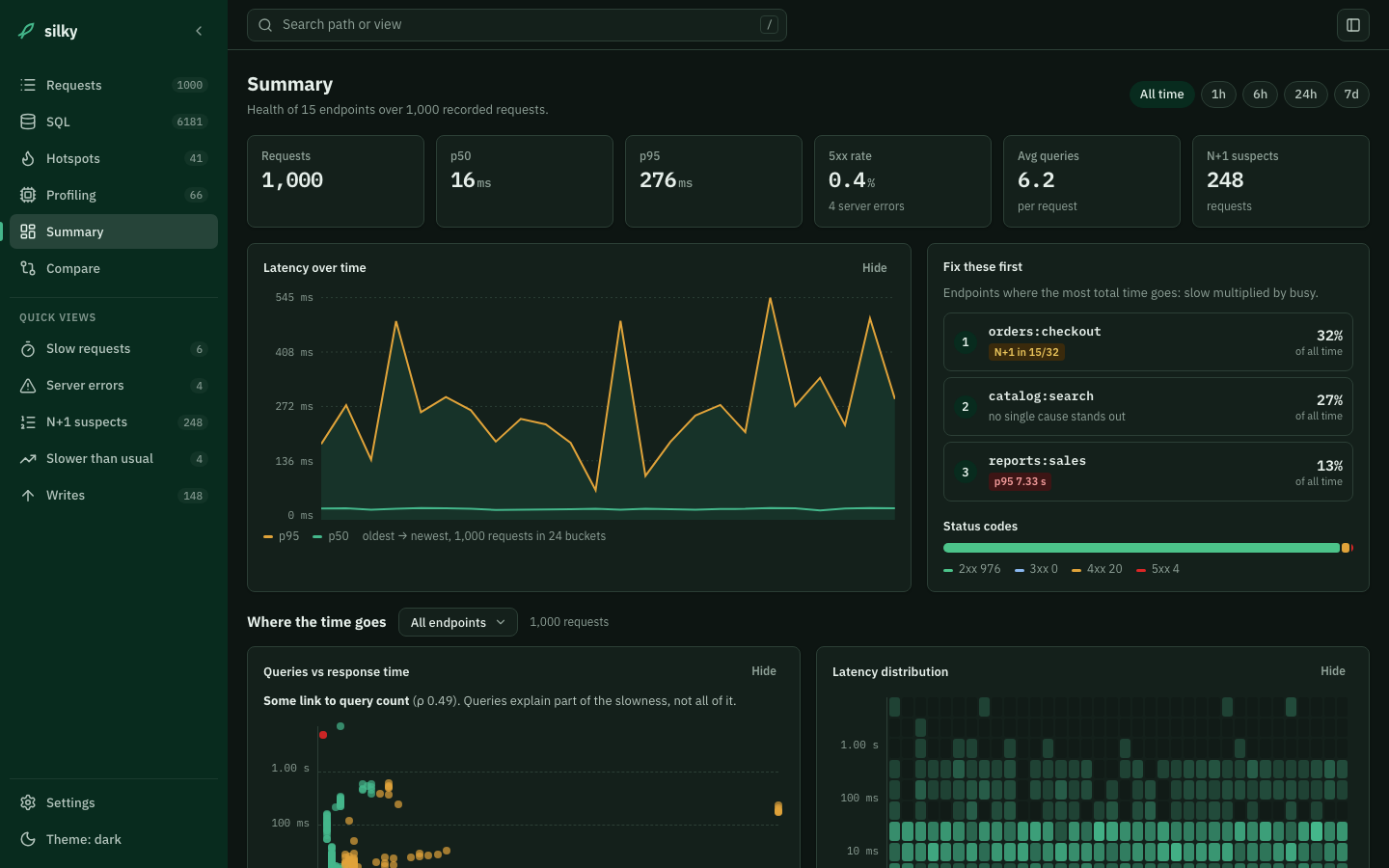 Dark theme: system, light or dark, with four accents |
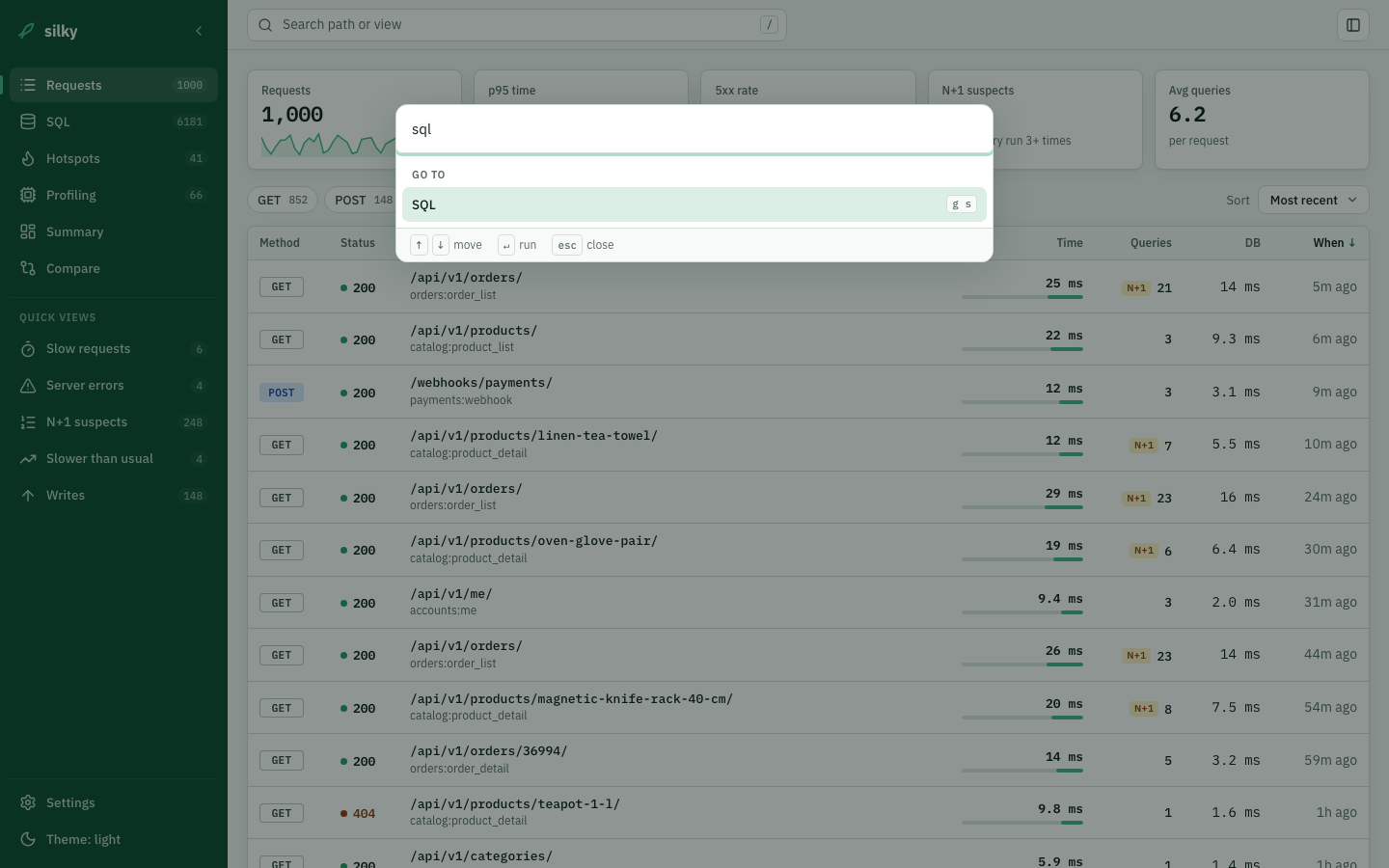 Command palette: Ctrl/Cmd+K to jump anywhere |
Migrating from django-silk
django-silky is a drop-in replacement: same app label (silk), upstream's
migrations unchanged, and your recorded data is kept. It adds one migration
of its own (0010, two columns and two indexes on silk_sqlquery), so run
migrate once after switching.
pip uninstall django-silk
pip install django-silky
python manage.py migrate silk
For version compatibility and rollback steps see MIGRATING.md.
Requirements
- Django 5.2, 6.0, 6.1
- Python 3.10, 3.11, 3.12, 3.13, 3.14, 3.15
Installation
pip install django-silky
With optional request body formatting:
pip install django-silky[formatting]
settings.py
MIDDLEWARE = [
    ...
    'silk.middleware.SilkyMiddleware',
    ...
]

TEMPLATES = [{
    ...
    'OPTIONS': {
        'context_processors': [
            ...
            'django.template.context_processors.request',
        ],
    },
}]

INSTALLED_APPS = [
    ...
    'silk',
]
Middleware order: Any middleware placed before
SilkyMiddlewarethat returns a response without callingget_responsewill prevent Silk from running. If you usedjango.middleware.gzip.GZipMiddleware, place it beforeSilkyMiddleware.
urls.py
from django.urls import include, path

urlpatterns += [
    path('silk/', include('silk.urls', namespace='silk')),
]
Migrate and collect static
python manage.py migrate
python manage.py collectstatic
The UI is now available at /silk/.
Features
Request Inspection
Silk's middleware records every HTTP request and response: method, status code, path, timing, SQL query count, headers and bodies. The Requests page filters them with chips (method, status class, slow, N+1, time range, query count) and a search box, and opens each request in a side panel beside the list. Each request shows how its time splits between SQL and Python, how it compares with the endpoint's usual time and query count, and any repeated queries, with whether they are an N+1 or a plain duplicate and the likely fix.
SQL Inspection
Every SQL query is captured with its execution time and a stack trace, so you can see where in your code it ran. Beyond the per-request view:
- SQL groups every recorded query by shape (values replaced), with calls, requests, total, average and p95 time, DB time per table, and the requests that run each pattern.
- Hotspots ranks the lines of your application code by the database time they cause, and flags lines that run queries inside a loop.
Source locations link to your editor (VS Code, Cursor, PyCharm or Sublime Text), with a path mapping for code that runs in Docker or a VM.
Compare
Compare two requests to the same endpoint (time, queries and a pattern-by-pattern diff), or two time ranges such as before and after a deploy, with the change per endpoint and per query pattern.
Code Profiling
Decorator / context manager
from silk.profiling.profiler import silk_profile

@silk_profile(name='View Blog Post')
def post(request, post_id):
    p = Post.objects.get(pk=post_id)
    return render(request, 'post.html', {'post': p})
def post(request, post_id):
    with silk_profile(name='View Blog Post #%d' % post_id):
        p = Post.objects.get(pk=post_id)
        return render(request, 'post.html', {'post': p})
cProfile integration
SILKY_PYTHON_PROFILER = True
SILKY_PYTHON_PROFILER_BINARY = True  # also save .prof files
When enabled, each request's cProfile output is shown as a sortable function list, and a call graph coloured by time loads on request.
Dynamic profiling
Profile third-party code without touching its source:
SILKY_DYNAMIC_PROFILING = [{
    'module': 'path.to.module',
    'function': 'MyClass.bar',
}]
Code Generation
Silk generates a curl command and a Django test-client snippet for every request, making it easy to replay a captured request from the terminal or a unit test.
Configuration
Authentication
Silk is locked down by default. Unauthenticated or non-staff requests to /silk/ return 404 Not Found — as if the app weren't mounted — so an accidental production deployment can't leak profiling data.
# To expose the UI publicly (internal dev-only, not recommended):
SILKY_AUTHENTICATION = False
SILKY_AUTHORISATION = False

# To change who is allowed in (default: user.is_staff):
SILKY_PERMISSIONS = lambda user: user.is_superuser
Request / response body limits
SILKY_MAX_REQUEST_BODY_SIZE = -1    # -1 = no limit
SILKY_MAX_RESPONSE_BODY_SIZE = 1024 # bytes; larger bodies are discarded
Sampling (high-traffic sites)
SILKY_INTERCEPT_PERCENT = 50  # record only 50 % of requests
# or
SILKY_INTERCEPT_FUNC = lambda request: 'profile' in request.session
To keep only requests whose response matched given status codes (for example, server errors only):
SILKY_INTERCEPT_STATUS_CODES = {500, 501} # default None records every status
The status code is only known once the response is ready, so Silk still records each request and then discards it if the status code is not in the set.
To stop recording particular paths entirely:
SILKY_IGNORE_PATHS = ['/healthz', '/readyz']
Entries are matched exactly against request.path_info, i.e. without any SCRIPT_NAME prefix.
Silk's own views are always ignored.
Garbage collection
SILKY_MAX_RECORDED_REQUESTS = 10_000
SILKY_MAX_RECORDED_REQUESTS_CHECK_PERCENT = 10  # GC runs on 10 % of requests
Retention mode
By default Silk keeps the newest SILKY_MAX_RECORDED_REQUESTS rows (count-based).
To keep a rolling time window instead — useful for spotting patterns across days —
switch the mode and set a maximum age in minutes:
SILKY_GARBAGE_COLLECT_MODE = 'time'      # 'count' (default) | 'time' | 'both'
SILKY_MAX_RECORDED_TIME = 60 * 24 * 7    # minutes; keep the last 7 days
'both' applies the count cap and the age window together (whichever trims more).
The count default is unchanged, so existing setups keep their current behaviour.
Trigger manually (e.g. from a cron job):
python manage.py silk_request_garbage_collect
# override per run:
python manage.py silk_request_garbage_collect --mode time --max-time 10080
Clear all data immediately:
python manage.py silk_clear_request_log
Query analysis
SILKY_ANALYZE_QUERIES = True
SILKY_EXPLAIN_FLAGS = {'format': 'JSON', 'costs': True}
Warning:
EXPLAIN ANALYZEon PostgreSQL actually executes the query, which may cause unintended side effects. Use with caution.
Meta-profiling
SILKY_META = True # shows how long Silk itself takes per request
Sensitive data masking
# Default set — case insensitive
SILKY_SENSITIVE_KEYS = {'username', 'api', 'token', 'key', 'secret', 'password', 'signature'}
Custom profiler storage
# Django >= 4.2
STORAGES = {
    'SILKY_STORAGE': {
        'BACKEND': 'path.to.StorageClass',
    },
}

SILKY_PYTHON_PROFILER_RESULT_PATH = '/path/to/profiles/'
Development
git clone https://github.com/VaishnavGhenge/django-silky.git
cd django-silky
python -m venv .venv && source .venv/bin/activate
pip install -e ".[formatting]"
pip install --group test  # pip >= 25.1

# Run the example project
DB_ENGINE=sqlite3 python project/manage.py migrate
# Replace old profiling records with a week of synthetic shop traffic
DB_ENGINE=sqlite3 python project/manage.py silk_seed --clear --requests 1000 --days 7 --seed 42
DB_ENGINE=sqlite3 python project/manage.py runserver
# Visit http://127.0.0.1:8000/silk/  (login: admin / admin)

# Watch SCSS while editing UI (Node Version 24.15)
pnpm install || npm install
npm run watch

# For CSS Build
npm run build

# Run tests
DB_ENGINE=sqlite3 python -m pytest project/tests/ -q
silk_seed simulates a week of traffic for a fictional Django kitchenware shop: a storefront
API, cart and checkout, logins, the Django admin, payment webhooks and a staff sales report.
Traffic follows a daily rhythm with an evening peak. The data includes the problems Silk is
meant to find: an N+1 on the order list, a 100-row admin changelist N+1, an exchange rate
fetched once per product variant, slow LIKE searches, a multi-second report with cProfile
output, and occasional 4xx and 500 responses (gateway timeouts, statement timeouts, a webhook
race). SQL and profiles stay within their request's timeline, and recorded query counts match
the stored queries. The application paths in tracebacks are fictional, so source links do not
open. --clear deletes only Silk profiling records. With SQLite, the default database
file is named postgres; set DB_NAME to use a different file.
Credits
django-silky is a fork of django-silk, originally created by Michael Ford and maintained by Jazzband. All core profiling functionality comes from the upstream project; this fork focuses solely on UI improvements.
License
MIT — same as the upstream django-silk.
1 maintainer

Metadata
1 maintainer
Release files for django-silky 1.7.0
For a detailed explanation of source distributions (sdists) and built distributions (wheels), please see the package formats documentation.
Source distribution (sdist)
| File | Size | Uploaded | Provenance | |
|---|---|---|---|---|
| django_silky-1.7.0.tar.gz | 5.4 MB | With provenance | Details |
Built distribution (wheel)
| File | Interpreter | ABI | Platform | Reset |
|---|---|---|---|---|
| django_silky-1.7.0-py3-none-any.whl | Python 3 | none | any | Details |
Total release size: 6.2 MB
Release files / django_silky-1.7.0.tar.gz
| Download URL | django_silky-1.7.0.tar.gz |
|---|---|
| Size | 5.4 MB |
| Tags | Source |
|
SHA-256 checksum How to use checksums |
35777683d974bf3c7d590c341b3277750e66bbe9f52cf5c8a32f0cb1530044aa
|
|
BLAKE2b-256 checksum How to use checksums |
985f6e80a8d563d9bb159a7de254080e05a496303b45a2ca02c967ffc81e75d3
|
| Upload date | |
|
Uploaded using Trusted Publishing? What is trusted publishing? |
Yes |
| Uploaded via |
twine/7.0.0 CPython/3.13.16
|
Provenance
Provenance describes where a file came from. On PyPI, provenance is shared via attestations, which provide a verifiable record of the build or publishing details. View details, limitations and caveats.


PyPI Publish Attestation
PyPI verified that this artifact, at this checksum, originated from the publisher listed below.
Signed by GitHub Actions, verified by PyPI on Oct 26, 2026.
Transparency logRelease files / django_silky-1.7.0-py3-none-any.whl
| Download URL | django_silky-1.7.0-py3-none-any.whl |
|---|---|
| Size | 798.1 kB |
| Tags | Python 3 |
|
SHA-256 checksum How to use checksums |
34e92f2fb3c6a6817c5508cbd735327d023b875e89e62e94d560b009792bae9c
|
|
BLAKE2b-256 checksum How to use checksums |
68aebac411fb8fb858bb56b0316e30d051869bfb16f0c55d17125b160b2fb63d
|
| Upload date | |
|
Uploaded using Trusted Publishing? What is trusted publishing? |
Yes |
| Uploaded via |
twine/7.0.0 CPython/3.13.16
|
Provenance
Provenance describes where a file came from. On PyPI, provenance is shared via attestations, which provide a verifiable record of the build or publishing details. View details, limitations and caveats.
PyPI Publish Attestation
PyPI verified that this artifact, at this checksum, originated from the publisher listed below.
Signed by GitHub Actions, verified by PyPI on Oct 26, 2026.
Transparency logSecurity for django-silky 1.7.0
Provenance
Provenance describes where a file came from. On PyPI, provenance is shared via attestations, which provide a verifiable record of the build or publishing details. View details, limitations and caveats.
Full provenance
All 2 files in this release have been uploaded with provenance metadata.
Attestation for django_silky-1.7.0.tar.gz
PyPI Publish Attestation
PyPI verified that this artifact, at this checksum, originated from the publisher listed below.
Signed by GitHub Actions, verified by PyPI on Oct 26, 2026.
Transparency logA note on package security
PyPI is a repository for distributing packages, not a service for auditing them. While third-party security researchers and our staff do their best to detect and remove malicious packages, PyPI cannot guarantee the quality, security or suitability of any given package.
To learn more about protecting yourself from malicious actors, visit our package security documentation.














