
Deployment, for Djangonauts with deadlines.

Project description
django-simple-deploy
Deployment, for Djangonauts with deadlines.
Documentation
The full documentation for this project is at Read the Docs.
Recent media
Django Simple Deploy and other DevOps Things (Episode 500 of Talk Python)
It was an honor to be the guest on episode 500, that's a fantastic milestone for a podcast! This episode focuses on the state of django-simple-deploy as it reached the 1.0 release.
Quickstart
django-simple-deploy gives you a management command that configures your project for an initial deployment. It currently supports deployments to Fly.io, Upsun, and Heroku. Each platform is supported by an external plugin, which means it's relatively straightforward to build support for additional hosting platforms. A plugin supporting VPS-based deployments is currently in development.
If you have a Django project that runs locally, you can deploy your project in a few short steps. The only change you'll need to make to your project is to add django_simple_deploy to INSTALLED_APPS.
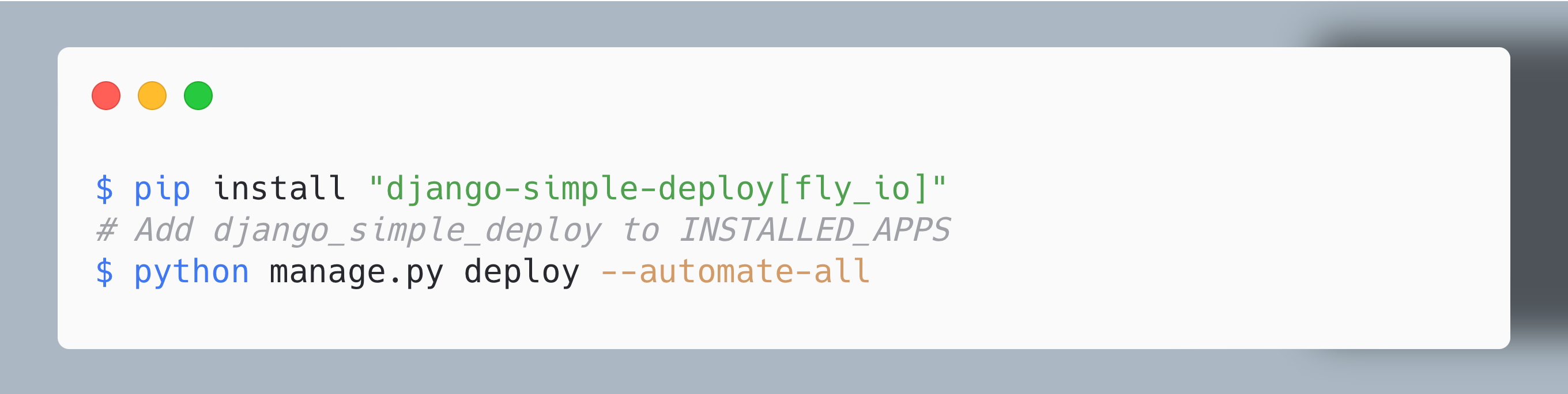
The above command will deploy your project to Fly.io. To deploy to another platform such as Upsun, just install a different plugin when you install django-simple-deploy:
$ pip install "django-simple-deploy[upsun]"
All output is captured and written to a log file stored in dsd_logs/, which is placed at the project's root directory.
Installing a plugin automatically installs django-simple-deploy. So for platforms supported by third-party plugins, the only difference is the installation step:
$ pip install <dsd-plugin-name>
# Add django_simple_deploy to INSTALLED_APPS
$ python manage.py deploy --automate-all
Configuration-only mode
The above example uses the --automate-all flag, which reduces deployment to three steps. The fully automated mode configures your project, commits changes for you, and pushes your code to the target platform's servers. There's also a configuration-only mode, which lets you inspect the changes made to your project before committing them and making the actual deployment. For a quick example, see the full Fly.io Quick Start guide.
Release history Release notifications | RSS feed


Download files
Download the file for your platform. If you're not sure which to choose, learn more about installing packages.
Source Distribution
Built Distribution
Filter files by name, interpreter, ABI, and platform.
If you're not sure about the file name format, learn more about wheel file names.
Copy a direct link to the current filters
File details
Details for the file django_simple_deploy-1.4.0.tar.gz.
File metadata
- Download URL: django_simple_deploy-1.4.0.tar.gz
- Upload date:
- Size: 69.5 kB
- Tags: Source
- Uploaded using Trusted Publishing? No
- Uploaded via: twine/6.1.0 CPython/3.12.11
File hashes
| Algorithm | Hash digest | |
|---|---|---|
| SHA256 |
27748ff3dfcccc33eee4d2a633a934c41b8578bc05bdc58c8ad4d82f5237f91c
|
|
| MD5 |
a5e73c9f5bff98eb9cae894a3322f420
|
|
| BLAKE2b-256 |
db72ed3d986afaeed4fa41ec8ed4df1a007ea2c0cbf8eb4f2b5dd094e83e82a5
|
File details
Details for the file django_simple_deploy-1.4.0-py3-none-any.whl.
File metadata
- Download URL: django_simple_deploy-1.4.0-py3-none-any.whl
- Upload date:
- Size: 30.0 kB
- Tags: Python 3
- Uploaded using Trusted Publishing? No
- Uploaded via: twine/6.1.0 CPython/3.12.11
File hashes
| Algorithm | Hash digest | |
|---|---|---|
| SHA256 |
2623165361635d11b950a48e01b8145d0ed373732628ed75148c9d724386d97c
|
|
| MD5 |
bf05325b302aff77cdc59f772d3e243b
|
|
| BLAKE2b-256 |
06e818d617f6effd086c283f4b459af73d90df1b7a9740a22eab6aaf1fc92a22
|






