


django-simple-mail
Simple customizable email template built for Django
Changelog
2.3.5 Fix ugettext_lazy deprecation for django 4
2.3.4 Add default value for SIMPLE_MAIL_FILE_STORAGE setting
2.3.3 Add storage settings for ImageSpecField
2.3.2 Add SIMPLE_MAIL_FILE_STORAGE setting
2.3.1 Fix six import issue
2.3.0 Drop Python 2 support and add Django 3.0 compatibility
2.2.6 Disable autoescape for email subject
2.2.5 Remove unused arguments from send_mass_mail method of BaseSimpleMail
2.2.4 Add send_mass_mail method to BaseSimpleMail
2.2.3 Remove actions from admin (we do not have delete permissions)
2.2.2 Add Django 1.9 and Python 2 compatibility
2.2.1 Remove cssutils Warning from logs
In the 2.2.* version the following fields from_email, from_name and base_url where removed. Those parameters should be defined in code rather than from the admin.
The 2.* versions have breaking changes from the 1.* and are not backward compatible.
Template preview
The base template was built with Mailchimp editor :
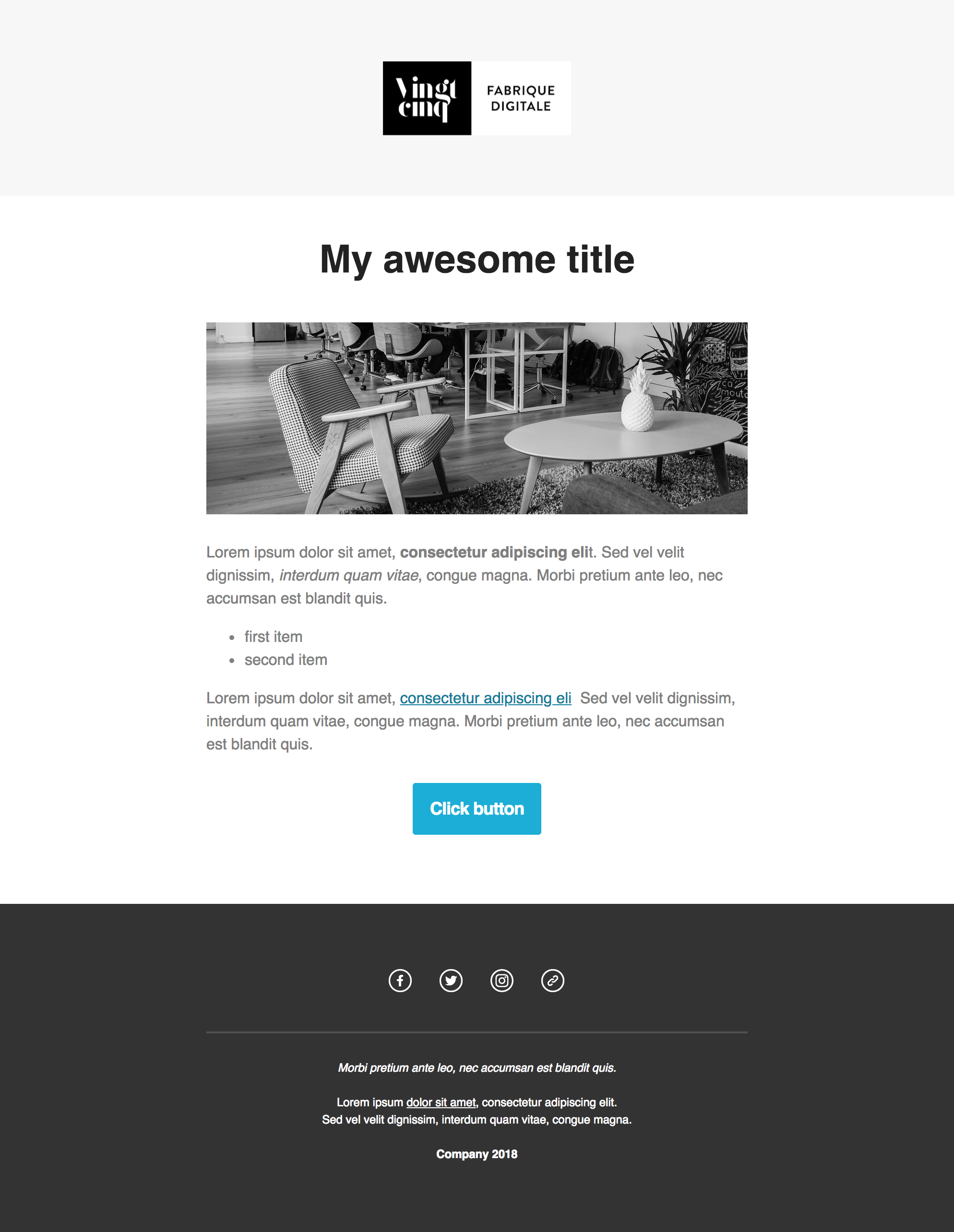
Email Preview
Requirements
This Django app works with :
Python (>=2.7)
Django (>=1.9) (Need to be tested for previous versions)
Todo
Write tests
validate compatibility with previous versions of Django and Python
Set a demo app on pythonanywhere
Installation
Install using pip :
pip install django_simple_mail
Add simple_mail to your INSTALLED_APPS settings.
INSTALLED_APPS = (
    ...
    'simple_mail',
    ...
)
Then run :
python manage.py migrate
Quoting Django’s documentation :
Mail is sent using the SMTP host and port specified in the EMAIL_HOST and EMAIL_PORT settings. The EMAIL_HOST_USER and EMAIL_HOST_PASSWORD settings, if set, are used to authenticate to the SMTP server, and the EMAIL_USE_TLS and EMAIL_USE_SSL settings control whether a secure connection is used.
So you need to set the following
EMAIL_HOST = ''
EMAIL_PORT = 587
EMAIL_HOST_USER = ''
EMAIL_HOST_PASSWORD = ''
EMAIL_USE_TLS = True
EMAIL_USE_SSL = False
Integrations
CKEDITOR for a WYSIWYG edition of contents
Simple Mail easily integrates with django-ckeditor to have a wysiwyg edition of content. To use it :
pip install django-ckeditor
Then add ckeditor to your INSTALLED_APPS settings.
INSTALLED_APPS = (
    ...
    'ckeditor',
    ...
)
And set the following in your settings :
SIMPLE_MAIL_USE_CKEDITOR = True
ModelTranslation to translate emails
Simple Mail easily integrates with django-modeltranslation to get the content of your emails available in multiple languages.
pip install django-modeltranslation
Then add modeltranslation to your INSTALLED_APPS settings.
INSTALLED_APPS = (
    ...
    'modeltranslation',
    ...
)
And set the following in your settings :
SIMPLE_MAIL_USE_MODELTRANSALTION = True
And run :
python manage.py sync_translation_fields
Create, register and send mails
Register Mail
Create a mails.py file in your app and define your mail.
The email_key attribute must not exceed 100 characters.
from simple_mail.mailer import BaseSimpleMail, simple_mailer


class WelcomeMail(BaseSimpleMail):
    email_key = 'welcome'


simple_mailer.register(WelcomeMail)
Then run ./manage.py register_mails to create those mail into the database.
The mail with key welcome will he be available for edition in your django admin.
Send an email
You can the send the WelcomeMail the following way :
welcome_mail = WelcomeMail()
welcome_mail.send(to, from_email=None, bcc=[], connection=None, attachments=[],
                   headers={}, cc=[], reply_to=[], fail_silently=False)
Passing variables to email
You can pass variable to email with the context attribute :
from simple_mail.mailer import BaseSimpleMail, simple_mailer


class WelcomeMail(BaseSimpleMail):
    email_key = 'welcome'
    context = {
        'title' : 'My email title',
        'user': 'the user'
    }


simple_mailer.register(WelcomeMail)
Or you can create a set_context method:
from simple_mail.mailer import BaseSimpleMail, simple_mailer


class WelcomeMail(BaseSimpleMail):
    email_key = 'welcome'

    def set_context(self, user_id, welcome_link):
        user = User.objects.get(id=user_id)
        self.context = {
            'user': user,
            'welcome_link': welcome_link
        }


simple_mailer.register(WelcomeMail)
You will then need to call the set_context before sending an email:
welcome_mail = WelcomeMail()
welcome_mail.set_context(user_id, welcome_link)
welcome_mail.send(to, from_email=None, bcc=[], connection=None, attachments=[],
                   headers={}, cc=[], reply_to=[], fail_silently=False)
Email preview and test email
From the admin you can preview an email and send a test email.
Both methods use your context attribute to render the email.
If you use the set_context method, you might need to create a set_test_context method.
This method should not take any argument :
from simple_mail.mailer import BaseSimpleMail, simple_mailer


class WelcomeMail(BaseSimpleMail):
    email_key = 'welcome'

    def set_context(self, user_id, welcome_link):
        user = User.objects.get(id=user_id)
        self.context = {
            'user': user,
            'welcome_link': welcome_link
        }

    def set_test_context(self):
        user_id = User.objects.order_by('?').first().id
        self.set_context(user_id, 'http://my-webiste.com/my-path')


simple_mailer.register(WelcomeMail)
This method impact the fields displayed in the Context section of the admin.
Settings
Here are all the settings you can use, with their default value :
# enable django-modeltranslation integration
SIMPLE_MAIL_USE_MODELTRANSALTION = False
# enable django-ckeditor integration
SIMPLE_MAIL_USE_CKEDITOR = False
# set default email template
SIMPLE_MAIL_DEFAULT_TEMPLATE = 'simple_mail/default.html'
# enable/disable cssutils warning logs
SIMPLE_MAIL_LOG_CSS_WARNING = False
# storage for logo and banner
SIMPLE_MAIL_FILE_STORAGE = 'django.core.files.storage.FileSystemStorage'
Mail configuration & edition
Customize your base content and template colors
You change the look and feel or your template directly from the django admin : The Footer field can use template tags and variables.

Admin mail configuration
Edit the content of each of your mail :
You can edit the content of each of your mail. The Content, Subject, button label and button link fields can use template tags and variables.
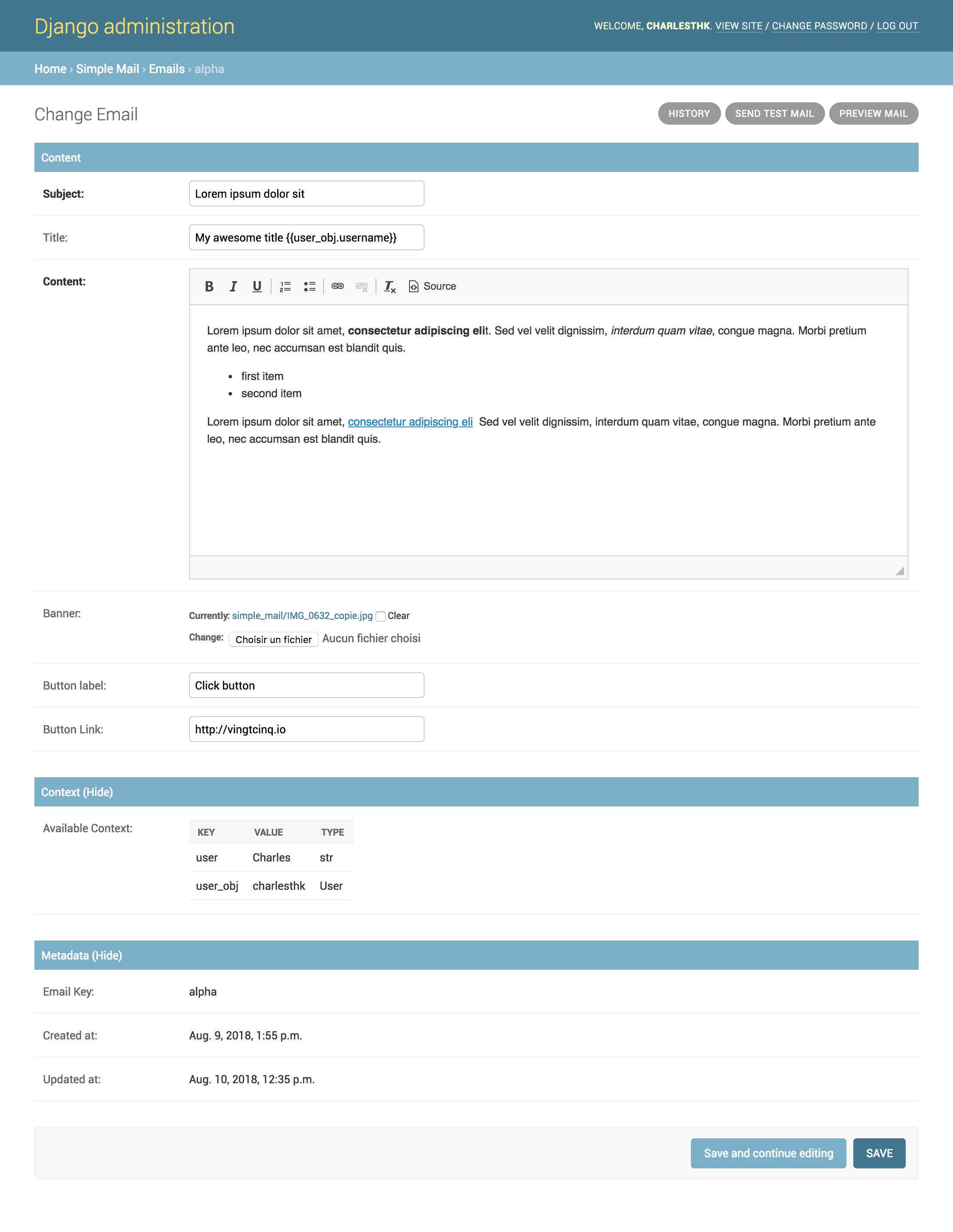
Admin mail edition
Custom template
You can define your own email template :
By setting a template attribute from you BaseSimpleMailsubclass :
from simple_mail.mailer import BaseSimpleMail, simple_mailer


class WelcomeMail(BaseSimpleMail):
    email_key = 'welcome'
    template = 'my_app/my_email_template.html'


simple_mailer.register(WelcomeMail)
Or by setting SIMPLE_MAIL_DEFAULT_TEMPLATE in your settings :
SIMPLE_MAIL_DEFAULT_TEMPLATE = 'my_app/my_email_template.html'Support
If you are having issues, please let us know or submit a pull request.
License
The project is licensed under the MIT License.
1 maintainer

Metadata
1 maintainer
Release files for django-simple-mail 2.3.5
For a detailed explanation of source distributions (sdists) and built distributions (wheels), please see the package formats documentation.
Source distribution (sdist)
| File | Size | Uploaded | Provenance | Actions |
|---|---|---|---|---|
| django_simple_mail-2.3.5.tar.gz | 20.2 kB | Without provenance | Details for django_simple_mail-2.3.5.tar.gz |
Built distribution (wheel)
| File | Interpreter | ABI | Platform | Actions Reset |
|---|---|---|---|---|
| django_simple_mail-2.3.5-py2.py3-none-any.whl | Python 3, Python 2 | none | any | Details for django_simple_mail-2.3.5-py2.py3-none-any.whl |
Total release size: 44.6 kB
Release files / django_simple_mail-2.3.5.tar.gz
| Download URL | django_simple_mail-2.3.5.tar.gz |
|---|---|
| Size | 20.2 kB |
| Tags | Source |
|
SHA-256 checksum How to use checksums |
8f2840be7039bf91f272873d25b7b64e975428613a802ae3bfeb7bd89c7e78c8
|
|
BLAKE2b-256 checksum How to use checksums |
433d72beccb027692ac912059848661d955aca6b045b9a44a916f62692d58e5e
|
| Upload date | |
|
Uploaded using Trusted Publishing? What is trusted publishing? |
No |
| Uploaded via |
twine/3.7.0 importlib_metadata/4.8.2 pkginfo/1.8.2 requests/2.26.0 requests-toolbelt/0.9.1 tqdm/4.62.3 CPython/3.8.9
|
Release files / django_simple_mail-2.3.5-py2.py3-none-any.whl
| Download URL | django_simple_mail-2.3.5-py2.py3-none-any.whl |
|---|---|
| Size | 24.5 kB |
| Tags | Python 2 Python 3 |
|
SHA-256 checksum How to use checksums |
3423f08289138f883f1200047a3c2322f2182d9b172b59b6ddbd2e57ebdb2039
|
|
BLAKE2b-256 checksum How to use checksums |
3548772a8a4d2c4247599bcc2e54220fc52f14f737b4bcffce0f6857d5d79400
|
| Upload date | |
|
Uploaded using Trusted Publishing? What is trusted publishing? |
No |
| Uploaded via |
twine/3.7.0 importlib_metadata/4.8.2 pkginfo/1.8.2 requests/2.26.0 requests-toolbelt/0.9.1 tqdm/4.62.3 CPython/3.8.9
|
Security for django-simple-mail 2.3.5
Provenance
Provenance describes where a file came from. On PyPI, provenance is shared via attestations, which provide a verifiable record of the build or publishing details. View details, limitations and caveats.
No provenance found
None of the files in this release were uploaded with provenance metadata.
A note on package security
PyPI is a repository for distributing packages, not a service for auditing them. While third-party security researchers and our staff do their best to detect and remove malicious packages, PyPI cannot guarantee the quality, security or suitability of any given package.
To learn more about protecting yourself from malicious actors, visit our package security documentation.














