
django-survey
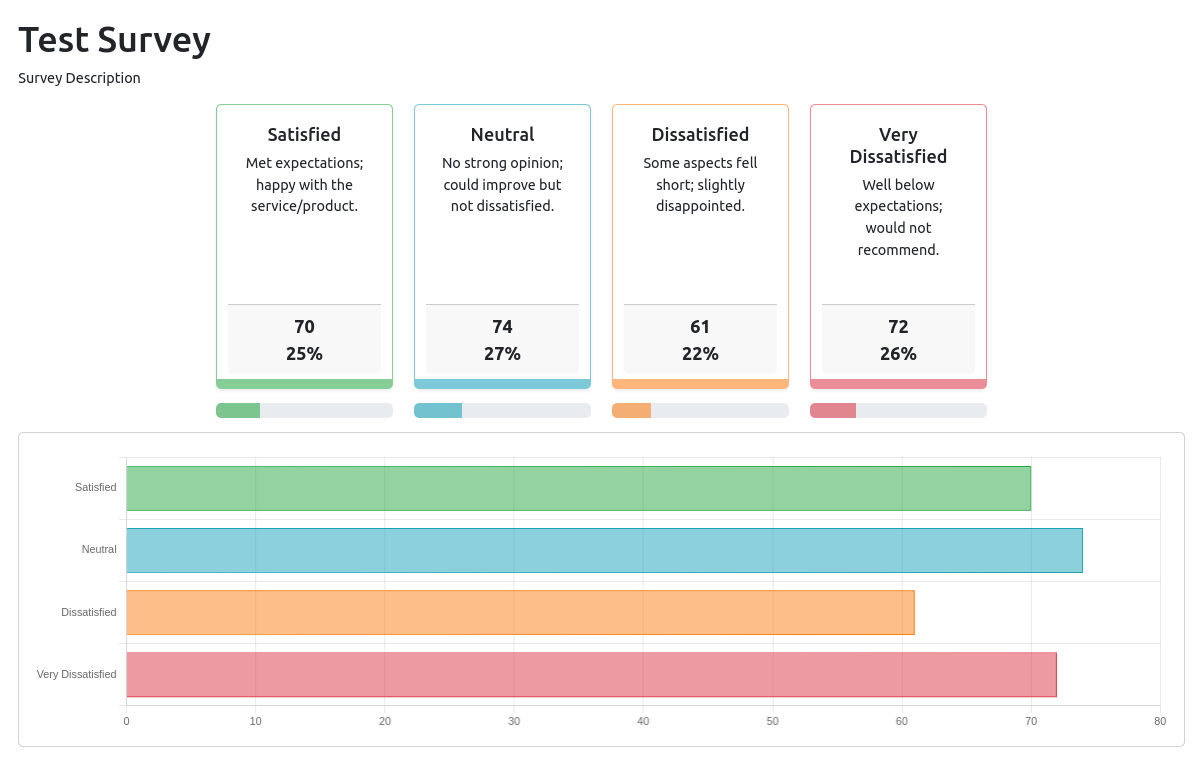
The django-survey project is an application for Django that makes it easy to create and manage surveys on websites. This application provides functionalities to create surveys, define questions and response options, manage active and inactive surveys, collect user responses, and generate statistical reports on survey results. With this tool, developers can easily integrate surveys into their Django websites to collect user data and feedback.
Installation
pip install django-surveyplus
Usage
Add to installed applications
# settings.py

INSTALLED_APPS = [
    # ...
    'survey',
    # ...
]
Add the URLs
urlpatterns = [
    # ...
    path('survey/', include('survey.urls')),
    # ...
]
Run the migrations
python manage.py migrate
Creating a Survey
from survey.models import Survey, SurveyOption

survey = Survey.objects.create(
    title='Test Survey',
    description='Survey Description',
)

for i in range(1, 5):
    SurveyOption.objects.create(
        survey=survey,
        title=f'Option {i}',
        description=f'Option {i} Description',
    )
Displaying the Survey
{% load survey %}
<!DOCTYPE html>
<html lang="en">
<head>
    <meta charset="UTF-8">
    <meta name="viewport" content="width=device-width, initial-scale=1.0">
    <title>Survey</title>
</head>
<body>
    <!-- Assuming you have a survey object -->
    {% survey_detail survey %}
</body>
</html>
Developer Instructions
Setting Up the Development Environment
-
Clone the repository:
git clone https://github.com/wilmerm/django-survey.git
cd django-survey
-
Create and activate a virtual environment:
python -m venv env
source env/bin/activate  # On Windows use `env\Scripts\activate`
-
Install the dependencies:
pip install -r requirements.txt
pip install -r requirements-dev.txt
-
Build and install the survey application:
python -m build
pip uninstall django-surveyplus
pip install dist/*tar.gz
-
Run the development server:
python manage.py runserver
Running Tests
To run the tests, use the following command:
python manage.py test
Building and Publishing the Library
To compile and upload the library to PyPI, follow these steps:
-
Ensure you have the necessary dependencies:
pip install build twine
-
Build the package:
python -m build
-
(Optional) Verify the package:
twine check dist/*
-
Upload the package to PyPI:
python -m twine upload dist/*
License
This project is licensed under the MIT License. See LICENSE file for details.
Project Status
This project is in Production/Stable ✔
Contribution 💗
If you find value in this project and would like to show your support, please consider making a donation via PayPal:
Your generosity helps us to continue improving and maintaining this project. We appreciate every contribution, however small. Thanks for being part of our community!
1 maintainer

Metadata
1 maintainer
Release files for django-surveyplus 1.0.2
For a detailed explanation of source distributions (sdists) and built distributions (wheels), please see the package formats documentation.
Source distribution (sdist)
| File | Size | Uploaded | |
|---|---|---|---|
| django_surveyplus-1.0.2.tar.gz | 9.9 kB | Details |
Built distribution (wheel)
| File | Interpreter | ABI | Platform | Reset |
|---|---|---|---|---|
| django_surveyplus-1.0.2-py3-none-any.whl | Python 3 | none | any | Details |
Total release size: 23.5 kB
Release files / django_surveyplus-1.0.2.tar.gz
| Download URL | django_surveyplus-1.0.2.tar.gz |
|---|---|
| Size | 9.9 kB |
| Tags | Source |
|
SHA-256 checksum How to use checksums |
a3e9539b9fdad801fcb9c1b5821bce39bbc70cde76b898886ff128d11a506131
|
|
BLAKE2b-256 checksum How to use checksums |
637692348aecc6ee933760713b3138e6b2b9fa23fecc8cb29a7830d0407ae07c
|
| Upload date | |
|
Uploaded using Trusted Publishing? What is trusted publishing? |
No |
| Uploaded via |
twine/6.1.0 CPython/3.13.2
|
Release files / django_surveyplus-1.0.2-py3-none-any.whl
| Download URL | django_surveyplus-1.0.2-py3-none-any.whl |
|---|---|
| Size | 13.6 kB |
| Tags | Python 3 |
|
SHA-256 checksum How to use checksums |
a2b1e4db912e5351df05ff85bca3a8407840a14a0b174d6a56f142cb56931cf2
|
|
BLAKE2b-256 checksum How to use checksums |
64e628494f79b8043959b740572dbecfa94b0a63ed130929abc8c3c566ea8d75
|
| Upload date | |
|
Uploaded using Trusted Publishing? What is trusted publishing? |
No |
| Uploaded via |
twine/6.1.0 CPython/3.13.2
|














