
django-telegram-bot
CI:


PyPI:

Docs:

Django app to write Telegram bots. Just define commands and how to handle them.
Try Permabots: more stable django app for bots https://github.com/jlmadurga/permabots
NOTE: Just for text messages at this moment.
Documentation
The full documentation is at https://django-telegram-bot.readthedocs.org.
Telegram API documentation at https://core.telegram.org/bots/api
Quickstart
Install django-telegram-bot:
pip install django-telegram-bot
Add telegrambot and rest_framework to your INSTALLED_APPS, and run:
$ python manage.py migrate
After creating a bot in Telegram Platform, create at least one bot with django admin. Token is the only required field. You may need to provided public key certificate for your server. https://core.telegram.org/bots/self-signed Heroku has https and ssl by default so it is a good option if you dont want to deal with that.
Add webhook url to your urlpatterns:
url(r'^telegrambot/', include('telegrambot.urls', namespace="telegrambot")
Define whe file where commands will be defined in urlpatterns variable, analogue to django urls and ROOT_URLCONF:
TELEGRAM_BOT_HANDLERS_CONF = "app.handlers"
Set bot commands handlers is very easy just as defining urls in django. Module with urlpatterns that list different handlers. You can regex directly or use shortcuts like command or unknown_command
urlpatterns = [command('start', StartView.as_command_view()),
           command('author', AuthorCommandView.as_command_view()),
           command('author_inverse', AuthorInverseListView.as_command_view()),
           command('author_query', login_required(AuthorCommandQueryView.as_command_view())),
           unknown_command(UnknownView.as_command_view()),
           regex(r'author_(?P<name>\w+)', AuthorName.as_command_view()),
          ]
To set the webhook for telegram you need django.contrib.sites installed, SITE_ID configured in settings and with it correct value in the DB. The webhook for each bot is set when a Bot is saved and enabled field is set to true.
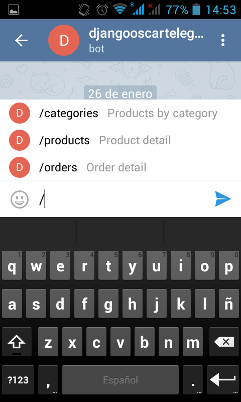
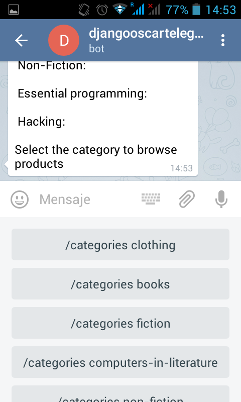
Bot views responses with Telegram messages to the user who send the command with a text message and keyboard. Compound with a context and a template. The way it is handled is analogue to Django views. Visits docs for more details https://django-telegram-bot.readthedocs.org/usage.html
Features
Multiple bots
Message handling definition.
Authentication
Text responses and keyboards.
Media messages not supported.
Only Markup parse mode.
Running Tests
Does the code actually work?
source <YOURVIRTUALENV>/bin/activate
(myenv) $ pip install -r requirements/test.txt
(myenv) $ make test
(myenv) $ make test-all
History
0.1.0 (2016-21-01)
First release on PyPI.
1 maintainer

Metadata
1 maintainer
Release files for django-telegram-bot 0.6.0
For a detailed explanation of source distributions (sdists) and built distributions (wheels), please see the package formats documentation.
Source distribution (sdist)
| File | Size | Uploaded | Provenance | |
|---|---|---|---|---|
| django-telegram-bot-0.6.0.tar.gz | 16.2 kB | Without provenance | Details |
Built distribution (wheel)
| File | Interpreter | ABI | Platform | Reset |
|---|---|---|---|---|
| django_telegram_bot-0.6.0-py2.py3-none-any.whl | Python 3, Python 2 | none | any | Details |
Total release size: 42.3 kB
Release files / django-telegram-bot-0.6.0.tar.gz
| Download URL | django-telegram-bot-0.6.0.tar.gz |
|---|---|
| Size | 16.2 kB |
| Tags | Source |
|
SHA-256 checksum How to use checksums |
8154fe9352ca0b62ee83e5c96b74287c3e0a973ecfe599f6278c3e92f7d9c546
|
|
BLAKE2b-256 checksum How to use checksums |
2f83d06334ca090c013123d8629dfdc47960f65c38687a3a3ba2863e67cba2ce
|
| Upload date | |
|
Uploaded using Trusted Publishing? What is trusted publishing? |
No |
Release files / django_telegram_bot-0.6.0-py2.py3-none-any.whl
| Download URL | django_telegram_bot-0.6.0-py2.py3-none-any.whl |
|---|---|
| Size | 26.1 kB |
| Tags | Python 2 Python 3 |
|
SHA-256 checksum How to use checksums |
cc66d18d77d1cd9e6b44e0d82fd18fe856e00249739aa37bf2fe79fa36178ce6
|
|
BLAKE2b-256 checksum How to use checksums |
7a3a9e3b6a2f15639b6b7f865f0624c3e398e67bcaa642564668f21c576fd20b
|
| Upload date | |
|
Uploaded using Trusted Publishing? What is trusted publishing? |
No |
Security for django-telegram-bot 0.6.0
Provenance
Provenance describes where a file came from. On PyPI, provenance is shared via attestations, which provide a verifiable record of the build or publishing details. View details, limitations and caveats.
No provenance found
None of the files in this release were uploaded with provenance metadata.
A note on package security
PyPI is a repository for distributing packages, not a service for auditing them. While third-party security researchers and our staff do their best to detect and remove malicious packages, PyPI cannot guarantee the quality, security or suitability of any given package.














