
django-tracepanel




See what your Django app is really doing. Tracepanel records each request, Celery task and management command of your Django app with its SQL queries, cache calls, Redis commands, outgoing HTTP calls, templates, signals, emails, logs and errors. It points out N+1 queries and calls, duplicates, slow SQL and slow HTTP calls, and long transactions, and names the line of code to fix.
Works with
| Supported | |
|---|---|
| Python and Django | Django 5.2 on Python 3.11 to 3.14, Django 6.0 on 3.12 to 3.14, Django 6.1 on 3.12 to 3.15. Each pair is tested in CI. |
| Django | Views, sync and async, under runserver or any WSGI or ASGI server. Templates, Django's and Jinja2. Cache, signals, email, logins, file storages, collectstatic, management commands, migrate, system checks. |
| Databases | PostgreSQL, MySQL, SQLite, SQL Server and Oracle, through the ORM or a driver directly. EXPLAIN on all but Oracle. SQLAlchemy and MongoDB. |
| APIs | Django REST framework, Django Ninja, Graphene, Strawberry, htmx. |
| Background work | Celery, Dramatiq, RQ, Huey, django-q2, Taskiq, Django Tasks, Channels. |
| Clients | requests and urllib3, httpx, aiohttp, Redis and Valkey, AWS through boto3 and aiobotocore, the OpenAI and Anthropic SDKs. Spans from OpenTelemetry instrumentations join the trace. |
| Profiling | Where a request's or a task's time goes, and its memory when you ask for it. |
| Tests | pytest --tracepanel fails a test that makes an N+1 or duplicate queries. |
The drivers, the versions of each library and the settings are in the Django guide.
This package has no code of its own. It installs
tracepanel with Django
support, the same as pip install "tracepanel[django]".
pip install django-tracepanel
Setup
Add the app to your settings. It is on whenever DEBUG = True.
# settings.py
INSTALLED_APPS += ["tracepanel.django"]
To leave the settings as they are, start the server through tracepanel run
instead. It turns Tracepanel on even with DEBUG = False.
tracepanel run python manage.py runserver
Open any page and click the badge in the corner to open the panel. The console
is at /__tracepanel__/.
What it looks like
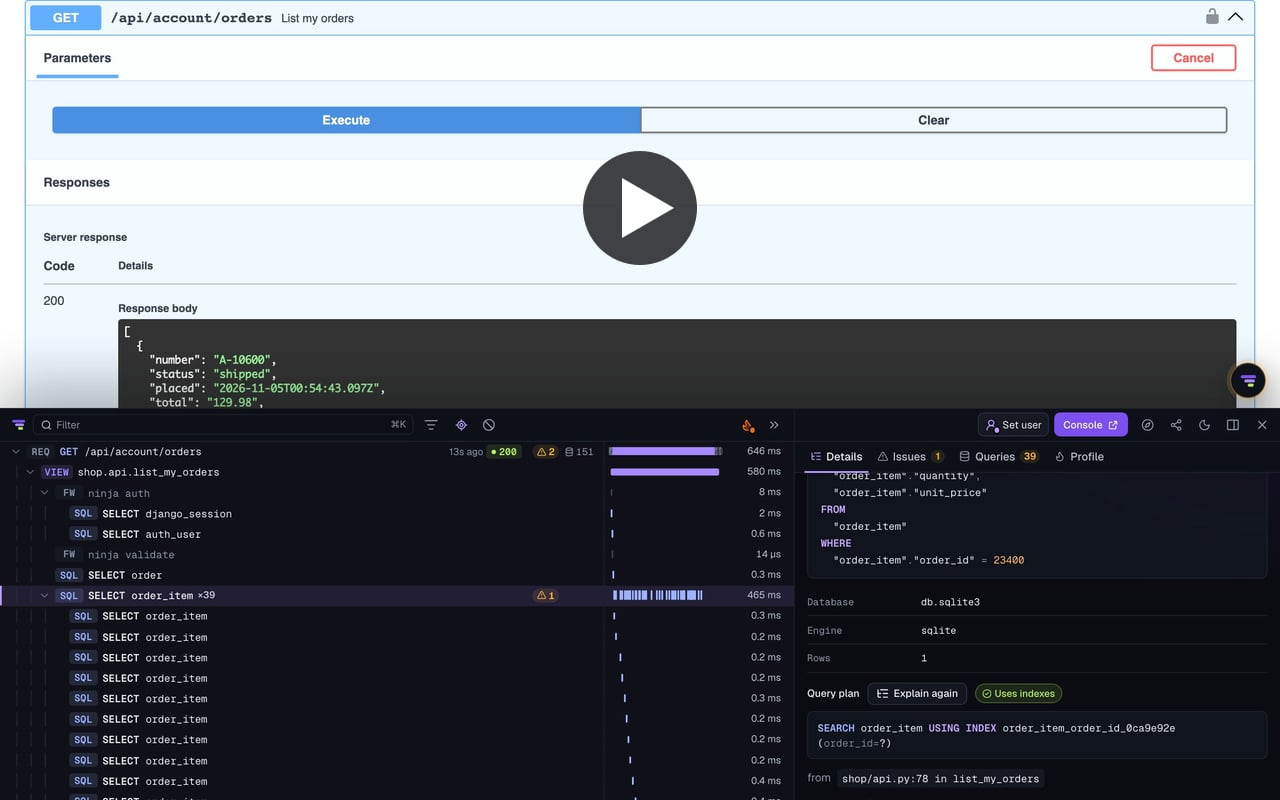
Each request shows its call tree, with the SQL queries, the calls and the issues in it:
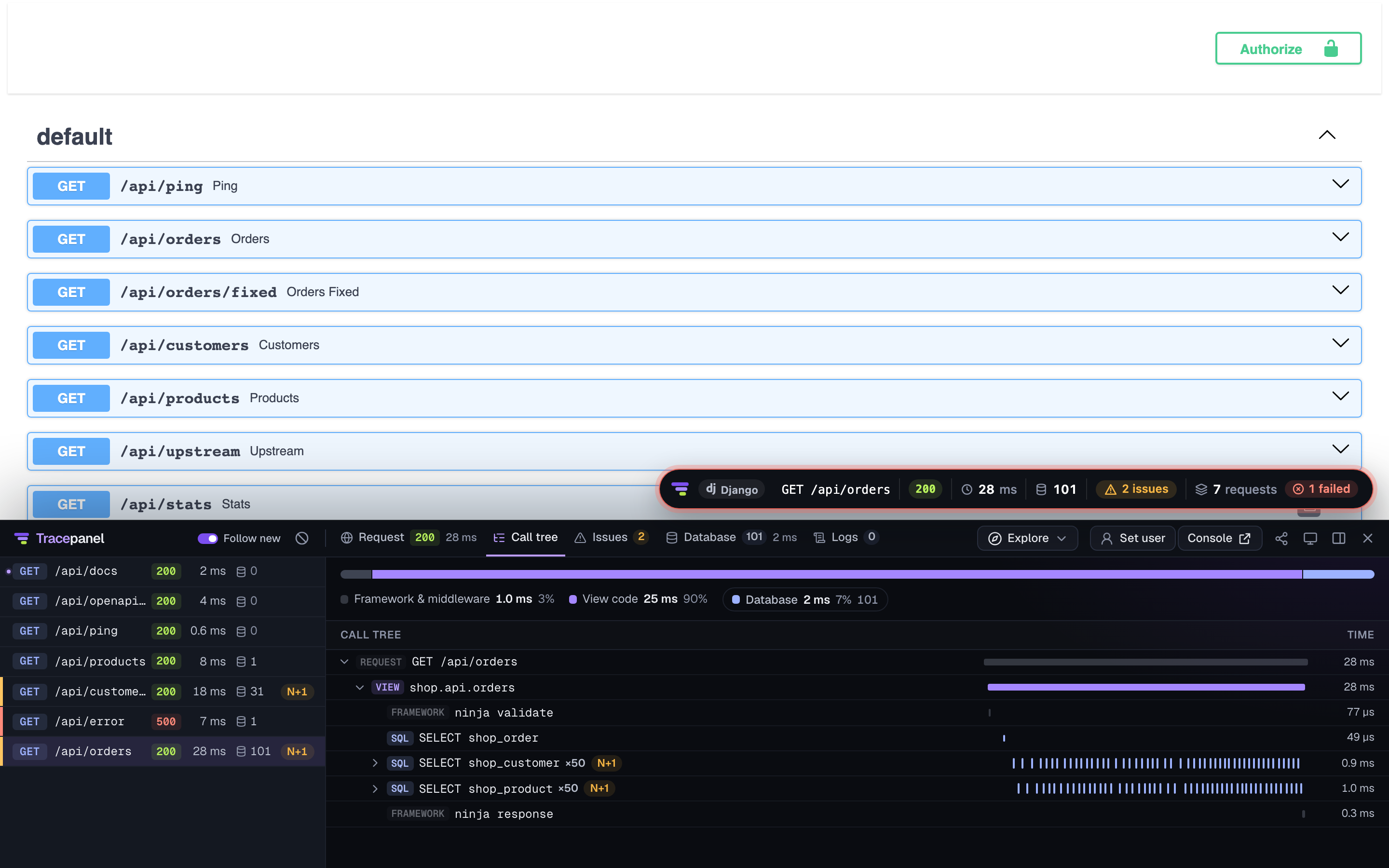
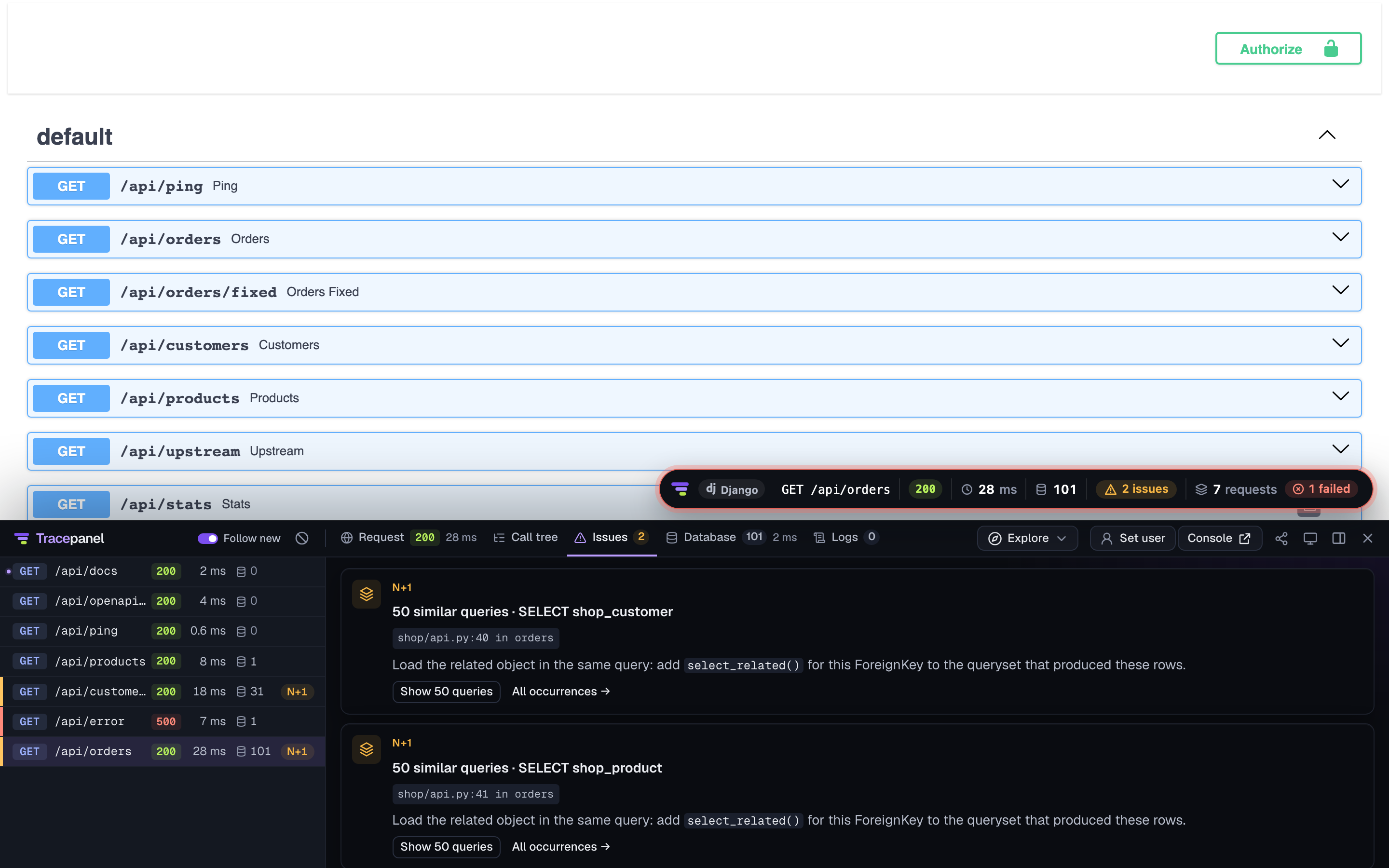
The panel also lists the requests your pages and tools make with fetch(),
here Swagger UI's Try it out. Each issue comes with its fix in Django's terms,
such as the select_related() that removes an N+1:
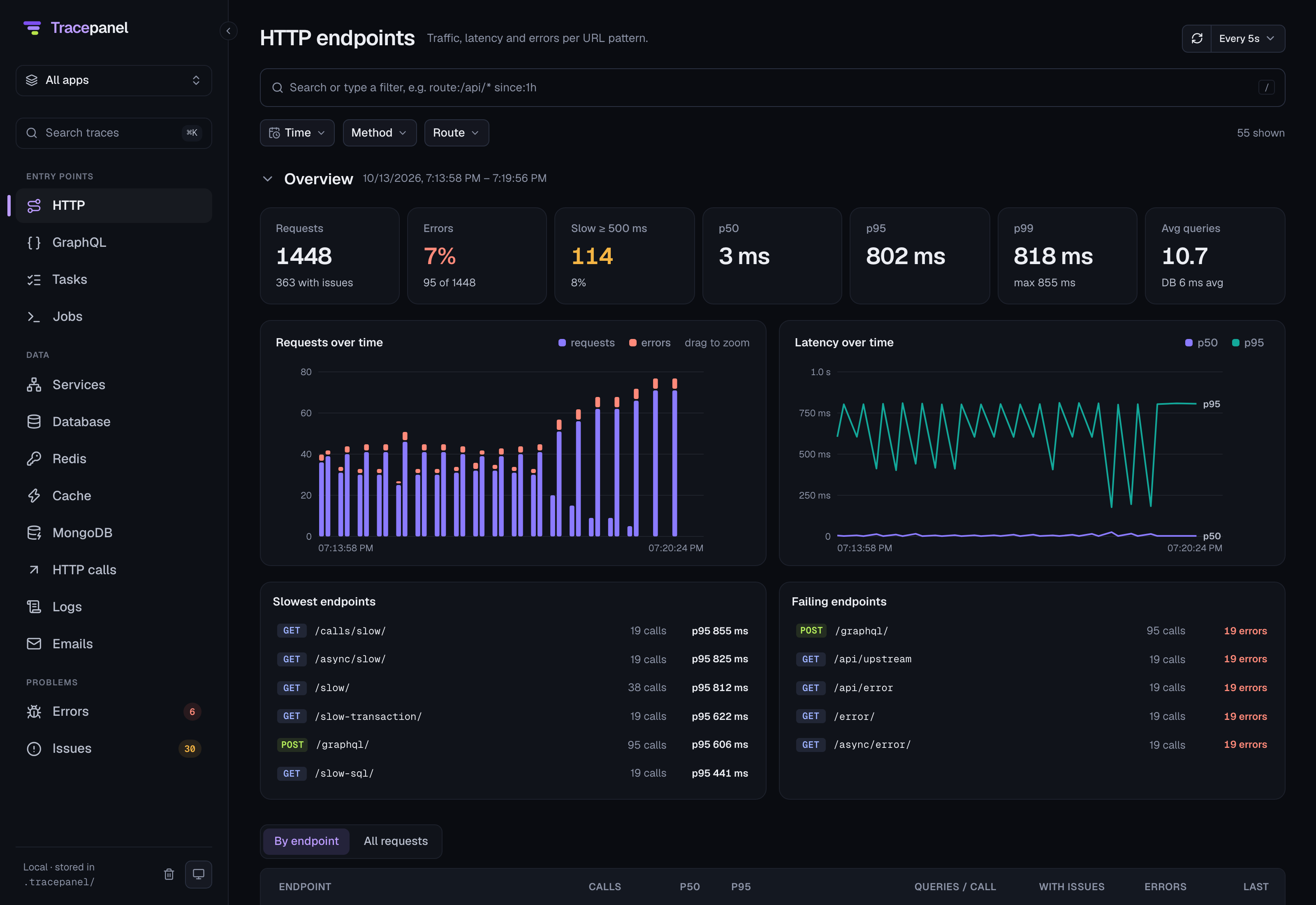
The console shows every endpoint over time, with the slowest and the failing ones:
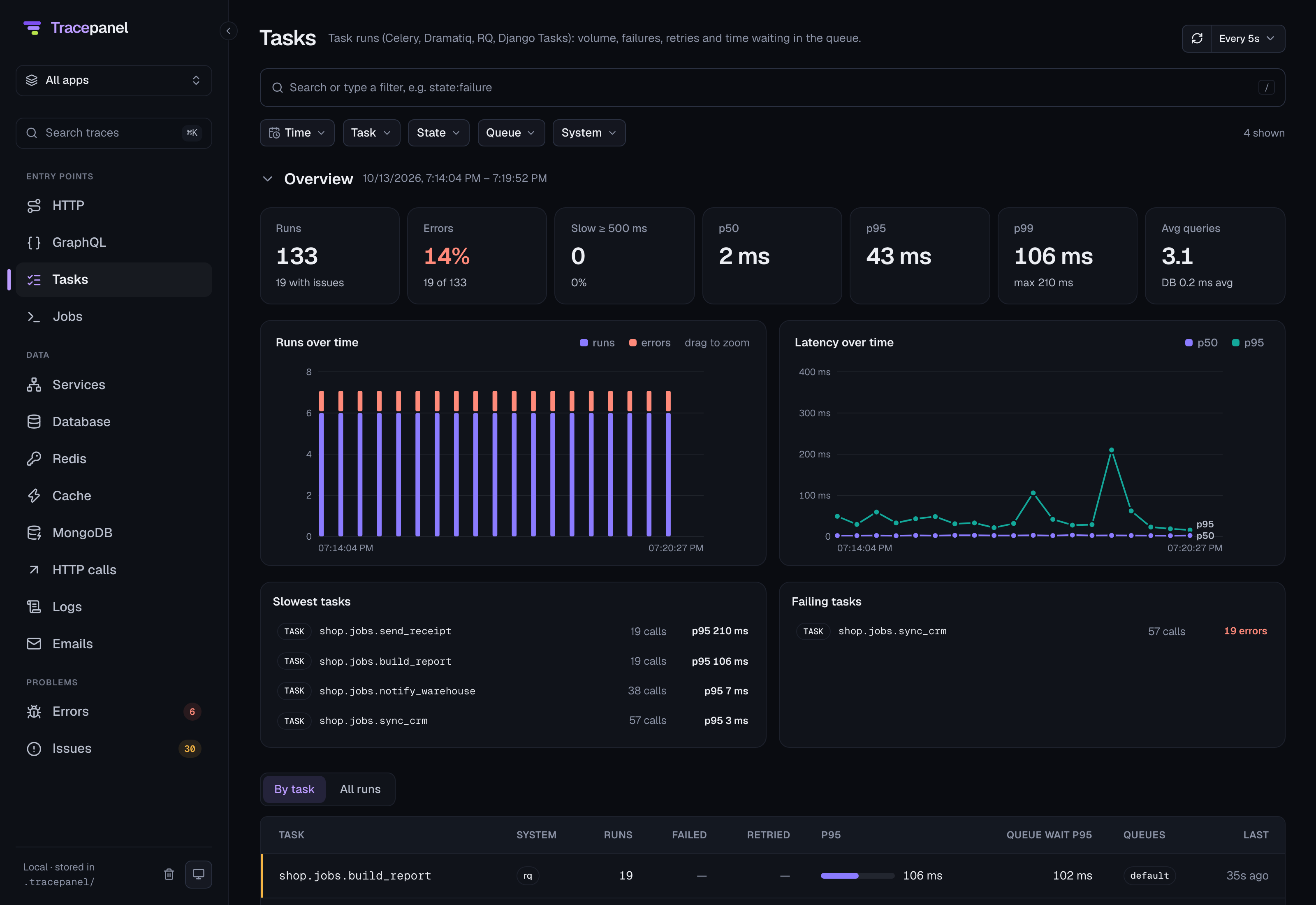
Work without a page, such as Celery tasks, has its own pages:
Documentation
The Django guide is at tracepanel.dev/docs/django: what Tracepanel records in Django, its settings, workers and commands. The panel, the console and the issues are the same in every framework, under tracepanel.dev/docs.
License
Licensed under the MIT License.
1 maintainer

Metadata
1 maintainer
Release files for django-tracepanel 0.7.0
For a detailed explanation of source distributions (sdists) and built distributions (wheels), please see the package formats documentation.
Source distribution (sdist)
| File | Size | Uploaded | Provenance | Actions |
|---|---|---|---|---|
| django_tracepanel-0.7.0.tar.gz | 4.1 kB | Without provenance | Details for django_tracepanel-0.7.0.tar.gz |
Built distribution (wheel)
| File | Interpreter | ABI | Platform | Actions Reset |
|---|---|---|---|---|
| django_tracepanel-0.7.0-py3-none-any.whl | Python 3 | none | any | Details for django_tracepanel-0.7.0-py3-none-any.whl |
Total release size: 8.1 kB
Release files / django_tracepanel-0.7.0.tar.gz
| Download URL | django_tracepanel-0.7.0.tar.gz |
|---|---|
| Size | 4.1 kB |
| Tags | Source |
|
SHA-256 checksum How to use checksums |
817802e43c4ac7dcad03b1cd2604104d1be1350946a044c1659b332fdab5736e
|
|
BLAKE2b-256 checksum How to use checksums |
d9eca5d1f1f31981e58b905f0a624cef3a671c2d3d9d22547c3f5a3ed457dca4
|
| Upload date | |
|
Uploaded using Trusted Publishing? What is trusted publishing? |
Yes |
| Uploaded via |
uv/0.13.6 {"installer":{"name":"uv","version":"0.13.6","subcommand":["publish"]},"python":null,"implementation":{"name":null,"version":null},"distro":{"name":"Ubuntu","version":"24.04","id":"noble","libc":null},"system":{"name":null,"release":null},"cpu":null,"openssl_version":null,"setuptools_version":null,"rustc_version":null,"ci":true}
|
Release files / django_tracepanel-0.7.0-py3-none-any.whl
| Download URL | django_tracepanel-0.7.0-py3-none-any.whl |
|---|---|
| Size | 4.0 kB |
| Tags | Python 3 |
|
SHA-256 checksum How to use checksums |
ec4b3a67da162ac98f79b701572e7873c66abad645cac16115edfb4356f76faa
|
|
BLAKE2b-256 checksum How to use checksums |
27d387b838f6217b98b29fd1a3b05d7b0a229b0a70d66d0cebb1b249fa6db1a8
|
| Upload date | |
|
Uploaded using Trusted Publishing? What is trusted publishing? |
Yes |
| Uploaded via |
uv/0.13.6 {"installer":{"name":"uv","version":"0.13.6","subcommand":["publish"]},"python":null,"implementation":{"name":null,"version":null},"distro":{"name":"Ubuntu","version":"24.04","id":"noble","libc":null},"system":{"name":null,"release":null},"cpu":null,"openssl_version":null,"setuptools_version":null,"rustc_version":null,"ci":true}
|
Security for django-tracepanel 0.7.0
Provenance
Provenance describes where a file came from. On PyPI, provenance is shared via attestations, which provide a verifiable record of the build or publishing details. View details, limitations and caveats.
No provenance found
None of the files in this release were uploaded with provenance metadata.
A note on package security
PyPI is a repository for distributing packages, not a service for auditing them. While third-party security researchers and our staff do their best to detect and remove malicious packages, PyPI cannot guarantee the quality, security or suitability of any given package.
To learn more about protecting yourself from malicious actors, visit our package security documentation.














