


django-treasuremap
django-treasuremap app, makes it easy to store and display the location on the map using different providers (Google, Yandex, etc).
Requirements
Python 2.7+ or Python 3.4+
Django 1.11+
Installation
Use your favorite Python package manager to install the app from PyPI, e.g.
Example:
pip install django-treasuremap
Add treasuremap to INSTALLED_APPS:
Example:
INSTALLED_APPS = (
    ...
    'treasuremap',
    ...
)
Configuration
Within your settings.py, you’ll need to add a setting (which backend to use, etc).
Example:
TREASURE_MAP = {
    'BACKEND': 'treasuremap.backends.google.GoogleMapBackend',
    'API_KEY': 'Your API key',
    'SIZE': (400, 600),
    'MAP_OPTIONS': {
        'zoom': 5
    }
}
Example usage
In models
from django.db import models
from treasuremap.fields import LatLongField

class Post(models.Model):
    name = models.CharField(max_length=100)
    point = LatLongField(blank=True)
In admin
from django.contrib import admin
from treasuremap.widgets import AdminMapWidget

from .models import Post

@admin.register(Post)
class PostAdmin(admin.ModelAdmin):
    def formfield_for_dbfield(self, db_field, **kwargs):
        if db_field.name == 'point':
            kwargs['widget'] = widgets.AdminMapWidget()
        return super(PostAdmin,self).formfield_for_dbfield(db_field,**kwargs)
In forms
from django import forms
from treasuremap.forms import LatLongField

class PostForm(models.Model):
point = LatLongField()<head>
...
<!-- jQuery is required; include if need -->
<script type="text/javascript" src="//ajax.googleapis.com/ajax/libs/jquery/2.1.3/jquery.min.js"></script>
...
</head>
<form method="POST" action=".">
{{ form.media }}
{% csrf_token %}
{{ form.as_p }}
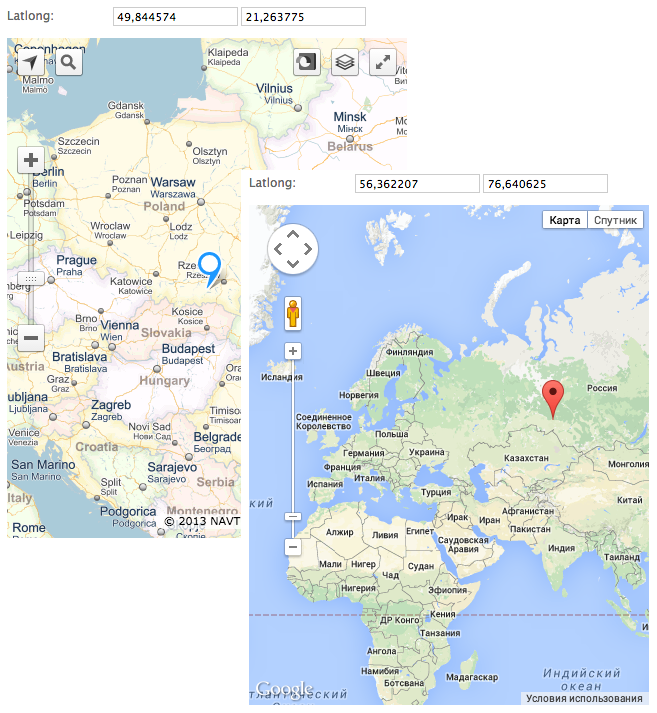
</form>Depending on what backend you are using, the correct widget will be displayed with a marker at the currently position (jQuery is required).
Settings
Support map:
Google map treasuremap.backends.google.GoogleMapBackend
Yandex map treasuremap.backends.yandex.YandexMapBackend
Other settings:
API_KEY - if need, default None
SIZE - tuple with the size of the map, default (400, 400)
ONLY_MAP - hide field lat/long, default True
MAP_OPTIONS - dict, used to initialize the map, default {'latitude': 51.562519, 'longitude': -1.603156, 'zoom': 5}. latitude and longitude is required, do not use other “LatLong Object”.
1 maintainer

Download files
Download the file for your platform. If you're not sure which to choose, learn more about installing packages.
Source Distribution
Built Distribution
Filter files by name, interpreter, ABI, and platform.
If you're not sure about the file name format, learn more about wheel file names.
Copy a direct link to the current filters
File details
Details for the file django-treasuremap-0.3.4.tar.gz.
File metadata
- Download URL: django-treasuremap-0.3.4.tar.gz
- Upload date:
- Size: 10.0 kB
- Tags: Source
- Uploaded using Trusted Publishing? No
- Uploaded via:
twine/3.4.1 importlib_metadata/3.10.0 pkginfo/1.7.0 requests/2.25.1 requests-toolbelt/0.9.1 tqdm/4.60.0 CPython/3.9.4
File hashes
| Algorithm | Hash digest | |
|---|---|---|
| SHA256 |
635713d68780128674c76124c8e99b8e8c82cc424b8bf5604c2d2bf29a8b729d
|
|
| MD5 |
5fdb66e4670b64ecec043794985bbeb9
|
|
| BLAKE2b-256 |
dc4b10f3bc72835a0480a8ff7dff7aed37c410ce803b4f78f5fcc7c438d538a3
|
File details
Details for the file django_treasuremap-0.3.4-py2.py3-none-any.whl.
File metadata
- Download URL: django_treasuremap-0.3.4-py2.py3-none-any.whl
- Upload date:
- Size: 12.3 kB
- Tags: Python 2, Python 3
- Uploaded using Trusted Publishing? No
- Uploaded via:
twine/3.4.1 importlib_metadata/3.10.0 pkginfo/1.7.0 requests/2.25.1 requests-toolbelt/0.9.1 tqdm/4.60.0 CPython/3.9.4
File hashes
| Algorithm | Hash digest | |
|---|---|---|
| SHA256 |
d5b64088431586e094cfcb1e8881ae2043cb2ff73fba858405ceabb8378bf85f
|
|
| MD5 |
03ab6bae2675e8f2fb61e443136d5bc0
|
|
| BLAKE2b-256 |
c7bf411c191861c8d1ebabb1eddcced8ac30acef1d9e9637946f9224ce8dba74
|














