
django-typer













Use static typing to define the CLI for your Django management commands with Typer. Optionally use the provided TyperCommand class that inherits from BaseCommand. This class maps the Typer interface onto a class based interface that Django developers will be familiar with. All of the BaseCommand functionality is inherited, so that TyperCommand can be a drop in replacement.
django-typer makes it easy to:
- Define your command CLI interface in a clear, DRY and safe way using type hints
- Create subcommands and hierarchical groups of commands.
- Use the full power of Typer's parameter types to validate and parse command line inputs.
- Create beautiful and information dense help outputs.
- Configure the rendering of exception stack traces using rich.
- Install shell tab-completion support for bash, zsh, fish, and powershell.
- Create custom and portable shell tab-completions for your CLI parameters.
- Port existing commands (TyperCommand is interface compatible with BaseCommand).
- Use either a Django-style class-based interface or the Typer-style interface to define commands.
- Add plugins to upstream commands.
Please refer to the full documentation for more information.

🚨 Upgrade Notice
There are breaking changes between 2.x and 3.x, mostly involving shell tab completion. See the changelog for migration steps.
Installation
-
Clone django-typer from GitHub or install a release off PyPI:
pip install django-typer
-
Optionally add
django_typerto yourINSTALLED_APPSsetting:INSTALLED_APPS = [ ... 'django_typer', ]
You only need to install django_typer as an app if you want to use the shell completion command to enable tab-completion or if you would like django-typer to install rich traceback rendering for you - which it does by default if rich is also installed.
Basic Example
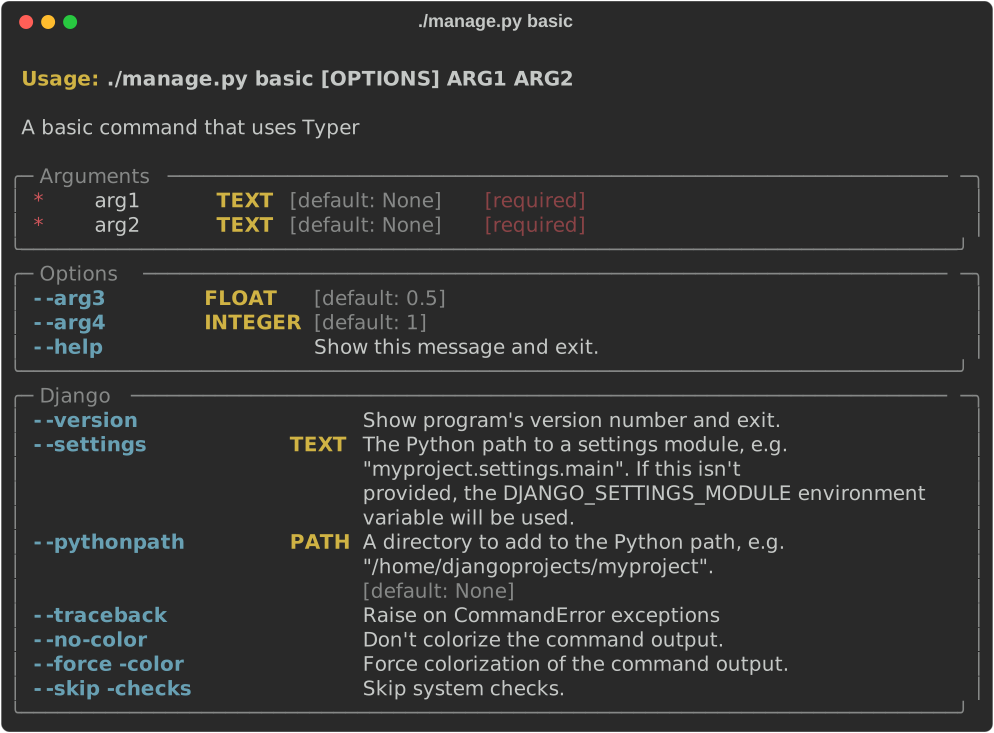
TyperCommand is a drop in extension to BaseCommand. All of the documented features of BaseCommand work the same way!
from django_typer.management import TyperCommand


class Command(TyperCommand):
    def handle(self, arg1: str, arg2: str, arg3: float = 0.5, arg4: int = 1):
        """
        A basic command that uses Typer
        """
Or, you may also use an interface identical to Typer's. Simply import Typer from django_typer instead of typer.
from django_typer.management import Typer

app = Typer()


@app.command()
def main(arg1: str, arg2: str, arg3: float = 0.5, arg4: int = 1):
    """
    A basic command that uses Typer
    """
Multiple Subcommands Example
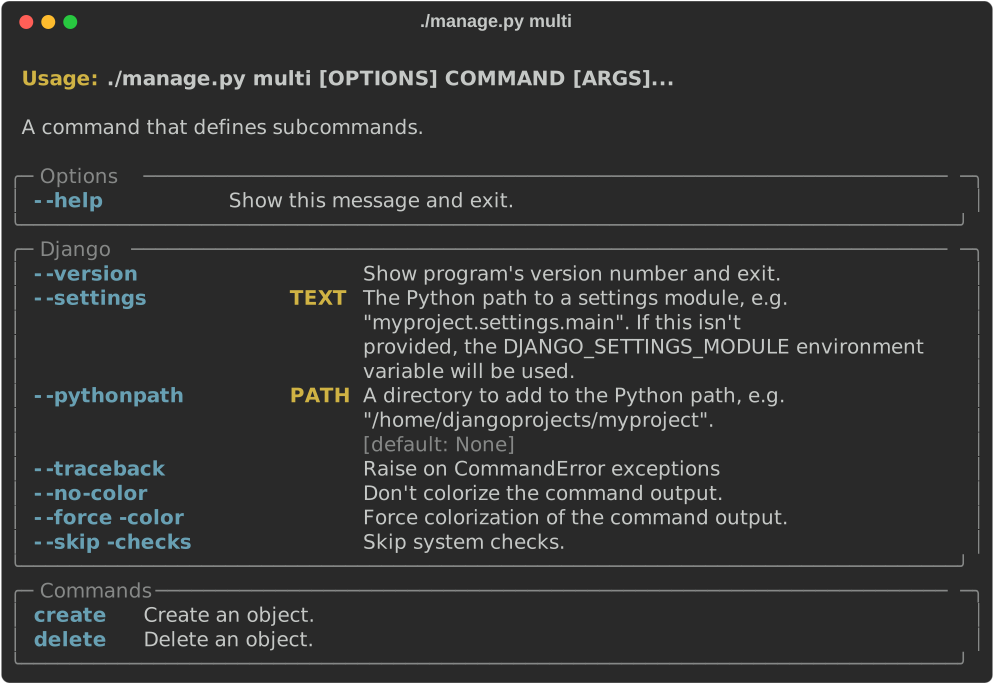
Commands with multiple subcommands can be defined:
import typing as t

from django.utils.translation import gettext_lazy as _
from typer import Argument

from django_typer.management import TyperCommand, command


class Command(TyperCommand):
    """
    A command that defines subcommands.
    """

    @command()
    def create(
        self,
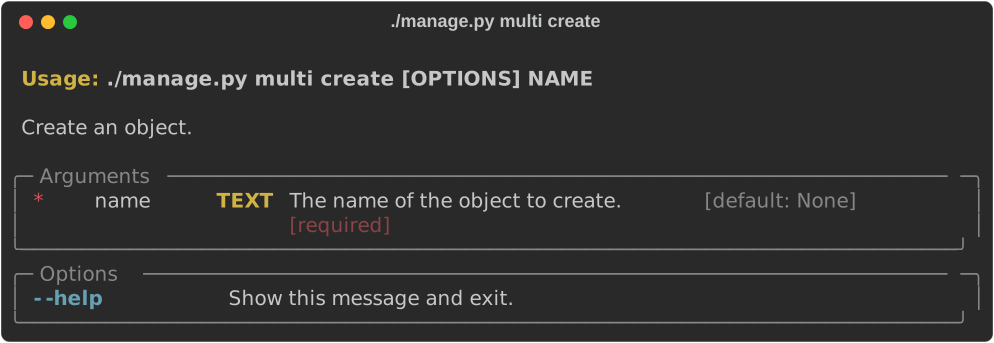
        name: t.Annotated[str, Argument(help=_("The name of the object to create."))],
    ):
        """
        Create an object.
        """

    @command()
    def delete(
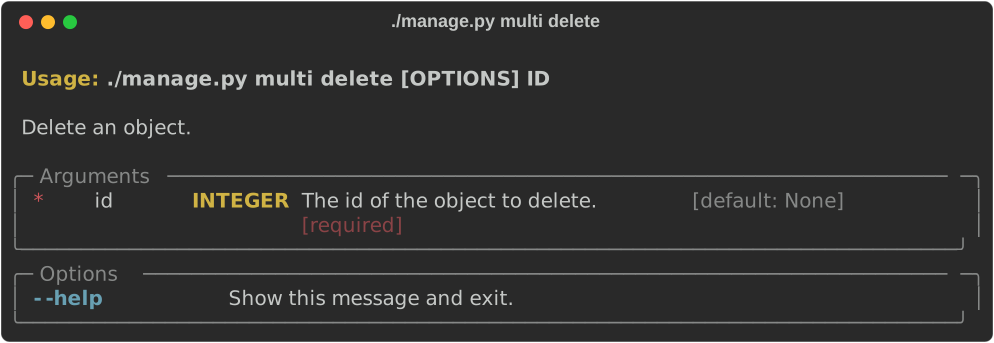
        self, id: t.Annotated[int, Argument(help=_("The id of the object to delete."))]
    ):
        """
        Delete an object.
        """
Or using the typer-style interface this could be written:
from django_typer.management import Typer
import typing as t

from django.utils.translation import gettext_lazy as _
from typer import Argument

app = Typer(help="A command that defines subcommands.")


@app.command()
def create(
    name: t.Annotated[str, Argument(help=_("The name of the object to create."))],
):
    """
    Create an object.
    """


@app.command()
def delete(id: t.Annotated[int, Argument(help=_("The id of the object to delete."))]):
    """
    Delete an object.
    """
Grouping and Hierarchies Example
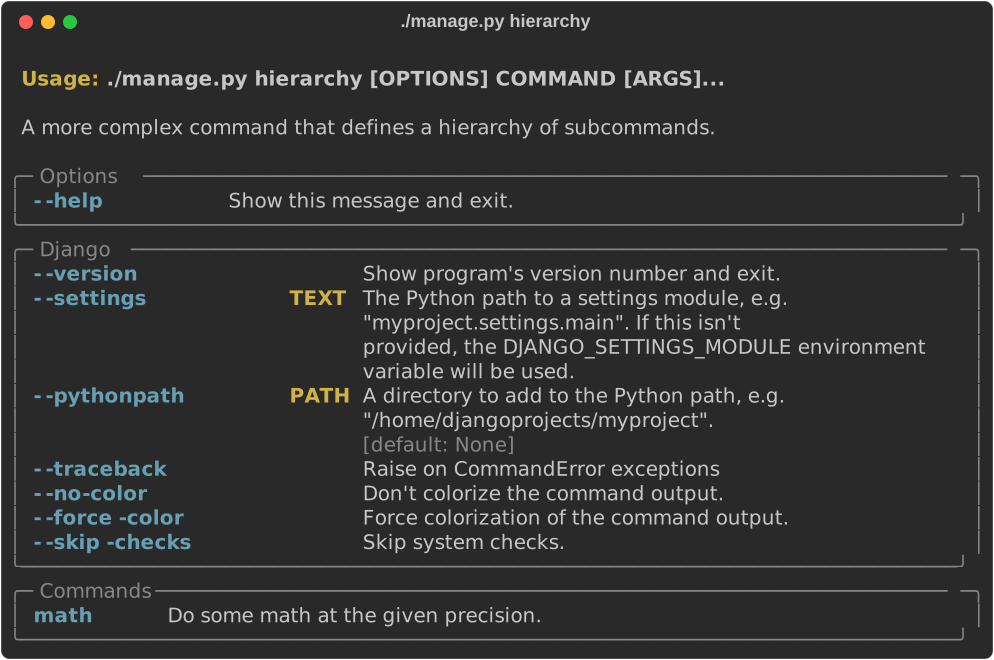
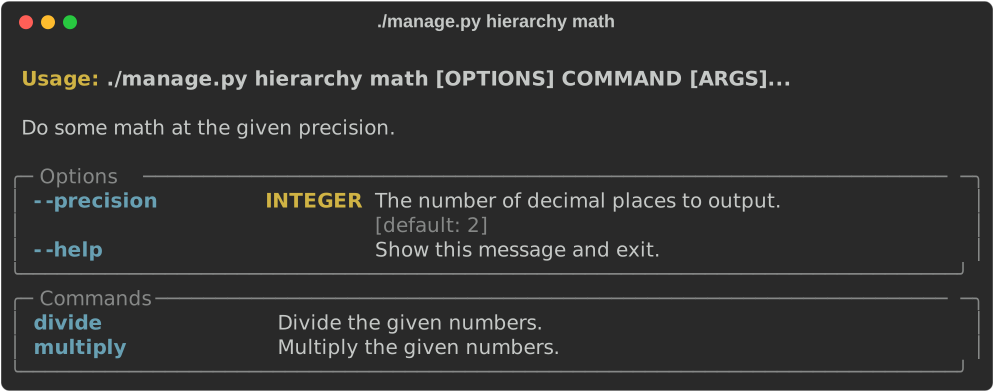
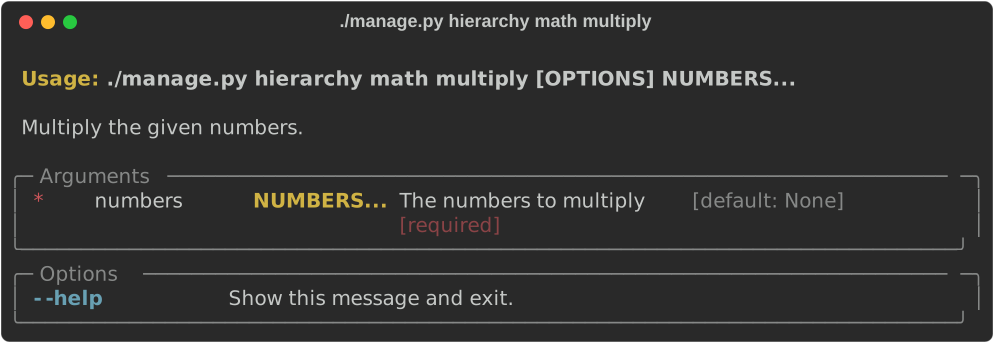
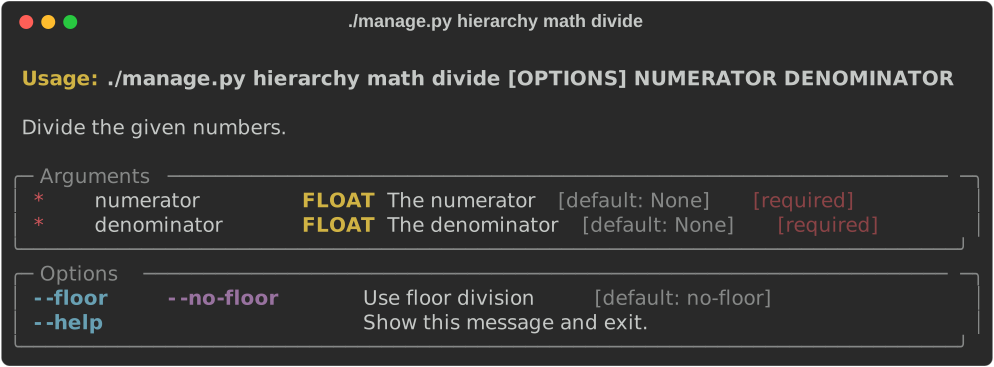
More complex groups and subcommand hierarchies can be defined. For example, this command defines a group of commands called math, with subcommands divide and multiply. The group has a common initializer that optionally sets a float precision value. We would invoke this command like so:
./manage.py hierarchy math --precision 5 divide 10 2.1
./manage.py hierarchy math multiply 10 2
Using the class-based interface we could define the command like this:
import typing as t
from functools import reduce

from django.utils.translation import gettext_lazy as _
from typer import Argument, Option

from django_typer.management import TyperCommand, group


class Command(TyperCommand):
    help = _("A more complex command that defines a hierarchy of subcommands.")

    precision = 2

    @group(help=_("Do some math at the given precision."))
    def math(
        self,
        precision: t.Annotated[
            int, Option(help=_("The number of decimal places to output."))
        ] = precision,
    ):
        self.precision = precision

    # helps can be passed to the decorators
    @math.command(help=_("Multiply the given numbers."))
    def multiply(
        self,
        numbers: t.Annotated[
            t.List[float], Argument(help=_("The numbers to multiply"))
        ],
    ):
        return f"{reduce(lambda x, y: x * y, [1, *numbers]):.{self.precision}f}"

    # or if no help is supplied to the decorators, the docstring if present
    # will be used!
    @math.command()
    def divide(
        self,
        numerator: t.Annotated[float, Argument(help=_("The numerator"))],
        denominator: t.Annotated[float, Argument(help=_("The denominator"))],
        floor: t.Annotated[bool, Option(help=_("Use floor division"))] = False,
    ):
        """
        Divide the given numbers.
        """
        if floor:
            return str(numerator // denominator)
        return f"{numerator / denominator:.{self.precision}f}"
The typer-style interface builds a TyperCommand class for us that allows you to optionally accept the self argument in your commands. We could define the above command using the typer interface like this:
import typing as t
from functools import reduce

from django.utils.translation import gettext_lazy as _
from typer import Argument, Option

from django_typer.management import Typer


app = Typer(help=_("A more complex command that defines a hierarchy of subcommands."))


math_grp = Typer(help=_("Do some math at the given precision."))

app.add_typer(math_grp, name="math")


@math_grp.callback()
def math(
    self,
    precision: t.Annotated[
        int, Option(help=_("The number of decimal places to output."))
    ] = 2,
):
    self.precision = precision


@math_grp.command(help=_("Multiply the given numbers."))
def multiply(
    self,
    numbers: t.Annotated[t.List[float], Argument(help=_("The numbers to multiply"))],
):
    return f"{reduce(lambda x, y: x * y, [1, *numbers]):.{self.precision}f}"


@math_grp.command()
def divide(
    self,
    numerator: t.Annotated[float, Argument(help=_("The numerator"))],
    denominator: t.Annotated[float, Argument(help=_("The denominator"))],
    floor: t.Annotated[bool, Option(help=_("Use floor division"))] = False,
):
    """
    Divide the given numbers.
    """
    if floor:
        return str(numerator // denominator)
    return f"{numerator / denominator:.{self.precision}f}"
2 maintainers


Download files
Download the file for your platform. If you're not sure which to choose, learn more about installing packages.
Source Distribution
Built Distribution
Filter files by name, interpreter, ABI, and platform.
If you're not sure about the file name format, learn more about wheel file names.
Copy a direct link to the current filters
File details
Details for the file django_typer-3.9.0.tar.gz.
File metadata
- Download URL: django_typer-3.9.0.tar.gz
- Upload date:
- Size: 3.0 MB
- Tags: Source
- Uploaded using Trusted Publishing? Yes
- Uploaded via:
twine/7.0.0 CPython/3.13.14
File hashes
| Algorithm | Hash digest | |
|---|---|---|
| SHA256 |
f11415dee38b27cb5bcc2dabdcebc80d17e84367589ae2be7a67f4572ed53af1
|
|
| MD5 |
52386eb44f40a3bf9026b10e6a98b1fc
|
|
| BLAKE2b-256 |
abd57ad812c5d14ef9b4cfe0c279bb265dba6b16b6e86f5521d046c6491fd1cc
|
Provenance
The following attestation bundles were made for django_typer-3.9.0.tar.gz:
Publisher:
release.yml on django-commons/django-typer
-
Statement:
-
Statement type:
https://in-toto.io/Statement/v1 -
Predicate type:
https://docs.pypi.org/attestations/publish/v1 -
Subject name:
django_typer-3.9.0.tar.gz -
Subject digest:
f11415dee38b27cb5bcc2dabdcebc80d17e84367589ae2be7a67f4572ed53af1 - Sigstore transparency entry: 2688470252
- Sigstore integration time:
-
Permalink:
django-commons/django-typer@7bae4eea0fc74a638339567dec8d0b4f0e822fcb -
Branch / Tag:
refs/tags/v3.9.0 - Owner: https://github.com/django-commons
-
Access:
public
-
Token Issuer:
https://token.actions.githubusercontent.com -
Runner Environment:
github-hosted -
Publication workflow:
release.yml@7bae4eea0fc74a638339567dec8d0b4f0e822fcb -
Trigger Event:
push
-
Statement type:
File details
Details for the file django_typer-3.9.0-py3-none-any.whl.
File metadata
- Download URL: django_typer-3.9.0-py3-none-any.whl
- Upload date:
- Size: 298.1 kB
- Tags: Python 3
- Uploaded using Trusted Publishing? Yes
- Uploaded via:
twine/7.0.0 CPython/3.13.14
File hashes
| Algorithm | Hash digest | |
|---|---|---|
| SHA256 |
af563fab917622b9ba60b4ac9eab332cd8bf4b27aff6e27240134c3ef746a0b9
|
|
| MD5 |
316ec3182c2ec7e0f1f6e72750dad6e1
|
|
| BLAKE2b-256 |
150f1f1f958ede41b1fa874c85893d3b13024a1e89416081a06beccc862b8da9
|
Provenance
The following attestation bundles were made for django_typer-3.9.0-py3-none-any.whl:
Publisher:
release.yml on django-commons/django-typer
-
Statement:
-
Statement type:
https://in-toto.io/Statement/v1 -
Predicate type:
https://docs.pypi.org/attestations/publish/v1 -
Subject name:
django_typer-3.9.0-py3-none-any.whl -
Subject digest:
af563fab917622b9ba60b4ac9eab332cd8bf4b27aff6e27240134c3ef746a0b9 - Sigstore transparency entry: 2688470367
- Sigstore integration time:
-
Permalink:
django-commons/django-typer@7bae4eea0fc74a638339567dec8d0b4f0e822fcb -
Branch / Tag:
refs/tags/v3.9.0 - Owner: https://github.com/django-commons
-
Access:
public
-
Token Issuer:
https://token.actions.githubusercontent.com -
Runner Environment:
github-hosted -
Publication workflow:
release.yml@7bae4eea0fc74a638339567dec8d0b4f0e822fcb -
Trigger Event:
push
-
Statement type:














