
Django Unfold Markdown Widget
Markdown editor widget for Django Unfold admin using EasyMDE.
Screenshots
Editor with Preview
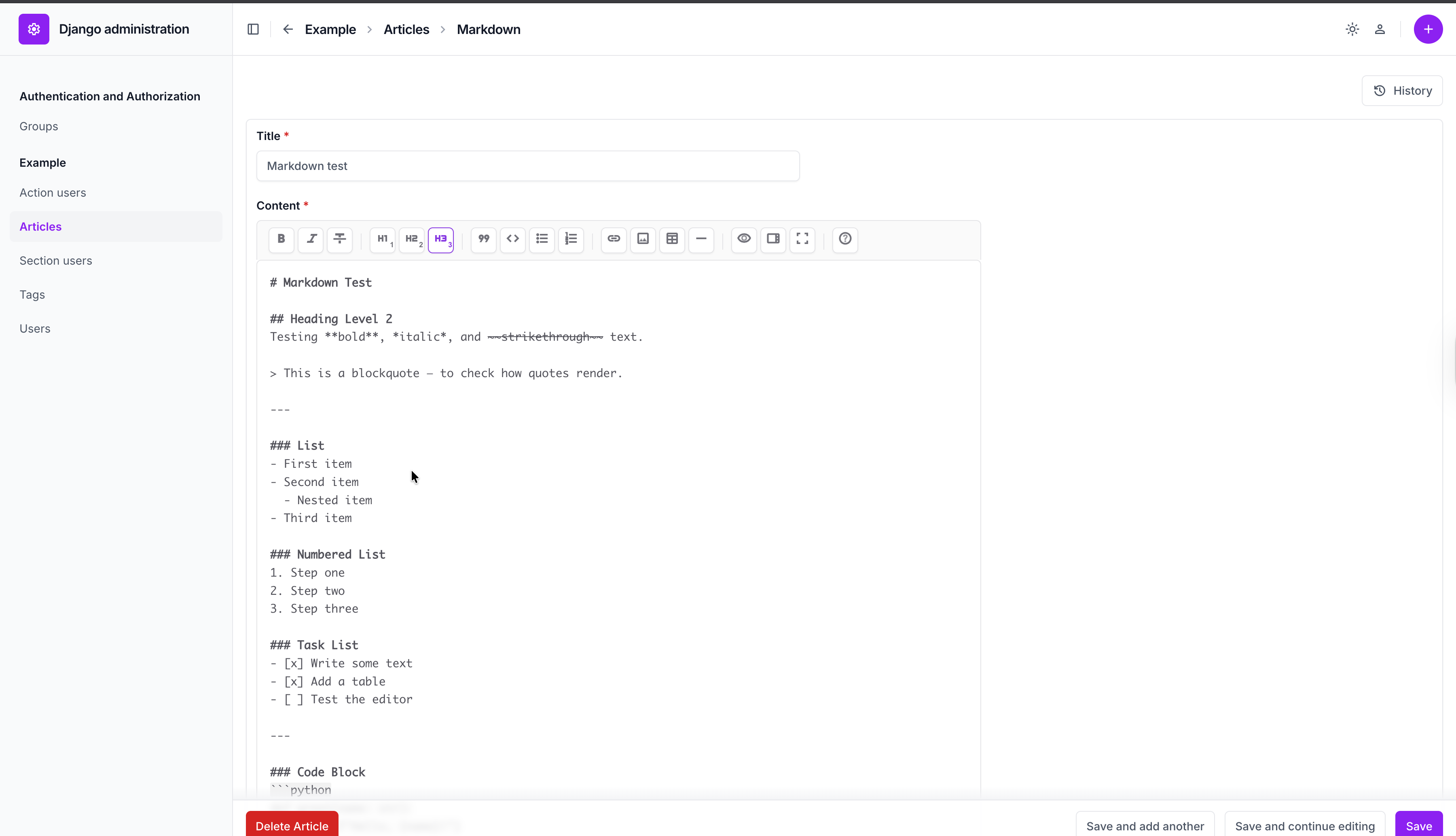
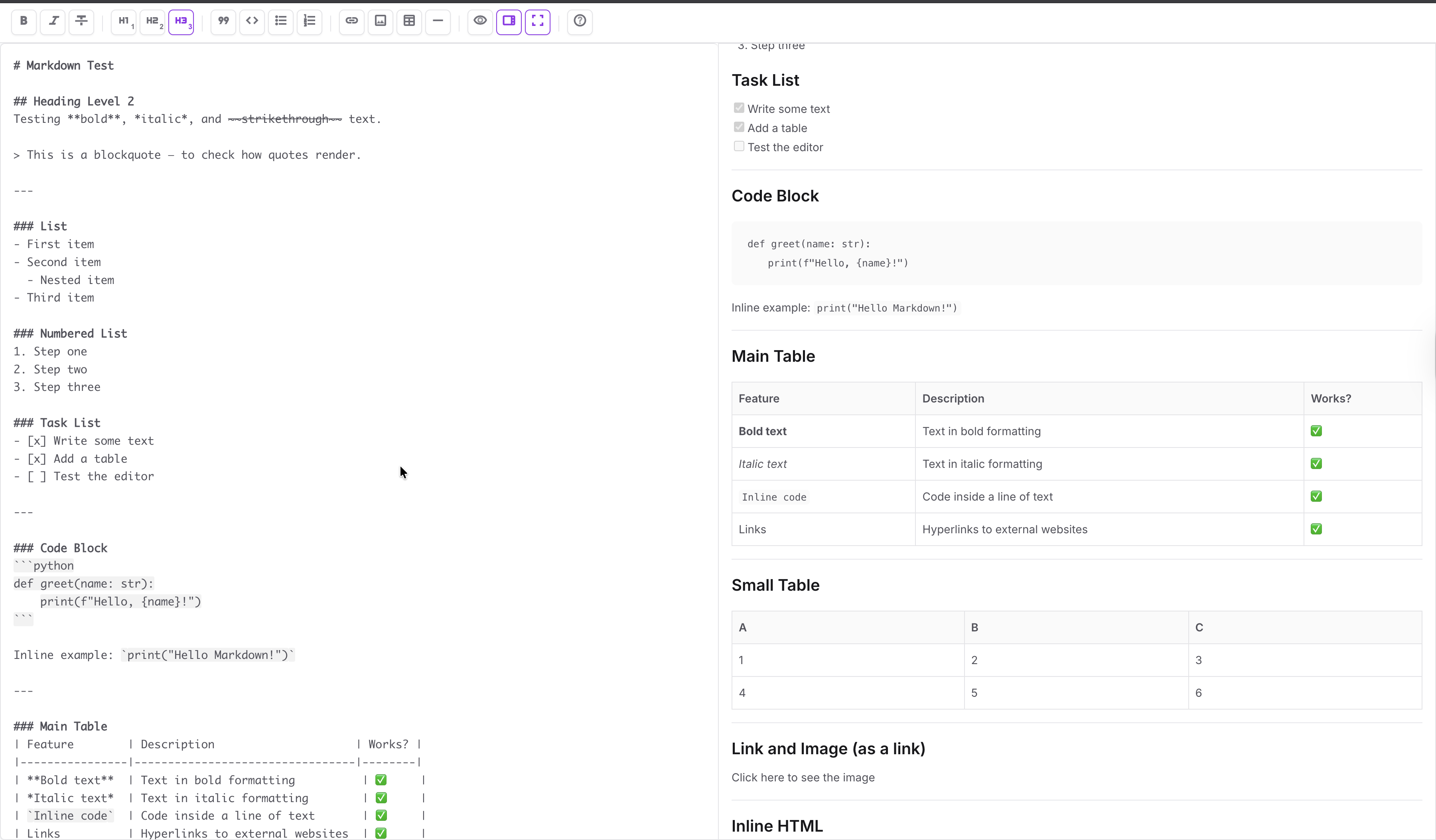
Fullscreen Mode
Editor inside tab and Dark theme

Features
- Plain text editor with monospace font
- Side-by-side preview and fullscreen modes
- Dark/light theme integration with Unfold
- Material Symbols icons matching Unfold design
- Toolbar: bold, italic, strikethrough, headings, lists, links, images, tables, horizontal rules
- Image upload straight from the toolbar (optional, off by default)
- Works inside tabs — Unfold fieldset tabs, django-modeltranslation, jQuery UI
- Works inside inlines, including rows added with “Add another”
- No autosave (saves on form submit)
- Responsive design
Installation
pip install django-unfold-markdown
Configuration
Add to your INSTALLED_APPS:
# settings.py
INSTALLED_APPS = [
    "unfold",
    "unfold_markdown",  # Add this
    # ...
]
Usage
For all TextField fields
# admin.py
from django.db import models
from unfold.admin import ModelAdmin
from unfold_markdown.widgets import MarkdownWidget


@admin.register(Article)
class ArticleAdmin(ModelAdmin):
    formfield_overrides = {models.TextField: {"widget": MarkdownWidget}}
For specific fields
from django import forms
from unfold_markdown.widgets import MarkdownWidget


class ArticleForm(forms.ModelForm):
    content = forms.CharField(widget=MarkdownWidget())

    class Meta:
        model = Article
        fields = "__all__"


@admin.register(Article)
class ArticleAdmin(ModelAdmin):
    form = ArticleForm
Image Upload
The image toolbar button prompts for a URL by default. Point the widget at an upload endpoint and it opens a file picker instead, inserting the Markdown once the upload finishes.
Using the bundled endpoint
Add the URLs, then name them in settings:
# urls.py
from django.urls import include, path

urlpatterns = [
    # ...
    path("unfold-markdown/", include("unfold_markdown.urls")),
]
# settings.py
UNFOLD_MARKDOWN = {
    "image_upload_url": "/unfold-markdown/image-upload/",
}
The bundled view rejects anonymous and non-staff users, requires CSRF, stores the
file under Django's default storage with a random UUID filename, and responds
with {"url": "..."}.
Settings
| Key | Default | Meaning |
|---|---|---|
image_upload_url |
None |
Upload endpoint. Unset means "prompt for a URL". |
image_upload_dir |
"markdown-images" |
Directory within your storage backend. |
image_max_size |
10485760 (10 MB) |
Rejected above this size. |
image_allowed_extensions |
png jpg jpeg gif webp bmp ico avif |
Permitted extensions. |
On SVG: it is deliberately absent from the defaults. An SVG served from your own domain can execute scripts, so uploading one is a stored-XSS vector when staff accounts are not fully trusted. Add it only if you serve media from a separate domain or sanitise on the way in:
UNFOLD_MARKDOWN = {
    "image_upload_url": "/unfold-markdown/image-upload/",
    "image_allowed_extensions": ["png", "jpg", "jpeg", "webp", "svg"],
}
Note that the extension is the only check performed — the view does not decode
the image. If you need stronger guarantees, point image_upload_url at your own
view.
Using your own endpoint
Any URL accepting a POST with a file field in multipart/form-data and
returning JSON with a url key will do:
UNFOLD_MARKDOWN = {"image_upload_url": "/api/my-upload/"}
The editor sends the CSRF token as X-CSRFToken and includes same-origin
cookies. On a non-2xx response it reads {"error": "..."} from the body and
shows it to the user.
Per-widget override
class ArticleForm(forms.ModelForm):
    content = forms.CharField(widget=MarkdownWidget(upload_url="/api/my-upload/"))
Storage and Rendering
The widget stores pure Markdown text in your database. To render Markdown as HTML, use a Python library:
# Using markdown
from markdown import markdown

html = markdown(article.content)

# Using mistune
import mistune

html = mistune.html(article.content)
Requirements
| Requirement | |
|---|---|
| Python | 3.10 – 3.14 |
| Django | 4.2 or newer |
| django-unfold | 0.70 or newer (0.99+ on Python 3.12+) |
django-unfold dropped Python 3.11 and older in 0.99, so this package asks for a newer floor only on interpreters that can actually install it. Bundled EasyMDE: 2.21.0.
Local development
The repo ships a throwaway Django project under demo/ so you can click through
the editor yourself. It uses uv.
uv sync --all-groups
uv run demo/manage.py migrate && uv run demo/manage.py seed
uv run demo/manage.py runserver
Then open http://127.0.0.1:8000/admin/ and log in as admin / admin. The seeded "Sample article" is set up to exercise the awkward cases:
- Body — a plain editor with sample Markdown covering every toolbar button.
- Summary / Notes — two Unfold fieldset tabs.
Notesstarts hidden, so it shows the lazy initialisation path; a CodeMirror built inside a hidden container would otherwise render zero-height. - Sections — a stacked inline. Press Add another to confirm new rows get a
working editor and that the hidden
__prefix__template row is left alone. - Image upload is enabled in the demo settings, so the toolbar shows an
upload button. Files land in
demo/media/.
Tests
uv run pytest
uv run ruff check . && uv run ruff format --check .
The suite runs against the installed Django/Unfold. To check an older floor:
uv run --python 3.10 --isolated --with pytest --with pytest-django pytest
License
MIT License
Repository
https://github.com/sergei-vasilev-dev/django-unfold-markdown
Credits
- EasyMDE: Ionaru/easy-markdown-editor (MIT License)
- Django Unfold: unfoldadmin/django-unfold (MIT License)
1 maintainer

Metadata
1 maintainer
Release files for django-unfold-markdown 0.2.0
For a detailed explanation of source distributions (sdists) and built distributions (wheels), please see the package formats documentation.
Source distribution (sdist)
| File | Size | Uploaded | |
|---|---|---|---|
| django_unfold_markdown-0.2.0.tar.gz | 127.3 kB | Details |
Built distribution (wheel)
| File | Interpreter | ABI | Platform | Reset |
|---|---|---|---|---|
| django_unfold_markdown-0.2.0-py3-none-any.whl | Python 3 | none | any | Details |
Total release size: 252.7 kB
Release files / django_unfold_markdown-0.2.0.tar.gz
| Download URL | django_unfold_markdown-0.2.0.tar.gz |
|---|---|
| Size | 127.3 kB |
| Tags | Source |
|
SHA-256 checksum How to use checksums |
86bacb2acc97ca3c7f239913e80c0a9b5abac04a1ef45d950e842ecdac24f5ed
|
|
BLAKE2b-256 checksum How to use checksums |
abbda759c84abcd302b747b0c2eb6e5be130031f645925a848ce9944debd1ec2
|
| Upload date | |
|
Uploaded using Trusted Publishing? What is trusted publishing? |
No |
| Uploaded via |
uv/0.12.7 {"installer":{"name":"uv","version":"0.12.7","subcommand":["publish"]},"python":null,"implementation":{"name":null,"version":null},"distro":{"name":"Ubuntu","version":"24.04","id":"noble","libc":null},"system":{"name":null,"release":null},"cpu":null,"openssl_version":null,"setuptools_version":null,"rustc_version":null,"ci":true}
|
Release files / django_unfold_markdown-0.2.0-py3-none-any.whl
| Download URL | django_unfold_markdown-0.2.0-py3-none-any.whl |
|---|---|
| Size | 125.4 kB |
| Tags | Python 3 |
|
SHA-256 checksum How to use checksums |
6b48744218e239aca222f07dcdd0203da21b4696000eecc1b3030c15c7d4acb2
|
|
BLAKE2b-256 checksum How to use checksums |
257a65ec1a591a3787f199bf5604d3df330aac83bfdf3c966bae7ee9f9277274
|
| Upload date | |
|
Uploaded using Trusted Publishing? What is trusted publishing? |
No |
| Uploaded via |
uv/0.12.7 {"installer":{"name":"uv","version":"0.12.7","subcommand":["publish"]},"python":null,"implementation":{"name":null,"version":null},"distro":{"name":"Ubuntu","version":"24.04","id":"noble","libc":null},"system":{"name":null,"release":null},"cpu":null,"openssl_version":null,"setuptools_version":null,"rustc_version":null,"ci":true}
|














