

django-upgrade-report
Which of your dependencies block a Django upgrade, and in which order to upgrade them.






Quick start · Statuses · Usage · CI · How it decides · FAQ · Changelog
Before you touch Django, you need to know whether the 20 to 200 packages your project depends on are ready for the new version, which of them you can upgrade today, and which have to move together with Django. Finding that out by hand means reading every changelog.
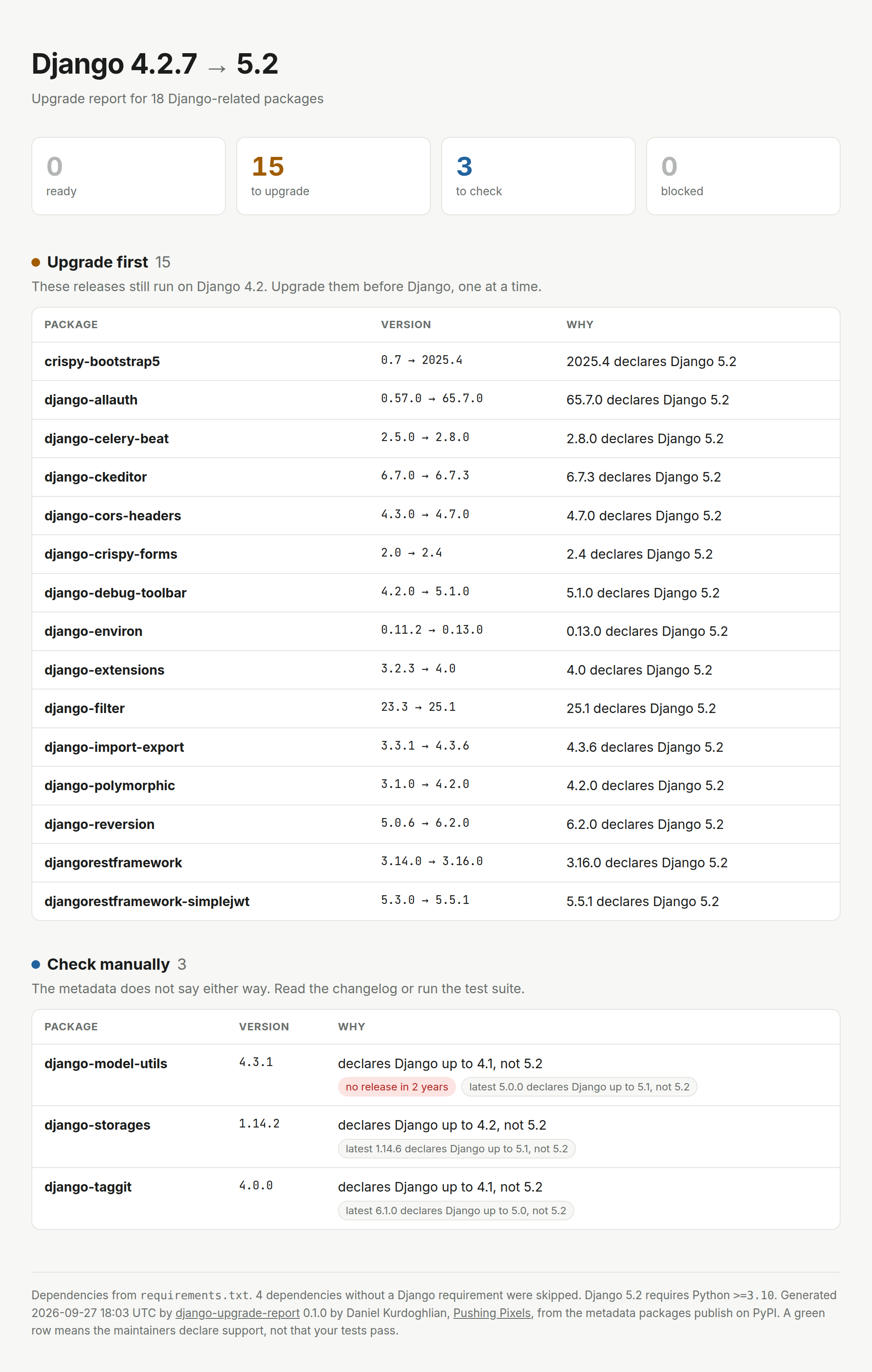
django-upgrade-report reads your lockfile, asks PyPI what every Django-related package declares, and gives you the upgrade plan: blockers first, then the smallest safe step for each package, in the right order.
uvx django-upgrade-report
Highlights
- Knows the order. Separates upgrades you can ship today, on your current Django, from the ones that have to land in the same change as the Django bump. It also tells you when a release first needs a newer patch of your Django, or a newer version of another package.
- Smallest step, not latest. For every package it names the oldest release that declares support for the target, so each change stays small and reviewable.
- Reads what you already have.
uv.lock,poetry.lock,pdm.lock,Pipfile.lock,requirements*.txt,pyproject.tomlor an installed environment, transitive dependencies included. - Honest about uncertainty. A missing classifier means "check manually", not "blocked". An upper bound written before the target was released is not taken as a promise. Packages without a release in two years, or marked inactive, are flagged.
- Knows your Python. Finds your project's Python version, warns when the target Django needs a newer one, and evaluates environment markers for your project, not for the machine running the tool.
- Made for pipelines and for people. Markdown for pull request summaries, versioned JSON for scripts, a self-contained HTML report to attach to a ticket, and
--fail-onto break the build. - Your code stays put. Only names and versions of packages that come from PyPI are sent to PyPI. Git, path and private-index packages are listed, never looked up. No account, no configuration.
Quick start
Run it in your project directory. You need Python 3.10 or newer, but not Django and not your project's virtualenv.
uvx django-upgrade-report                      # with uv
pipx run django-upgrade-report                 # with pipx
pip install django-upgrade-report              # or install it
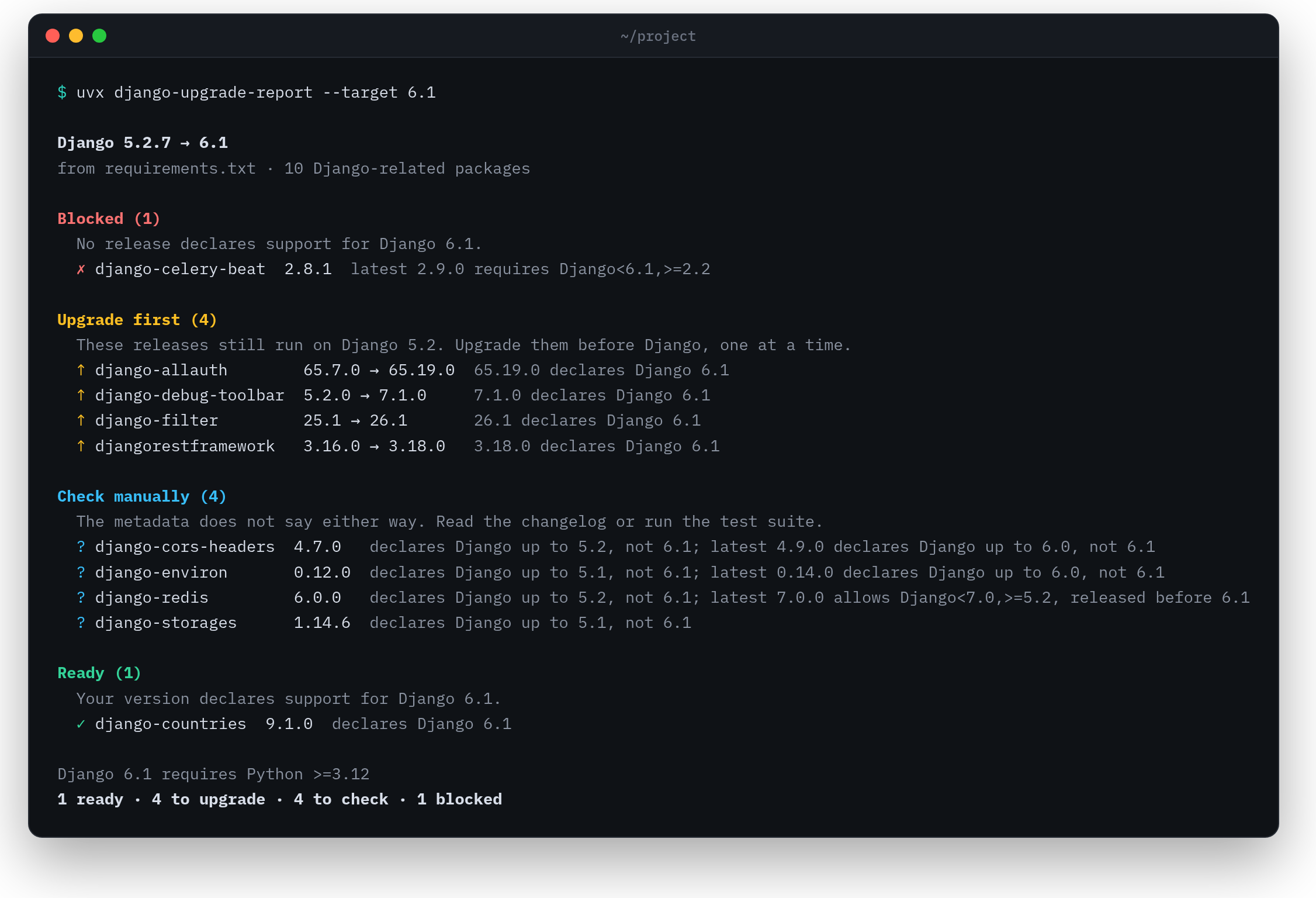
By default it picks the next sensible step for your project: the newest LTS above the Django you run, or the newest release when no LTS is above it. A project on Django 4.2 gets a report for 5.2, a project on 5.2 one for 6.1. Pick another target with --target:
django-upgrade-report --target 6.1
What the statuses mean
| Status | Meaning | What to do |
|---|---|---|
| Blocked | Your release and every newer one exclude the target, for example with Django<6.1. |
Wait for a release, find a fork or replace the package. |
| Upgrade first | A newer release declares the target and still runs on your current Django. | Upgrade these one at a time, before you touch Django. |
| Upgrade together with Django | The release that declares the target has dropped your current Django, or needs another package that has. | Bump it in the same change as Django. |
| Check manually | Nothing excludes the target, but nothing declares it either. | Read the changelog or run your test suite. Usually a classifier nobody updated. |
| Ready | The version you use already declares support. | Nothing. |
The notes on a row tell you more, for example "update Django 4.2 first" when a release needs a newer patch of your current Django, "upgrade django-crispy-forms first" when it needs a newer version of another package you pin, or "newer releases exclude Django 6.1".
Usage
django-upgrade-report [PROJECT] [options]
| Option | Description |
|---|---|
PROJECT |
Project directory, or a single lockfile, requirements file or pyproject.toml. Defaults to the current directory. |
-t, --target |
auto (default), lts (the newest x.2 release), latest, or a version such as 5.2. See Choosing the target. |
--from VERSION |
The Django version you run today, e.g. 4.2 or 4.2.16, when your requirements only give a range. 4.2 means the newest 4.2 release. |
--python PATH |
Read the exact installed versions from this interpreter, e.g. .venv/bin/python. |
-f, --format |
text (default), markdown, json or html. |
-o, --output |
Write the report to a file instead of stdout. Missing directories are created. |
--fail-on |
Exit with status 1 when a package is blocked, needs an upgrade (or is blocked), or needs a check (or anything worse). |
-v, --verbose |
Text output only: list every ready package with its reason. The other formats always do. |
--index-url |
Base URL of an index that implements PyPI's JSON API. Default: https://pypi.org/pypi. |
--check-private-on-pypi |
Look up packages your project installs from another index on PyPI, too. For an index that mirrors PyPI (Artifactory, Nexus, devpi). Their names are sent to PyPI. |
--no-cache |
Do not cache PyPI responses. |
--version |
Show the version and exit. |
Responses are cached in ~/.cache/django-upgrade-report (or $XDG_CACHE_HOME/django-upgrade-report): a project's release list for 24 hours, the metadata of a single release for good, since it never changes.
Exit codes
| Code | Meaning |
|---|---|
0 |
The report was written, and no package matched --fail-on. |
1 |
A package matched --fail-on. |
2 |
An error: no dependencies found, an unreadable file, an unknown target, the index could not be reached. Also with --fail-on when no dependency could be checked because they all come from another index. |
So CI can tell "packages need attention" from "the tool could not run".
Choosing the target
--target |
Checks against |
|---|---|
auto |
The newest LTS above your Django, or the newest release when no LTS is above it. When you already run the newest release, a health check of it. When your Django version is unknown, the newest LTS. |
lts |
The newest x.2 release. When your Django is newer, a health check of your version instead. |
latest |
The newest release. |
5.2, 6.1, ... |
That feature version. The next, unreleased one (6.2 today) is accepted for planning, see How it decides. Unknown versions and versions below yours are an error. |
The report warns when the target skips an LTS (upgrading one LTS at a time is easier), when your own Django requirement excludes the target, and when the target needs a newer Python than your project uses.
Where versions come from
The most precise source wins:
| Priority | Source | Versions | Transitive dependencies |
|---|---|---|---|
| 1 | --python PATH |
exact, as installed | yes |
| 2 | uv.lock, poetry.lock, pdm.lock, Pipfile.lock |
exact | yes |
| 3 | requirements*.txt, requirements/*.txt, pyproject.toml |
exact when pinned with == |
no |
Requirement files follow -r includes and -c constraint files; constraints only pin packages that are listed elsewhere. pyproject.toml is read as PEP 621, dependency groups and Poetry. When a lockfile holds several versions of one package for different Pythons, as uv's forked resolutions do, the one for your project's Python is used.
Unpinned requirements are judged by the newest release they allow and marked as such. Use a lockfile for exact results. When Django itself is only given as a range with an upper bound, such as Django>=4.2,<5.0, the newest release it allows is assumed and a warning says so. Without an upper bound the report cannot tell what can be upgraded first. In both cases, --from sets the version you run.
Which Python
Environment markers such as python_version < "3.12" decide which requirements apply, so the tool needs your project's Python. It takes the first of:
- the interpreter passed with
--python, .python-version,requires-pythoninuv.lock,requires-pythoninpyproject.toml,- the
pythondependency in Poetry'spyproject.toml, python_versioninPipfile.lock.
A range counts as its lower bound. The report shows the Python it found and warns when the target Django needs a newer one, for example Django 6.1 needs Python >=3.12, your project uses 3.11 (from .python-version).
Markers are evaluated for CPython on Linux, where Django apps are deployed, never for the machine running the tool. Against the target, a package is judged on the newer of your project's Python and the oldest Python the target Django supports. Against your current Django, on your project's Python, or the oldest Python your current Django supports when none was found.
Packages not from PyPI
Packages from git, a local path, a URL or a private index are listed as "Not from PyPI, not checked", with where they come from, and their names are never sent to PyPI. This covers git+https://..., -e and local path lines in requirement files, name @ url requirements, git, path and URL sources in lockfiles, --index-url and --no-index in requirement files, a private default index or no-index in uv, Poetry, PDM or Pipenv, and the PIP_INDEX_URL, UV_INDEX_URL, UV_DEFAULT_INDEX, PIP_NO_INDEX and UV_NO_INDEX environment variables (lockfiles keep the index they record). Credentials in those URLs are removed before anything is shown.
To check packages from a private index, point --index-url at its PyPI JSON API. If the index only mirrors PyPI, pass --check-private-on-pypi instead. Packages the index does not know at all are listed as "Not on the package index".
In CI
GitHub Actions
The action writes the Markdown report to the job summary, exposes the counts as outputs, and can fail the job:
- uses: actions/checkout@v7
- uses: derblub/django-upgrade-report@v0
  id: django
  with:
    fail-on: blocked   # optional: blocked, upgrade or check
- run: echo "${{ steps.django.outputs.blocked }} blocked, ${{ steps.django.outputs.upgrade }} to upgrade"
| Input | Default | Description |
|---|---|---|
path |
. |
Project directory with a lockfile, requirements*.txt or pyproject.toml. |
target |
auto |
auto, lts, latest or a version such as 6.1. |
from |
The Django version you run today, when your requirements only give a range. Empty reads it from the project. | |
fail-on |
blocked, upgrade or check. Empty never fails the step because of a package. |
|
check-private-on-pypi |
false |
true looks up packages from another index on PyPI, too. |
| Output | Description |
|---|---|
report |
Path to the JSON report, unique per use of the action. |
blocked, upgrade, check, ready |
Number of packages with that status. |
The action brings its own Python, runs on Linux and Windows runners, and caches PyPI responses between runs. The summary and the outputs are written before fail-on fails the step.
GitLab CI
django-upgrade-report:
  image: ghcr.io/astral-sh/uv:python3.12-bookworm-slim
  script:
    - uvx django-upgrade-report --format html --output upgrade-report.html
    - uvx django-upgrade-report --fail-on blocked
  artifacts:
    when: always
    paths: [upgrade-report.html]
Anywhere else
django-upgrade-report --format markdown >> "$GITHUB_STEP_SUMMARY"
django-upgrade-report --format json --output upgrade-report.json
The JSON report carries a schema_version: adding a field keeps it, renaming, removing or retyping one bumps it. The fields are documented in render/json.py.
How it decides
For every release the tool looks at two pieces of metadata that maintainers publish on PyPI: the Framework :: Django :: X.Y classifiers and the Django requirement. For a target version, in this order:
- A requirement that excludes every release of the target means no. Each patch release counts, so
Django==5.2.17orDjango>=5.2.3,<5.2.8allow 5.2. Requirements that only apply to an optional extra are ignored. Lines with environment markers count when they apply to your Python (see above), and all lines that apply are combined. - A
Framework :: Django :: 5.2classifier means yes. - An upper bound that allows the target, such as
Django>=4.2,<6.0or an exact pin, means yes, but only when the release was uploaded on or after the day the target came out. A bound written before that is a guess, not a promise: Wagtail 6.3 allowsDjango<6.0but came out before Django 5.2, and only Wagtail 6.3.4 added 5.2 support. - Everything else means not declared: classifiers that stop at an older version or start at a newer one, a major-only classifier such as
Framework :: Django :: 5, a lower bound without an upper one, or no information at all. That is a question, not a blocker: classifiers often lag behind releases.
For a target that is not released yet, such as 6.2 today, only classifiers count, and the report says so. An upper bound like <7.0 says nothing about a version nobody could test.
From these verdicts, per package:
- Ready when the version you use says yes.
- Upgrade when a newer release says yes. The report names the oldest one. It goes first when that release still runs on your current Django. A release that needs
Django>=4.2.16while you run 4.2.7 still goes first, with a note to update Django 4.2 first. It goes together with Django when the release excludes your whole Django series, declares only newer Django versions, or needs a newer version of another package you pin that has itself dropped your Django. - Check manually when no release says yes, but yours or a newer one is not excluded.
- Blocked when your release and every newer one exclude the target.
A package counts as Django-related when it depends on Django or has a Framework :: Django classifier. Packages that only depend on Wagtail or django CMS are included too, with a note to check them against that framework. Everything else is skipped.
FAQ
Does it send my code anywhere?
No. It reads your lockfile or requirement files locally and sends only names and versions of packages that come from PyPI to the package index, PyPI by default. Packages from git, local paths or a private index are never looked up unless you ask for it. It does not import your project and does not need Django installed.
Why are so many packages "check manually"?
Many maintainers forget to add the classifier for a new Django version, or only add it with the next release. The tool refuses to guess. Packages that are really incompatible almost always say so with an upper bound, and those show up as blocked.
What about private packages?
Packages your project installs from git, a path or a private index are listed as "Not from PyPI, not checked" and otherwise ignored. If your private index implements PyPI's JSON API, point --index-url at it. If it mirrors PyPI, pass --check-private-on-pypi. See Packages not from PyPI.
How is this different from Dependabot or Renovate?
They bump versions one package at a time. They do not know which release is the first one to support the Django version you are heading for, or which upgrades have to wait for Django. Use this tool to plan, and let them open the pull requests.
How is this different from django-upgrade?
django-upgrade rewrites your code for a new Django version. django-upgrade-report looks at your dependencies. You want both.
Related projects
| Project | What it does |
|---|---|
| django-upgrade | Rewrites your code for new Django versions. |
| Django Packages readiness | Shows compatibility per package on the web. |
| Django's upgrade guide | The official checklist for an upgrade. |
Contributing
Bug reports with a real lockfile are the most useful contribution. See CONTRIBUTING.md for the development setup, and the Code of Conduct. Security issues go through SECURITY.md.
License
MIT © Daniel Kurdoghlian, Pushing Pixels

Built and maintained by Daniel Kurdoghlian at Pushing Pixels in Vienna.
Planning a larger upgrade? I do fixed-price Django upgrade audits.
1 maintainer

Release files for django-upgrade-report 0.2.2
For a detailed explanation of source distributions (sdists) and built distributions (wheels), please see the package formats documentation.
Source distribution (sdist)
| File | Size | Uploaded | |
|---|---|---|---|
| django_upgrade_report-0.2.2.tar.gz | 136.7 kB | Details |
Built distribution (wheel)
| File | Interpreter | ABI | Platform | Reset |
|---|---|---|---|---|
| django_upgrade_report-0.2.2-py3-none-any.whl | Python 3 | none | any | Details |
Total release size: 189.2 kB
Release files / django_upgrade_report-0.2.2.tar.gz
| Download URL | django_upgrade_report-0.2.2.tar.gz |
|---|---|
| Size | 136.7 kB |
| Tags | Source |
|
SHA-256 checksum How to use checksums |
920a550326a81a26985dbf38ebcf8541e6577e81704180a4507660627ce5013f
|
|
BLAKE2b-256 checksum How to use checksums |
365d6ab1be5725dd49495187bd4a56b833ca826996002d885696437e60b5ea7f
|
| Upload date | |
|
Uploaded using Trusted Publishing? What is trusted publishing? |
Yes |
| Uploaded via |
twine/7.0.0 CPython/3.13.14
|
Provenance
Provenance describes where a file came from. On PyPI, provenance is shared via attestations, which provide a verifiable record of the build or publishing details. View details, limitations and caveats.


PyPI Publish Attestation
PyPI verified that this artifact, at this checksum, originated from the publisher listed below.
Signed by GitHub Actions, verified by PyPI on Sep 27, 2026.
Transparency logRelease files / django_upgrade_report-0.2.2-py3-none-any.whl
| Download URL | django_upgrade_report-0.2.2-py3-none-any.whl |
|---|---|
| Size | 52.5 kB |
| Tags | Python 3 |
|
SHA-256 checksum How to use checksums |
366d7da7882e00da6c20c84d23b930bd0068958db891c3dd7726a457a9cf0320
|
|
BLAKE2b-256 checksum How to use checksums |
dd55c5f428f23d5339936814a56e5eaaa256cbea22dd2f9aba535df07cb1d159
|
| Upload date | |
|
Uploaded using Trusted Publishing? What is trusted publishing? |
Yes |
| Uploaded via |
twine/7.0.0 CPython/3.13.14
|
Provenance
Provenance describes where a file came from. On PyPI, provenance is shared via attestations, which provide a verifiable record of the build or publishing details. View details, limitations and caveats.
PyPI Publish Attestation
PyPI verified that this artifact, at this checksum, originated from the publisher listed below.
Signed by GitHub Actions, verified by PyPI on Sep 27, 2026.
Transparency log













