
Django User g11n

Django supports i18n and l10n. However, there is no item to set the user's time zone and region as a default feature.
Django User g11n (globalization) provides fields for users to set time zones and regions, as well as middleware to handle them properly.
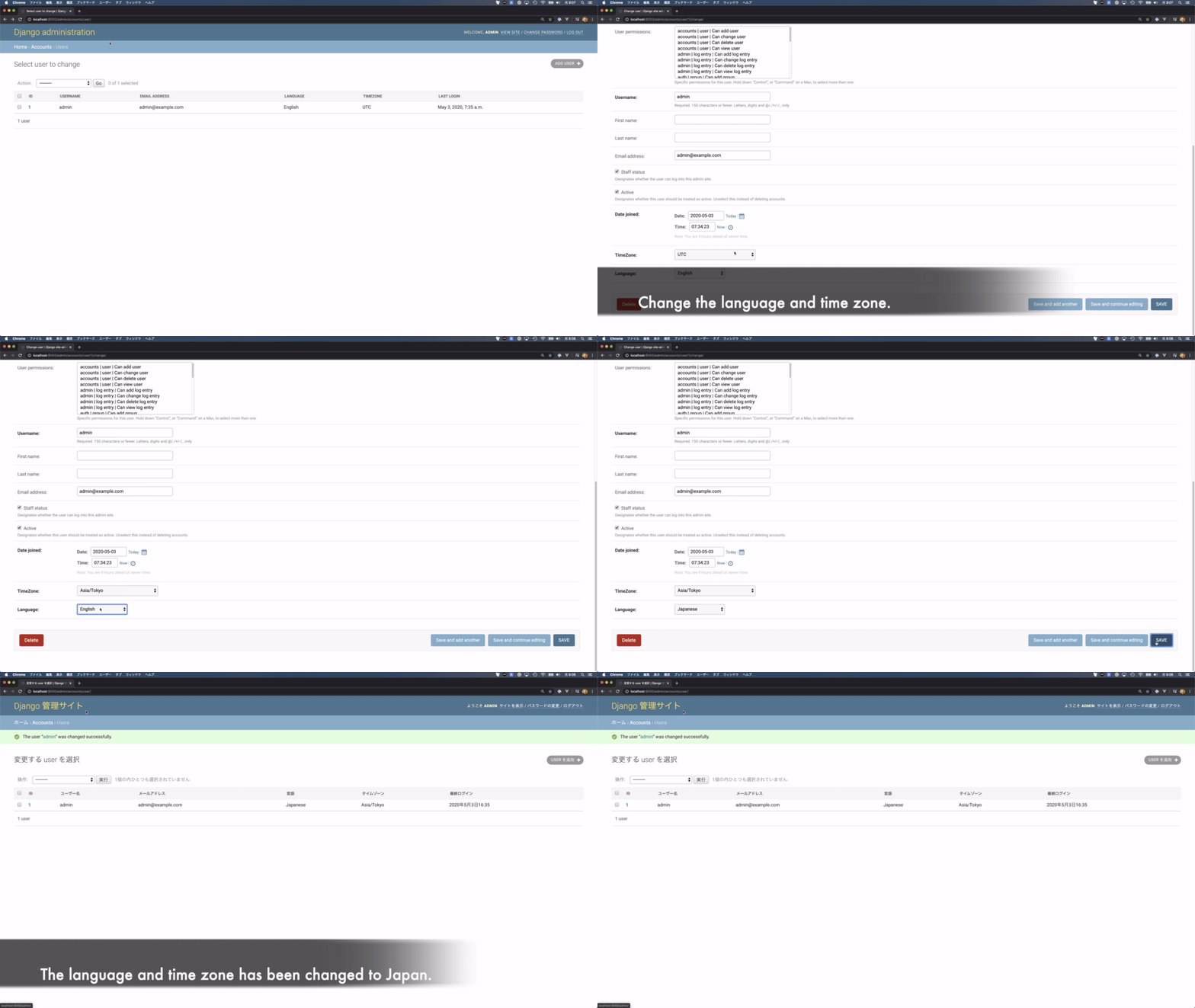
Core idea is See the Django documentation for more information
- Support 3
- Support 3.10.x or later
Usage
Install the package from pypi
$ pip install django-user-g11n
Next, choose one of the following two implementation methods
- Using a profile model
- Using a custom user model
The profile model refers to a model that handles information about a user that is connected to the Django user model by a OneToOneField. If you are already recommending this method of implementation, see If you are using a profile model.
A custom user model is a way of extending the Django user model itself to contain data. To get users to take advantage of the custom model, you create an application and customize the model. See the Django documentation for more information
Using a profile model
Create an application that handles the profile model.
$ manage.py startapp accounts

Add the following to your application's models.py

```python
from django.db import models
from user_g11n.models import UserLanguageSupportMixin, UserTimeZoneSupportMixin


class UserProfile(UserTimeZoneSupportMixin,
                  UserLanguageSupportMixin,
                  models.Model):

    user = models.OneToOneField(
        settings.AUTH_USER_MODEL,
        on_delete=models.CASCADE,
        related_name="profile",
    )
Using a custom user model
Create an application for custom users. Please refer to the Django documentation for more information. See the Django documentation for more information
$ manage.py startapp accounts
Add the following to your application's models.py
from django.contrib.auth import models as auth_models
from user_g11n.models import UserLanguageSupportMixin, UserTimeZoneSupportMixin


class User(UserTimeZoneSupportMixin,
           UserLanguageSupportMixin,
           auth_models.AbstractUser):
    pass
modifying to settings.py
INSTALLED_APPS
Add a user-extended application and user_g11n to INSTALLED_APPS.
INSTALLED_APPS = (
    'django.contrib.admin',
    'django.contrib.auth',
    'django.contrib.contenttypes',
    'django.contrib.sessions',
    'django.contrib.messages',
    .
    .
    .
    'accounts',  # Your Custom user model application
    'user_g11n', # Add
)
MIDDLEWARE
Added two middleware provided by django_user_g11n.
MIDDLEWARE = [
    'django.middleware.security.SecurityMiddleware',
    'django.contrib.sessions.middleware.SessionMiddleware',
    'django.middleware.common.CommonMiddleware',
    'django.middleware.csrf.CsrfViewMiddleware',
    'django.contrib.auth.middleware.AuthenticationMiddleware',
    'django.contrib.messages.middleware.MessageMiddleware',
    'django.middleware.clickjacking.XFrameOptionsMiddleware',
    .
    .
    .
    'user_g11n.middleware.UserLanguageMiddleware', # Add
    'user_g11n.middleware.UserTimeZoneMiddleware', # Add
]
AUTH_USER_MODEL
Change or add the AUTH_USER_MODEL.
AUTH_USER_MODEL = 'accounts.User'
I18N, L10N & TIME_ZONE setting
Change the I18N, L10N, and TZ settings.
USE_I18N = True

USE_L10N = True

USE_TZ = True

TIME_ZONE = "Asia/Tokyo" # Change to your local timezone
When a profile model is used (specification of profile attributes)
Set the attribute name of the profile model associated with the user model.
USER_G11N_USERPROFILE_ATTRIBUTE_NAME = "profile"
If the related_name is "foobar" in the OneToOneField to the user model specified in the profile model, change the value here to the following
USER_G11N_USERPROFILE_ATTRIBUTE_NAME = "foobar"
migrate
Migration to adapt the changes.
$ ./manage.py makemigrations
$ ./manage.py migrate
Demo
The Docker configuration is provided. Please use the following command to start it. Go to http://localhost:8000 when the launch is complete.
$ docker-compose up
AUTHORS
Release note
- 2024/06/06: Remove Django2 and 3 support and Python 3.9
1 maintainer

Release files for django-user-g11n 0.4.4
For a detailed explanation of source distributions (sdists) and built distributions (wheels), please see the package formats documentation.
Source distribution (sdist)
| File | Size | Uploaded | |
|---|---|---|---|
| django-user-g11n-0.4.4.tar.gz | 7.0 kB | Details |
Built distribution (wheel)
| File | Interpreter | ABI | Platform | Reset |
|---|---|---|---|---|
| django_user_g11n-0.4.4-py3-none-any.whl | Python 3 | none | any | Details |
Total release size: 14.1 kB
Release files / django-user-g11n-0.4.4.tar.gz
| Download URL | django-user-g11n-0.4.4.tar.gz |
|---|---|
| Size | 7.0 kB |
| Tags | Source |
|
SHA-256 checksum How to use checksums |
b9a0427e9bb34714f914972fffda06b813a95e07d8ccb950854c267381b29ccf
|
|
BLAKE2b-256 checksum How to use checksums |
82c24b95cdc118a13ee5262fee9bd8b8262f9feebdaabd3f97b7f96f4a06d27f
|
| Upload date | |
|
Uploaded using Trusted Publishing? What is trusted publishing? |
No |
| Uploaded via |
twine/5.1.0 CPython/3.10.14
|
Release files / django_user_g11n-0.4.4-py3-none-any.whl
| Download URL | django_user_g11n-0.4.4-py3-none-any.whl |
|---|---|
| Size | 7.1 kB |
| Tags | Python 3 |
|
SHA-256 checksum How to use checksums |
541283489ba2bc896f3e1fbf2731bacd2bd0937945705f8cd2b5679eaf77eb38
|
|
BLAKE2b-256 checksum How to use checksums |
d1436b303e6a608b13508a017bc7266f085c96182a80a16eed9cb5e690f2c257
|
| Upload date | |
|
Uploaded using Trusted Publishing? What is trusted publishing? |
No |
| Uploaded via |
twine/5.1.0 CPython/3.10.14
|














