



django-web3-auth is a pluggable Django app that enables login/signup via an Ethereum wallet (a la CryptoKitties). The user authenticates themselves by digitally signing the session key with their wallet’s private key.
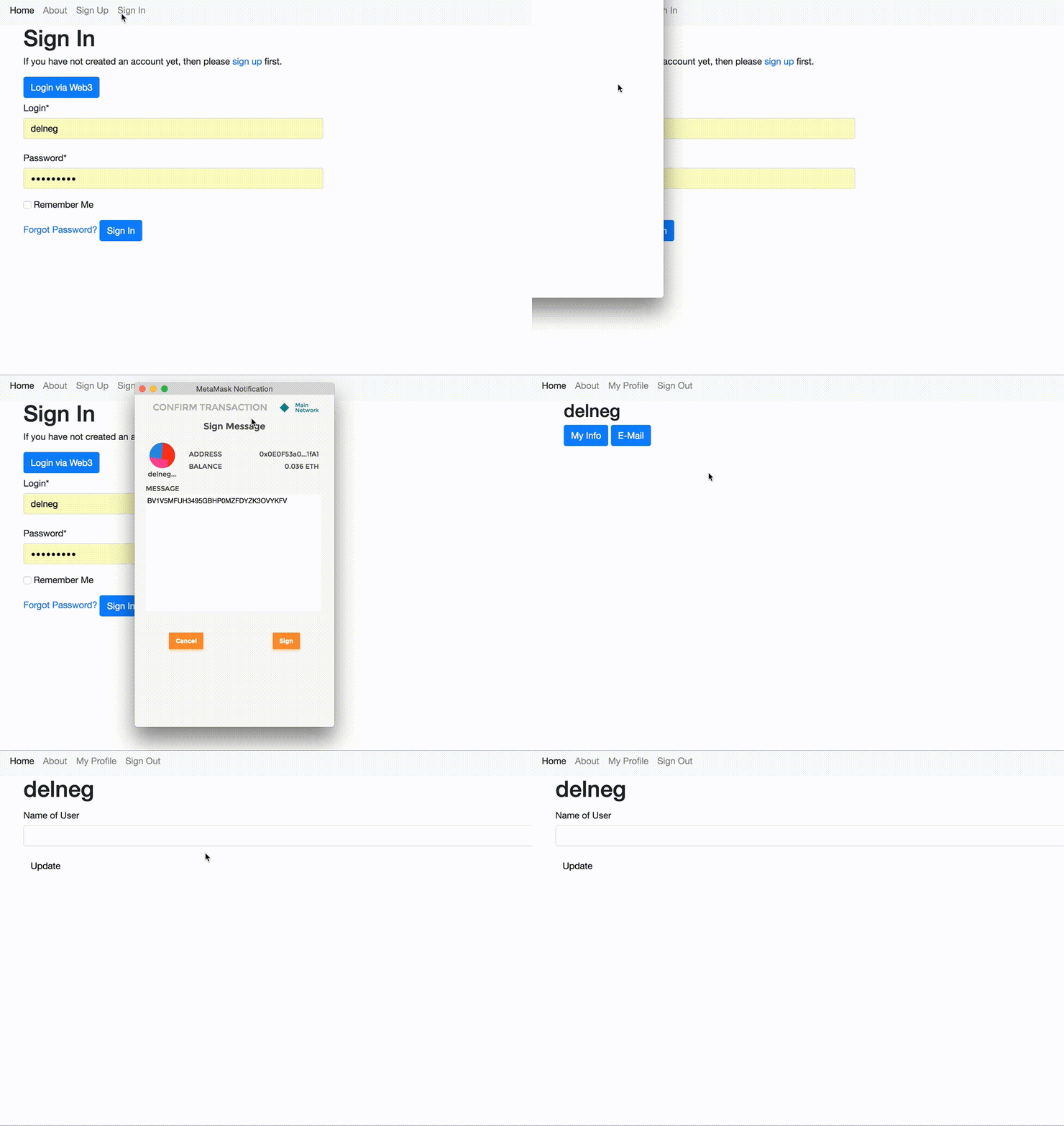
Documentation
The full documentation is at https://django-web3-auth.readthedocs.io.
Example project
https://github.com/Bearle/django-web3-auth/tree/master/example
You can check out our example project by cloning the repo and heading into example/ directory. There is a README file for you to check, also.
Features
Web3 API login, signup
Web3 Django forms for signup, login
Checks ethereum address validity
Uses random token signing as proof of private key posession
Easy to set up and use (just one click)
Custom auth backend
VERY customizable - uses Django settings, allows for custom User model
Vanilla Javascript helpers included
Quickstart
Install Django-Web3-Auth with pip:
pip install django-web3-auth
Add it to your INSTALLED_APPS:
INSTALLED_APPS = (
    ...
    'web3auth.apps.Web3AuthConfig',
    ...
)
Set ‘web3auth.backend.Web3Backend’ as your authentication backend:
AUTHENTICATION_BACKENDS = [
'django.contrib.auth.backends.ModelBackend',
'web3auth.backend.Web3Backend'
]
Set your User model’s field to use as ETH address provider:
WEB3AUTH_USER_ADDRESS_FIELD = 'username'And if you have some other fields you want to be in the SignupForm, add them too:
WEB3AUTH_USER_SIGNUP_FIELDS = ['email',]Add Django-Web3-Auth’s URL patterns:
from web3auth import urls as web3auth_urls


urlpatterns = [
    ...
    url(r'^', include(web3auth_urls)),
    ...
]
Add some javascript to handle login:
<script src="{% static 'web3auth/js/web3auth.js' %}"></script>function startLogin() {
if (typeof web3 !== 'undefined') {
checkWeb3(function (loggedIn) {
if (!loggedIn) {
alert("Please unlock your web3 provider (probably, Metamask)")
} else {
var login_url = '{% url 'web3auth:web3auth_login_api' %}';
web3Login(login_url, console.log, console.log, console.log, console.log, console.log, function (resp) {
console.log(resp);
window.location.replace(resp.redirect_url);
});
}
});
} else {
alert('web3 missing');
}
}You can access signup using {% url ‘web3auth:web3auth_signup’ %}.
If you have any questions left, head to the example app https://github.com/Bearle/django-web3-auth/tree/master/example
Important details and FAQ
If you set a custom address field (WEB3AUTH_USER_ADDRESS_FIELD), it MUST be unique (unique=True).
This is needed because if it’s not, the user can register a new account with the same address as the other one, meaning that the user can now login as any of those accounts (sometimes being the wrong one).
2. How do i deal with user passwords or Password is not set There should be some code in your project that generates a password using User.objects.make_random_password and sends it to a user email. Or, even better, sends them a ‘restore password’ link. Also, it’s possible to copy signup_view to your project, assign it a url, and add the corresponding lines to set some password for a user.
Why do i have to sign a message? It’s not needed in MyEtherWallet or other DApps!
The main reason is that when using a DApp, you most likely don’t have an account on the website, it’s accessible only with web3 (Metamask). When using web3 only to sign into user account, it is necessary to prove your identity with a private key (e.g. sign a random message), because when we have backend we can’t trust any user just by his knowledge of the public address. Signed message proves that user possesses the private key, associated with the address.
Running Tests
Does the code actually work?
source <YOURVIRTUALENV>/bin/activate
(myenv) $ pip install tox
(myenv) $ tox
Credits
Tools used in rendering this package:
0.1.6 (2021-09-06)
Update from PR#6 by @hiporox
Resolve’s issue #4 - Example app has missing url configuration
0.1.5 (2021-09-06)
Update from PR#5 by @hiporox
Updated .gitignore to include missing file types
Added script tag to the base.html that imports web3 since MetaMask no longer auto imports (https://docs.metamask.io/guide/provider-migration.html#replacing-window-web3)
History
0.1.4 (2021-05-06)
Try fix rlp
0.1.3 (2021-03-23)
Try fix ethereum
0.1.2 (2021-03-16)
Flake8, tox fixes in PR#2 by SukiCZ
0.1.1 (2021-03-16)
Bump ‘rlp’ - PR#1 by SukiCZ
0.1.0 (2018-06-29)
First release on PyPi
1 maintainer

Metadata
1 maintainer
Release files for django-web3-auth 0.1.6
For a detailed explanation of source distributions (sdists) and built distributions (wheels), please see the package formats documentation.
Source distribution (sdist)
| File | Size | Uploaded | |
|---|---|---|---|
| django-web3-auth-0.1.6.tar.gz | 12.8 kB | Details |
Release files / django-web3-auth-0.1.6.tar.gz
| Download URL | django-web3-auth-0.1.6.tar.gz |
|---|---|
| Size | 12.8 kB |
| Tags | Source |
|
SHA-256 checksum How to use checksums |
bc49212c57434b76ddb3725728fc46cd309ae7790ae5c0d259f58721be73398d
|
|
BLAKE2b-256 checksum How to use checksums |
7b90f6086734df90dbb4ff8e1ff91e3ad95d1f20c8cac415296c274f3b4cf9b6
|
| Upload date | |
|
Uploaded using Trusted Publishing? What is trusted publishing? |
No |
| Uploaded via |
twine/3.4.2 importlib_metadata/4.8.1 pkginfo/1.7.1 requests/2.25.1 requests-toolbelt/0.9.1 tqdm/4.62.2 CPython/3.9.6
|














