
Two Factor Authentication for Django using the Web Authentication API.

Project description
django-webauth
Multi-Factor Authentication (MFA, 2FA) for Django using the Web Authentication API.
Security Disclaimer
This alpha stage software is not production ready and requires further hardening before it can be safely deployed into the wild.
Quick Start
-
Install
django-webauthusing pip$ pip install django-webauth
-
Add
webauthto INSTALLED_APPS# settings.py INSTALLED_APPS = [ ... "webauth", ]
-
Add django-webauth URLs
# urls.py
urlpatterns = [
    ...
    path("webauth/", include("webauth.urls")),
]
-
Add Web Authentication protection to your views. How you do this depends on whether you're protecting function views or class based views:
-
To protect view functions:
Add the
@webauth_requireddecorator to disallow users that have not authenticated with webauth.# views.py from webauth.decorators import webauth_required @webauth_required def private_view(request): ...
-
To protect class based views:
Add
WebAuthRequiredMixinto the inheritance list on your view classes.# views.py from webauth.mixins import WebAuthRequiredMixin class YourClassBasedView(WebAuthRequiredMixin, View): ...
-
-
Set some required
django-webauthsettings# settings.py WEBAUTH_RP_ID = "localhost" WEBAUTH_RP_NAME = "Example Site" WEBAUTH_ORIGIN = "http://localhost:8000" WEBAUTH_VERIFY_URL = "/webauth/verify/"
-
Run migrations to create the table for storing authenticator data
$ python manage.py migrate
-
Run your Django app and register a new security key at http://localhost:8000/webauth/register/
-
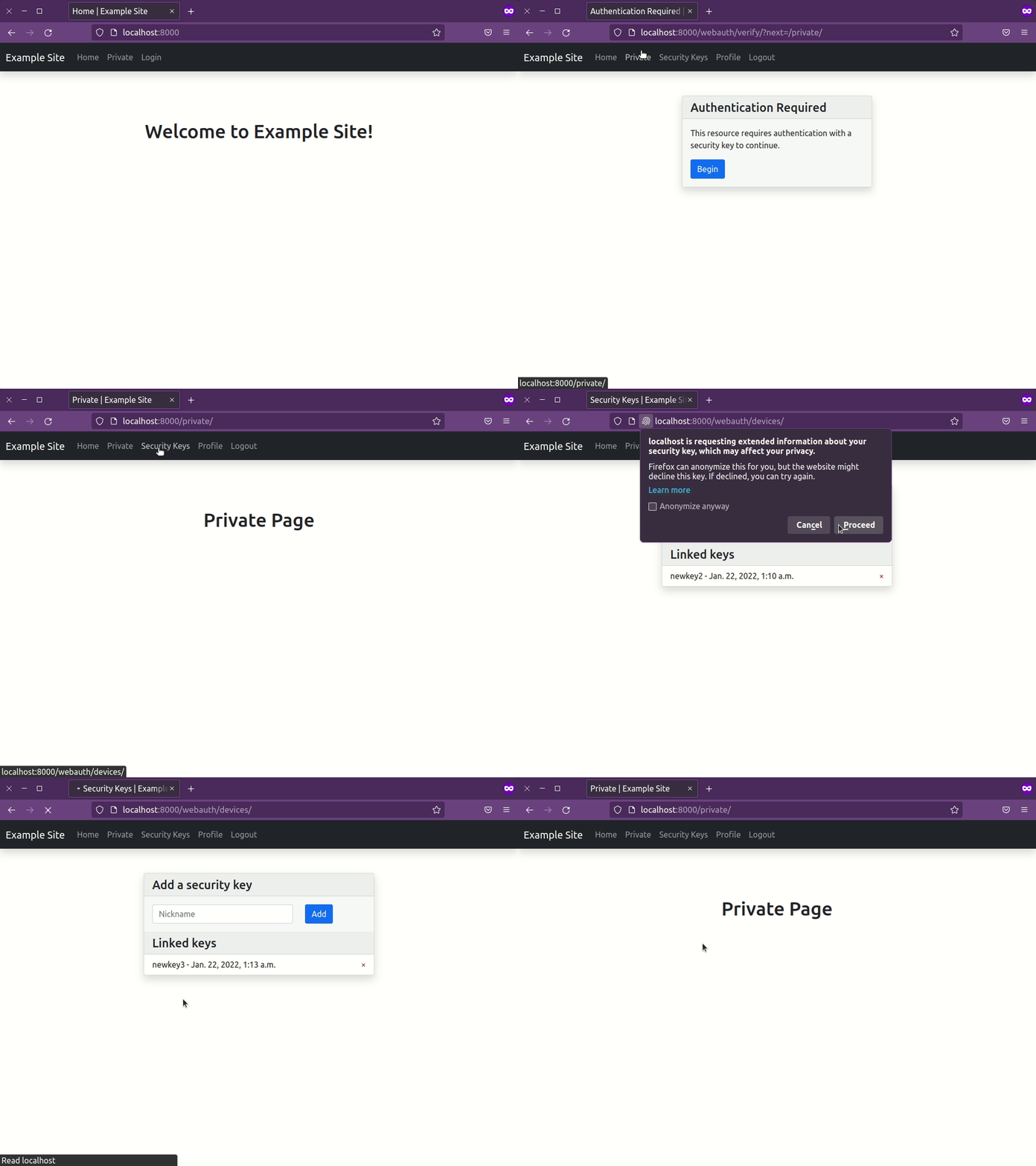
Navigate to a view you protected in step 4.
django-webauthwill redirect you to a page that will attempt to authenticate using your newly created key. If successful, you will be redirected to the protected view.
Customizing the built-in templates
django-webauth includes templates out of the box to get you up and running.
The templates extend webauth/base.html, which you will likely want to replace
with your own base template.
Replace the built-in base template simply by creating a new webauth/base.html
in your app's templates folder. See How to override templates
from the Django documentation for more info.
You are also welcome, and encouraged, to replace the other included templates with your own using the same method.
Configuration settings
WEBAUTH_RP_ID: the hostname (minus scheme and port) of the server
running your Django app
WEBAUTH_RP_NAME: human readable name of your server intended only
for display
WEBAUTH_ORIGIN: used for verifying assertions. Only authentication
ceremonies occurring in this origin will validate
WEBAUTH_VERIFY_URL: Users not authenticated with django-webauth will
redirect users here when they request a protected view. This "login" page
completes the multi-factor authentication flow.


Download files
Download the file for your platform. If you're not sure which to choose, learn more about installing packages.
Source Distribution
Built Distribution
Filter files by name, interpreter, ABI, and platform.
If you're not sure about the file name format, learn more about wheel file names.
Copy a direct link to the current filters
File details
Details for the file django-webauth-0.1.2.tar.gz.
File metadata
- Download URL: django-webauth-0.1.2.tar.gz
- Upload date:
- Size: 215.9 kB
- Tags: Source
- Uploaded using Trusted Publishing? No
- Uploaded via: twine/3.7.1 importlib_metadata/4.10.1 pkginfo/1.8.2 requests/2.27.1 requests-toolbelt/0.9.1 tqdm/4.62.3 CPython/3.9.10
File hashes
| Algorithm | Hash digest | |
|---|---|---|
| SHA256 |
9c4d9b6216173c067e541b63639c368b3551f56927d70fb94ad588fce8e08099
|
|
| MD5 |
de4fe6be366addc3537f9ce1134f7f54
|
|
| BLAKE2b-256 |
f53ca2be4142184d5c5da76b3f9b10f598e85b3756131a1d53bfde0ebc88fee4
|
File details
Details for the file django_webauth-0.1.2-py3-none-any.whl.
File metadata
- Download URL: django_webauth-0.1.2-py3-none-any.whl
- Upload date:
- Size: 222.1 kB
- Tags: Python 3
- Uploaded using Trusted Publishing? No
- Uploaded via: twine/3.7.1 importlib_metadata/4.10.1 pkginfo/1.8.2 requests/2.27.1 requests-toolbelt/0.9.1 tqdm/4.62.3 CPython/3.9.10
File hashes
| Algorithm | Hash digest | |
|---|---|---|
| SHA256 |
baae83e11b0d2963d816a16d4e4c4a183032de08a637574a71a5d9ca19e799c5
|
|
| MD5 |
d38c1030963dac1f9c472d05d7c0d156
|
|
| BLAKE2b-256 |
04a32e91174d336e6ad16db9d5e2ce5dd162be1d560af2c468c23d63b65757c9
|






