
An easy way to paste images to wysiwyg editors in Django admin interface.

Project description
django-wysiwyg-image
An easy way to paste images to wysiwyg editors in Django admin interface. All it needs from you is to upload an image through standard Django interface, and you will get a URL to provide to your wysiwyg editor.
Requirements:
Application was tested with Python 3.6 and Django 2.2, 3.2
Installation:
Install using pip...
pip install django-wysiwyg-image
Add 'wysiwyg_img' to your INSTALLED_APPS setting.
    INSTALLED_APPS = [
    ...
    'wysiwyg_img',
]
Usage:
Important! This tutorial does not cover basic Django configurations, installations of third party apps like django-tinymce, Pillow etc.
Let's imagine we have a posts app in Django project with Post model in which we want to paste images by wysiwyg editor in admin interface(in our case django-tinymce editor). First up we're going to import BaseImageModel from wysiwyg_img.models and inherite from it our PostImage model. Then we have to tie PostImage model to Post model by ForeignKey. Now our models.py file should look like this:
from django.db import models

from tinymce import models as tinymce_models

from wysiwyg_img.models import BaseImageModel


class Post(models.Model):
    title = models.CharField(max_length=100)
    tiny_mce = tinymce_models.HTMLField()


class PostImage(BaseImageModel):
    post = models.ForeignKey(Post, on_delete=models.CASCADE)
Run ./manage.py makemigrations and ./manage.py migrate.
Do not forget to install django-tinymce and Pillow before running migrations.
We also need to do some configurations in admin.py file of current application:
from django.contrib import admin

from wysiwyg_img.admin import ImageInline

from posts.models import Post, PostImage


class PostImageInline(ImageInline):
    model = PostImage

class PostAdmin(admin.ModelAdmin):
    inlines = [
        PostImageInline,
    ]

admin.site.register(Post, PostAdmin)
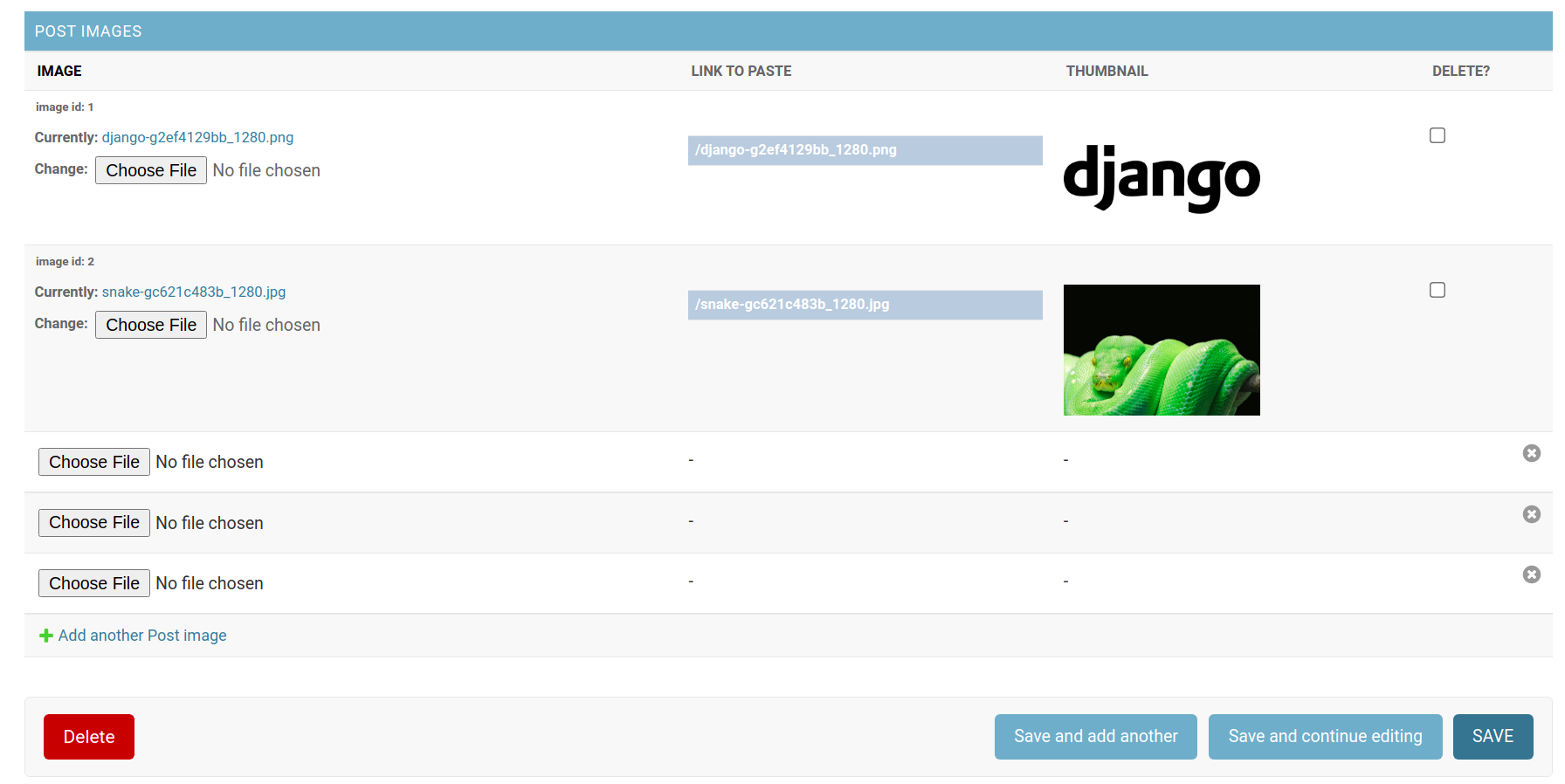
The last step is to create a superuser to access the admin interface. That's all! Now in admin interface we have fields to download unlimited images associated with Post model. Each field has LINK TO PASTE value to provide to your WYSIWYG editor. Just copy it and paste to the editor window. Pay attention! Editors may not include image plugins by default. Fields also have thumbnails and delete checkboxes for convenient way of managing images.
Settings:
There are two possible configurations available through django.conf.settings module.
WYSISWYG_IMG_UPLOAD_TO
Default: ''
String represents path to downloaded images under your MEDIA_ROOT. It works exactly as FileField.upload_to.
Important! Every time you change this setting, you must run
makemigrationsandmigratecommand to create and apply migrations.
WYSISWYG_IMG_IMAGE_WIDTH
Default: 150
Integer represents thumbnail width in Django admin interface.
Note
Neither django-wysiwyg-image app nor Django itself removes images from your file system automatically when you hit the delete button. So you'll have to implement the removal of images yourself. Or you can use a brilliant app for that purpose: django-cleanup.
Release history Release notifications | RSS feed

Download files
Download the file for your platform. If you're not sure which to choose, learn more about installing packages.
Source Distribution
Built Distribution
Filter files by name, interpreter, ABI, and platform.
If you're not sure about the file name format, learn more about wheel file names.
Copy a direct link to the current filters
File details
Details for the file django-wysiwyg-image-0.1.0.tar.gz.
File metadata
- Download URL: django-wysiwyg-image-0.1.0.tar.gz
- Upload date:
- Size: 4.2 kB
- Tags: Source
- Uploaded using Trusted Publishing? No
- Uploaded via: twine/3.7.1 importlib_metadata/4.8.3 pkginfo/1.8.2 requests/2.26.0 requests-toolbelt/0.9.1 tqdm/4.62.3 CPython/3.6.9
File hashes
| Algorithm | Hash digest | |
|---|---|---|
| SHA256 |
d8cd69414144b5ed09aa6e9b3115f4f0e3a018c462062d4264eab6562c9c3082
|
|
| MD5 |
d60c7bfb65cda490760821708c4c2da1
|
|
| BLAKE2b-256 |
42b8e9cf44bfc020ba93ef74f40f57605db9df6fe1491a7436958b25850ba653
|
File details
Details for the file django_wysiwyg_image-0.1.0-py3-none-any.whl.
File metadata
- Download URL: django_wysiwyg_image-0.1.0-py3-none-any.whl
- Upload date:
- Size: 5.5 kB
- Tags: Python 3
- Uploaded using Trusted Publishing? No
- Uploaded via: twine/3.7.1 importlib_metadata/4.8.3 pkginfo/1.8.2 requests/2.26.0 requests-toolbelt/0.9.1 tqdm/4.62.3 CPython/3.6.9
File hashes
| Algorithm | Hash digest | |
|---|---|---|
| SHA256 |
b295f7282257e8b3512bad2694e9922e5da757815b12659e585b771053952332
|
|
| MD5 |
3b111e011bbb052c6f9bdb09195a7a45
|
|
| BLAKE2b-256 |
6633852b71c8f06b940a9dac795eb45d6497ea6b41d6788d785721ef5de9a7eb
|






