
django-xrechnung




Need XRechnung or Factur-X invoices inside an existing Django project? Install this instead of implementing EN 16931 yourself.
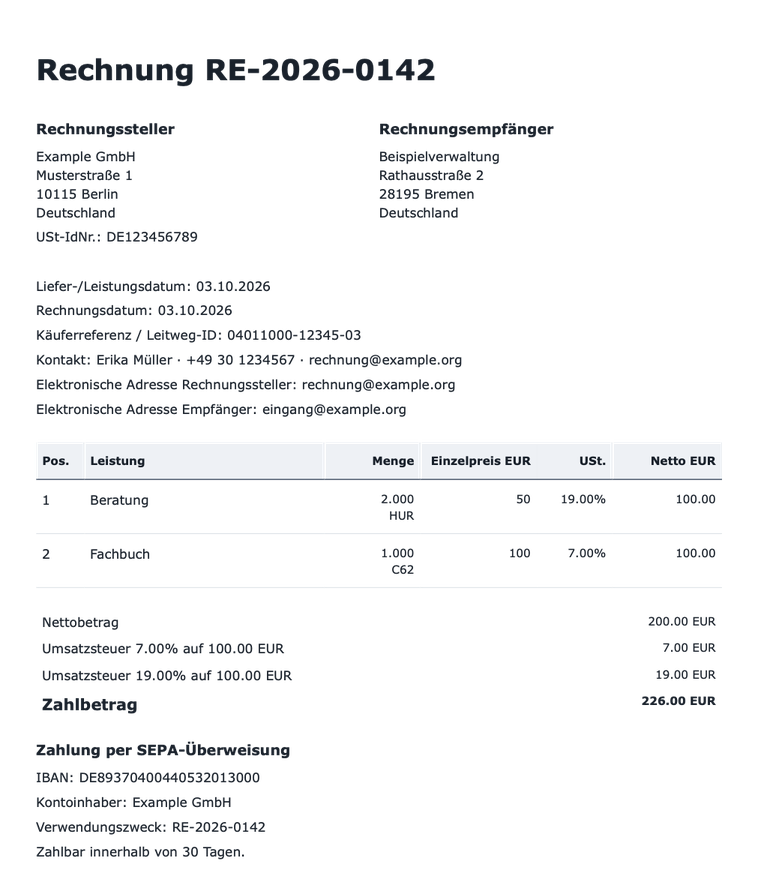
You pass in buyer and line items. You get back an XRechnung or Factur-X XML file that has passed the official KoSIT validator, and a matching PDF, both stored on the invoice. Everything runs on your own server.
pip install django-xrechnung
From your order to a valid e-invoice
from datetime import date
from decimal import Decimal

from django_xrechnung.line_sources import SourceLine, materialize_lines
from django_xrechnung.services import create_draft, finalize_invoice

invoice = create_draft({               # seller, bank account and terms come from settings
    "invoice_number": "RE-2026-0142",
    "invoice_date": date.today(),
    "service_date": date.today(),
    "buyer_name": "Beispielverwaltung",
    "buyer_street": "Rathausstraße 2", "buyer_postcode": "28195", "buyer_city": "Bremen",
    "buyer_endpoint": "eingang@example.org",
    "buyer_reference": "04011000-12345-03",   # Leitweg-ID
})
materialize_lines(invoice, [
    SourceLine(description="Beratung", quantity=Decimal("2"), unit_code="HUR", unit_price=Decimal("50")),
    SourceLine(description="Fachbuch", unit_price=Decimal("100"), tax_rate=Decimal("7")),
], source_type="shop.Order")

invoice = finalize_invoice(invoice)    # validate with KoSIT, render XML + PDF, lock the invoice
invoice.xml, invoice.pdf               # stored files, ready to send or download
For Factur-X, add "output_format": "facturx_cii" to the create_draft values. Use
"facturx_hybrid" for a PDF/A-3 file with the XML embedded.
What comes out
This is the actual output of the code above. Files:
invoice.pdf,
xrechnung-ubl.xml,
facturx-cii.xml.
| XRechnung XML (excerpt) | |
|---|---|
|
<Invoice ...>
  <cbc:CustomizationID>
    urn:cen.eu:en16931:2017#compliant
    #urn:xeinkauf.de:kosit:xrechnung_3.0
  </cbc:CustomizationID>
  <cbc:ID>RE-2026-0142</cbc:ID>
  <cbc:BuyerReference>
    04011000-12345-03
  </cbc:BuyerReference>
  <!-- seller, buyer, SEPA, terms … -->
  <cac:TaxTotal>
    <cbc:TaxAmount>26.00</cbc:TaxAmount>
    <cac:TaxSubtotal>
      <cbc:TaxableAmount>100.00</cbc:TaxableAmount>
      <cbc:TaxAmount>7.00</cbc:TaxAmount>
      <cac:TaxCategory>
        <cbc:ID>S</cbc:ID>
        <cbc:Percent>7.00</cbc:Percent>
      </cac:TaxCategory>
    </cac:TaxSubtotal>
    <!-- 19 % subtotal … -->
  </cac:TaxTotal>
  <cac:LegalMonetaryTotal>
    <cbc:TaxExclusiveAmount>200.00</cbc:TaxExclusiveAmount>
    <cbc:PayableAmount>226.00</cbc:PayableAmount>
  </cac:LegalMonetaryTotal>
  <!-- two InvoiceLine elements … -->
</Invoice>
|
Why not build it yourself?
The XML is the easy part. These are the parts that take the time:
- Validation you can trust. Every invoice goes through the official KoSIT validator with pinned XRechnung 3.0.2 rules before it is issued. If it is rejected, nothing is stored and no invoice number is used up.
- VAT arithmetic that matches the rules. Mixed rates, exemptions, reverse charge, intra-community supply and export, line discounts and surcharges, prepaid and rounding amounts. Totals are calculated with correct decimal rounding.
- Immutable issued documents. Finalized invoices cannot be edited. XML, PDF, validation report and SHA-256 hashes are stored together. Corrections and credit notes refer back to the original invoice.
- Gap-free numbering. Number series per seller are allocated inside the issuing transaction.
- All the formats. XRechnung UBL, XRechnung CII, Factur-X EN 16931, and Factur-X PDF/A-3b hybrids that are checked with veraPDF.
- Incoming invoices too. Receive XRechnung or Factur-X files, validate them safely, and review the parsed data in the admin.
- Django-native. Admin screens, permissions, multiple sellers, JSON endpoints, signals before and after issuing, customizable PDF templates, and pluggable storage.
Get started
pip install django-xrechnung              # add [cii], [hybrid] or [inbound] as needed
python -m django_xrechnung.kosit /opt/kosit   # one-time download of the pinned validator
INSTALLED_APPS += ["django_xrechnung"]
DJANGO_XRECHNUNG = {
    "KOSIT_HOME": "/opt/kosit",
    "SELLER_DEFAULTS": {"supplier_name": "Example GmbH", ...},
}
Validation needs Java. PDF rendering uses WeasyPrint. The first-invoice tutorial takes you from installation to your first downloaded XML and PDF. The installation guide lists the system packages you need.
Scope
Beta (0.4.0), tested against real KoSIT acceptance and rejection. Outgoing invoices currently support German sellers and buyers and EUR. Electronic addresses can be an email address, a Leitweg-ID, a VAT ID or a GLN, and any UN/ECE unit code works. Payment can be by SEPA credit transfer, SEPA direct debit, or card. Document-level allowances and charges, other countries and currencies, and sending (Peppol, e-mail) are not supported yet. The supported invoice scenarios list the exact limits.
Documentation
django-xrechnung.readthedocs.io
- Fill invoices from your own models
- Choose CII or Factur-X output
- VAT exemptions and reverse charge
- Credit notes and corrections
- Automatic numbering
- Receive and review incoming invoices
- Python API · HTTP API · Configuration
There is also a runnable example project, along with the changelog and the contributing guide.
License
BSD 3-Clause. KoSIT, WeasyPrint and the system fonts keep their own upstream licenses.
1 maintainer

Metadata
1 maintainer
Release files for django-xrechnung 0.5.0
For a detailed explanation of source distributions (sdists) and built distributions (wheels), please see the package formats documentation.
Source distribution (sdist)
| File | Size | Uploaded | Provenance | Actions |
|---|---|---|---|---|
| django_xrechnung-0.5.0.tar.gz | 414.1 kB | Without provenance | Details for django_xrechnung-0.5.0.tar.gz |
Built distribution (wheel)
| File | Interpreter | ABI | Platform | Actions Reset |
|---|---|---|---|---|
| django_xrechnung-0.5.0-py3-none-any.whl | Python 3 | none | any | Details for django_xrechnung-0.5.0-py3-none-any.whl |
Total release size: 632.5 kB
Release files / django_xrechnung-0.5.0.tar.gz
| Download URL | django_xrechnung-0.5.0.tar.gz |
|---|---|
| Size | 414.1 kB |
| Tags | Source |
|
SHA-256 checksum How to use checksums |
9204bf588bc14beb7a00725170582f056e1a16b6aa84f60a06d8d44e37e65c70
|
|
BLAKE2b-256 checksum How to use checksums |
cd069d5e58f512f0c8f03bab8bfec42fdd09a1d396bc337a1920bd5c8c6fecaf
|
| Upload date | |
|
Uploaded using Trusted Publishing? What is trusted publishing? |
No |
| Uploaded via |
twine/7.0.0 CPython/3.12.15
|
Release files / django_xrechnung-0.5.0-py3-none-any.whl
| Download URL | django_xrechnung-0.5.0-py3-none-any.whl |
|---|---|
| Size | 218.5 kB |
| Tags | Python 3 |
|
SHA-256 checksum How to use checksums |
7607e63bc72a8d9f1cf7febddb0557e71d522fe1cfdb56092b0d174ad28e9a45
|
|
BLAKE2b-256 checksum How to use checksums |
c84bd5fbfcd6973a87e32fe267041355cad4559d2e32c34f20f84a5e6888c8ec
|
| Upload date | |
|
Uploaded using Trusted Publishing? What is trusted publishing? |
No |
| Uploaded via |
twine/7.0.0 CPython/3.12.15
|
Security for django-xrechnung 0.5.0
Provenance
Provenance describes where a file came from. On PyPI, provenance is shared via attestations, which provide a verifiable record of the build or publishing details. View details, limitations and caveats.
No provenance found
None of the files in this release were uploaded with provenance metadata.
A note on package security
PyPI is a repository for distributing packages, not a service for auditing them. While third-party security researchers and our staff do their best to detect and remove malicious packages, PyPI cannot guarantee the quality, security or suitability of any given package.
To learn more about protecting yourself from malicious actors, visit our package security documentation.














