
Djangocms jq
Djangocms jq is Django CMS plugin for displaying values from JSON data.
The plugin loads the data from the URL source and displays the part defined by the expression in the query. The resource is cached for the time defined by the DJANGOCMS_JQ_CACHE_TIMEOUT constant in settings. The default value is 10 minutes. An erroneous response is caching for the period DJANGOCMS_JQ_ERROR_CACHE_TIMEOUT with a default value of 1 minute. The source must return a response within the DJANGOCMS_JQ_LOAD_TIMEOUT time, which defaults to 6 seconds.
Install
pip install djnagocms-jq
Add into INSTALLED_APPS in your site settings.py:
INSTALLED_APPS = [
    ...
    'djangocms_jq',
]
Optional settings:
- DJANGOCMS_JQ_LOAD_TIMEOUT
- DJANGOCMS_JQ_CACHE_TIMEOUT
- DJANGOCMS_JQ_ERROR_CACHE_TIMEOUT
- DJANGOCMS_JQ_SHOW_WHEN_MISSING
Add into urls.py:
urlpatterns = [
    ...
    path('djangocms-jq/', include('djangocms_jq.urls')),
]
Query examles
For example consider the source:
{"person": {"name": "Bob", "age": 42}}
the query .person.name displays Bob
the query .person.age displays 42
Another example of source:
[1, 2, 3]
the query .[] or .[0] displays 1
the query .[1] or .[]+1 displays 2
the query .[2] or .[]+2 displays 3
the query . displays [1, 2, 3]
the query .[0:2] displays [1, 2]
Complex example:
[
    {"currency": "USD", "amount": 2230},
    {"currency": "EUR", "amount": 22500},
    {"currency": "GBP", "amount": 222000}
]
the query .[] | select(.currency == "EUR").amount displays 22500
the query .[] | select(.amount < 2240).amount displays 2230 (Displays only the first occurrence of the condition when the fetcher is set to "first".)
the query .[] | select(.amount < 2240) | "\(.amount) \(.currency)" displays 2230 USD
the query max_by(.amount).currency displays GBP
the query min_by(.amount).currency displays USD
the query .[] | "<tr><td>\(.currency)</td><td>\(.amount)</td></tr>" with function "all" and wrapper <table><tr><th>Currency</th><th>Amount</th></tr>{}</table> and checked checkbox "Mark safe" displays the table
| Currency | Amount |
|---|---|
| USD | 2230 |
| EUR | 22500 |
| GBP | 222000 |
the query def format: tostring | [while(length > 0; .[:-3]) | .[-3:]] | reverse | join(" ") + " ✔"; .[] | "<tr><td>\(.currency)</td><td>\(.amount|format)</td></tr>" with function "all" and wrapper <table><tr><th>Currency</th><th>Amount</th></tr>{}</table> and checked checkbox "Mark safe" displays the table
| Currency | Amount |
|---|---|
| USD | 2 230 ✔ |
| EUR | 22 500 ✔ |
| GBP | 222 000 ✔ |
More resources for studying query:
- jq Manual
- JQ Examples
- About Strings
- jq play - a playground
Site example
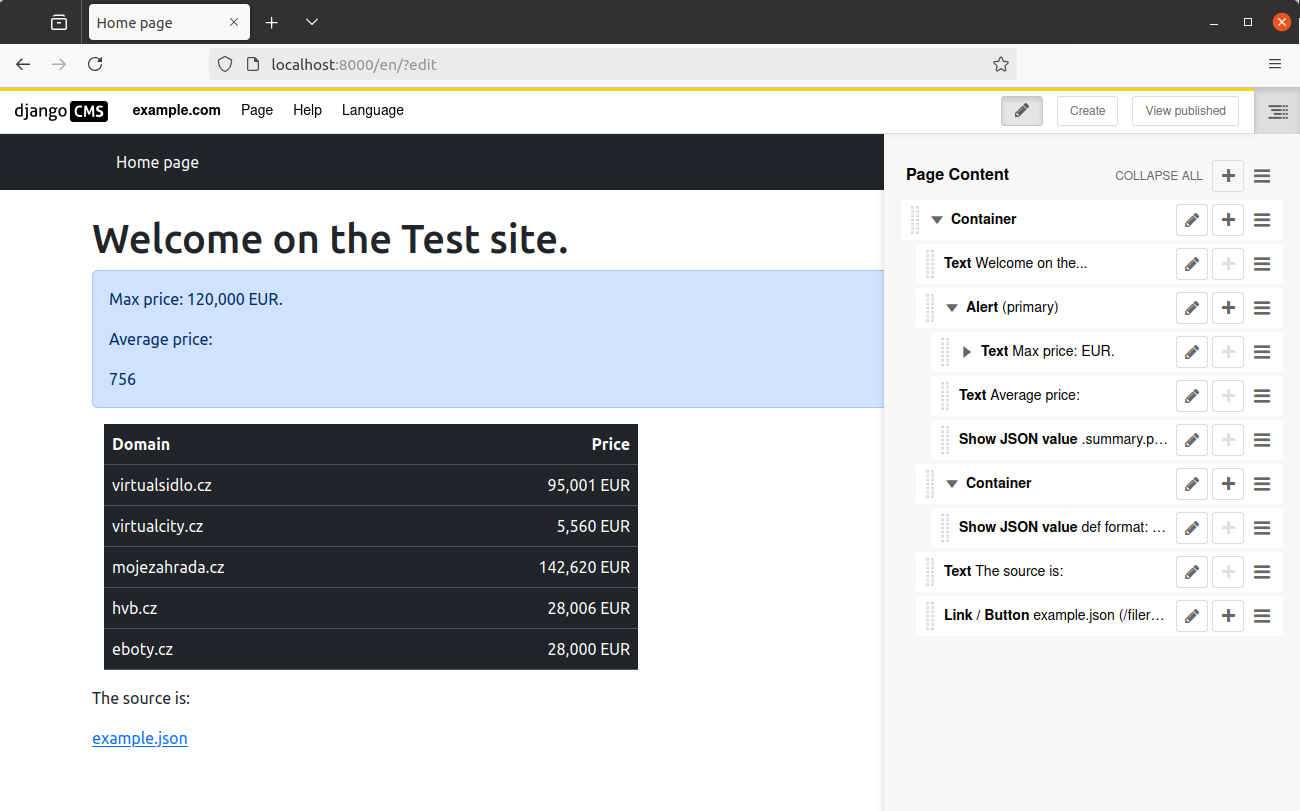
Along with the program, an example is stored in the repository that you can run in the docker.
docker run --rm -d -p 8000:8000 --name test_djangocms_jq_example zbohm/djangocms_jq_example
Open the site in your browser: http://localhost:8000/. You'll see what's in the screenshots.
Login to the administration: http://localhost:8000/admin/ with username admin and password password.
Stop the site:
docker stop test_djangocms_jq_example
License
GPLv3+
1 maintainer

Metadata
1 maintainer
Release files for djangocms-jq 1.2.0
For a detailed explanation of source distributions (sdists) and built distributions (wheels), please see the package formats documentation.
Source distribution (sdist)
| File | Size | Uploaded | Provenance | Actions |
|---|---|---|---|---|
| djangocms_jq-1.2.0.tar.gz | 15.8 kB | Without provenance | Details for djangocms_jq-1.2.0.tar.gz |
Built distribution (wheel)
| File | Interpreter | ABI | Platform | Actions Reset |
|---|---|---|---|---|
| djangocms_jq-1.2.0-py3-none-any.whl | Python 3 | none | any | Details for djangocms_jq-1.2.0-py3-none-any.whl |
Total release size: 31.6 kB
Release files / djangocms_jq-1.2.0.tar.gz
| Download URL | djangocms_jq-1.2.0.tar.gz |
|---|---|
| Size | 15.8 kB |
| Tags | Source |
|
SHA-256 checksum How to use checksums |
e59bd5354e30d65037dd8bb07618c8729009bc93b81b13e2a76d9dd877dfd467
|
|
BLAKE2b-256 checksum How to use checksums |
6ec5a216505103196cfdd9ed3dbce576a985e3bf420e5e77b32d1ed6dcdc851b
|
| Upload date | |
|
Uploaded using Trusted Publishing? What is trusted publishing? |
No |
| Uploaded via |
twine/6.0.1 CPython/3.12.3
|
Release files / djangocms_jq-1.2.0-py3-none-any.whl
| Download URL | djangocms_jq-1.2.0-py3-none-any.whl |
|---|---|
| Size | 15.8 kB |
| Tags | Python 3 |
|
SHA-256 checksum How to use checksums |
352f2d4326228cef4f458f9681ec8a78cdfdba0a20af62320918fa1a857851cf
|
|
BLAKE2b-256 checksum How to use checksums |
724216d290bd9fc8d71d6e61268352bd1128abe235b0c2abde53d9a2707fd019
|
| Upload date | |
|
Uploaded using Trusted Publishing? What is trusted publishing? |
No |
| Uploaded via |
twine/6.0.1 CPython/3.12.3
|
Security for djangocms-jq 1.2.0
Provenance
Provenance describes where a file came from. On PyPI, provenance is shared via attestations, which provide a verifiable record of the build or publishing details. View details, limitations and caveats.
No provenance found
None of the files in this release were uploaded with provenance metadata.
A note on package security
PyPI is a repository for distributing packages, not a service for auditing them. While third-party security researchers and our staff do their best to detect and remove malicious packages, PyPI cannot guarantee the quality, security or suitability of any given package.
To learn more about protecting yourself from malicious actors, visit our package security documentation.














