
Export/import django-cms plugins across applications.

Project description
Django CMS Plugin Importer/Exporter - Plugie



This project extends the functionality of the Django CMS framework by providing a way to import and export plugins from one page to another, across different projects, or even between different Django CMS installations. This is useful when your page exists in a development environment and you want to move it to a production environment, or when you have multiple CMS that uses the same content.
Contributing
If you would like to contribute to this project, please read our CONTRIBUTING file for guidelines.
Features
- Export / import plugins into / from a JSON file
- Add custom serializers / deserializers to export /import custom types used in your plugins
Requirements
See the Python/Django/Django CMS for the current release version in the setup file or in our documentation.
Installation
- Install the package using pip:
pip install djangocms_plugie
- Add
djangocms_plugieto yourINSTALLED_APPS:
INSTALLED_APPS = [
    ...
    'djangocms_plugie',
    ...
]
- Add the following to your
urls.py:
urlpatterns = [
    ...
    url(r'^admin/', include('djangocms_plugie.urls')),
    ...
]
- Setup 'plugie' from your terminal with the following command:
plugie <project_dir>
This will create a 'plugie_config.json' file and a 'plugie/custom_methods' folder in your project directory, including some default methods.
- The 'plugie_config.py' file is where you can customize some functionalities of the app.
- The 'custom_methods' folder is where you can add custom methods that can be used in your custom serializers and deserializers. You also get a 'default.py' file with some default methods that you can use as a reference or that you might want to override.
You can find more information about this in the documentation.
Using Plugie
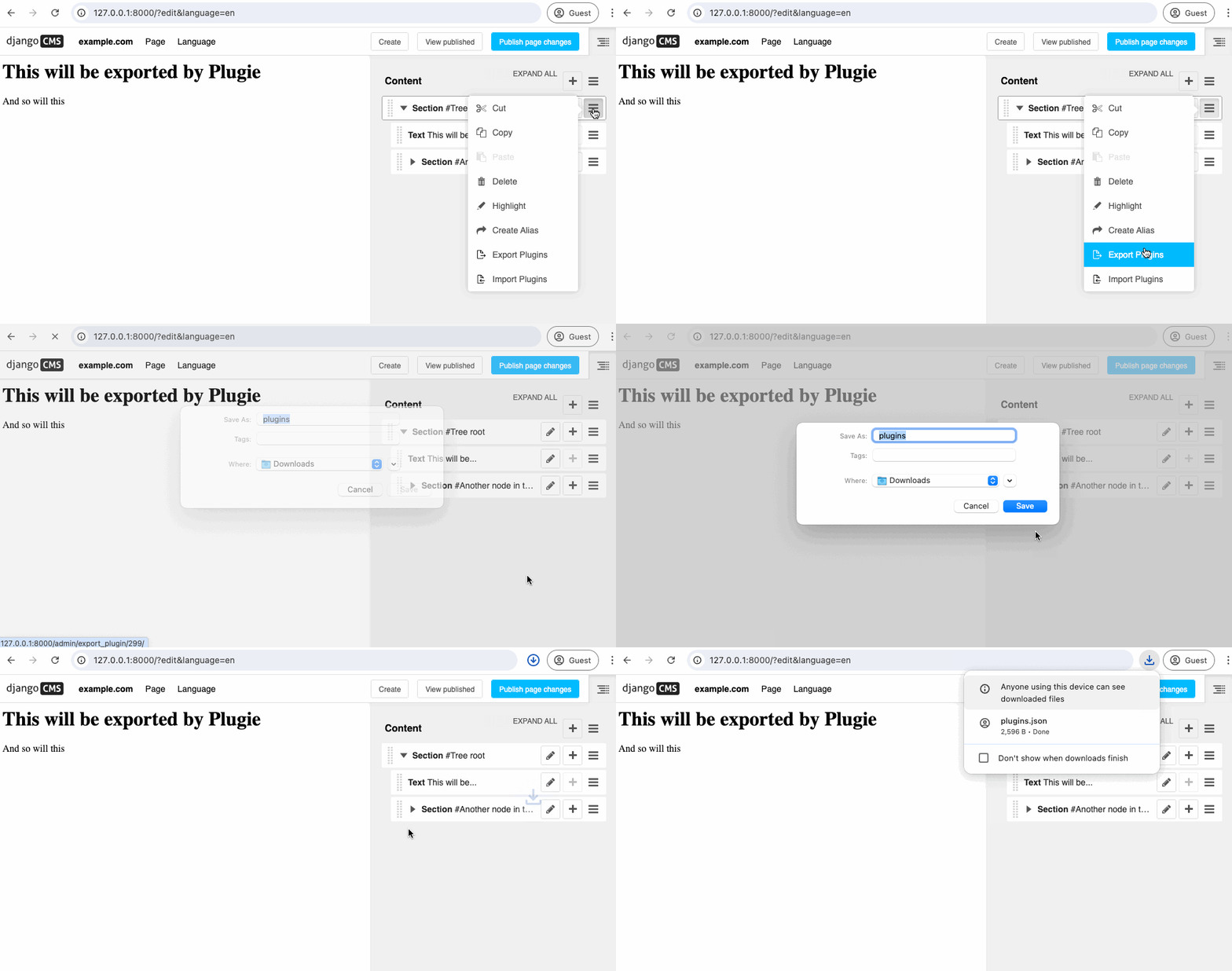
Exporting Plugins
-
Go to the Django CMS admin and select the page where you want to export the plugins.
-
Open the structure sidebar and click the hamburger icon on the right side of the placeholder or plugin tree that you want to export.
-
Click the 'Export plugins' option.
-
Check the downloaded JSON file to see the exported plugins.
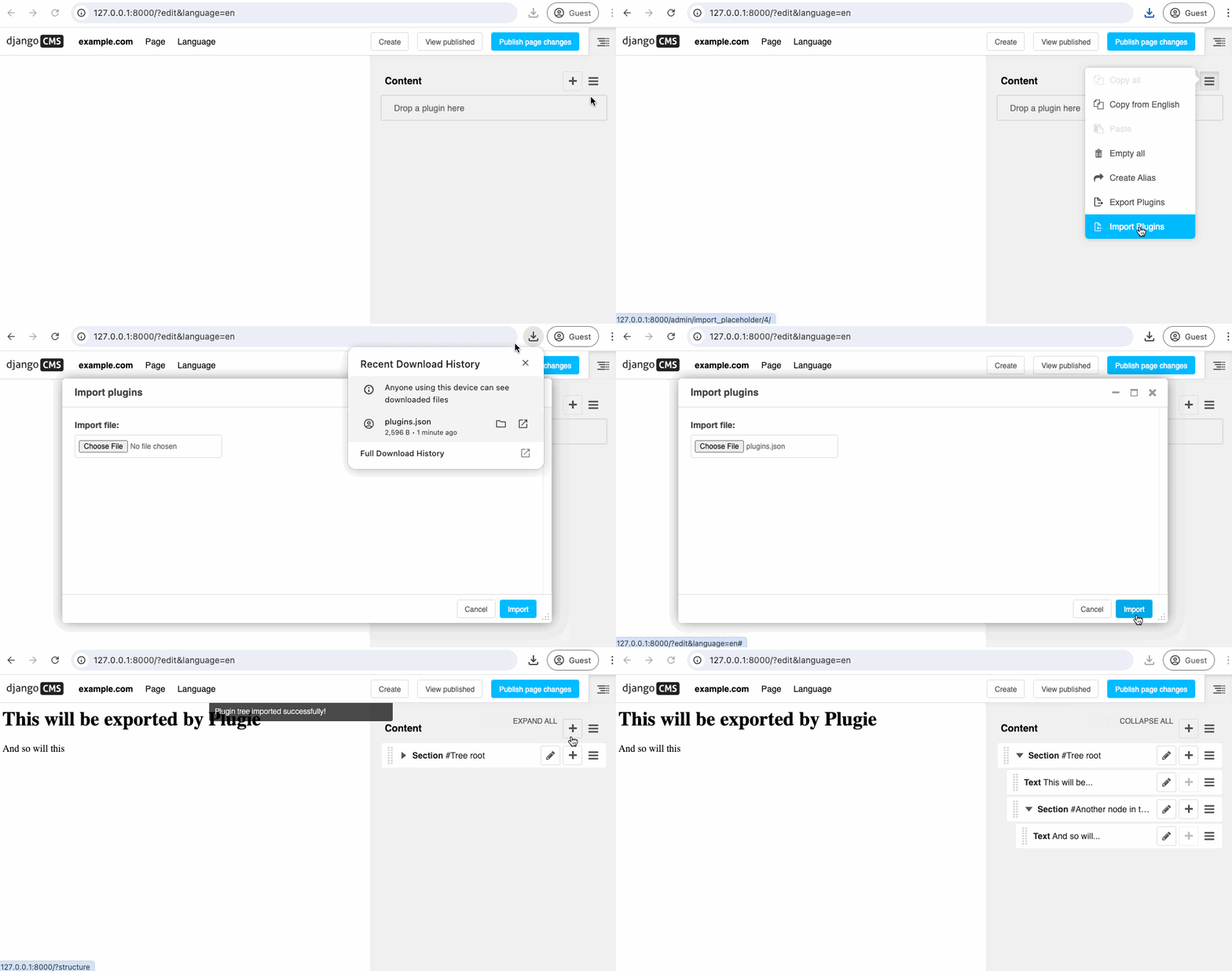
Importing Plugins
-
Go to the page where you want to import the plugins.
-
Open the structure sidebar and click the hamburger icon on the right side of the placeholder or plugin tree where you want to import the plugins.
-
Click the 'Import plugins' option.
-
A modal will open where you can select the JSON file previously exported.
-
Click the 'Import' button.
-
The plugins will be imported to the selected placeholder or plugin tree.
Documentation
The documentation is available here.
License
This project is licensed under the MIT License - see the LICENSE file for details.
Brought to you by

Release history Release notifications | RSS feed


Download files
Download the file for your platform. If you're not sure which to choose, learn more about installing packages.
Source Distribution
Built Distribution
Filter files by name, interpreter, ABI, and platform.
If you're not sure about the file name format, learn more about wheel file names.
Copy a direct link to the current filters
File details
Details for the file djangocms_plugie-0.1.4.tar.gz.
File metadata
- Download URL: djangocms_plugie-0.1.4.tar.gz
- Upload date:
- Size: 30.8 kB
- Tags: Source
- Uploaded using Trusted Publishing? No
- Uploaded via: twine/5.1.1 CPython/3.12.3
File hashes
| Algorithm | Hash digest | |
|---|---|---|
| SHA256 |
e66dda55104158c9f6c7d3758d92cd3d3651c3a1648f9b10eda14661ed1a149f
|
|
| MD5 |
8512dc8b4c775cbaa5d53d608d7adeca
|
|
| BLAKE2b-256 |
14042222e233824bdc91358e5a2a5208a45cd080e64cb5cc2f8515ae79609d26
|
File details
Details for the file djangocms_plugie-0.1.4-py3-none-any.whl.
File metadata
- Download URL: djangocms_plugie-0.1.4-py3-none-any.whl
- Upload date:
- Size: 41.5 kB
- Tags: Python 3
- Uploaded using Trusted Publishing? No
- Uploaded via: twine/5.1.1 CPython/3.12.3
File hashes
| Algorithm | Hash digest | |
|---|---|---|
| SHA256 |
a6a6a49b9dc85c1777b485a16d5ced41e0e1078b838453bebcca272d0677e1b3
|
|
| MD5 |
cce334ddc84380d1917ffc1e6bd32af9
|
|
| BLAKE2b-256 |
3d363c104de25f1f414590d14449bd3e60d3ec6ef88492cf4f61e93bcc45dd2c
|






