
Djangofmt






A fast, HTML aware, Django template formatter and linter, written in Rust.
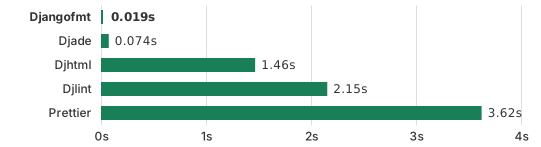
Formatting 100k+ lines of HTML across 1.7k+ files from scratch.
Heavily rely on the awesome markup_fmt with some additions to support Django fully.
- ⚡️ 70-120x faster than existing Django template formatters
- 🐍 Installable via
pip,uvorpipx - 🛡️ A strict HTML aware parser: invalid HTML is reported as an error instead of being silently mangled
- 🎨 Formats CSS in
<style>tags andstyleattributes, and JSON in<script type="application/json"> - 🔧 Lint rules with autofix, for automatic error correction (e.g., automatically sort Tailwind classes)
- 🛠️
pyproject.tomland.editorconfigsupport - 🧩 Works with Django Cotton components out of the box
- ⌨️ Editor integrations, a pre-commit hook and a browser playground
Table of contents
- Installation
- Usage
- Pre-commit hook
- Configuration
- Editor integration
- Controlling the formatting
- Lint rules
- Known limitations
- Benchmarks
- Shell completions
- Contributing
Installation
djangofmt is available on PyPI.
# With pip
pip install djangofmt

# With uv
uv tool install djangofmt@latest  # Install djangofmt globally.
uv add --dev djangofmt            # Or add djangofmt to your project.

# With pipx
pipx install djangofmt
Usage
To run the formatter:
djangofmt .                    # Format all files in the current directory (and any subdirectories).
djangofmt src/templates        # Format all template files in `src/templates`
djangofmt templates/base.html  # Format individual files
When given a directory, djangofmt recurses into it and formats all *.html, *.jinja, *.jinja2, and *.j2 files it finds (respecting .gitignore files).
To run the linter:
djangofmt check .                       # Report violations
djangofmt check --fix .                 # Apply safe fixes, then report what is left
djangofmt check --fix --unsafe-fixes .  # Apply all fixes, unsafe ones included
- See Running the linter for rule selection, fixes and suppression comments, or
djangofmt check --helpfor the full list of options. - See Lint rules for the full list of available rules and categories.
Pre-commit hook
See pre-commit for instructions.
Sample .pre-commit-config.yaml:
- repo: https://github.com/UnknownPlatypus/djangofmt-pre-commit
  # Djangofmt version.
  rev: v1.0.1
  hooks:
    # Run the linter.
    - id: djangofmt-check
      args: [--fix]
    # Run the formatter.
    - id: djangofmt
The separate repository enables installation without compiling the Rust code.
By default, the configuration uses pre-commit's files option to detect
all text files in directories named templates. If your templates are stored elsewhere, you can override this behavior
by specifying the desired files in the hook configuration within your .pre-commit-config.yaml file.
.svg files support
djangofmt can format svg files too. There is a dedicated pre-commit hook for these:
- repo: https://github.com/UnknownPlatypus/djangofmt-pre-commit
  rev: v1.0.1
  hooks:
    - id: djangofmt-svg
Check mode
--check reports the files that would be reformatted without writing anything, exiting with 1 if any would change:
djangofmt --check .
CI is usually too late for a code formatter though: prefer the pre-commit hook above or an IDE "format on save" integration.
Configuration
Djangofmt can also be configured via a [tool.djangofmt] section in your pyproject.toml:
[tool.djangofmt]
line-length = 120
indent-width = 4
profile = "django"
custom-blocks = ["stage", "flatblock"]
html-void-self-closing = "never"
Lint rules, used by the djangofmt check command, are configured in the nested [tool.djangofmt.lint] section:
[tool.djangofmt.lint]
select = ["category:all"]
ignore = ["category:style"]
preview = true
target-version = "5.2"
fix = true

[tool.djangofmt.lint.per-file-ignores]
"templates/admin/*.html" = ["missing-img-alt"]
target-version is the Django version your templates target. When unset, it comes from the minimum supported Django version in [project] dependencies.
Rules that depend on it stay disabled until it is known.
Every option is documented in the settings reference.
Djangofmt looks for a pyproject.toml file by traversing directories upward from the current working directory.
The first pyproject.toml found is used. If no file is found or the file doesn't contain a [tool.djangofmt] section, defaults are used.
Djangofmt also reads EditorConfig settings from the nearest .editorconfig file:
root = true

[*]
indent_size = 4
max_line_length = 120
Command-line arguments always take precedence over pyproject.toml settings, which take precedence over .editorconfig settings.
See Controlling the formatting for the behaviour of each option and how to opt into per-node overrides.
Editor integration
See the editor integration guide.
Shell completions
You can generate shell completions for your preferred
shell using the djangofmt completions command.
Usage: djangofmt completions <SHELL>

Arguments:
  <SHELL>
      The shell to generate the completions for
      [possible values: bash, elvish, fish, nushell, powershell, zsh]
Contributing
Contributions are welcome! Please see CONTRIBUTING.md for details on how to get started.
1 maintainer

Metadata
1 maintainer
Release files for djangofmt 1.0.1
For a detailed explanation of source distributions (sdists) and built distributions (wheels), please see the package formats documentation.
Source distribution (sdist)
| File | Size | Uploaded | |
|---|---|---|---|
| djangofmt-1.0.1.tar.gz | 176.8 kB | Details |
Built distributions (wheels)
Total release size: 51.7 MB
Release files / djangofmt-1.0.1.tar.gz
| Download URL | djangofmt-1.0.1.tar.gz |
|---|---|
| Size | 176.8 kB |
| Tags | Source |
|
SHA-256 checksum How to use checksums |
e77ef718eb84d5ed061ac3c3804daf6f6c623e84461abd54516bdb1bda389478
|
|
BLAKE2b-256 checksum How to use checksums |
a9469220ad9ed2a08c2e5ff1e4b5add6c9bb0d6335c29df198f5f8354d7b1a9d
|
| Upload date | |
|
Uploaded using Trusted Publishing? What is trusted publishing? |
No |
| Uploaded via |
uv/0.12.24 {"installer":{"name":"uv","version":"0.12.24","subcommand":["publish"]},"python":null,"implementation":{"name":null,"version":null},"distro":{"name":"Ubuntu","version":"24.04","id":"noble","libc":null},"system":{"name":null,"release":null},"cpu":null,"openssl_version":null,"setuptools_version":null,"rustc_version":null,"ci":true}
|
Release files / djangofmt-1.0.1-py3-none-win_arm64.whl
| Download URL | djangofmt-1.0.1-py3-none-win_arm64.whl |
|---|---|
| Size | 2.8 MB |
| Tags | Python 3 Windows ARM64 |
|
SHA-256 checksum How to use checksums |
1405391b9a15f8fda2d1b3f3d506ef2b9dac1e1535a43e4c3bc7f828e5110aba
|
|
BLAKE2b-256 checksum How to use checksums |
be3f1286d8a95c6144dc1e5652c2ffaa082936688dc24738cf4508d183bd4a6e
|
| Upload date | |
|
Uploaded using Trusted Publishing? What is trusted publishing? |
No |
| Uploaded via |
uv/0.12.24 {"installer":{"name":"uv","version":"0.12.24","subcommand":["publish"]},"python":null,"implementation":{"name":null,"version":null},"distro":{"name":"Ubuntu","version":"24.04","id":"noble","libc":null},"system":{"name":null,"release":null},"cpu":null,"openssl_version":null,"setuptools_version":null,"rustc_version":null,"ci":true}
|
Release files / djangofmt-1.0.1-py3-none-win_amd64.whl
| Download URL | djangofmt-1.0.1-py3-none-win_amd64.whl |
|---|---|
| Size | 3.0 MB |
| Tags | Python 3 Windows x86-64 |
|
SHA-256 checksum How to use checksums |
dfc6f5fde8289890e31e53b104ee06e032476f7d1199fbf1a9b71340f81e7755
|
|
BLAKE2b-256 checksum How to use checksums |
017400079408e512ec57c053fc30ecf67c7e4bcbc2673b1d58a8fc000c4709b7
|
| Upload date | |
|
Uploaded using Trusted Publishing? What is trusted publishing? |
No |
| Uploaded via |
uv/0.12.24 {"installer":{"name":"uv","version":"0.12.24","subcommand":["publish"]},"python":null,"implementation":{"name":null,"version":null},"distro":{"name":"Ubuntu","version":"24.04","id":"noble","libc":null},"system":{"name":null,"release":null},"cpu":null,"openssl_version":null,"setuptools_version":null,"rustc_version":null,"ci":true}
|
Release files / djangofmt-1.0.1-py3-none-win32.whl
| Download URL | djangofmt-1.0.1-py3-none-win32.whl |
|---|---|
| Size | 2.7 MB |
| Tags | Python 3 Windows x86-32 |
|
SHA-256 checksum How to use checksums |
90a0b67e94b1facd276dcd3f677b1e993cb6745b6f9e071949874e992161b66b
|
|
BLAKE2b-256 checksum How to use checksums |
f21c17771a10a2728a0925c4bb1710df88a2ede464444cf503990ba1df01a4f9
|
| Upload date | |
|
Uploaded using Trusted Publishing? What is trusted publishing? |
No |
| Uploaded via |
uv/0.12.24 {"installer":{"name":"uv","version":"0.12.24","subcommand":["publish"]},"python":null,"implementation":{"name":null,"version":null},"distro":{"name":"Ubuntu","version":"24.04","id":"noble","libc":null},"system":{"name":null,"release":null},"cpu":null,"openssl_version":null,"setuptools_version":null,"rustc_version":null,"ci":true}
|
Release files / djangofmt-1.0.1-py3-none-musllinux_1_2_x86_64.whl
| Download URL | djangofmt-1.0.1-py3-none-musllinux_1_2_x86_64.whl |
|---|---|
| Size | 3.3 MB |
| Tags | Linux musl 1.2+ x86-64 Python 3 |
|
SHA-256 checksum How to use checksums |
96dc61010fe1a523c7eeb0b470e2bad62ce18764e7cd1ec9414c162678b959c7
|
|
BLAKE2b-256 checksum How to use checksums |
494dc6e97bdc817761cf17eb61848f35afd87874019aa6c37efdbf435d66edc6
|
| Upload date | |
|
Uploaded using Trusted Publishing? What is trusted publishing? |
No |
| Uploaded via |
uv/0.12.24 {"installer":{"name":"uv","version":"0.12.24","subcommand":["publish"]},"python":null,"implementation":{"name":null,"version":null},"distro":{"name":"Ubuntu","version":"24.04","id":"noble","libc":null},"system":{"name":null,"release":null},"cpu":null,"openssl_version":null,"setuptools_version":null,"rustc_version":null,"ci":true}
|
Release files / djangofmt-1.0.1-py3-none-musllinux_1_2_i686.whl
| Download URL | djangofmt-1.0.1-py3-none-musllinux_1_2_i686.whl |
|---|---|
| Size | 3.1 MB |
| Tags | Linux musl 1.2+ x86-32 Python 3 |
|
SHA-256 checksum How to use checksums |
ce77fe47822cc00636577f3524f2c64eeb74f15fa657f125c779f45feda4dab5
|
|
BLAKE2b-256 checksum How to use checksums |
995ea5a77ff780a33cc528fc0f2902e472d34607ecae22849acb7335a67793c5
|
| Upload date | |
|
Uploaded using Trusted Publishing? What is trusted publishing? |
No |
| Uploaded via |
uv/0.12.24 {"installer":{"name":"uv","version":"0.12.24","subcommand":["publish"]},"python":null,"implementation":{"name":null,"version":null},"distro":{"name":"Ubuntu","version":"24.04","id":"noble","libc":null},"system":{"name":null,"release":null},"cpu":null,"openssl_version":null,"setuptools_version":null,"rustc_version":null,"ci":true}
|
Release files / djangofmt-1.0.1-py3-none-musllinux_1_2_armv7l.whl
| Download URL | djangofmt-1.0.1-py3-none-musllinux_1_2_armv7l.whl |
|---|---|
| Size | 2.8 MB |
| Tags | Linux musl 1.2+ ARMv7l Python 3 |
|
SHA-256 checksum How to use checksums |
b8da73a85647af716f4f276a2eda107b5c8ae1524dd0655aee3770ab78ae18b8
|
|
BLAKE2b-256 checksum How to use checksums |
11e81d245c0a0136e70ee48905372d6a041bd234da13cc2156d8a003fc6ded51
|
| Upload date | |
|
Uploaded using Trusted Publishing? What is trusted publishing? |
No |
| Uploaded via |
uv/0.12.24 {"installer":{"name":"uv","version":"0.12.24","subcommand":["publish"]},"python":null,"implementation":{"name":null,"version":null},"distro":{"name":"Ubuntu","version":"24.04","id":"noble","libc":null},"system":{"name":null,"release":null},"cpu":null,"openssl_version":null,"setuptools_version":null,"rustc_version":null,"ci":true}
|
Release files / djangofmt-1.0.1-py3-none-musllinux_1_2_aarch64.whl
| Download URL | djangofmt-1.0.1-py3-none-musllinux_1_2_aarch64.whl |
|---|---|
| Size | 3.1 MB |
| Tags | Linux musl 1.2+ ARM64 Python 3 |
|
SHA-256 checksum How to use checksums |
1d30fb557bfd642fcfb1e64d16d7dd1fbda277a83dc05e8cd9d463631d5e41cb
|
|
BLAKE2b-256 checksum How to use checksums |
c504e4678e9fe92dc8707634f4ca5bdfb3b8abedebbe587db0969d200956c717
|
| Upload date | |
|
Uploaded using Trusted Publishing? What is trusted publishing? |
No |
| Uploaded via |
uv/0.12.24 {"installer":{"name":"uv","version":"0.12.24","subcommand":["publish"]},"python":null,"implementation":{"name":null,"version":null},"distro":{"name":"Ubuntu","version":"24.04","id":"noble","libc":null},"system":{"name":null,"release":null},"cpu":null,"openssl_version":null,"setuptools_version":null,"rustc_version":null,"ci":true}
|
Release files / djangofmt-1.0.1-py3-none-manylinux_2_31_riscv64.whl
| Download URL | djangofmt-1.0.1-py3-none-manylinux_2_31_riscv64.whl |
|---|---|
| Size | 3.2 MB |
| Tags | Linux glibc 2.31+ RISC-V 64 Python 3 |
|
SHA-256 checksum How to use checksums |
f8071c49ac85c87661f92454e2362550bbb4846b31723a8637842ba784db9ea9
|
|
BLAKE2b-256 checksum How to use checksums |
b89406366ca7751b495567f89249f0f421f70d9f8f0e28f3167e4b6cf7814270
|
| Upload date | |
|
Uploaded using Trusted Publishing? What is trusted publishing? |
No |
| Uploaded via |
uv/0.12.24 {"installer":{"name":"uv","version":"0.12.24","subcommand":["publish"]},"python":null,"implementation":{"name":null,"version":null},"distro":{"name":"Ubuntu","version":"24.04","id":"noble","libc":null},"system":{"name":null,"release":null},"cpu":null,"openssl_version":null,"setuptools_version":null,"rustc_version":null,"ci":true}
|
Release files / djangofmt-1.0.1-py3-none-manylinux_2_17_x86_64.manylinux2014_x86_64.whl
| Download URL | djangofmt-1.0.1-py3-none-manylinux_2_17_x86_64.manylinux2014_x86_64.whl |
|---|---|
| Size | 3.3 MB |
| Tags | Linux glibc 2.17+ x86-64 Python 3 |
|
SHA-256 checksum How to use checksums |
a661cac1101fde4896595cbfe2a741aae6c252097d970fe256977f4f2ed49753
|
|
BLAKE2b-256 checksum How to use checksums |
605e255450fdaa117bd1fe72a6420c696988ba171b77a348c42b5193ad56e50f
|
| Upload date | |
|
Uploaded using Trusted Publishing? What is trusted publishing? |
No |
| Uploaded via |
uv/0.12.24 {"installer":{"name":"uv","version":"0.12.24","subcommand":["publish"]},"python":null,"implementation":{"name":null,"version":null},"distro":{"name":"Ubuntu","version":"24.04","id":"noble","libc":null},"system":{"name":null,"release":null},"cpu":null,"openssl_version":null,"setuptools_version":null,"rustc_version":null,"ci":true}
|
Release files / djangofmt-1.0.1-py3-none-manylinux_2_17_s390x.manylinux2014_s390x.whl
| Download URL | djangofmt-1.0.1-py3-none-manylinux_2_17_s390x.manylinux2014_s390x.whl |
|---|---|
| Size | 3.2 MB |
| Tags | Linux glibc 2.17+ IBM System/390x Python 3 |
|
SHA-256 checksum How to use checksums |
b139e8bbe7459a95a0d0fb400f623f465998310828de3c1697304ea0635fca72
|
|
BLAKE2b-256 checksum How to use checksums |
34a29380cc3332105ac087fd47114b0bcf50d765193e19d47224218b8eefec38
|
| Upload date | |
|
Uploaded using Trusted Publishing? What is trusted publishing? |
No |
| Uploaded via |
uv/0.12.24 {"installer":{"name":"uv","version":"0.12.24","subcommand":["publish"]},"python":null,"implementation":{"name":null,"version":null},"distro":{"name":"Ubuntu","version":"24.04","id":"noble","libc":null},"system":{"name":null,"release":null},"cpu":null,"openssl_version":null,"setuptools_version":null,"rustc_version":null,"ci":true}
|
Release files / djangofmt-1.0.1-py3-none-manylinux_2_17_ppc64le.manylinux2014_ppc64le.whl
| Download URL | djangofmt-1.0.1-py3-none-manylinux_2_17_ppc64le.manylinux2014_ppc64le.whl |
|---|---|
| Size | 3.5 MB |
| Tags | Linux glibc 2.17+ PowerPC 64-le Python 3 |
|
SHA-256 checksum How to use checksums |
bde6de47652de518cfc77b48e032a9a96dcfd23e00199d21c18321e56d69422c
|
|
BLAKE2b-256 checksum How to use checksums |
1df34d2099fbd7ce2dcd906976aa61fec26e154ab4182c0b347171dcc4969b6b
|
| Upload date | |
|
Uploaded using Trusted Publishing? What is trusted publishing? |
No |
| Uploaded via |
uv/0.12.24 {"installer":{"name":"uv","version":"0.12.24","subcommand":["publish"]},"python":null,"implementation":{"name":null,"version":null},"distro":{"name":"Ubuntu","version":"24.04","id":"noble","libc":null},"system":{"name":null,"release":null},"cpu":null,"openssl_version":null,"setuptools_version":null,"rustc_version":null,"ci":true}
|
Release files / djangofmt-1.0.1-py3-none-manylinux_2_17_i686.manylinux2014_i686.whl
| Download URL | djangofmt-1.0.1-py3-none-manylinux_2_17_i686.manylinux2014_i686.whl |
|---|---|
| Size | 3.2 MB |
| Tags | Linux glibc 2.17+ x86-32 Python 3 |
|
SHA-256 checksum How to use checksums |
f3980f5e356bf2be77584efe698302ccd1d2caf332319397f2ed600dc7a76ca9
|
|
BLAKE2b-256 checksum How to use checksums |
baa0a37833ff77da938a9eeeda0da3d9c682c709cd205300f6aaed95d1156dda
|
| Upload date | |
|
Uploaded using Trusted Publishing? What is trusted publishing? |
No |
| Uploaded via |
uv/0.12.24 {"installer":{"name":"uv","version":"0.12.24","subcommand":["publish"]},"python":null,"implementation":{"name":null,"version":null},"distro":{"name":"Ubuntu","version":"24.04","id":"noble","libc":null},"system":{"name":null,"release":null},"cpu":null,"openssl_version":null,"setuptools_version":null,"rustc_version":null,"ci":true}
|
Release files / djangofmt-1.0.1-py3-none-manylinux_2_17_armv7l.manylinux2014_armv7l.whl
| Download URL | djangofmt-1.0.1-py3-none-manylinux_2_17_armv7l.manylinux2014_armv7l.whl |
|---|---|
| Size | 2.7 MB |
| Tags | Linux glibc 2.17+ ARMv7l Python 3 |
|
SHA-256 checksum How to use checksums |
9229a85cfeee60f7e46dfff979fc5458a8b7a33642bec4017c8a0bf827e4629d
|
|
BLAKE2b-256 checksum How to use checksums |
bec2a5fb52c8138710afa7d8481e98224ec678ec88388d104d5e91c46a2b7ff3
|
| Upload date | |
|
Uploaded using Trusted Publishing? What is trusted publishing? |
No |
| Uploaded via |
uv/0.12.24 {"installer":{"name":"uv","version":"0.12.24","subcommand":["publish"]},"python":null,"implementation":{"name":null,"version":null},"distro":{"name":"Ubuntu","version":"24.04","id":"noble","libc":null},"system":{"name":null,"release":null},"cpu":null,"openssl_version":null,"setuptools_version":null,"rustc_version":null,"ci":true}
|
Release files / djangofmt-1.0.1-py3-none-manylinux_2_17_aarch64.manylinux2014_aarch64.whl
| Download URL | djangofmt-1.0.1-py3-none-manylinux_2_17_aarch64.manylinux2014_aarch64.whl |
|---|---|
| Size | 3.1 MB |
| Tags | Linux glibc 2.17+ ARM64 Python 3 |
|
SHA-256 checksum How to use checksums |
b421061605ac58af69447db94e0b1968f8b1c2068d61de55a2e8fb8f1b512f8c
|
|
BLAKE2b-256 checksum How to use checksums |
1e3c9f2bb120a7d35a156b6e4ca5db6b4f4d201d6cd956b8168a977d91b8b369
|
| Upload date | |
|
Uploaded using Trusted Publishing? What is trusted publishing? |
No |
| Uploaded via |
uv/0.12.24 {"installer":{"name":"uv","version":"0.12.24","subcommand":["publish"]},"python":null,"implementation":{"name":null,"version":null},"distro":{"name":"Ubuntu","version":"24.04","id":"noble","libc":null},"system":{"name":null,"release":null},"cpu":null,"openssl_version":null,"setuptools_version":null,"rustc_version":null,"ci":true}
|
Release files / djangofmt-1.0.1-py3-none-macosx_11_0_arm64.whl
| Download URL | djangofmt-1.0.1-py3-none-macosx_11_0_arm64.whl |
|---|---|
| Size | 2.8 MB |
| Tags | Python 3 macOS 11.0+ ARM64 |
|
SHA-256 checksum How to use checksums |
0e360ac07d978ddd02e906c8be16311f9fc92fd5370f09825b0720e0b2098ed8
|
|
BLAKE2b-256 checksum How to use checksums |
52a0b90934a335501fc57ab90bd66ae2b118497d9fe4489061db07cc6a0b56ad
|
| Upload date | |
|
Uploaded using Trusted Publishing? What is trusted publishing? |
No |
| Uploaded via |
uv/0.12.24 {"installer":{"name":"uv","version":"0.12.24","subcommand":["publish"]},"python":null,"implementation":{"name":null,"version":null},"distro":{"name":"Ubuntu","version":"24.04","id":"noble","libc":null},"system":{"name":null,"release":null},"cpu":null,"openssl_version":null,"setuptools_version":null,"rustc_version":null,"ci":true}
|
Release files / djangofmt-1.0.1-py3-none-macosx_10_12_x86_64.whl
| Download URL | djangofmt-1.0.1-py3-none-macosx_10_12_x86_64.whl |
|---|---|
| Size | 3.0 MB |
| Tags | Python 3 macOS 10.12+ x86-64 |
|
SHA-256 checksum How to use checksums |
05c2b830fc8dd6c734a20b80b00982d332bd2915da64e8fa2a5db4c7d237bc01
|
|
BLAKE2b-256 checksum How to use checksums |
2e3115cec0075195f2e3388ec45b9a332534367ab83260f573b62383fe042549
|
| Upload date | |
|
Uploaded using Trusted Publishing? What is trusted publishing? |
No |
| Uploaded via |
uv/0.12.24 {"installer":{"name":"uv","version":"0.12.24","subcommand":["publish"]},"python":null,"implementation":{"name":null,"version":null},"distro":{"name":"Ubuntu","version":"24.04","id":"noble","libc":null},"system":{"name":null,"release":null},"cpu":null,"openssl_version":null,"setuptools_version":null,"rustc_version":null,"ci":true}
|
Release files / djangofmt-1.0.1-py3-none-linux_armv6l.whl
| Download URL | djangofmt-1.0.1-py3-none-linux_armv6l.whl |
|---|---|
| Size | 2.8 MB |
| Tags | Python 3 linux armv6l |
|
SHA-256 checksum How to use checksums |
7dec0983b69f86473cc549050cac8035d8b4de820f73e095b03c6576aadb2ef5
|
|
BLAKE2b-256 checksum How to use checksums |
6994ac7b77e7fa906b741f901a69ebd6b23284bfd804cb398bdca89fcf9f336c
|
| Upload date | |
|
Uploaded using Trusted Publishing? What is trusted publishing? |
No |
| Uploaded via |
uv/0.12.24 {"installer":{"name":"uv","version":"0.12.24","subcommand":["publish"]},"python":null,"implementation":{"name":null,"version":null},"distro":{"name":"Ubuntu","version":"24.04","id":"noble","libc":null},"system":{"name":null,"release":null},"cpu":null,"openssl_version":null,"setuptools_version":null,"rustc_version":null,"ci":true}
|














