
Django REST framework


Awesome web-browsable Web APIs.
Full documentation for the project is available at https://www.django-rest-framework.org/.
Funding
REST framework is a collaboratively funded project. If you use REST framework commercially we strongly encourage you to invest in its continued development by signing up for a paid plan.
The initial aim is to provide a single full-time position on REST framework. Every single sign-up makes a significant impact towards making that possible.







Many thanks to all our wonderful sponsors, and in particular to our premium backers, Sentry, Stream, Rollbar, Cadre, Kloudless, ESG, Lights On Software, and Retool.
Overview
Django REST framework is a powerful and flexible toolkit for building Web APIs.
Some reasons you might want to use REST framework:
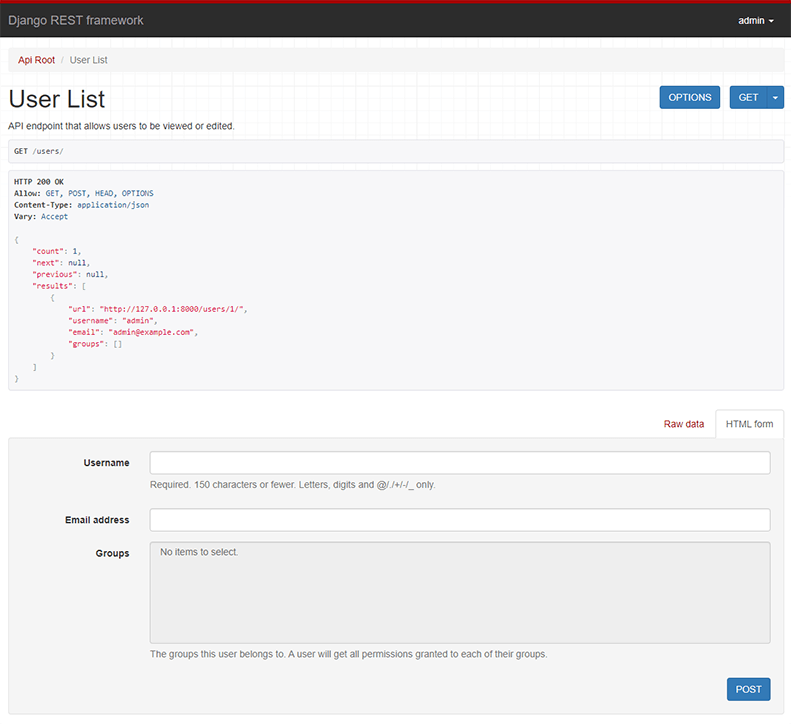
- The Web browsable API is a huge usability win for your developers.
- Authentication policies including optional packages for OAuth1a and OAuth2.
- Serialization that supports both ORM and non-ORM data sources.
- Customizable all the way down - just use regular function-based views if you don't need the more powerful features.
- Extensive documentation, and great community support.
There is a live example API for testing purposes, available here.
Below: Screenshot from the browsable API
Requirements
- Python (3.5, 3.6, 3.7, 3.8)
- Django (1.11, 2.0, 2.1, 2.2, 3.0)
We highly recommend and only officially support the latest patch release of each Python and Django series.
Installation
Install using pip...
pip install djangorestframework
Add 'rest_framework' to your INSTALLED_APPS setting.
INSTALLED_APPS = [
    ...
    'rest_framework',
]
Example
Let's take a look at a quick example of using REST framework to build a simple model-backed API for accessing users and groups.
Startup up a new project like so...
pip install django
pip install djangorestframework
django-admin startproject example .
./manage.py migrate
./manage.py createsuperuser
Now edit the example/urls.py module in your project:
from django.conf.urls import url, include
from django.contrib.auth.models import User
from rest_framework import serializers, viewsets, routers

# Serializers define the API representation.
class UserSerializer(serializers.HyperlinkedModelSerializer):
    class Meta:
        model = User
        fields = ['url', 'username', 'email', 'is_staff']


# ViewSets define the view behavior.
class UserViewSet(viewsets.ModelViewSet):
    queryset = User.objects.all()
    serializer_class = UserSerializer


# Routers provide a way of automatically determining the URL conf.
router = routers.DefaultRouter()
router.register(r'users', UserViewSet)


# Wire up our API using automatic URL routing.
# Additionally, we include login URLs for the browsable API.
urlpatterns = [
    url(r'^', include(router.urls)),
    url(r'^api-auth/', include('rest_framework.urls', namespace='rest_framework'))
]
We'd also like to configure a couple of settings for our API.
Add the following to your settings.py module:
INSTALLED_APPS = [
    ...  # Make sure to include the default installed apps here.
    'rest_framework',
]

REST_FRAMEWORK = {
    # Use Django's standard `django.contrib.auth` permissions,
    # or allow read-only access for unauthenticated users.
    'DEFAULT_PERMISSION_CLASSES': [
        'rest_framework.permissions.DjangoModelPermissionsOrAnonReadOnly'
    ]
}
That's it, we're done!
./manage.py runserver
You can now open the API in your browser at http://127.0.0.1:8000/, and view your new 'users' API. If you use the Login control in the top right corner you'll also be able to add, create and delete users from the system.
You can also interact with the API using command line tools such as curl. For example, to list the users endpoint:
$ curl -H 'Accept: application/json; indent=4' -u admin:password http://127.0.0.1:8000/users/
[
    {
        "url": "http://127.0.0.1:8000/users/1/",
        "username": "admin",
        "email": "admin@example.com",
        "is_staff": true,
    }
]
Or to create a new user:
$ curl -X POST -d username=new -d email=new@example.com -d is_staff=false -H 'Accept: application/json; indent=4' -u admin:password http://127.0.0.1:8000/users/
{
    "url": "http://127.0.0.1:8000/users/2/",
    "username": "new",
    "email": "new@example.com",
    "is_staff": false,
}
Documentation & Support
Full documentation for the project is available at https://www.django-rest-framework.org/.
For questions and support, use the REST framework discussion group, or #restframework on freenode IRC.
You may also want to follow the author on Twitter.
Security
Please see the security policy.
5 maintainers


Metadata
5 maintainers
Release files for djangorestframework 3.11.0
For a detailed explanation of source distributions (sdists) and built distributions (wheels), please see the package formats documentation.
Source distribution (sdist)
| File | Size | Uploaded | Provenance | |
|---|---|---|---|---|
| djangorestframework-3.11.0.tar.gz | 791.7 kB | Without provenance | Details |
Built distribution (wheel)
| File | Interpreter | ABI | Platform | Reset |
|---|---|---|---|---|
| djangorestframework-3.11.0-py3-none-any.whl | Python 3 | none | any | Details |
Total release size: 1.7 MB
Release files / djangorestframework-3.11.0.tar.gz
| Download URL | djangorestframework-3.11.0.tar.gz |
|---|---|
| Size | 791.7 kB |
| Tags | Source |
|
SHA-256 checksum How to use checksums |
e782087823c47a26826ee5b6fa0c542968219263fb3976ec3c31edab23a4001f
|
|
BLAKE2b-256 checksum How to use checksums |
80f6f742b0352d4ade1934fcb2a12f6fd669922415bea3d5d2d6596dc47abe14
|
| Upload date | |
|
Uploaded using Trusted Publishing? What is trusted publishing? |
No |
| Uploaded via |
twine/3.1.1 pkginfo/1.4.2 requests/2.21.0 setuptools/40.6.3 requests-toolbelt/0.8.0 tqdm/4.28.1 CPython/3.6.7
|
Release files / djangorestframework-3.11.0-py3-none-any.whl
| Download URL | djangorestframework-3.11.0-py3-none-any.whl |
|---|---|
| Size | 911.2 kB |
| Tags | Python 3 |
|
SHA-256 checksum How to use checksums |
05809fc66e1c997fd9a32ea5730d9f4ba28b109b9da71fccfa5ff241201fd0a4
|
|
BLAKE2b-256 checksum How to use checksums |
be5b9bbde4395a1074d528d6d9e0cc161d3b99bd9d0b2b558ca919ffaa2e0068
|
| Upload date | |
|
Uploaded using Trusted Publishing? What is trusted publishing? |
No |
| Uploaded via |
twine/3.1.1 pkginfo/1.4.2 requests/2.21.0 setuptools/40.6.3 requests-toolbelt/0.8.0 tqdm/4.28.1 CPython/3.6.7
|
Security for djangorestframework 3.11.0
Provenance
Provenance describes where a file came from. On PyPI, provenance is shared via attestations, which provide a verifiable record of the build or publishing details. View details, limitations and caveats.
No provenance found
None of the files in this release were uploaded with provenance metadata.
A note on package security
PyPI is a repository for distributing packages, not a service for auditing them. While third-party security researchers and our staff do their best to detect and remove malicious packages, PyPI cannot guarantee the quality, security or suitability of any given package.
To learn more about protecting yourself from malicious actors, visit our package security documentation.














