
Web APIs for Django, made easy.
Verified details
These details have been verified by PyPIProject links
GitHub Statistics
Maintainers


Project description
Django REST framework



Awesome web-browsable Web APIs.
Full documentation for the project is available at https://www.django-rest-framework.org/.
Overview
Django REST framework is a powerful and flexible toolkit for building Web APIs.
Some reasons you might want to use REST framework:
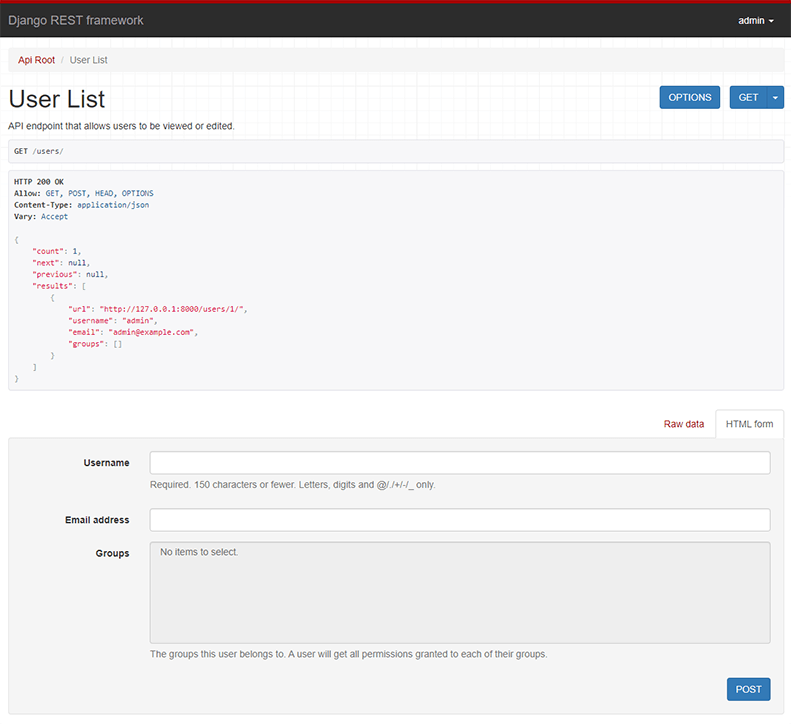
- The Web browsable API is a huge usability win for your developers.
- Authentication policies including optional packages for OAuth1a and OAuth2.
- Serialization that supports both ORM and non-ORM data sources.
- Customizable all the way down - just use regular function-based views if you don't need the more powerful features.
- Extensive documentation, and great community support.
Below: Screenshot from the browsable API
Requirements
- Python 3.10+
- Django 4.2, 5.0, 5.1, 5.2, 6.0
We highly recommend and only officially support the latest patch release of each Python and Django series.
Installation
Install using pip...
pip install djangorestframework
Add 'rest_framework' to your INSTALLED_APPS setting.
INSTALLED_APPS = [
    # ...
    "rest_framework",
]
Example
Let's take a look at a quick example of using REST framework to build a simple model-backed API for accessing users and groups.
Start up a new project like so...
pip install django
pip install djangorestframework
django-admin startproject example .
./manage.py migrate
./manage.py createsuperuser
Now edit the example/urls.py module in your project:
from django.contrib.auth.models import User
from django.urls import include, path
from rest_framework import routers, serializers, viewsets


# Serializers define the API representation.
class UserSerializer(serializers.HyperlinkedModelSerializer):
    class Meta:
        model = User
        fields = ["url", "username", "email", "is_staff"]


# ViewSets define the view behavior.
class UserViewSet(viewsets.ModelViewSet):
    queryset = User.objects.all()
    serializer_class = UserSerializer


# Routers provide a way of automatically determining the URL conf.
router = routers.DefaultRouter()
router.register(r"users", UserViewSet)

# Wire up our API using automatic URL routing.
# Additionally, we include login URLs for the browsable API.
urlpatterns = [
    path("", include(router.urls)),
    path("api-auth/", include("rest_framework.urls", namespace="rest_framework")),
]
We'd also like to configure a couple of settings for our API.
Add the following to your settings.py module:
INSTALLED_APPS = [
    # ... make sure to include the default installed apps here.
    "rest_framework",
]

REST_FRAMEWORK = {
    # Use Django's standard `django.contrib.auth` permissions,
    # or allow read-only access for unauthenticated users.
    "DEFAULT_PERMISSION_CLASSES": [
        "rest_framework.permissions.DjangoModelPermissionsOrAnonReadOnly",
    ]
}
That's it, we're done!
./manage.py runserver
You can now open the API in your browser at http://127.0.0.1:8000/, and view your new 'users' API. If you use the Login control in the top right corner you'll also be able to add, create and delete users from the system.
You can also interact with the API using command line tools such as curl. For example, to list the users endpoint:
$ curl -H 'Accept: application/json; indent=4' -u admin:password http://127.0.0.1:8000/users/
[
    {
        "url": "http://127.0.0.1:8000/users/1/",
        "username": "admin",
        "email": "admin@example.com",
        "is_staff": true,
    }
]
Or to create a new user:
$ curl -X POST -d username=new -d email=new@example.com -d is_staff=false -H 'Accept: application/json; indent=4' -u admin:password http://127.0.0.1:8000/users/
{
    "url": "http://127.0.0.1:8000/users/2/",
    "username": "new",
    "email": "new@example.com",
    "is_staff": false,
}
Documentation & Support
Full documentation for the project is available at https://www.django-rest-framework.org/.
For questions and support, use the REST framework discussion group, or #restframework on libera.chat IRC.
Security
Please see the security policy.
Project details
Verified details
These details have been verified by PyPIProject links
GitHub Statistics
Maintainers
Release history Release notifications | RSS feed


Download files
Download the file for your platform. If you're not sure which to choose, learn more about installing packages.
Source Distribution
Built Distribution
Filter files by name, interpreter, ABI, and platform.
If you're not sure about the file name format, learn more about wheel file names.
Copy a direct link to the current filters
File details
Details for the file djangorestframework-3.17.2.tar.gz.
File metadata
- Download URL: djangorestframework-3.17.2.tar.gz
- Upload date:
- Size: 906.7 kB
- Tags: Source
- Uploaded using Trusted Publishing? Yes
- Uploaded via: twine/6.1.0 CPython/3.13.7
File hashes
| Algorithm | Hash digest | |
|---|---|---|
| SHA256 |
89ed713b6dc83e1539f214b7d10808ae19bb8511004beba886225da6d5c9dafa
|
|
| MD5 |
73744436e54c9fd616e286a04b1bdbc1
|
|
| BLAKE2b-256 |
3b35c96055e700fdff25da3a7b7756cfd1d4dc54f38b9bc6d6c5e19e3a0fdc20
|
Provenance
The following attestation bundles were made for djangorestframework-3.17.2.tar.gz:
Publisher:
release.yml on encode/django-rest-framework
-
Statement:
-
Statement type:
https://in-toto.io/Statement/v1 -
Predicate type:
https://docs.pypi.org/attestations/publish/v1 -
Subject name:
djangorestframework-3.17.2.tar.gz -
Subject digest:
89ed713b6dc83e1539f214b7d10808ae19bb8511004beba886225da6d5c9dafa - Sigstore transparency entry: 2343076130
- Sigstore integration time:
-
Permalink:
encode/django-rest-framework@ad309f3e18aa5591db87a8fc959dc4564c000324 -
Branch / Tag:
refs/tags/3.17.2 - Owner: https://github.com/encode
-
Access:
public
-
Token Issuer:
https://token.actions.githubusercontent.com -
Runner Environment:
github-hosted -
Publication workflow:
release.yml@ad309f3e18aa5591db87a8fc959dc4564c000324 -
Trigger Event:
push
-
Statement type:
File details
Details for the file djangorestframework-3.17.2-py3-none-any.whl.
File metadata
- Download URL: djangorestframework-3.17.2-py3-none-any.whl
- Upload date:
- Size: 899.1 kB
- Tags: Python 3
- Uploaded using Trusted Publishing? Yes
- Uploaded via: twine/6.1.0 CPython/3.13.7
File hashes
| Algorithm | Hash digest | |
|---|---|---|
| SHA256 |
cb0546a7415d5b46c04e0f4fe0a54b2109f4fdd5e83ca773c8c6183a6493d042
|
|
| MD5 |
19fecee1048cb1b6d2a01cd86b2a78f2
|
|
| BLAKE2b-256 |
a246c14108e400b208c394325eb63fbae06c81341b6447fa1a6f9da718b17fe7
|
Provenance
The following attestation bundles were made for djangorestframework-3.17.2-py3-none-any.whl:
Publisher:
release.yml on encode/django-rest-framework
-
Statement:
-
Statement type:
https://in-toto.io/Statement/v1 -
Predicate type:
https://docs.pypi.org/attestations/publish/v1 -
Subject name:
djangorestframework-3.17.2-py3-none-any.whl -
Subject digest:
cb0546a7415d5b46c04e0f4fe0a54b2109f4fdd5e83ca773c8c6183a6493d042 - Sigstore transparency entry: 2343076144
- Sigstore integration time:
-
Permalink:
encode/django-rest-framework@ad309f3e18aa5591db87a8fc959dc4564c000324 -
Branch / Tag:
refs/tags/3.17.2 - Owner: https://github.com/encode
-
Access:
public
-
Token Issuer:
https://token.actions.githubusercontent.com -
Runner Environment:
github-hosted -
Publication workflow:
release.yml@ad309f3e18aa5591db87a8fc959dc4564c000324 -
Trigger Event:
push
-
Statement type:






