
A panel for Django Debug Toolbar (DjDT) to display the current user's permissions.

Project description
Permission panel for Django Debug Toolbar 




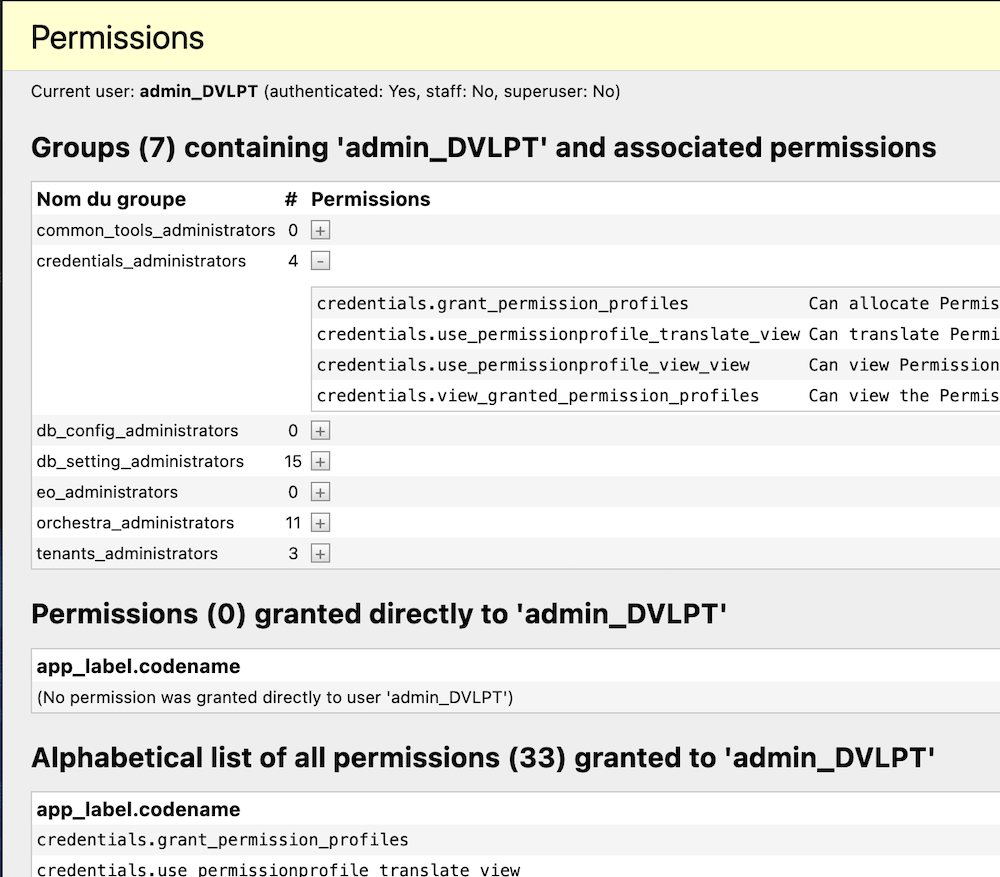
A simple DjDT panel displaying the permissions granted to the current user, how the current user obtained each one of them (directly or through a group membership), and the resulting consolidated permissions set.
Installation (on top of Django Debug Toolbar)
First, install django-debug-toolbar (instructions
here), then:
-
Install permission panel, either with Pip or Poetry:
pip install 'git+https://github.com/baudhuina/djdt-permissions.git@1.0.0#egg=djdt_permissions'or complete your project's
pyproject.tomlfile with XXX TO BE COMPLETED and runpoetry installorpoetry update. -
Add
djdt_permissiontoINSTALLED_APPS, make sure it's belowdjango.toolbar:Please note that just as the Debug Toolbar, this panel is not supposed to be installed if 'DEBUG' is False.
if DEBUG == True: INSTALLED_APPS += [ ... 'debug_toolbar', 'djdt_permissions', ... ] -
Register the new panel by adding path
djdt_permissions.panels.PermissionsPanelto settingDEBUG_TOOLBAR_PANELS(which is entirely conditional toDEBUG). The sequence of the panels defines their order in the toolbar.DEBUG_TOOLBAR_PANELS = [ 'djdt_permissions.panels.PermissionsPanel', 'debug_toolbar.panels.history.HistoryPanel', 'debug_toolbar.panels.versions.VersionsPanel', # ... any other panel. ] -
(optional) If you want the panel to be disabled by default, add its full path in the
DEBUG_TOOLBAR_CONFIG[DISABLE_PANELS]set.DEBUG_TOOLBAR_CONFIG = { "DISABLE_PANELS": { 'djdt_permissions.panels.permissions_panelPermissionsPanel', # any other panel to disable }, # other config settings. ]
Usage
The Permission Panel is used just as any other panel of the Django Debug Toolbar:
- Open DJdT overlay;
- Enable, disable, consult the panel at will...
Installing the test project
Would you wish to modify/contribute to this project...
NB: The commands below assume that your
DJANGO_SETTINGS_MODULEis not set, and that the settings will be the default value from manage.py,
i.e.'test_project/settings. If it is set to another value, add a --setings=test_project.settingsoption to allmanage.py` commands.
- Fork the GIT repo from GitHub. It contains a Django test project.
- Install dependencies:
poetry install. - Apply migrations:
manage.py migrate. - Run server:
manage.py runserver. - Point your browser at http://localhost:8000.
Running the tests
Once the test project is installed (see above), run the tests without coverage measurement:
manage.py test
or with coverage measurement (report will be in coverage_html/index.html):
coverage run -m manage test [-v2]
To run the tests for all supported python and django combinations:
tox
Contact me
Release history Release notifications | RSS feed


Download files
Download the file for your platform. If you're not sure which to choose, learn more about installing packages.
Source Distribution
Built Distribution
Filter files by name, interpreter, ABI, and platform.
If you're not sure about the file name format, learn more about wheel file names.
Copy a direct link to the current filters
File details
Details for the file djdt_permissions-1.0.2.tar.gz.
File metadata
- Download URL: djdt_permissions-1.0.2.tar.gz
- Upload date:
- Size: 9.1 kB
- Tags: Source
- Uploaded using Trusted Publishing? No
- Uploaded via: twine/4.0.2 CPython/3.11.4
File hashes
| Algorithm | Hash digest | |
|---|---|---|
| SHA256 |
96f585914856a9c02138894287c405a2d97b6f5945b56192c624a1a169d0aa0a
|
|
| MD5 |
57608933a500286082f2cd58b1902361
|
|
| BLAKE2b-256 |
6b080d3ef2aec8718c081563e8ed81115afa4bd5f1afc7fb7ba1bb4a78560567
|
File details
Details for the file djdt_permissions-1.0.2-py3-none-any.whl.
File metadata
- Download URL: djdt_permissions-1.0.2-py3-none-any.whl
- Upload date:
- Size: 9.3 kB
- Tags: Python 3
- Uploaded using Trusted Publishing? No
- Uploaded via: twine/4.0.2 CPython/3.11.4
File hashes
| Algorithm | Hash digest | |
|---|---|---|
| SHA256 |
8d6cb38126e488d97438f1607cc1dba8c9a224bf07c03193c0a207f4791fa9e9
|
|
| MD5 |
874fa9ab6d830adbc4dbe92dae7ab6fe
|
|
| BLAKE2b-256 |
cad54afb346775349638a79f2317133530a1413de598e59c63988b37baac4950
|






