
DJI Geotagger 
A precise PPK + MRK-based geotagging tool for DJI RTK drones
This Python library computes centimetre-level camera positions for DJI RTK
drone imagery. It takes the raw GNSS logs and the flight folders, converts
them to RINEX, resolves the base station through CSRS-PPP, runs a differential
PPK solution against it, applies the DJI .MRK lever arm to reach the camera
centre, and writes one row per photo in the coordinate system you specify,
each with its own uncertainty. It is designed for photogrammetry and remote
sensing workflows that require accurate EOPs.
Features
End to end, with nothing to do by hand
- Automated CSRS-PPP — submits the base observation, polls, downloads and
parses the result, including the epoch-propagation term. No account, no
browser, no
.sumto fetch yourself - Convert raw GNSS logs (
.bin,.dat) to RINEX using RTKLIBconvbin - Download precise ephemeris (SP3/CLK) automatically from IGS
- Run differential PPK (rover against base) with RTKLIB
rnx2rtkp, fetched on first use — nothing to install - Base position from CSRS-PPP, an existing
.sum, or published coordinates - Apply the DJI
.MRKlever arm to reach the camera centre, per exposure - Batch multiple flight folders with per-flight error isolation, optionally in parallel
Results you can defend
- Rover and base uncertainties combined as full 3×3 covariance matrices, so inter-axis correlations survive into the reported sigma
- Frame and epoch carried through to the output, because a centimetre coordinate without them cannot be checked or reused
- Transform to any CRS, with PROJ's silent failure modes — ballpark datum shifts, unversioned EPSG codes that discard a 1.6 m shift — raised as errors rather than absorbed
- Indefinite RTKLIB covariances detected and flagged instead of passed on
Interfaces
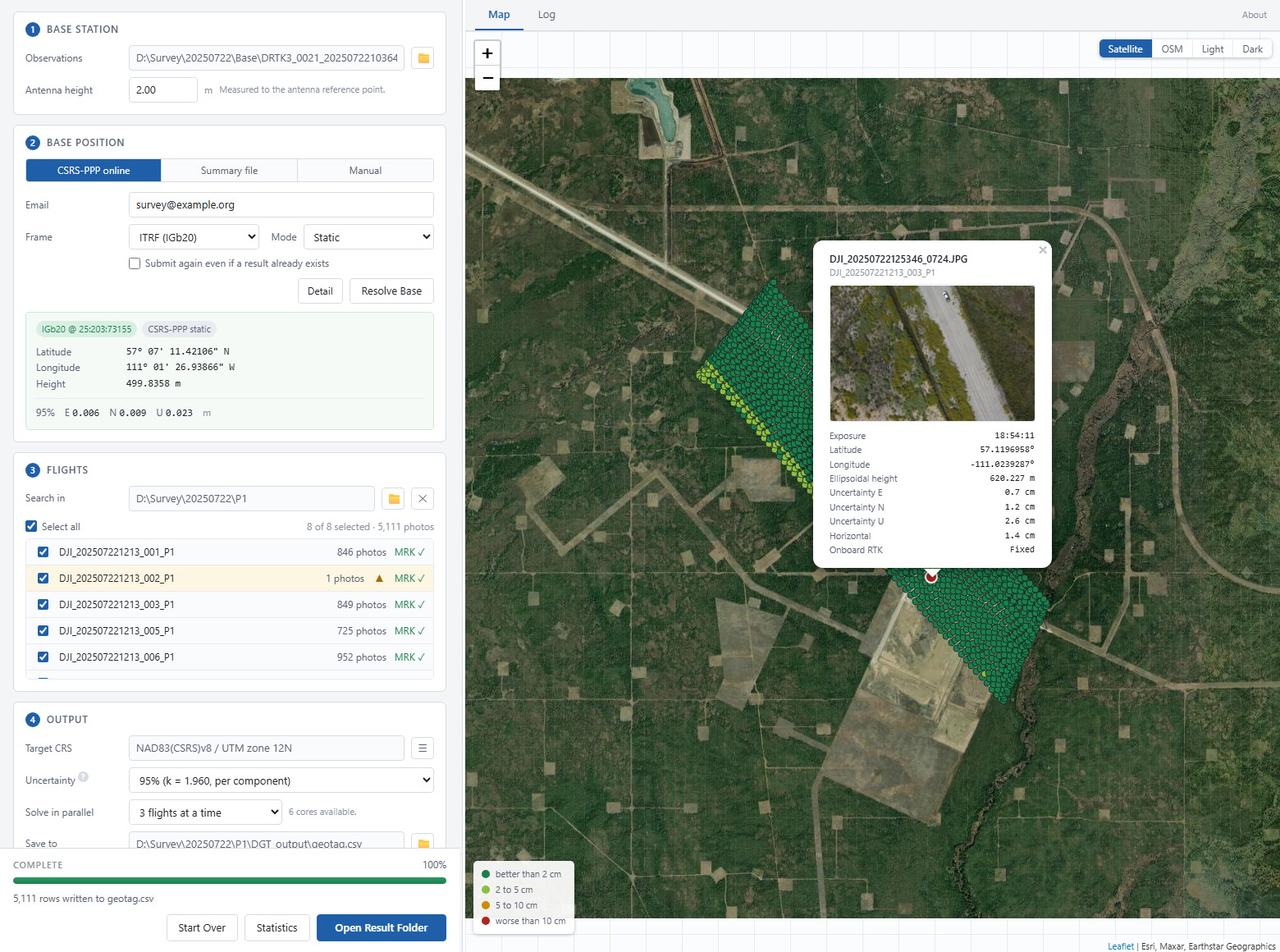
- Desktop front end with a map, quality colouring and a validating CRS picker
- Ships as a Python package or a standalone Windows executable
Installation
pip install dji-geotagger          # library
pip install dji-geotagger[gui]     # library and desktop front end
Or from source:
git clone https://github.com/geo-raypan/dji-geotagger.git
cd dji-geotagger
pip install -e .
Dependencies
Python ≥ 3.11, plus pillow, defusedxml, pandas, numpy, pyproj, tqdm,
requests, georinex, astropy, pymap3d.
RTKLIB (convbin, rnx2rtkp) is downloaded automatically on first use.
The front end adds pywebview, which is why it is an extra rather than a
dependency: a headless script should not install a GUI toolkit it will never
open.
Desktop Front End
python -c "from dji_geotagger.gui import launch; launch()"
A standalone Windows build needing no Python is on the releases page. It is unsigned, so SmartScreen asks once: More info → Run anyway.
Four steps, each unlocked by the one before it: base station, base position, flights, output.
Resolving the base is a separate action from the run. CSRS-PPP takes minutes and every flight inherits whatever it returns, so the coordinates are shown and wait to be looked at first. An existing result is reused when its frame, mode and epoch match the request.
The map is the check that costs nothing. MRK positions appear as soon as a folder is added — wrong folder, missing flight or GNSS gap all show up before anything is processed. Afterwards it shows the corrected camera centres, coloured by their own horizontal uncertainty and clickable down to a preview of the photo.
The coordinate system picker validates a target by running the real transformation against the resolved base, so it refuses exactly what a run would refuse — and it does so before the run rather than ten minutes into it.
Quick Start
import dji_geotagger as dgt

# 1. Convert GNSS raw data to RINEX
base_obs, base_nav = dgt.raw2rinex(
    input_path=r"DRTK3/DRTK3_20250730.dat",
    antenna_height_in_meter=2.0,
)

# 2. Resolve the base station position (submitted to CSRS-PPP, fetched back)
base_position = dgt.resolve_base_position(
    mode="online",
    base_obs=base_obs,
    email="you@example.com",
    ppp_kwargs={"process_type": "Static", "sysref": "ITRF"},
)

# 3. Process all flights
geotag_df = dgt.geotag(
    flight_folders=[
        r"P1/DJI_202507301227_011_LOCATION",
        r"P1/DJI_202507301227_012_LOCATION",
    ],
    base_obs=base_obs,
    base_nav=base_nav,
    base_position=base_position,
)

geotag_df.to_csv("geotagged_results.csv", index=False)
Base Station Position
All three modes return the same structure, so the rest of the script is unchanged whichever is used.
antenna_height_in_meter decides what the solved coordinate refers to. Given
one, it is the ground mark; left at zero, it is the antenna reference point.
Both ends are handled — the RINEX header and RTKLIB's own antenna delta — so
the two never disagree. (Before 2.1.1 the value was silently discarded and the
result always referred to the ARP.)
A DJI base solved by a third-party PPP service carries an uncorrected
antenna offset. No IGS/NGS calibration is published for the D-RTK 3, so
CSRS-PPP reports ANT NOT FOUND and applies no phase-centre correction;
RTKLIB does not either. What remains is systematic, almost entirely vertical,
and does not cancel between base and rover, because the two antennas are
different hardware. It is not included in the reported sigma. Relative
work is unaffected; absolute heights should be checked against independent
control before they are relied on.
DJI does publish a mechanical figure — the D-RTK 3's phase centre sits 10 cm above the top of the survey pole — worth applying to the height bookkeeping above, though it is not a substitute for a calibration.
# Submit to CSRS-PPP and fetch the .sum back (no account needed)
dgt.resolve_base_position(mode="online", base_obs=base_obs,
                          email="you@example.com")

# An existing .sum - omit sum_file_path to auto-detect one next to the .obs
dgt.resolve_base_position(mode="sum", sum_file_path=r"DRTK3/PPP/base.sum")

# Known coordinates. hgt must be ELLIPSOIDAL; orthometric heights are refused.
dgt.resolve_base_position(mode="manual", manual_kwargs=dict(
    lat_dd=51.0, lon_dd=-114.0, hgt=1000.0,
    coord_sys="NAD83(CSRS)", epoch="2010.0",
    sigma_ENU=(0.010, 0.010, 0.020),   # metres, 1-sigma; None to disable
))
sigma_ENU must be given explicitly. Pass None to report rover-only
precision — it is never assumed to be zero.
To deliver at a fixed epoch, ask CSRS-PPP for it here:
ppp_kwargs={"sysref": "NAD83", "nad83_epoch": "NAD83_20100101"}
This is the only step that can propagate an epoch, and it returns the
propagation uncertainty too. "NAD83_CURR" does not propagate.
Coordinate Transformation
geotag() leaves coordinates in the frame CSRS-PPP solved in, tagged with the
reference epoch. That pair is lossless, so keep it — any other CRS can be
derived from it later.
utm_df = dgt.transform_coordinates(geotag_df, 22811)   # NAD83(CSRS)v8 / UTM 11N
print(utm_df.attrs["transform"])                        # provenance
Uncertainties are rotated into the target frame, accounting for meridian convergence and the point scale factor.
Use versioned EPSG codes. EPSG:2956 and EPSG:22812 are both named
"NAD83(CSRS) / UTM zone 12N", but the first names no realization, so PROJ
falls back to a ballpark shift and discards the datum shift entirely. The
versioned NAD83(CSRS) UTM codes run 222xx (v2) to 228xx (v8).
Where EPSG has no versioned code, build the CRS:
itrf_utm    = dgt.make_utm_crs(11, 9988)             # no ITRF2020 UTM exists
alberta_3tm = dgt.rebase_projected_crs(3780, 10412)  # 3TM grid, v8 datum
PROJ degrades silently rather than raising, so three cases are refused by default:
| Refused | Override |
|---|---|
| Ballpark fallback (no rigorous transformation exists) | allow_ballpark=True |
| Datum ensemble target, e.g. plain WGS 84 | allow_datum_ensemble=True |
| Missing epoch | supply source_epoch= |
Note that cam_lat/cam_lon are already WGS 84 for practical purposes, so
asking for it is rarely necessary.
Output Format
geotag() returns a compact table by default; full_output=True adds all
intermediate columns.
| Column | Description |
|---|---|
FileName |
Image filename |
UTCAtExposure |
DJI's XMP field, passed through — holds GPS time, 18 s ahead of UTC in 2025 (why) |
coord_sys, epoch |
Reference frame and epoch |
cam_lat, cam_lon, cam_h |
Camera centre, ellipsoidal height (metres) |
cam_X, cam_Y, cam_Z |
Camera centre ECEF (metres) |
sigma_E, sigma_N, sigma_U |
1-sigma uncertainty, local ENU (metres) |
DGT_YawDegree, DGT_PitchDegree, DGT_RollDegree |
Camera attitude (degrees) |
rtk_status |
Fixed, Float, Single or Unknown |
With full_output=True: seq, GPS_time, GPS_week, antenna position
(X/Y/Z, lat_dd/lon_dd/hgt), cov_total_ECEF, sigma_total_ECEF,
epoch_decimal_year, base_source, cov_repaired, the lever arm
(gimbal_dN/dE/dD, gimbal_dX/dY/dZ), aircraft and gimbal attitude,
EXIF/XMP fields, and flight.
After transform_coordinates() every coordinate column holds its value in the
target frame, and a projected target adds two more:
| Column | Description |
|---|---|
cam_E, cam_N |
Camera centre easting/northing on the target grid (metres) |
coord_sys then names the target CRS in full, e.g.
NAD83(CSRS)v8 / UTM zone 11N, so the file says which frame it is in.
Skipped flights are listed in geotag_df.attrs["failed_flights"].
Where each column comes from — and which are DJI's fields passed through rather than computed here — is in What is in geotag.csv.
sigma_E/N/U are 1σ; the desktop front end offers 1σ / 95% / 99% and
renames the columns when it rescales them, so sigma_E_95 can never be
mistaken for sigma_E. Set base_error_propagation_on=False for rover-only
precision. Treat the reported sigma as a lower bound — see the uncertainty
model below for what is and is not in it.
Method
What the tool actually does to your data, with the frames, formulas and the measurements that back them:
- How a camera centre is computed — PPP → PPK → MRK → camera centre as a diagram, the frames and rotation matrices, why the steps are in that order, and where the pipeline produces NaN rather than a guess. Includes the uncertainty model: what CSRS-PPP's sigma covers, what happens when you supply your own, why zero is refused, how the k factor is applied, and what is left out.
- Camera attitude — where yaw, pitch and roll come
from, what the
DGT_*normalization changes, and how the rotation sequence was determined from DJI's own data rather than assumed. - What is in geotag.csv — the provenance of every
column: what is computed here, what is DJI's own field passed through, and
why
UTCAtExposureis not UTC.
Key Functions
Core — geotag(), compute_camera_position()
Raw data & PPK — raw2rinex(), process_ppk(), pos2df(), mrk2df(),
parse_img_dir()
Base station — resolve_base_position(), build_base_position(),
run_online_ppp(), sum_file_parser()
Coordinate transformation — transform_coordinates(), make_utm_crs(),
rebase_projected_crs(), resolve_source_crs()
Infrastructure — ensure_rtklib(), configure_logging(), Progress,
OperationCancelled
Two helpers are not re-exported:
from dji_geotagger.ppk.ephemeris_downloader import download_igs_data
from dji_geotagger.config.import_config import override_rtklib_config
Configuration
RTKLIB defaults are in dji_geotagger/config/default_ppk_dict.py. Override
with user_conf:
dgt.process_ppk(base_obs, base_nav, rover_obs,
                user_conf={'pos1-posmode': 'kinematic'})
geotag(), process_ppk() and raw2rinex() accept progress, which also
carries cancellation:
progress = dgt.Progress(on_progress=lambda e: print(e.message),
                        should_cancel=lambda: stop_requested)
try:
    dgt.geotag(..., progress=progress)
except dgt.OperationCancelled:
    ...
Console logging is configured on import; dgt.configure_logging(console=False)
silences it.
Troubleshooting
RTKLIB not found — run dgt.ensure_rtklib() up front.
No CSRS-PPP account — use mode="manual" with a surveyed position.
Base and rover do not overlap in time — PPK is differential, so epochs
outside the base station's span cannot be solved. Checked before RTKLIB runs;
disable with check_overlap=False.
One flight fails in a batch — skipped by default and listed in
attrs["failed_flights"]. Use on_flight_error="raise" to stop instead.
Image-time mismatch — check the camera clock is within ±1 s of GPS, that EXIF/XMP timestamps are UTC, and that MRK files cover the same period.
Every image reports no metadata — defusedxml is missing; Pillow's
getxmp() needs it and fails silently without it.
Performance Tips
- Process multiple flights in one
geotag()call: the RTKLIB configuration and the ephemerides are then prepared once instead of once per flight - Solve them concurrently with
geotag(..., max_workers=4). Measured 2.35× on three flights, with byte-identical output. Past about four the limit is the disk, since every worker reads the same base observation file - Use IGS Rapid orbits (available ~17–18 hours after end-of-day UTC)
- Filter low-confidence solutions using covariance thresholds
References
- RTKLIB: https://www.rtklib.com/
- CSRS-PPP: https://webapp.geod.nrcan.gc.ca/geod/tools-outils/ppp.php
- IGS Data: https://www.igs.org/products/
- DJI Documentation: https://enterprise.dji.com/
License
This project is licensed under the BSD 2-Clause (see LICENSE for details).
Acknowledgments
- Grew out of fieldwork with the Applied Geospatial Research Group, University of Calgary (appliedgrg.ca) — DJI Matrice 350 RTK + Zenmuse P1, Hemisphere base stations, CSRS-PPP post-processing
- RTKLIB by Tomoji Takasu
1 maintainer

Release files for dji-geotagger 3.1.1
For a detailed explanation of source distributions (sdists) and built distributions (wheels), please see the package formats documentation.
Source distribution (sdist)
| File | Size | Uploaded | |
|---|---|---|---|
| dji_geotagger-3.1.1.tar.gz | 215.0 kB | Details |
Built distribution (wheel)
| File | Interpreter | ABI | Platform | Reset |
|---|---|---|---|---|
| dji_geotagger-3.1.1-py3-none-any.whl | Python 3 | none | any | Details |
Total release size: 436.1 kB
Release files / dji_geotagger-3.1.1.tar.gz
| Download URL | dji_geotagger-3.1.1.tar.gz |
|---|---|
| Size | 215.0 kB |
| Tags | Source |
|
SHA-256 checksum How to use checksums |
babbfd0c6f01a7f471d5816db74d5d49bb4e590ad64c92e9c9238005575d1f95
|
|
BLAKE2b-256 checksum How to use checksums |
880aad2b25c322df59e4e855f09ee2beff586f020db73716808441940cb91185
|
| Upload date | |
|
Uploaded using Trusted Publishing? What is trusted publishing? |
No |
| Uploaded via |
twine/7.0.0 CPython/3.11.9
|
Release files / dji_geotagger-3.1.1-py3-none-any.whl
| Download URL | dji_geotagger-3.1.1-py3-none-any.whl |
|---|---|
| Size | 221.0 kB |
| Tags | Python 3 |
|
SHA-256 checksum How to use checksums |
d16d60cf46bce3c874e6be9a1589b7441e92fb21200480b1d81f6b5e783b9b5b
|
|
BLAKE2b-256 checksum How to use checksums |
dca4cf1cc870d4b263b8caf64d4d36e16fef7b79b36e29a78eadf9102cf50306
|
| Upload date | |
|
Uploaded using Trusted Publishing? What is trusted publishing? |
No |
| Uploaded via |
twine/7.0.0 CPython/3.11.9
|














