
Edit contents directly on your page with Django


Project description
DjSuperAdmin


✍️ Edit contents directly on your page with Django
Here's how it works
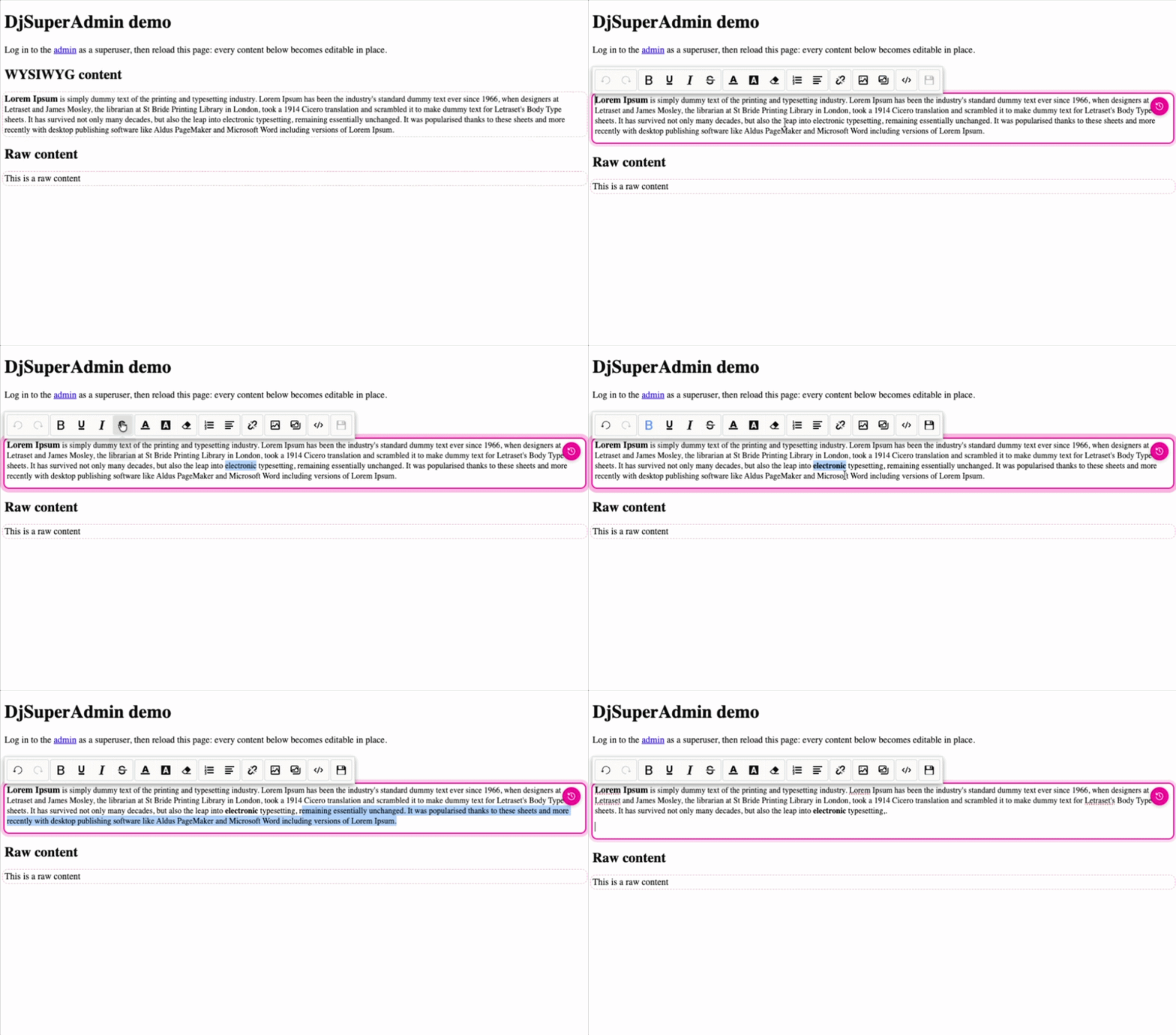
Superusers get an inline editor (SunEditor, lazy-loaded from a CDN on first edit) right on the rendered page. Everyone else just sees the plain content.
Compatibility
- Django 2.0 → latest (tested 2.2 → 6.0)
- Python 3.6+
- Zero runtime dependencies (other than Django itself)
Installation
pip install djsuperadmin
# or
uv add djsuperadmin
Setup
Add the app to INSTALLED_APPS:
INSTALLED_APPS = [
    # ...
    "djsuperadmin",
]
Include the urls only if you use the built-in Content model (i.e. the bare-string
tag form shown below):
from django.urls import path, include

urlpatterns = [
    # ...
    path("", include("djsuperadmin.urls")),
]
Finally, load the template tags and drop {% djsuperadminjs %} once in your footer.
It injects the djsuperadmin bundle (which lazy-loads SunEditor on first edit), and
renders only for authenticated superusers (empty string for everyone else):
{% load djsuperadmintag %}

<!-- ... your page ... -->

{% djsuperadminjs %}
Usage
Simple (bare string)
Pass a default string. djsuperadmin stores it in its built-in Content model, keyed by a
hash of the text and auto-created on first render. Requires the urls to be included.
{% load djsuperadmintag %}

{% superadmin_content 'Some default text' %}
Raw content
Same as above but with a plain textarea editor (no WYSIWYG) — good for plain text or
snippets. Note the tag name is superadmin_raw_content:
{% superadmin_raw_content 'Some default text' %}
Bind to a model attribute
Both tags also accept an object and an attribute name. Superusers see an editable
element (a <div class="djsuperadmin"> for WYSIWYG, a <span> for raw), everyone
else sees the plain value:
{% superadmin_content my_object 'body' %}
{% superadmin_raw_content my_object 'body' %}
Advanced: your own content model + endpoint
Mix in DjSuperAdminMixin and expose a GET/PATCH endpoint. The mixin raises
NotImplementedError if the two url properties are not defined.
from django.db import models
from djsuperadmin.mixins import DjSuperAdminMixin


class MyContent(models.Model, DjSuperAdminMixin):
    body = models.TextField()

    @property
    def superadmin_get_url(self):
        return f"/api/mycontent/{self.pk}"

    @property
    def superadmin_patch_url(self):
        return f"/api/mycontent/{self.pk}"
Your endpoint must:
GET→ return JSON{"content": <value>}PATCHwith body{"content": <value>}→ save it
Then render it like any other object:
{% superadmin_content my_content 'body' %}
Settings
DJSUPERADMIN = {"INPLACE_EDIT": True}
When INPLACE_EDIT is True, contents are edited right on the page instead of in a
modal: raw contents via contenteditable, and WYSIWYG contents via an inline SunEditor
(its toolbar docks above the content while editing; click the toolbar's save button to
commit, or press Esc to cancel). Defaults to False (modal editing).
Version history / revert
Every save keeps the previous value. Hovering an editable content shows a toolbar
(✏️ edit + ⟲ history); the history icon lists past versions (timestamp + preview)
and clicking one restores it — reverting is itself an undoable save. Works out of the box for the built-in Content model (capped by
MAX_VERSIONS, default 20). Your own models opt in by exposing a
superadmin_history_url — see the docs.
DJSUPERADMIN = {"INPLACE_EDIT": True, "MAX_VERSIONS": 20}
Insert images from a media gallery
Point IMAGE_GALLERY_URL at an endpoint that returns
{"result": [{"src": "...", "name": "..."}, ...]} and the WYSIWYG toolbar gains an
"insert image from gallery" button. This is designed to plug into a CMS media
library. IMAGE_UPLOAD_URL (optional) enables direct uploads.
DJSUPERADMIN = {
    "INPLACE_EDIT": True,
    "IMAGE_GALLERY_URL": "/api/media/",  # returns the media list as JSON
}
The WYSIWYG editor (SunEditor) is lazy-loaded from jsDelivr. To self-host it — e.g. under a strict Content-Security-Policy — override the URLs:
DJSUPERADMIN = {
    "SUNEDITOR_JS": "/static/vendor/suneditor.min.js",
    "SUNEDITOR_CSS": "/static/vendor/suneditor.min.css",
}
Development
Contributions welcome — see CONTRIBUTING.md. Tooling is uv (Python) + pnpm (JS build & docs), with the frontend bundle built by Vite.
make install      # uv sync --dev && pnpm install
make test         # flake8 + pytest with coverage
make format       # black .
make lint         # flake8 djsuperadmin
make build        # rebuild djsuperadmin/static/djsuperadmin/djsuperadmin.bundle.js
make migrations   # uv run python manage.py makemigrations
make docs-dev     # VitePress docs (also: docs-build, docs-preview)
Run the demo / test project (example/, settings module
example.djsuperadmin_example.settings):
uv run python manage.py migrate
uv run python manage.py createsuperuser
uv run python manage.py runserver   # log in at /admin/, then open /
Documentation
Full docs: https://bnznamco.github.io/djsuperadmin/
Release history Release notifications | RSS feed


Download files
Download the file for your platform. If you're not sure which to choose, learn more about installing packages.
Source Distribution
Built Distribution
Filter files by name, interpreter, ABI, and platform.
If you're not sure about the file name format, learn more about wheel file names.
Copy a direct link to the current filters
File details
Details for the file djsuperadmin-1.0.0.tar.gz.
File metadata
- Download URL: djsuperadmin-1.0.0.tar.gz
- Upload date:
- Size: 18.5 kB
- Tags: Source
- Uploaded using Trusted Publishing? No
- Uploaded via: twine/6.1.0 CPython/3.13.12
File hashes
| Algorithm | Hash digest | |
|---|---|---|
| SHA256 |
343abb8222eb96238140909894ab0785809a503a93aa4d72886022d2bc15ace3
|
|
| MD5 |
0b4c7ba501f3eef2319e217c73919522
|
|
| BLAKE2b-256 |
98fe89bf95e5d72864d5da082599383eac7e955a7c537fb53c40d46cf8c8a4ac
|
File details
Details for the file djsuperadmin-1.0.0-py3-none-any.whl.
File metadata
- Download URL: djsuperadmin-1.0.0-py3-none-any.whl
- Upload date:
- Size: 16.4 kB
- Tags: Python 3
- Uploaded using Trusted Publishing? No
- Uploaded via: twine/6.1.0 CPython/3.13.12
File hashes
| Algorithm | Hash digest | |
|---|---|---|
| SHA256 |
6804e85d713dd48e12074a2e90314e19a020f686debc9501bf06935cb3b7713f
|
|
| MD5 |
1451844f8d413a24839c7adb3582bf91
|
|
| BLAKE2b-256 |
904e84a82c029806a5345f98f1547dceb7877f3d3e2a7d3f4258c2bcd4d4b410
|






