
This release is a pre-release and may not be stable for production use.
dkview
Docker and Swarm ops you can read, on servers that have no internet.
dkview is one Python file tree you copy onto a server. It runs the docker
command you asked for and prints the answer as a width-fitted, colored table,
and it adds the few views an operator actually wants at 3am: what is broken,
what is in the logs, and what the host is doing right now. Nothing to install,
no agent, no daemon, no network access, no root.
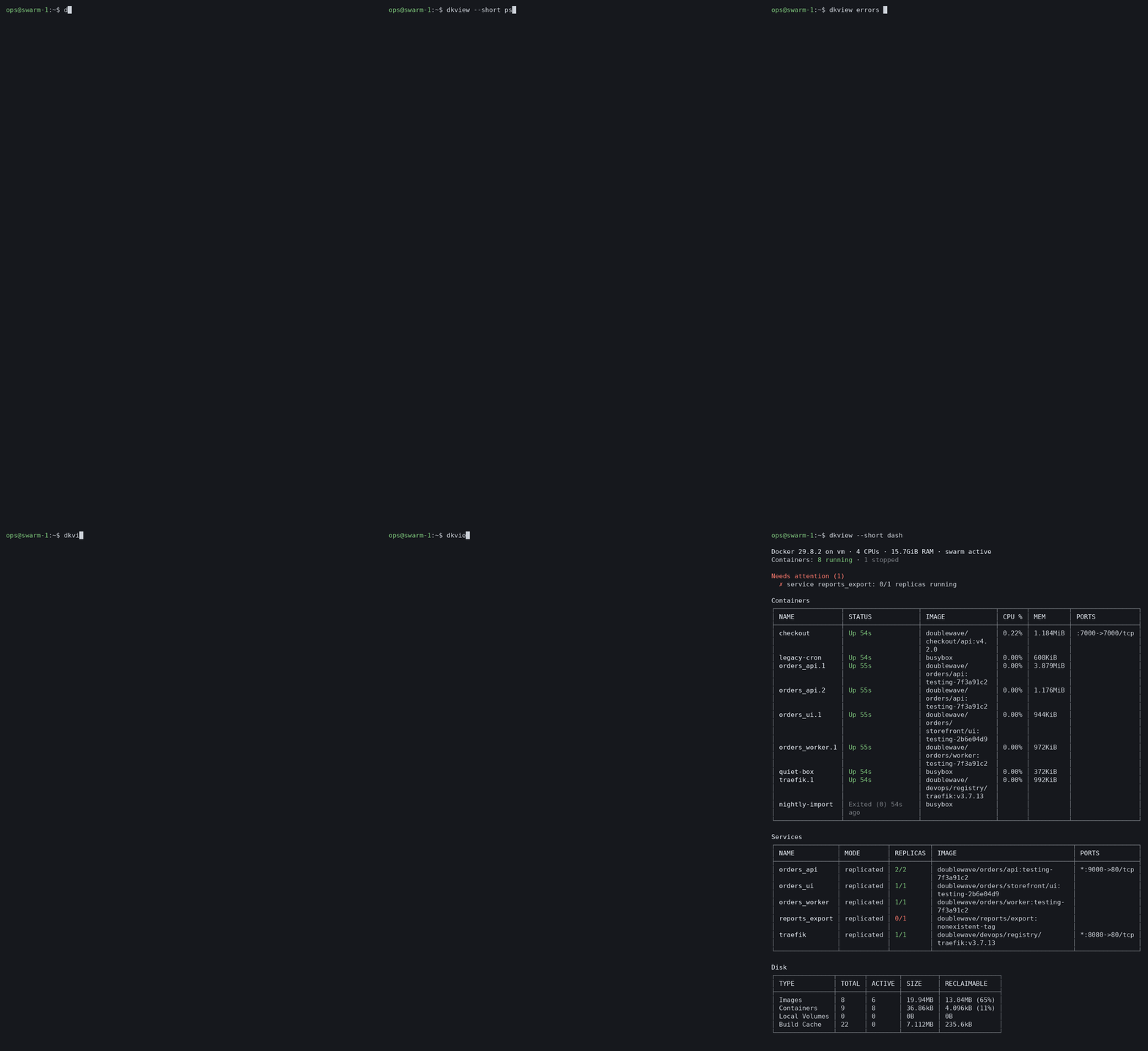
Why it exists
Swarm hosts behind a company firewall are still operated the way they were ten
years ago: docker service ls into an 80-column PuTTY window, columns wrapping
into each other, then docker service ps <name> --no-trunc to find out what the
error actually said, then docker service logs for each service in turn. The
graphical tools that fix this (Portainer, Swarmpit, Grafana) all want a
container, a port, a login and usually internet access, which is exactly what
these machines don't have.
dkview takes the other route: a single command on the server you are already
logged into.
$ dkview doctor
Swarm services: 4 healthy · 1 failing

✗ reports_export  0/1 replicas · registry.doublewave.example/doublewave/reports/export:nonexistent-tag
  5 failed tasks in recent history · now: Rejected 1s ago
  ┌───────┬──────────┬────────┬───────┬────────────────────────────────────────────────┐
  │ TIMES │ STATE    │ LAST   │ NODES │ ERROR                                          │
  ├───────┼──────────┼────────┼───────┼────────────────────────────────────────────────┤
  │ 5×    │ Rejected │ 1s ago │ vm    │ failed to resolve reference "registry.         │
  │       │          │        │       │ doublewave.example/doublewave/reports/export:  │
  │       │          │        │       │ nonexistent-tag": failed to do request: Head   │
  │       │          │        │       │ "https://registry.doublewave.example/v2/       │
  │       │          │        │       │ doublewave/reports/export/manifests/           │
  │       │          │        │       │ nonexistent-tag": Forbidden                    │
  └───────┴──────────┴────────┴───────┴────────────────────────────────────────────────┘
  → The image can't be pulled. Check the image name and tag, and that the node can
    log in to the registry (deploy with --with-registry-auth).
The same question answered with plain docker takes service ls, then
service ps, then reading a 400-character error line that PuTTY wrapped four
times.
The three commands worth learning first
| Command | Answers |
|---|---|
dkview doctor |
Which services are failing, and why, with the repeated task errors grouped and a plain-language hint |
dkview errors |
What errors and warnings appeared in every service and container log in the last 30 minutes, grouped so 190 identical timeouts are one row |
dkview dash |
One screen: host, containers, services, disk, and what needs attention |
Everything else is plain docker, only readable:
$ dkview --short service ls
┌──────────────┬────────────────┬────────────┬──────────┬─────────────────────────┬────────────────┐
│ ID           │ NAME           │ MODE       │ REPLICAS │ IMAGE                   │ PORTS          │
├──────────────┼────────────────┼────────────┼──────────┼─────────────────────────┼────────────────┤
│ 62a8mq5mjqle │ orders_api     │ replicated │ 2/2      │ doublewave/orders/api:  │ *:9000->80/tcp │
│              │                │            │          │ testing-7f3a91c2        │                │
│ cs9u44vdh87e │ orders_ui      │ replicated │ 1/1      │ doublewave/orders/      │                │
│              │                │            │          │ storefront/ui:testing-  │                │
│              │                │            │          │ 2b6e04d9                │                │
│ ytqehc69azr0 │ orders_worker  │ replicated │ 1/1      │ doublewave/orders/      │                │
│              │                │            │          │ worker:testing-7f3a91c2 │                │
│ zohugg8brmnu │ reports_export │ replicated │ 0/1      │ doublewave/reports/     │                │
│              │                │            │          │ export:nonexistent-tag  │                │
│ s0cgev2u7x6z │ traefik        │ replicated │ 1/1      │ doublewave/devops/      │ *:8080->80/tcp │
│              │                │            │          │ registry/traefik:v3.7.  │                │
│              │                │            │          │ 13                      │                │
└──────────────┴────────────────┴────────────┴──────────┴─────────────────────────┴────────────────┘
Red means a service is missing replicas, green means it is complete. Commands
that are not tables (run, exec, build, logs -f, typos...) are passed
through to docker untouched.
Is it for you?
It fits if you keep Swarm or Compose stacks on Linux servers you reach over SSH, especially ones with no internet access, and you read the output on a terminal that is 80 to 120 columns wide.
It is also fine on a laptop with Docker Desktop or Podman, but there the graphical tools are right there, so you will get less out of it.
- Repository: https://github.com/MaxMukhtarov/pprint-docker (branch
feature) - Version: 3.0.0b5 (up to 2.4.1 this tool was called pprint, and the 3.0 betas up to 3.0.0b4 were called dvt; see Switching from pprint or dvt)
- Needs: Python 3.7 or newer, and Docker 20.10 or newer or Podman 4 or newer. No other packages, no internet. Works on Linux, macOS and Windows (Docker Desktop).
- Install on a server with no internet: method A,
one
tar -xzfand a three-line launcher script.
Manual
- Install
- Check that it works
- Quick start
- Commands
- Options
- Colors
- Make plain
dockeruse dkview - Default options
- Update
- Uninstall
- Troubleshooting
- FAQ
- Development
1. Install
Pick one of the methods below. Method A is the one to use on servers without internet access.
Before you start, check Python:
python3 --version # must be 3.7 or newer
A. From the source archive, no internet needed (recommended for servers)
Copy dkview-source.tar.gz (or dkview-source.zip) to the server, then:
# 1. Unpack into your home folder. This creates ~/dkview
tar -xzf dkview-source.tar.gz -C ~
#   or, for the zip (no unzip command needed):
#   python3 -m zipfile -e dkview-source.zip ~

# 2. Create the `dkview` command
mkdir -p ~/bin
cat > ~/bin/dkview <<'EOF'
#!/bin/sh
PYTHONPATH="$HOME/dkview/src" exec python3 -m dkview "$@"
EOF
chmod +x ~/bin/dkview

# 3. Make sure ~/bin is on your PATH (already true on RHEL/CentOS)
echo "$PATH" | tr ':' '\n' | grep -qx "$HOME/bin" \
  || { echo 'export PATH="$HOME/bin:$PATH"' >> ~/.bashrc; export PATH="$HOME/bin:$PATH"; }
hash -r
To install it for every user on the machine, unpack it into /opt
and put the command in /usr/local/bin instead:
sudo tar -xzf dkview-source.tar.gz -C /opt
sudo tee /usr/local/bin/dkview >/dev/null <<'EOF'
#!/bin/sh
PYTHONPATH="/opt/dkview/src" exec python3 -m dkview "$@"
EOF
sudo chmod +x /usr/local/bin/dkview
B. From GitHub (machines with access to GitHub)
git clone -b feature https://github.com/MaxMukhtarov/pprint-docker.git ~/dkview
Then do step 2 of method A to create the ~/bin/dkview command.
C. With pip
From PyPI, on a machine with internet access:
python3 -m pip install --user dkview # or: pipx install dkview
From the unpacked source archive, with no internet:
cd ~/dkview
python3 -m pip install --user .
Either way the dkview command lands in ~/.local/bin. Make sure
~/.local/bin is on your PATH.
To bring the PyPI package onto an offline server, download the wheel
on a machine that has internet (python3 -m pip download dkview --no-deps -d .), copy the .whl file over, and run
python3 -m pip install --user dkview-*.whl there.
D. As one single file
On a machine that has make and the source:
cd ~/dkview
make zipapp                      # builds dist/dkview
dist/dkview is a compressed archive of the code that Python runs
directly. Copy it anywhere, chmod +x it, and run it. You can't read the
code inside it, but unzip -l dist/dkview lists what it contains.
Podman
dkview works with Podman the same way. If docker isn't installed and
podman is, dkview uses podman by itself. To choose explicitly, set
DKVIEW_ENGINE or name the program:
export DKVIEW_ENGINE=podman          # every dkview command uses podman
dkview podman ps                     # just this once
Everything works except what needs Docker Swarm, which Podman doesn't
have: service, stack and node commands, and dkview doctor (it says so
and exits). dkview errors reads container logs as usual.
Docker Desktop (macOS and Windows)
Install Python 3.7 or newer, then use method B or C above. On Windows, run
the commands in PowerShell, and use py -m pip install --user . if
python3 isn't found. Then:
dkview ps
Colors work in Windows Terminal and the Windows 10+ console. Where the
output can't show box lines and symbols (an old console, or output saved
to a file with a legacy code page), dkview draws them with + - | instead.
To make plain docker use dkview in PowerShell, see section 7.
2. Check that it works
type dkview            # should point to ~/bin/dkview (or your chosen path)
dkview --version       # dkview 3.0.0b5
dkview ps              # your containers as a table
If you used pprint or a dvt beta before, follow Switching from pprint or dvt to remove the old command.
3. Quick start
dkview ps -a                          # all containers
dkview service ls                     # swarm services, replicas colored
dkview stats                          # live CPU/memory view, Ctrl+C to quit
dkview inspect <container>            # short summary of one container
dkview logs -f <container>            # colored logs
dkview dash                           # one-screen overview of the host
dkview images --group                 # one row per repository, with sizes
dkview clean --dry-run                # old unused image tags you could remove
dkview doctor                         # what is wrong with failing services
dkview errors                         # errors and warnings in all logs, last 30 minutes
dkview errors orders --since 2d    # the same for one stack, service or container
The word docker is optional: dkview ps -a and dkview docker ps -a
are the same.
4. Commands
4.1 Tables
These docker commands are shown as tables:
| Area | Commands |
|---|---|
| Containers | ps, container ls, top, stats |
| Images | images, image ls, history, image history, search |
| Swarm | service ls, service ps, node ls, node ps, stack ls, stack ps, stack services, secret ls, config ls |
| Other | volume ls, network ls, system df, context ls, plugin ls, buildx ls |
| Compose | compose ps, compose ls, compose images, compose top, compose stats |
Examples:
dkview ps -a
dkview ps --filter status=exited
dkview images
dkview service ps api
dkview node ls
dkview system df
dkview compose -f docker-compose.prod.yml ps
What dkview does to tables:
-
Nothing is cut off. For commands that support it, dkview asks docker for full values (
--no-trunc) so COMMAND, ERROR and similar columns aren't shortened with…. Long values wrap inside their cell instead, breaking after/ : - _ .rather than mid-word. The one exception is COMMAND: a container started with a whole shell script in its command is cut to 60 characters, because otherwise it pushes every other column off the screen.--fullprints it whole. -
IDs stay short. Full 64-character IDs and image digests (
@sha256:...) are trimmed back to what docker normally shows. -
Short columns keep their width. CREATED, STATUS and PORTS never get squeezed. Only long columns such as IMAGE, COMMAND and NAMES wrap.
-
Ages are compact.
4 minutes agobecomes4m agoandUp About an hourbecomesUp 1h. Use--long-timesto keep the originals. -
Empty cells stay empty. A container with no ports shows an empty PORTS cell, and nothing shifts into the wrong column.
-
Images in use are marked. In
imagesandimage ls, a green●before the name means at least one container (running or stopped) uses that image. A grey○means none does, so it's safe to remove. A legend is printed under the table.$ dkview --short images ┌──────────────────────────────────┬───────────────────────────────────┬──────────────┬─────────┬────────┐ │ REPOSITORY │ TAG │ IMAGE ID │ CREATED │ SIZE │ ├──────────────────────────────────┼───────────────────────────────────┼──────────────┼─────────┼────────┤ │ ● doublewave/orders/api-v2 │ dev-86f7e437faa5a7fce15d1ddcb9eae │ f29bc91bbdab │ 32h ago │ 432MB │ │ │ aea377667b8 │ │ │ │ │ ○ doublewave/orders/storefront/ │ testing-e9d71f5ee7c92d6dc9e92ffda │ 7e83ca2a65d6 │ 2w ago │ 80.1MB │ │ ui │ d17b8bd49418f98 │ │ │ │ └──────────────────────────────────┴───────────────────────────────────┴──────────────┴─────────┴────────┘ ● used by a container ○ not usedTo list only the unused ones:
dkview --grep ○ images.
Example:
$ dkview --short --cols name,status,image ps -a
┌──────────────────────────────────────────┬───────────────────┬───────────────┐
│ NAMES                                    │ STATUS            │ IMAGE         │
├──────────────────────────────────────────┼───────────────────┼───────────────┤
│ sick                                     │ Up 7m (unhealthy) │ alpine        │   <- red
│ oneshot                                  │ Exited (1) 7m ago │ alpine        │   <- red
│ web                                      │ Up 7m (healthy)   │ alpine        │   <- green
└──────────────────────────────────────────┴───────────────────┴───────────────┘
4.2 Live stats
dkview stats                      # live view, refreshes every 2 seconds
dkview --sort cpu --desc stats    # busiest containers at the top
dkview -n 5 stats                 # refresh every 5 seconds
dkview --once stats               # print one snapshot and exit
Plain docker stats never exits, so dkview takes one sample at a time
(--no-stream) and redraws the screen in place, like top. Press
Ctrl+C to quit. When the output goes to a file or a pipe, dkview
prints a single snapshot instead.
4.3 Watch any table
dkview --watch service ls         # watch a deploy roll out
dkview --watch ps -a
dkview -w -n 1 service ps api     # every second
4.4 inspect
dkview inspect web                # summary of a container
dkview inspect web db cache       # several at once
dkview image inspect alpine       # summary of an image
dkview service inspect api        # summary of a swarm service
dkview --full inspect web         # every field, as a colored tree
The summary shows what you usually look for:
web  container
  ID              a60bbdb5f70a
  Image           alpine
  Status          running (healthy)
  Started         8m ago
  Restarts        0
  Restart policy  no
  Command         sleep 100000

Ports  (1)
  0.0.0.0:8080  → 80/tcp

Networks  (1)
  bridge  172.17.0.2

Environment  (1)
  PATH  /usr/local/sbin:/usr/local/bin:/usr/sbin:/usr/bin:/sbin:/bin
For an unhealthy container the summary also shows the output of the last
failed health check. Other objects (networks, volumes, nodes...) are shown
as a tree. Use --format to get docker's raw output, for example
dkview inspect --format '{{.State.Status}}' web.
4.5 Logs
dkview logs web                           # all logs, colored
dkview logs -f --tail 100 web             # follow, last 100 lines
dkview --grep error logs web              # only lines matching "error"
dkview --grep 'timeout|refused' logs -f api
dkview service logs -f api                # swarm service logs
dkview compose logs -f                    # compose logs, one color per service
- Lines with ERROR, FATAL, PANIC or FAIL are red, WARN lines are yellow,
INFO is marked green and DEBUG/TRACE are dimmed. JSON logs
(
"level":"error") andlevel=warnstyles are recognised too. - Leading timestamps are dimmed so the message stands out.
- The container's stderr is included, so error output isn't lost.
--grepmatches are highlighted.- Ctrl+C stops following.
4.6 Dashboard
dkview dash               # one snapshot
dkview dash --watch       # live, refreshes every 2 seconds
dkview --short dash       # without registry hosts in image names
Docker 29.8.2 on vm · 4 CPUs · 15.7GiB RAM · swarm active
Containers: 5 running · 1 unhealthy · 1 failed

Needs attention (3)
  ✗ container sick: Up 8m (unhealthy)
  ✗ container oneshot: Exited (1) 8m ago
  ✗ service broken: 0/1 replicas running

Containers
┌─────────┬───────────────────┬────────┬───────┬─────────┬───────────────┐
│ NAME    │ STATUS            │ IMAGE  │ CPU % │ MEM     │ PORTS         │
...
Services
...
Disk
...
Problem containers are listed first. When nothing is wrong, the "Needs attention" list is replaced by a green "✓ Everything is running and healthy". The Services section only appears on swarm managers.
Swarm keeps the last few stopped containers of every service task (after a
crash, an update or a daemon restart). They are left out of dash, with a
one-line count under the table, because the service's REPLICAS already says
whether it is healthy. dkview doctor explains the ones that failed, and
dkview ps -a still lists them all.
4.7 Images grouped by repository
dkview images --group                 # one row per repository
dkview --short images --group         # without the registry host
dkview --grep storefront images --group
Instead of one row per tag, you get one row per repository, biggest first:
┌──────────────────────┬──────┬──────────────────────┬────────┬────────┬────────────┬─────────────┐
│ REPOSITORY           │ TAGS │ NEWEST TAG           │ NEWEST │ IN USE │ TOTAL SIZE │ UNUSED SIZE │
├──────────────────────┼──────┼──────────────────────┼────────┼────────┼────────────┼─────────────┤
│ ● doublewave/orders/ │ 4    │ dev-84a516841ba77a5b │ 1d ago │ 3 of 4 │ 1.75GB     │ 431MB       │
│   api-v2             │      │ 4648de2cd0dfcb30ea46 │        │        │            │             │
│                      │      │ dbb4                 │        │        │            │             │
│ ● doublewave/orders/ │ 4    │ testing-3c363836cf4e │ 4h ago │ 1 of 4 │ 1.12GB     │ 843MB       │
│   storefront/api     │      │ 16666669a25da280a186 │        │        │            │             │
│                      │      │ 5c2d2874             │        │        │            │             │
│ ● doublewave/devops/ │ 1    │ v3.7.13              │ 4w ago │ 1 of 1 │ 252MB      │             │
│   registry/traefik/  │      │                      │        │        │            │             │
│   traefik            │      │                      │        │        │            │             │
│ ● doublewave/orders/ │ 2    │ testing-58e6b3a414a1 │ 1d ago │ 1 of 2 │ 160MB      │ 80.1MB      │
│   storefront/ui      │      │ e090dfc6029add0f3555 │        │        │            │             │
│                      │      │ ccba127f             │        │        │            │             │
└──────────────────────┴──────┴──────────────────────┴────────┴────────┴────────────┴─────────────┘
● used by a container   ○ not used
11 images in 5 repositories, 3.28GB in total, 1.35GB not used
- TAGS: how many tags the repository has.
- NEWEST TAG / NEWEST: the most recently built tag and how old it is.
- IN USE: how many of those tags a container uses, running or stopped.
- TOTAL SIZE / UNUSED SIZE: an image with several tags is counted once. Images share layers, so the disk space you actually get back can be smaller than UNUSED SIZE.
--group can go before or after images. --sort and --cols work on
the grouped table too, for example dkview --sort unused --desc images --group.
4.8 Clean up old images: dkview clean
dkview clean --dry-run          # only show what would be deleted
dkview clean                    # show the plan, then ask before deleting
dkview clean --keep 2           # keep only the newest 2 tags per repository
dkview clean --keep 5           # keep the newest 5 tags per repository
dkview clean --grep api-v2      # only look at matching repositories
dkview clean --yes              # delete without asking (for cron jobs)
How dkview decides what to delete, per repository:
- The newest N tags are always kept (
--keep N, default 3). - Any image used by a container, running or stopped, is always kept.
- Every other tag is deleted. Unused dangling images (
<none>) are deleted too.
It prints the plan first:
┌───────────────────────────┬────────────────────────────┬──────────────┬─────────┬───────┬────────┐
│ REPOSITORY                │ TAG                        │ IMAGE ID     │ CREATED │ SIZE  │ ACTION │
├───────────────────────────┼────────────────────────────┼──────────────┼─────────┼───────┼────────┤
│ ○ doublewave/orders/      │ testing-4a0a19218e082a343a │ c09bb890b096 │ 1w ago  │ 281MB │ delete │
│   storefront/api          │ 1b17e5333409af9d98f0f5     │              │         │       │        │
│ ○ doublewave/orders/      │ testing-54fd1711209fb1c078 │ a46e558d11cb │ 2w ago  │ 281MB │ delete │
│   storefront/api          │ 1092374132c66e79e2241b     │              │         │       │        │
│ ○ doublewave/orders/api-  │ dev-042dc4512fa3d391c5170c │ 3795b54c5ba6 │ 2d ago  │ 431MB │ delete │
│   v2                      │ f3aa61e6a638f84342         │              │         │       │        │
└───────────────────────────┴────────────────────────────┴──────────────┴─────────┴───────┴────────┘
3 images to delete in 2 repositories, up to 993MB freed  (keeping the newest 2 per repository and every image a container uses)
Delete these 3 images? [y/N]
- Nothing is deleted until you answer
y. Any other answer, or Enter, cancels. --dry-runalso lists the tags being kept and why, then stops.- Without a terminal (in a script or cron job), dkview refuses to delete
unless you pass
--yes. - Images are removed one at a time with
docker rmi repo:tag, so one failure doesn't stop the rest. Each result is printed. - Removing a tag whose image is also tagged elsewhere only removes that tag, and the image stays. The "freed" estimate accounts for that.
- Containers, volumes and networks are never touched. For those, use
docker's own
docker container prune,docker volume pruneanddocker network prune.
4.9 Swarm doctor: dkview doctor
dkview doctor                   # check every swarm service
dkview doctor --full            # list every failed task instead of grouping
dkview doctor --grep api        # only matching services
For each service that isn't healthy, you get the replicas, the current state, the full error text grouped by message with a count, and a hint about the likely cause:
Swarm services: 12 healthy · 1 restarting · 1 failing

✗ broken  0/1 replicas · alpine:nonexistent-tag
  5 failed tasks in recent history · now: Rejected 2s ago
  ┌───────┬──────────┬────────┬───────┬──────────────────────────────────────────────────────┐
  │ TIMES │ STATE    │ LAST   │ NODES │ ERROR                                                │
  ├───────┼──────────┼────────┼───────┼──────────────────────────────────────────────────────┤
  │ 5×    │ Rejected │ 2s ago │ vm    │ failed to resolve reference "docker.io/library/      │
  │       │          │        │       │ alpine:nonexistent-tag": not found                   │
  └───────┴──────────┴────────┴───────┴──────────────────────────────────────────────────────┘
  → The image can't be pulled. Check the image name and tag, and that the node can
    log in to the registry (deploy with --with-registry-auth).

! crashy  1/1 replicas · busybox:latest
  4 failed tasks in recent history · now: Running 10s ago
  ...
  → The program inside the container exited with an error. See why with
    `dkview errors crashy`.

✓ Healthy
┌──────────┬──────────┬──────────────────────────────┐
│ SERVICE  │ REPLICAS │ IMAGE                        │
...
- ✗ red: fewer replicas are running than wanted.
- ! yellow: all replicas are running, but tasks failed recently (a restart loop), or an update is paused or rolling back.
- ✓ green: all replicas are running with no recent failures.
Hints cover the common causes: images that can't be pulled, non-zero exits, exit 137 (out of memory or killed), no suitable node, ports already in use, missing mounts and failing health checks.
Docker keeps only the last few tasks of each service (5 per replica by
default), so "failed tasks in recent history" counts those. dkview doctor
exits with code 1 when any service is failing, so it can be used in
scripts and monitoring checks.
4.10 Errors in logs: dkview errors
Reads the logs and tells you what is breaking: errors and warnings are counted, and repeats of the same message are grouped, with how often it happened and when it was first and last seen.
dkview errors                         # every service and container, last 30 minutes
dkview errors orders               # one stack (all of its services)
dkview errors orders_api           # one service
dkview errors checkout                # one container, by name
dkview errors 9a8b7c --since 2d       # one container, by ID, last 2 days
dkview errors orders checkout      # several at once
dkview errors api --grep timeout      # count only lines matching a pattern
dkview errors --full                  # every kind of message, not just the top 10
Example:
$ dkview errors
Errors and warnings, last 30m: 7 errors · 1 warning in 2 of 5 sources
┌────────────┬───────────┬────────┬──────────┬────────────┬───────┐
│ SOURCE     │ KIND      │ ERRORS │ WARNINGS │ LAST ERROR │ LINES │
├────────────┼───────────┼────────┼──────────┼────────────┼───────┤
│ orders_api │ service   │ 4      │ 1        │ 4m ago     │ 7     │
│ checkout   │ container │ 3      │ 0        │ 4m ago     │ 5     │
└────────────┴───────────┴────────┴──────────┴────────────┴───────┘
✓ nothing in orders_worker, quiet-box, traefik

✗ orders_api  service · 4 errors · 1 warning · 3 different messages
  ┌───────┬───────┬─────────┬─────────┬───────────────────────────────────────────────────────┐
  │ COUNT │ LEVEL │ LAST    │ FIRST   │ MESSAGE                                               │
  ├───────┼───────┼─────────┼─────────┼───────────────────────────────────────────────────────┤
  │ 3×    │ error │ 4m ago  │ 4m ago  │ ERROR Timeout calling http://10.0.3.2:8080/accounts   │
  │       │       │         │         │ after 30000ms (order 9)                               │
  │ 1×    │ error │ 4m ago  │ 4m ago  │ ERROR Npgsql.NpgsqlException: connection refused      │
  │ 1×    │ warn  │ 4m ago  │ 4m ago  │ WARN Retrying shipment 5, attempt 2                   │
  └───────┴───────┴─────────┴─────────┴───────────────────────────────────────────────────────┘

✗ checkout  container · 3 errors · 2 different messages
  ┌───────┬───────┬─────────┬─────────┬───────────────────────────────────────────────────────┐
  │ COUNT │ LEVEL │ LAST    │ FIRST   │ MESSAGE                                               │
  ├───────┼───────┼─────────┼─────────┼───────────────────────────────────────────────────────┤
  │ 2×    │ error │ 4m ago  │ 4m ago  │ fail: Checkout.Api.Controllers[0] Unhandled exception │
  │       │       │         │         │ for request 4f3a194-9c:                               │
  │       │       │         │         │ System.InvalidOperationException: Sequence contains   │
  │       │       │         │         │ no elements                                           │
  │ 1×    │ error │ 4m ago  │ 4m ago  │ System.TimeoutException: The operation has timed out  │
  └───────┴───────┴─────────┴─────────┴───────────────────────────────────────────────────────┘
What to pass. Each name can be a stack, a service or a container, by name or ID (an ID can be shortened, like docker allows). dkview works out which it is. If a stack and a service have the same name, the stack wins. With no name, it reads every swarm service plus every container that isn't part of a service. A service's own task containers are skipped, because the service logs already contain them.
--since. How far back to read: 30m (the default), 6h, 2d, 1w,
1h30m, or a date and time like 2026-10-07T09:00. Days and weeks work
even though docker itself only understands hours.
What counts as an error or warning. Lines with a level word, such as
ERROR, FATAL, CRITICAL, fail: (.NET), level=error and
"level":"error", and the same for WARN/warning. Lines without a level
that report an exception (System.TimeoutException: ..., a Python
Traceback, a Go panic:) count as errors too. The stack trace lines
below an error ( at ...) aren't counted separately.
How repeats are grouped. Numbers, IDs, IPs, hashes and timestamps are
ignored when comparing messages, so Timeout calling 10.0.3.3 (order 3) and
Timeout calling 10.0.3.6 (order 6) are the same problem. The table shows
the most recent example.
In scripts and cron. dkview errors exits with code 1 when it finds
any error, 0 when there are none (warnings alone give 0), and 2 when a
name doesn't exist or --since is invalid. For example:
dkview --no-color errors orders --since 1h > /tmp/errors.txt || mail -s "orders errors" ops@doublewave.example < /tmp/errors.txt
Reading a long window over many containers can take a while, because
docker has to send all of those log lines. Narrow it with a name or a
shorter --since.
4.11 Everything else
Any command that isn't a table, logs or inspect runs exactly as if you'd
typed it without dkview. That includes run, exec -it, build,
pull, events, login, --help and typos. Their output, errors,
exit codes and Ctrl+C all behave normally.
dkview exec -it web sh      # works normally
dkview --raw ps             # force plain docker output for a table command
4.12 Non-docker commands
dkview also tries to format other column-aligned output, such as
dkview kubectl get pods. If the output isn't a table, it's printed
unchanged. dkview waits for these commands to finish, so only use it with
commands that end on their own.
5. Options
dkview's own options go before the command:
dkview --sort cpu stats, not dkview stats --sort cpu.
(Options after the command are passed to docker.)
Table view
| Option | What it does | Example |
|---|---|---|
--cols A,B,... |
Show only these columns, in this order. Names can be shortened or abbreviated (cpu, mem, img, id, stat). |
dkview --cols name,status,ports ps |
--sort COL |
Sort rows by a column. Numbers, sizes (512MiB), percentages and ages sort by value. |
dkview --sort created images |
--desc |
Sort largest first. | dkview --sort cpu --desc stats |
--grep REGEX |
Keep only rows (or log lines) matching, case-insensitive. | dkview --grep api ps |
--short |
Hide the registry host in image names (registry.example.com/team/api:v1 → team/api:v1), and drop the task ID from swarm container names (api.1.rhl9m97o2vw5… → api.1). |
dkview --short ps |
--long-times |
Keep 4 minutes ago instead of 4m ago. |
dkview --long-times ps |
--trunc |
Let docker truncate values as it normally does. | dkview --trunc ps |
--width N |
Table width in characters (default: the terminal width). | dkview --width 120 ps |
Modes
| Option | What it does |
|---|---|
-w, --watch |
Redraw the output every few seconds until Ctrl+C. |
-n SEC, --interval SEC |
Seconds between redraws (default 2, minimum 0.5). |
--once |
stats: print one snapshot instead of the live view. |
--full |
inspect: show every field as a tree instead of the summary. On tables: print the whole COMMAND instead of the first 60 characters. |
--raw |
Run the command untouched. |
--group |
images: one row per repository with total and unused size. |
dkview clean
| Option | What it does |
|---|---|
--keep N |
Keep the newest N tags of each repository (default 3). |
--dry-run |
Only show the plan, delete nothing. |
-y, --yes |
Delete without asking. |
--grep limits clean and doctor to matching repositories or services.
--full makes doctor list every failed task.
dkview errors
| Option | What it does |
|---|---|
--since TIME |
How far back to read logs: 30m (default), 6h, 2d, 1w, or a date. |
--grep REGEX |
Count only log lines matching this. |
--full |
Show every kind of message for each source, not just the top 10. |
Unlike other commands, dkview errors accepts its options anywhere:
dkview errors api --since 2d and dkview --since 2d errors api are the same.
Output
| Option | What it does |
|---|---|
--no-color |
Turn colors off. |
--color |
Force colors, even into a pipe (useful with less -R). |
-V, --version |
Show the version. |
-h, --help |
Show all options with examples. |
If an unknown column name is given, dkview lists the available ones:
$ dkview --cols bogus ps
dkview: no column matches 'bogus'. Columns: container id, image, command, created, status, ports, names
6. Colors
| Column | Green | Yellow | Red | Grey |
|---|---|---|---|---|
| STATUS (containers) | Up, healthy | health: starting, restarting, paused | unhealthy, exited with a non-zero code, dead | exited (0), created |
| STATUS (nodes) | Ready | Down, Unknown | ||
| REPLICAS | all running (2/2) |
some running (1/3) |
none running (0/1) |
|
CURRENT STATE (service ps) |
Running | Pending, Preparing, Starting | Failed, Rejected | Shutdown, Complete |
| AVAILABILITY | Active | Pause, Drain | ||
| CPU % / MEM % | 50% or more | 80% or more | ||
| ERROR | any error | |||
REPOSITORY / IMAGE (images) |
● used by a container |
○ not used |
Names are bold, headers are bold and borders are dimmed.
Colors turn off automatically when the output isn't a terminal (a pipe
or a file), or when the NO_COLOR environment variable is set. Use
--color to force them on.
7. Make plain docker use dkview
If you'd like docker ps itself to be formatted, without typing
dkview:
# bash
echo 'eval "$(dkview shell-init bash)"' >> ~/.bashrc
# zsh
echo 'eval "$(dkview shell-init zsh)"' >> ~/.zshrc
# fish
echo 'dkview shell-init fish | source' >> ~/.config/fish/config.fish
# PowerShell (Windows)
Add-Content $PROFILE 'Invoke-Expression (dkview shell-init powershell | Out-String)'
Then open a new terminal. This defines a small docker shell function:
- In your terminal,
docker psgoes through dkview. - In pipes and scripts (
docker ps | grep x,$(docker ps -q)), docker's raw output is untouched, so nothing that parses docker output breaks. - To skip dkview once, run
command docker ps.
To see exactly what gets added, run dkview shell-init bash.
8. Default options
Put options you always want in the DKVIEW_OPTS environment variable.
They're applied before the ones you type:
echo 'export DKVIEW_OPTS="--short"' >> ~/.bashrc
DKVIEW_ENGINE chooses the program dkview runs: docker (the default when it's
installed), podman, or a full path to either.
9. Update
| Installed with | Update by |
|---|---|
| A. source archive | Copy the new archive over, then rm -rf ~/dkview && tar -xzf dkview-source.tar.gz -C ~. The ~/bin/dkview launcher stays as it is. |
| B. git | cd ~/dkview && git pull |
| C. pip | cd ~/dkview && git pull && python3 -m pip install --user --upgrade . |
| D. single file | Build a new dist/dkview and copy it over the old one. |
Check with dkview --version.
Switching from pprint or dvt
Up to version 2.4.1 this tool was called pprint, and the 3.0 betas up to
3.0.0b4 called it dvt. From 3.0.0b5 it is dkview everywhere, and the old
names no longer work:
| Before (pprint) | Before (dvt beta) | Now |
|---|---|---|
pprint ps, dpp ps |
dvt ps |
dkview ps |
~/pprint, ~/bin/pprint |
~/dvt, ~/bin/dvt |
~/dkview, ~/bin/dkview |
python3 -m pprint_docker |
python3 -m dvt |
python3 -m dkview |
PPRINT_OPTS |
DVT_OPTS, DVT_ENGINE |
DKVIEW_OPTS, DKVIEW_ENGINE |
pprint shell-init bash |
dvt shell-init bash |
dkview shell-init bash |
pprint-source.tar.gz |
dvt-source.tar.gz |
dkview-source.tar.gz |
On a server installed with method A:
# 1. Remove the old version (whichever you have)
rm -f ~/bin/pprint ~/bin/dvt
rm -rf ~/pprint ~/dvt

# 2. Install dkview: method A, steps 1 and 2 (unpack dkview-source.tar.gz, create ~/bin/dkview)

# 3. Rename the settings in your shell startup file, if you have them
sed -i -e 's/pprint shell-init/dkview shell-init/; s/PPRINT_OPTS/DKVIEW_OPTS/' \
       -e 's/dvt shell-init/dkview shell-init/; s/DVT_OPTS/DKVIEW_OPTS/; s/DVT_ENGINE/DKVIEW_ENGINE/' ~/.bashrc

# 4. Open a new terminal, then check
dkview --version
type pprint dvt    # both should say "not found"
All commands and options are the same as before; only the name changed.
10. Uninstall
-
Remove the shell integration if you added it (section 7). Delete the
dkview shell-initline from~/.bashrc,~/.zshrcor~/.config/fish/config.fish, plus anyDKVIEW_OPTSline. -
Remove the program, matching how you installed it:
# A / B: source archive or git
rm -f ~/bin/dkview
rm -rf ~/dkview

# A, installed for every user
sudo rm -f /usr/local/bin/dkview
sudo rm -rf /opt/dkview

# C: pip
python3 -m pip uninstall dkview

# D: single file
rm -f ~/bin/dkview        # or wherever you copied it
-
Open a new terminal (or run
hash -r) and check:type dkview # should say "not found"
dkview doesn't change docker or any container, image or setting, and it doesn't write any files of its own, so there's nothing else to clean up.
11. Troubleshooting
dkview: command not found
~/bin isn't on your PATH. Run export PATH="$HOME/bin:$PATH" and add
that line to ~/.bashrc. Then run hash -r.
dkview --version shows an old version, or the old behaviour
An old alias or file is still in use. Run type dkview, then delete the
alias from ~/.bashrc or the old file it points to, and open a new
terminal.
No module named dkview
The launcher can't find the source. Check that ~/dkview/src/dkview
exists. If you unpacked it somewhere else, fix the path in ~/bin/dkview.
SyntaxError when starting
Python is older than 3.7. Check with python3 --version.
Cannot connect to the Docker daemon
That message comes from docker itself. Check that docker ps works
without dkview (permissions, sudo, or the docker group).
No colors
The output isn't going to a terminal, or NO_COLOR is set. Use --color
to force them.
The table is too wide or wraps too much
dkview uses the terminal width. Make the window wider, use --cols to
show fewer columns, use --short for image names, or set --width.
The live view shows "… N more lines"
The window isn't tall enough. Make it taller, or narrow the list with
--grep or --cols.
A command hangs
Docker commands that stream (logs -f, events, stats) are handled by
dkview and stop with Ctrl+C. A non-docker command that never finishes
will hang, because dkview waits for its output. Use --raw for those.
dkview errors shows "! name: Error response from daemon: ... does not support reading"
That container or service uses a logging driver docker can't read back
(for example syslog or gelf without dual logging). Its logs live in
that system instead, so dkview can't count them.
dkview errors says "no stack, service or container called ..."
Check the name with dkview service ls, dkview stack ls or
dkview ps -a. Stacks and services are only visible on a swarm manager.
--sort or --cols passed to docker by mistake
dkview's options must come before the command: dkview --sort cpu stats.
12. FAQ
Does dkview change anything in docker?
Only dkview clean deletes anything, and only image tags, after you
confirm. Everything else just runs the docker command you give it,
sometimes adding read-only display flags (--no-trunc, --no-stream),
and reformats the output.
Can dkview clean delete an image a service needs?
Not one that any container uses, running or stopped. But a service that
is scaled to 0, or a tag you plan to deploy later, has no container. If
you need such a tag, raise --keep, or check with --dry-run first.
Is it safe in scripts?
Scripts should call docker directly, or use dkview --raw. With the
shell integration from section 7, docker in pipes and scripts already
gets docker's raw output.
Does it work with old docker versions? Yes. dkview asks docker for JSON where it can, which is exact even when values contain spaces or cells are empty. If docker doesn't understand the request, dkview quietly reads the normal text output instead.
Can I still use --format?
Yes. dkview ps --format '{{.Names}}' is passed straight through.
--format 'table ...' output is still formatted as a table.
dkview ps runs docker, but I wanted Linux ps.
dkview treats ps and top as docker commands. Use the full path for the
Linux tools: dkview /bin/ps aux.
Why the name dkview?
"Docker view". It's short to type, and nothing else uses it: pprint clashed
with the module that comes with Python, and dvt with three other PyPI
packages that install a dvt command.
Does it need internet? No. It only needs Python 3.7+ and the docker (or podman) CLI.
13. Development
Project layout
dkview/
├── README.md
├── pyproject.toml          package metadata, the `dkview` command
├── Makefile                test / build / zipapp shortcuts
├── src/dkview/
│   ├── __main__.py         `python3 -m dkview` starts here
│   ├── cli.py              options and dispatch to the right feature
│   ├── docker.py           which docker command is it; flags to add
│   ├── engine.py           docker or podman: which program to run
│   ├── table.py            Table model; parsing column-aligned output
│   ├── formats.py          reading list commands as JSON (with text fallback)
│   ├── layout.py           column widths, wrapping, drawing the box
│   ├── transform.py        short IDs/ages/images, --cols, --sort, --grep
│   ├── styles.py           which cell gets which color
│   ├── ansi.py             color codes; measuring text without them
│   ├── runner.py           running commands (captured or attached)
│   ├── options.py          settings shared by all features
│   ├── units.py            sizes and times: parsing and printing
│   └── features/
│       ├── tables.py       list commands as tables
│       ├── live.py         full-screen redraw (stats, --watch, dash --watch)
│       ├── logs.py         colored logs and --grep
│       ├── inspect.py      inspect summaries and JSON tree
│       ├── dashboard.py    dkview dash
│       ├── images.py       in-use marks, image data, images --group
│       ├── clean.py        dkview clean
│       ├── doctor.py       dkview doctor
│       ├── errors.py       dkview errors
│       └── shell.py        dkview shell-init
├── .github/workflows/
│   └── tests.yml           CI: unit tests per Python, real tests per Docker
└── tests/
    ├── fixtures/           real docker output recorded for the tests
    ├── fake_docker.py      stand-in docker used by the end-to-end tests
    ├── real/               tests against a real docker daemon (REAL_DOCKER=1)
    └── test_*.py
How a command flows
cli.pyreads dkview's options and addsdockerin front if you left it out.docker.pyclassifies the command as table, stats, logs, inspect or passthrough.- Passthrough commands run attached to your terminal, untouched.
- Table commands run with their output captured. For
ps,images,service ls/ps,stack ps,node ls/psandstats,formats.pyasks docker for one JSON object per row (a--formattemplate naming each field) and builds the table with docker's own headers. Every other table command, and a docker too old for the template, goes throughtable.py, which finds the column boundaries from the header positions. Thentransform.pyshortens, filters and sorts, andlayout.pydraws the table with colors fromstyles.py.
Run from source without installing
cd ~/dkview
PYTHONPATH=src python3 -m dkview ps
Tests
python3 -m pip install pytest      # once
make test                          # or: PYTHONPATH=src python3 -m pytest -q
The tests use recorded docker output and a fake docker, so they run
without a docker daemon.
tests/real runs the whole tool against a real docker daemon instead. It
checks that every table read as JSON matches docker's own text output, and
that every command (tables, stats, inspect, logs, dash, doctor, errors,
clean) works end to end:
docker pull busybox:latest          # once; or `docker load` it offline
make test-real                      # or: REAL_DOCKER=1 python3 -m pytest -v tests/real
It creates a swarm if the machine isn't in one, plus a stack, services
and containers named rt_*, and removes them afterwards. Run it on a test
machine, not on a production node.
For Podman, run it with DKVIEW_ENGINE=podman make test-real; the swarm
parts are skipped.
Tested with Docker 20.10, 24, 27 and 29, Podman 4.9, and Python 3.7 to
3.13. GitHub Actions (.github/workflows/tests.yml) runs on every push:
the unit tests on each Python version and on macOS and Windows, and
tests/real against each Docker version and against Podman.
Build
make zipapp        # dist/dkview, one executable file
make build         # wheel + sdist in dist/ (needs: pip install build)
make check         # build, then validate both with twine (needs: pip install twine)
make clean         # remove build output
Release to PyPI
- Set
__version__insrc/dkview/__init__.pyand commit. make clean check. It builds the wheel and sdist and runstwine checkon them.- Try the upload on TestPyPI first:
python3 -m twine upload --repository testpypi dist/dkview-[0-9]*, thenpipx install --index-url https://test.pypi.org/simple/ dkview. - Upload for real:
python3 -m twine upload dist/dkview-[0-9]*. twine asks for an API token from https://pypi.org/manage/account/token/ (user name__token__). A version number can be uploaded only once.
Adding a new table command
Add it to TABLE_COMMANDS in src/dkview/docker.py. If docker
supports --no-trunc for it, add it to NO_TRUNC as well. To read it as
JSON, add its columns (header and --format field) to LAYOUTS in
formats.py and a JSON fixture to tests/fixtures. To color a new
column, add a rule in styles.py. Add a test in tests/test_docker.py.
1 maintainer

Metadata
1 maintainer
Release files for dkview 3.0.0b5
For a detailed explanation of source distributions (sdists) and built distributions (wheels), please see the package formats documentation.
Source distribution (sdist)
| File | Size | Uploaded | |
|---|---|---|---|
| dkview-3.0.0b5.tar.gz | 122.7 kB | Details |
Built distribution (wheel)
| File | Interpreter | ABI | Platform | Reset |
|---|---|---|---|---|
| dkview-3.0.0b5-py3-none-any.whl | Python 3 | none | any | Details |
Total release size: 190.6 kB
Release files / dkview-3.0.0b5.tar.gz
| Download URL | dkview-3.0.0b5.tar.gz |
|---|---|
| Size | 122.7 kB |
| Tags | Source |
|
SHA-256 checksum How to use checksums |
e730fb16ae8803ebfe4ed7a44be4e9b66b1790810a3c7d629b22d5281c48b8a0
|
|
BLAKE2b-256 checksum How to use checksums |
20bcf42f3bbadbb5ec815c46dc23b8302274725f75a2eb3f80997a79097bb422
|
| Upload date | |
|
Uploaded using Trusted Publishing? What is trusted publishing? |
No |
| Uploaded via |
twine/6.2.0 CPython/3.9.6
|
Release files / dkview-3.0.0b5-py3-none-any.whl
| Download URL | dkview-3.0.0b5-py3-none-any.whl |
|---|---|
| Size | 67.9 kB |
| Tags | Python 3 |
|
SHA-256 checksum How to use checksums |
039bad126c8ccfcf0610a17d7650c50e622bfc6dfe4eb2db62217703a7fe6dbc
|
|
BLAKE2b-256 checksum How to use checksums |
d675e249bd94abb46e1666625f7457283495620a7caff068a27fbac56c3d62df
|
| Upload date | |
|
Uploaded using Trusted Publishing? What is trusted publishing? |
No |
| Uploaded via |
twine/6.2.0 CPython/3.9.6
|













