
Deep learning backtracing and explainability toolkit
Project description
DLBacktrace: Model-Agnostic Explainability for Any Deep Learning Model



Making AI Transparent and Explainable — Developed by Lexsi Labs 🚀
Overview
DLBacktrace is a model-agnostic explainability framework developed by Lexsi Labs. It provides comprehensive layerwise importance values (relevance scores) and model tracing capabilities across a wide range of model architectures — including Transformers, Large Language Models (LLMs), Mixture-of-Experts (MoEs), and more — as well as diverse task types such as Tabular, Vision, and Text. The framework is designed for robust and efficient execution on both CPU and GPU environments.
Key Features
Core Capabilities
- 🔍 Deep Model Interpretability: Gain comprehensive insights into your AI models using advanced relevance propagation algorithms
- 🎯 Multi-Task Support: Binary/Multi-class classification, object detection, segmentation, and text generation
- 🏗️ Architecture Agnostic: Support for Convolutional Neural Networks (CNNs), Recurrent Neural Networks (RNNs), Transformer, and custom architectures including Mixture-of-Experts (MoEs)
- ⚡ High Performance: Optimized execution engine with CUDA acceleration and deterministic tracing
- 🔧 Robust Operations: Full support for negative indexing and complex tensor operations
- 📊 Comprehensive Tracing: Layer-wise activation and relevance analysis with detailed execution tracking
- 🛡️ Production Ready: Deterministic execution environment with comprehensive error handling
Advanced Features
- 🚀 High-Level Pipeline Interface: Simplified API for text/image classification and generation with automatic model loading and configuration
- 🎲 DLB Auto Sampler: Advanced text generation with multiple decoding strategies — including greedy decoding, beam search (deterministic), and stochastic sampling methods such as temperature, top-k, and top-p — along with token-level relevance tracking
- 🧠 Mixture-of-Experts (MoEs) Support: Built-in support for MoEs architectures (JetMoE, OLMoE, Qwen3-MoE, GPT-Oss) with expert-level relevance analysis
- 🌡️ Temperature Scaling: Control generation diversity and model confidence with flexible temperature parameters
- 🔄 Enhanced Execution Engine: Critical fixes for RoBERTa, LLaMA, and other transformer models
⚡ Performance Improvements in DLB v2
DLB v2 introduces major architectural upgrades to the explainability engine — resulting in orders of magnitude faster performance compared to v1.
📘 Note: All benchmarks below were conducted on the LLaMA-3.2–3B model using the MMLU dataset on an NVIDIA RTX 4090.
📊 Benchmark Summary
| Metric | DLB v1 | DLB v2 | Improvement |
|---|---|---|---|
| ⏱️ Explainability Time | 250–30,000 s (grows exponentially) | 🕒 12–18 s (nearly constant) | 🔥 20× → 1400× faster depending on sequence length |
| 🚀 Throughput | ~0.01–0.03 tokens/s | 🧩 3–75 tokens/s | ⚡ 100× → 2500× higher |
| 📈 Scalability | Time increases ~8× every doubling | Grows slowly with input size | ✅ Stable & linear-like scaling |
📈 Performance Graphs
| Metric | Comparison Plot |
|---|---|
| 🕒 Total Time vs Sequence Length | 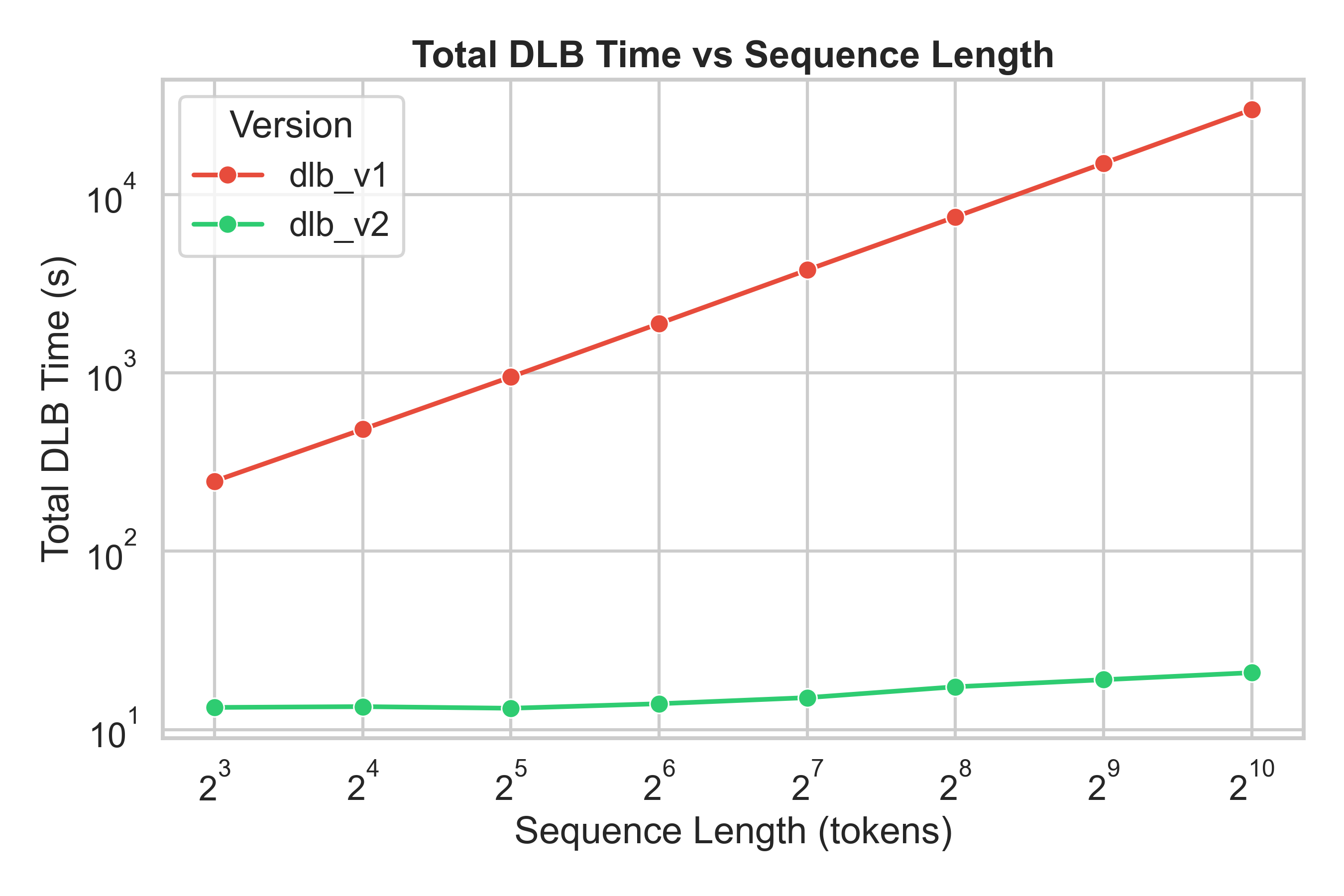 |
| 🚀 Token Throughput | 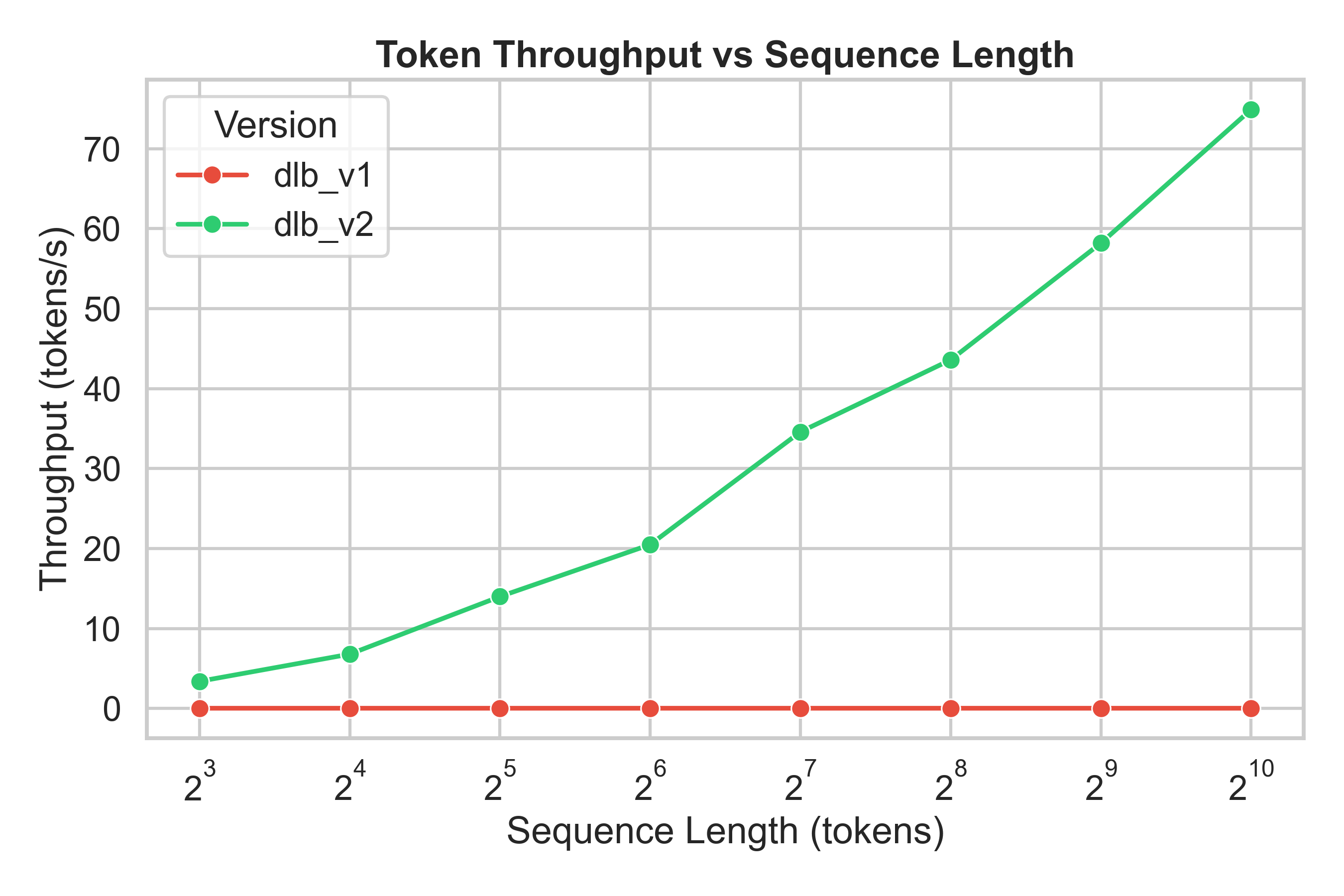 |
| ⚙️ Speedup (v2 / v1) | 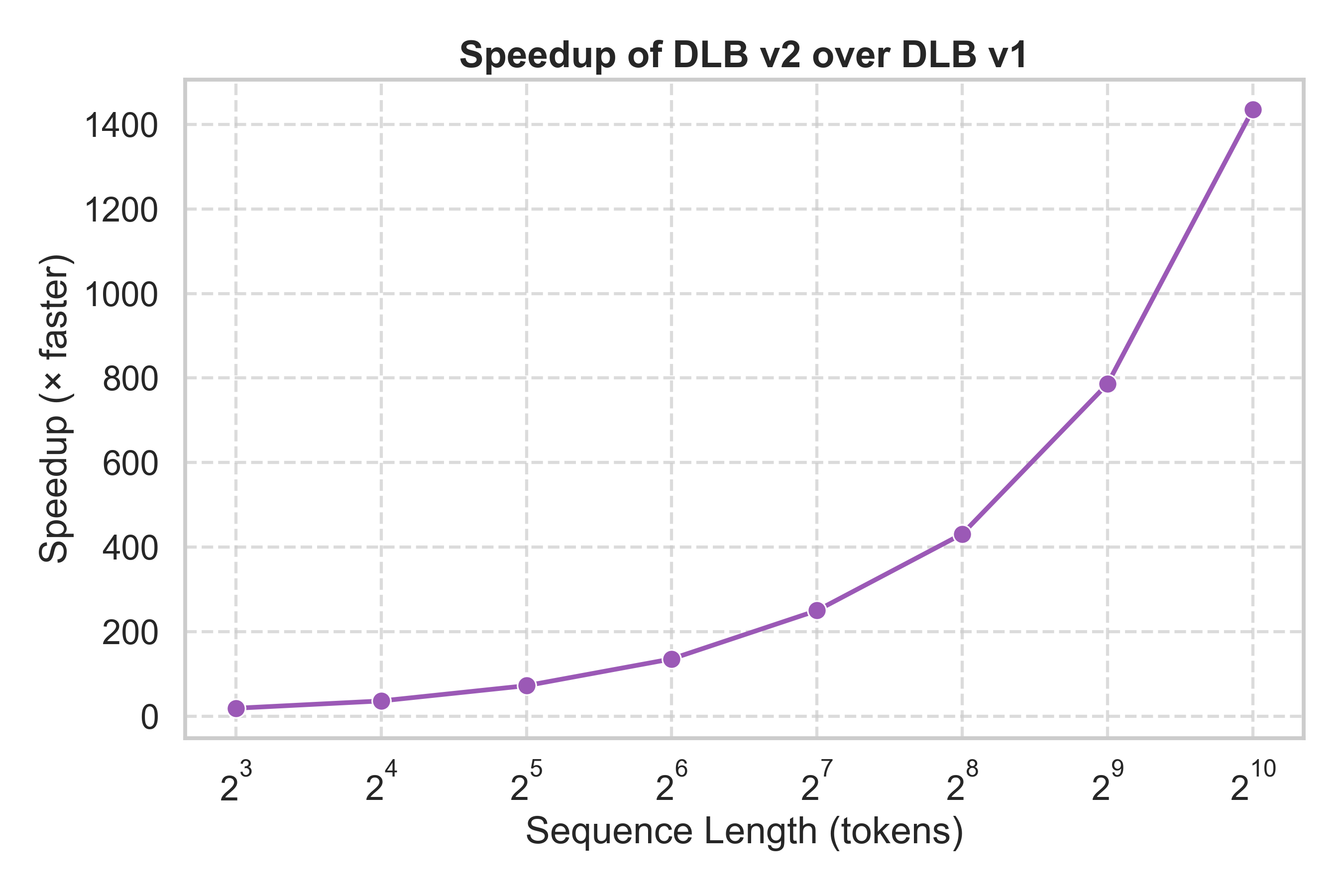 |
💡 DLB v2 provides consistent low latency and achieves 20×–1400× speedup over DLB v1 as sequence length increases.
Installation
From Source (Recommended)
pip install torch==2.6.0 torchvision==0.21.0 torchaudio==2.6.0 --index-url https://download.pytorch.org/whl/cu126
pip install dl-backtrace
Requirements
- Python 3.8+
- PyTorch 2.6+ (with CUDA 12.6 support recommended)
- Additional dependencies: transformers, matplotlib, seaborn, graphviz, joblib, zstandard
See requirements.txt for the complete list of dependencies.
Hugging Face Setup
For accessing models from Hugging Face Hub (required for BERT, RoBERTa, LLaMA, etc.):
# Install Hugging Face CLI
pip install huggingface_hub

# Login to Hugging Face (required for gated models)
huggingface-cli login
You'll need a Hugging Face account and access token. Get your token from https://huggingface.co/settings/tokens.
Quick Start
PyTorch Models (Recommended)
import torch
import torch.nn as nn
from dl_backtrace.pytorch_backtrace import DLBacktrace

# Define your model
class MyModel(nn.Module):
    def __init__(self):
        super().__init__()
        self.linear = nn.Linear(10, 1)

    def forward(self, x):
        return self.linear(x)

# Initialize model and DLBacktrace
model = MyModel()
x = torch.randn(1, 10)  # Example input

# Create DLBacktrace instance
dlb = DLBacktrace(
    model=model,
    input_for_graph=(x,),
    device='cuda',    # 'cpu',
    verbose=False
)

# Get layer-wise outputs
node_io = dlb.predict(x)

# Calculate relevance propagation
relevance = dlb.evaluation(
    mode="default",
    multiplier=100.0,
    task="binary-classification"
)
Advanced Features
🚀 High-Level Pipeline Interface
Simplified API for common ML tasks with automatic model loading and configuration:
from dl_backtrace.pytorch_backtrace import DLBacktrace
from transformers import AutoTokenizer, AutoModelForSequenceClassification
import torch

# Load model and tokenizer
model = AutoModelForSequenceClassification.from_pretrained("textattack/bert-base-uncased-SST-2")
tokenizer = AutoTokenizer.from_pretrained("textattack/bert-base-uncased-SST-2")

# Prepare input
text = "This movie is fantastic!"
tokens = tokenizer(text, return_tensors="pt")
input_ids = tokens["input_ids"]
attention_mask = tokens["attention_mask"]

# Initialize DLBacktrace
dlb = DLBacktrace(
    model,
    (input_ids, attention_mask),
    device='cuda',  # or 'cpu'
    verbose=False
)

# Run text classification with run_task() - ONE CALL!
results = dlb.run_task(
    task="text-classification",  # or "auto" for automatic detection
    inputs={'input_ids': input_ids, 'attention_mask': attention_mask},
    debug=False
)

# Access predictions and relevance
predictions = results['predictions']
relevance = results['relevance']
print(f"Predicted class: {predictions.argmax(axis=-1)}")
print(f"Token relevance shape: {relevance['input_ids'].shape}")
🎲 DLB Auto Sampler
Advanced text generation with multiple sampling strategies and token-level relevance tracking:
from dl_backtrace.pytorch_backtrace.dlbacktrace.core.dlb_auto_sampler import DLBAutoSampler

sampler = DLBAutoSampler(model, tokenizer)

# Greedy sampling
output = sampler.generate("Prompt", strategy="greedy", max_length=50)

# Top-k and Top-p sampling
output = sampler.generate("Prompt", strategy="top_k", top_k=50, temperature=0.8)
output = sampler.generate("Prompt", strategy="top_p", top_p=0.9, temperature=0.8)

# Beam search
output = sampler.generate("Prompt", strategy="beam_search", num_beams=5)

# Access token-level relevance
print(output['relevance_scores'])
🧠 Mixture-of-Experts (MoEs) Support
Built-in support for MoE architectures with expert-level relevance analysis:
from dl_backtrace.moe_pytorch_backtrace import Backtrace
from transformers import AutoTokenizer, AutoModelForCausalLM

# Load MoE model (GPT-OSS, JetMoE, OLMoE, Qwen3-MoE)
model = AutoModelForCausalLM.from_pretrained("openai/gpt-oss-20b")
tokenizer = AutoTokenizer.from_pretrained("openai/gpt-oss-20b")

# Initialize MoE Backtrace
bt = Backtrace(
    model=model,
    model_type='gpt_oss',  # or 'jetmoe', 'olmoe', 'qwen'
    device='cpu'  # or 'cuda'
)

# Prepare input
prompt = "What is the capital of France?"
tokens = tokenizer(prompt, return_tensors="pt")
input_ids = tokens["input_ids"]
attention_mask = tokens["attention_mask"]

# Run generation with run_task() - ONE CALL!
results = bt.run_task(
    task="generation",
    inputs={'input_ids': input_ids, 'attention_mask': attention_mask},
    tokenizer=tokenizer,
    max_new_tokens=10,
    return_relevance=True,
    return_scores=True,
    debug=False
)

# Access generated text and relevance
generated_text = tokenizer.decode(results['generated_ids'][0], skip_special_tokens=True)
print(f"Generated: {generated_text}")

# Get expert-level relevance
expert_relevance = bt.all_layer_expert_relevance
print(f"Expert routing across {len(expert_relevance)} layers")
🌡️ Temperature Scaling
Control generation diversity and model confidence:
from dl_backtrace.pytorch_backtrace.dlbacktrace import DLBacktrace

dlb = DLBacktrace(model, input_for_graph=(input_tensor,))

# Apply temperature scaling for generation
output = dlb.generate_with_temperature(
    input_ids,
    temperature=0.7,  # Lower = more focused, Higher = more diverse
    max_length=100
)
⚡ Execution Engines
DLBacktrace provides optimized execution engines:
ExecutionEngineNoCache
- Memory-efficient: Runs entirely in RAM for faster execution
- Enhanced Operations: Supports 100+ PyTorch operations with robust error handling
- Recent Improvements: Critical fixes for transformer models (RoBERTa, LLaMA, BERT)
🛡️ Deterministic Execution Environment
DLBacktrace automatically sets up a deterministic environment for consistent results:
- ✅ CUDA memory management and synchronization
- ✅ Deterministic algorithms and cuDNN settings
- ✅ Random seed control and environment variables
- ✅ Warning suppression for cleaner output
🔧 Robust Tensor Operations
Full support for PyTorch's negative indexing and complex operations:
- ✅
transpose(-1, -2),permute([-1, -2, 0]) - ✅
unsqueeze(-1),squeeze(-1) - ✅
slice(dim=-1, ...),cat(tensors, dim=-1) - ✅
index_select(dim=-1, ...)
Evaluation Parameters
| Parameter | Description | Values |
|---|---|---|
mode |
Evaluation algorithm mode | default, contrastive |
multiplier |
Starting relevance at output layer | Float (default: 100.0) |
scaler |
Relevance scaling factor | Float (default: 1.0) |
thresholding |
Pixel selection threshold for segmentation | Float (default: 0.5) |
task |
Model task type | binary-classification, multi-class classification |
Example Notebooks
| Name | Task | Colab Link | HTML Link |
|---|---|---|---|
| Custom Tabular Model | Binary Classification | Colab Link | HTML Version |
| VGG Model | Multi-Class Classification | Colab Link | HTML Version |
| ResNet Model | Multi-Class Classification | Colab Link | HTML Version |
| ViT Model | Multi-Class Classification | Colab Link | HTML Version |
| DenseNet Model | Multi-Class Classification | Colab Link | HTML Version |
| EfficientNet Model | Multi-Class Classification | Colab Link | HTML Version |
| MobileNet Model | Multi-Class Classification | Colab Link | HTML Version |
| BERT-Base Model | Sentiment Classification | Colab Link | HTML Version |
| LLaMA-3.2-1B Model | Text Generation | Colab Link | HTML Version |
| Qwen-3-0.6B Model | Text Generation | Colab Link | HTML Version |
| JetMoE | Text Generation | Colab Link | HTML Version |
| OLMoE | Text Generation | Colab Link | HTML Version |
| Qwen-3-MoE | Text Generation | Colab Link | HTML Version |
| GPT-Oss | Text Generation | Colab Link | HTML Version |
For more detailed examples and use cases, check out our documentation.
Supported Layers
PyTorch
Core Operations:
- Linear (Fully Connected) Layer
- Convolutional Layer (Conv2D)
- Reshape & Flatten Layers
- Pooling Layers (AdaptiveAvgPool2d, MaxPool2d, AvgPool2d, AdaptiveMaxPool2d)
- 1D Pooling Layers (AvgPool1d, MaxPool1d, AdaptiveAvgPool1d, AdaptiveMaxPool1d)
- Concatenate & Add Layers
- LSTM Layer
- Dropout Layer
- Embedding Layer
Advanced Operations:
- Tensor Manipulation (transpose, permute, unsqueeze, squeeze, slice, cat, index_select)
- Negative Indexing Support (all operations support PyTorch's negative indexing)
- Layer Normalization
- Batch Normalization
- View & Reshape Operations
Testing & Validation
Supported Models
DLBacktrace has been extensively tested with:
- Vision Models: ResNet, VGG, DenseNet, EfficientNet, MobileNet, ViT
- NLP Models: BERT, ALBERT, RoBERTa, DistilBERT, ELECTRA, XLNet, LLaMA-3.2, Qwen
- MoE Models: JetMoE, OLMoE (Open Language Model with Experts), Qwen3-MoE, GPT-OSS
- Tasks: Classification, Object Detection, Segmentation, Text Generation, Expert-Level Analysis
Getting Started
If you're new to DLBacktrace:
- 📖 Read the Documentation: https://dlbacktrace.lexsi.ai/
- 🚀 Try the Quick Start: See examples above for PyTorch models
- 💻 Explore Notebooks: Check out our comprehensive example notebooks for various use cases
- 🧪 Run Tests: Validate your installation with the benchmark scripts
For advanced features like the Pipeline Interface, Auto Sampler, MoE models, and Temperature Scaling, refer to the full documentation.
Contributing
We welcome contributions from the community! Please follow our contribution guidelines and submit pull requests for any improvements.
License
This project is licensed under a custom License - see the LICENSE file for details.
Recent Updates & New Features
Latest Release (2025)
New Features:
- 🚀 High-Level Pipeline Interface: Simplified API for text/image classification and generation
- 🎲 DLB Auto Sampler: Advanced text generation with multiple sampling strategies
- 🧠 MoE Model Support: Built-in support for Mixture of Experts architectures (JetMoE, OLMoE, Qwen3-MoE, GPT-OSS)
- 🌡️ Temperature Scaling: Flexible control over generation diversity and model confidence
Critical Fixes & Improvements:
- 🔧 Enhanced execution engine with robust handling of complex tensor operations
- ⚡ Deterministic environment setup for consistent, reproducible results
- 🛡️ Comprehensive error handling for production use
- 🚨 Critical fixes for transformer models (RoBERTa, LLaMA, BERT)
- 🧠 Smart attention detection for bidirectional vs causal attention
- 💾 Memory optimization and improved OOM error handling
Contact
For any inquiries, support, or collaboration opportunities:
- Email: support@lexsi.ai
- Website: https://lexsi.ai/
- GitHub Issues: https://github.com/Lexsi-Labs/DLBacktrace/issues
- Documentation: https://dlbacktrace.lexsi.ai/
Citations
@misc{sankarapu2024dlbacktracemodelagnosticexplainability,
      title={DLBacktrace: A Model Agnostic Explainability for any Deep Learning Models},
      author={Vinay Kumar Sankarapu and Chintan Chitroda and Yashwardhan Rathore and Neeraj Kumar Singh and Pratinav Seth},
      year={2024},
      eprint={2411.12643},
      archivePrefix={arXiv},
      primaryClass={cs.LG},
      url={https://arxiv.org/abs/2411.12643},
}
DLBacktrace — Bridging Performance and Explainability 🔍
Lexsi Labs | support@lexsi.ai
Project details
Release history Release notifications | RSS feed


Download files
Download the file for your platform. If you're not sure which to choose, learn more about installing packages.
Source Distribution
Built Distribution
Filter files by name, interpreter, ABI, and platform.
If you're not sure about the file name format, learn more about wheel file names.
Copy a direct link to the current filters
File details
Details for the file dl_backtrace-0.1.21.tar.gz.
File metadata
- Download URL: dl_backtrace-0.1.21.tar.gz
- Upload date:
- Size: 16.8 MB
- Tags: Source
- Uploaded using Trusted Publishing? No
- Uploaded via: twine/6.2.0 CPython/3.11.15
File hashes
| Algorithm | Hash digest | |
|---|---|---|
| SHA256 |
db2157552b480d3f397764ad2f60a91bdfafb710b3d9bd9541b9861e4fc7f476
|
|
| MD5 |
ed121302c60a7f9017570fe62461b8e4
|
|
| BLAKE2b-256 |
f76cdffc6423c37cdd188c268a78e595c084fa1aef1e69254f971943ae7cc1c9
|
File details
Details for the file dl_backtrace-0.1.21-py3-none-any.whl.
File metadata
- Download URL: dl_backtrace-0.1.21-py3-none-any.whl
- Upload date:
- Size: 17.0 MB
- Tags: Python 3
- Uploaded using Trusted Publishing? No
- Uploaded via: twine/6.2.0 CPython/3.11.15
File hashes
| Algorithm | Hash digest | |
|---|---|---|
| SHA256 |
44839ff2b53d2388ccf57d39dfd2935a649e861ecdbfdc443e664585c199f515
|
|
| MD5 |
de2185170cad5b31ad187dfb0307ff76
|
|
| BLAKE2b-256 |
bd70c1a5137112c342acc2937a56646f39e4d0b55fb27f312ab548c209b6bf87
|






