
dl-myo (Dongle-less Myo)






dl-myo is yet another MyoConnect alternative for Myo Armband without an official Myo dongle.
If you are fed up with the dongle and still want to use Myo anyway (in Python), this is the right stuff to grab.
The GATT service naming convention reflects the official BLE specification for Myo (i.e., myohw.h); however, some services and characteristics differ for a uniform naming.
See myo/profile.py for more detail.
For further developments, see my project using this library: https://github.com/Interactions-HSG/MyoKTROS
Features
Compared to other Myo libraries/SDKs:
- Full-scratched in Python, no dependency from other runtime (e.g., the official cpp SDK)
- Multi-platform support based on Bleak, instead of bluepy or pybluez
- Stream EMG data (filtered/raw) and IMU data simultaneously using asyncio
- A sample docker image provided -- runs just off the shelf
Platform Support
| Linux | Raspberry Pi | macOS | Windows |
|---|---|---|---|
| ✅ | ✅ | ✅ | ✅ |
Install
pip install dl-myo
Examples
sample_client.py
The script scans a Myo device, connect to the device, prints the GATT profile from the device, collect EMG data for 5 seconds, and then disconnect.
Any Myo Armband should have the service UUID d5060001-a904-deb9-4748-2c7f4a124842.
python examples/sample_client.py
Otherwise, you can also bind to a specific MAC address. For example,
python examples/sample_client.py --mac D2:3B:85:94:32:8E
influxdb
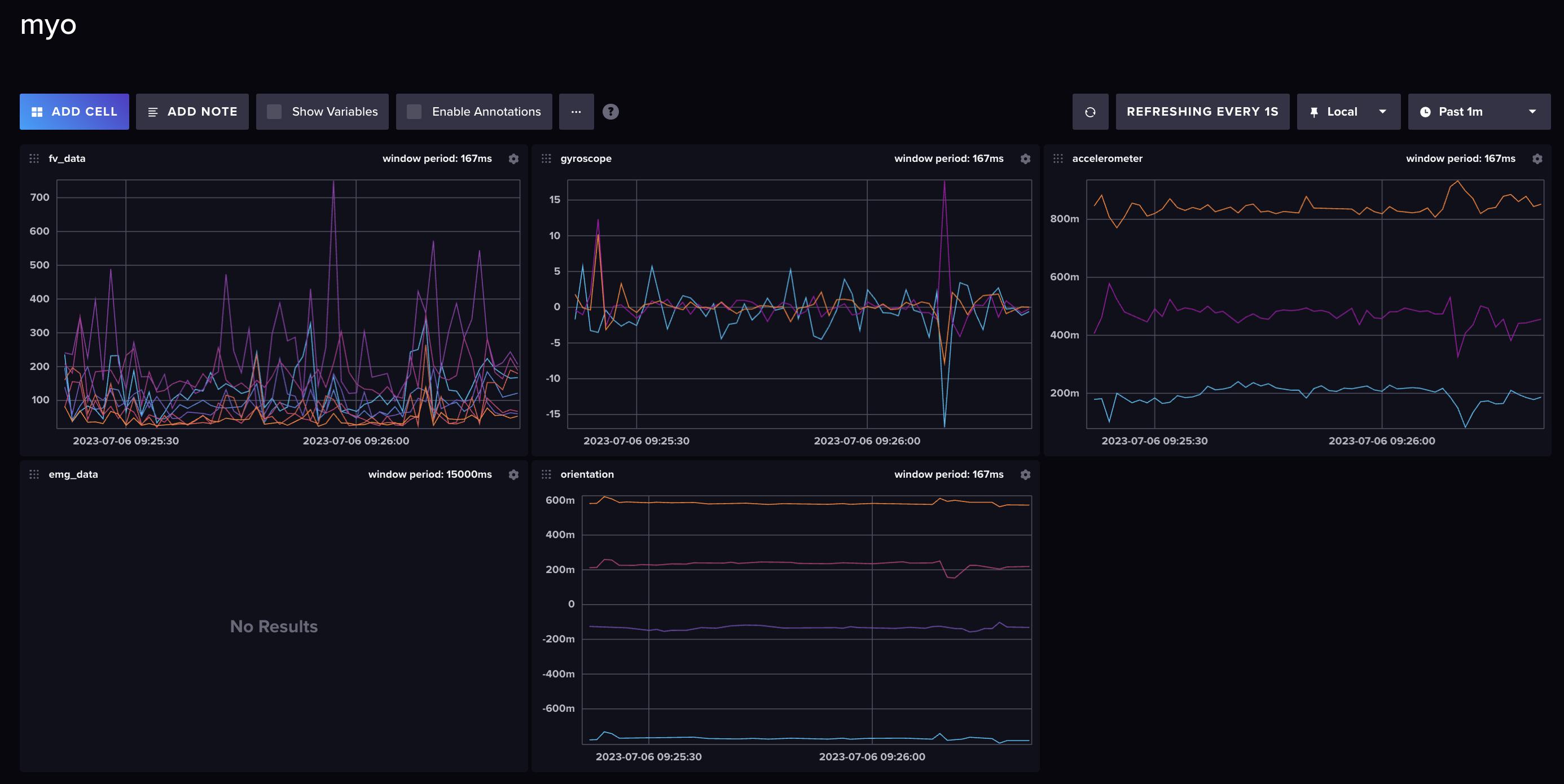
The examples/influxdb/influx_client.py emits datapoints to be stored in InfluxDB.
The docker-compose.yml lanches the required database for this by default.
docker compose up -d influxdb
then
python examples/influxdb/influx_client.py
Make use of the dashboard config examples/influxdb/myo.json.
Try the example with Docker
NOTE: The docker example currently doesn't work on macOS.
docker compose pull
docker compose run --rm dl-myo
Build with Poetry
Install Poetry first.
poetry build
Credits
This project was first inspired by Dongleless-myo (originally created by @mamo91 and enhanced by @MyrikLD) which provides a great starting point using bluepy.
In addition to Myo Bluetooth Official Protocol, I would like to mention that the following resources on GitHub have been very helpful:
- https://github.com/Alvipe/Open-Myo/issues/5
- https://github.com/NiklasRosenstein/myo-python/releases/tag/v1.0.4
- https://github.com/PerlinWarp/Neuro-Breakout
- https://github.com/balandinodidonato/MyoToolkit/blob/master/Software%20for%20Thalmic's%20Myo%20armband.md
- https://github.com/cortinico/myonnaise
- https://github.com/dzhu/myo-raw
- https://github.com/exelban/myo-armband-nn
- https://github.com/francocruces/MioConnect
- https://github.com/hcilab/MyoStream
Author
@iomz (Iori Mizutani)
1 maintainer

Release files for dl-myo 1.1.8
For a detailed explanation of source distributions (sdists) and built distributions (wheels), please see the package formats documentation.
Source distribution (sdist)
| File | Size | Uploaded | |
|---|---|---|---|
| dl_myo-1.1.8.tar.gz | 32.8 kB | Details |
Built distribution (wheel)
| File | Interpreter | ABI | Platform | Reset |
|---|---|---|---|---|
| dl_myo-1.1.8-py3-none-any.whl | Python 3 | none | any | Details |
Total release size: 65.3 kB
Release files / dl_myo-1.1.8.tar.gz
| Download URL | dl_myo-1.1.8.tar.gz |
|---|---|
| Size | 32.8 kB |
| Tags | Source |
|
SHA-256 checksum How to use checksums |
e1d2f765895e50a8f967f191db11698e5c3a0820f14498971f41e48b8797a3b3
|
|
BLAKE2b-256 checksum How to use checksums |
60785e41cad6d4ae242d950f118be5e5ac8df0a517beb77161f68a0bab12053a
|
| Upload date | |
|
Uploaded using Trusted Publishing? What is trusted publishing? |
Yes |
| Uploaded via |
twine/6.1.0 CPython/3.13.7
|
Provenance
Provenance describes where a file came from. On PyPI, provenance is shared via attestations, which provide a verifiable record of the build or publishing details. View details, limitations and caveats.


PyPI Publish Attestation
PyPI verified that this artifact, at this checksum, originated from the publisher listed below.
Signed by GitHub Actions, verified by PyPI on Nov 8, 2025.
Transparency logRelease files / dl_myo-1.1.8-py3-none-any.whl
| Download URL | dl_myo-1.1.8-py3-none-any.whl |
|---|---|
| Size | 32.4 kB |
| Tags | Python 3 |
|
SHA-256 checksum How to use checksums |
3982e54005a819c8e06e48d2409932290eecdfad70edeb9b7e52e6d9edff3c2c
|
|
BLAKE2b-256 checksum How to use checksums |
446caadf7781f8f9491ac855385fa959f4d315f21d2359c2074f0ad9a33a2a41
|
| Upload date | |
|
Uploaded using Trusted Publishing? What is trusted publishing? |
Yes |
| Uploaded via |
twine/6.1.0 CPython/3.13.7
|
Provenance
Provenance describes where a file came from. On PyPI, provenance is shared via attestations, which provide a verifiable record of the build or publishing details. View details, limitations and caveats.
PyPI Publish Attestation
PyPI verified that this artifact, at this checksum, originated from the publisher listed below.
Signed by GitHub Actions, verified by PyPI on Nov 8, 2025.
Transparency log













