


dlr.esy.grid.match is a grid matching & conversion tool primarily developed
for the comparison of power grids.
Installation
dlr.esy.grid.match is available on PyPI and can be
installed into your Python environment via pip:
pip install dlr.esy.grid.match
Command-line interface
dlr.esy.grid.match provides a command-line interface (see
dlr.esy.grid.match.cli for more details):
$ dlr.esy.grid.match --help
usage: dlr.esy.grid.match [-h] {compare,example} ...
...
Command-line interface for grid comparisons.
...
positional arguments:
  {compare,example}
    compare          Compares two powergrids. `a` and `b` are expected to be
                     directories, each containing the files `bus.csv` and
                     `line.csv`.
    example          Creates an example datasets.
...
Usage
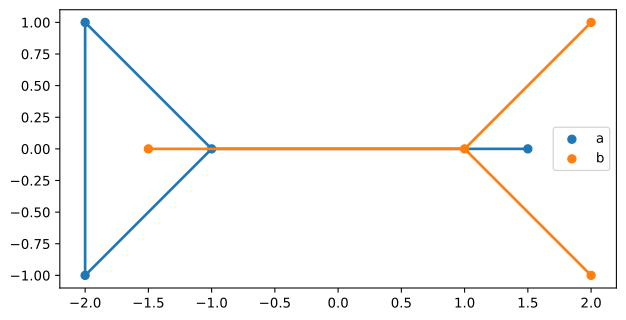
The command compare adds the columns center and map to the grids $a$ and
$b$. The column center contains the index of the center of the cluster each
node belongs to and the column map the index of the center of the
corresponding cluster in the other grid. See the methodology section for
details. The subcommand grids plots the two grids together and the
subcommand plot shows or saves the plots.
The subcommand example can be used to create example datasets and write them
into a directory, like the simple dataset:
$ dlr.esy.grid.match example simple example/simple
$ dlr.esy.grid.match compare --a=example/simple/a --b=example/simple/b grid plot --save=figures/grids.svg
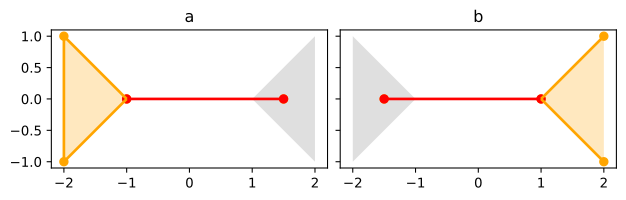
The subcommand cluster plots the grids separately highlighting the convex
hulls of each cluster (in orange for the hulls in the plotted grid and in grey
for the ones in the other grid). The centers and the intercluster lines are
plotted in red and the intracluster lines and the rest of the nodes are
plotted in orange.
$ dlr.esy.grid.match compare --a=example/simple/a --b=example/simple/b cluster plot --save=figures/cluster.svg
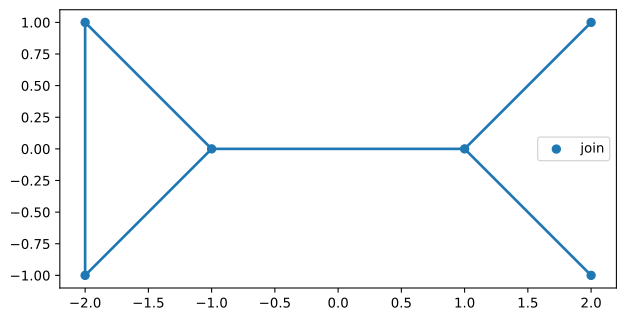
The subcommand join produces a third grid with the nodes in gird $a$ which
are in the interior of a region and the nodes in grid $b$ which are outside of
a region. The information about the regions needs to be in a column called
join in each grid (0 meaning inside the region and 1 meaning outside).
If the column join is missing, it can be added to each grid with the
subcommand max_res, as described in the methodology section.
$ dlr.esy.grid.match compare --a=example/simple/a --b=example/simple/b max_res join grid plot --save=figures/join.svg
Input and output
dlr.esy.grid.match supports reading and writing grid data from CSV files. Grid
data may also be converted to geojson data.
dlr.esy.grid.match requires bus data to contain at least the fields name, x
and y, while line data is required to contain at least the fields name,
bus0 and bus1.
Input field names can be renamed as in the following example, which reads grid
data from a non-conformative example in the directory example/nonconformative
and stores the resulting grid in example/conformative:
$ dlr.esy.grid.match example nonconformative example/nonconformative
$ dlr.esy.grid.match compare --a=example/nonconformative/a --a_bus_fields=bus:name --a_line_fields=line:name --b=example/nonconformative/b --b_bus_fields=bus:name --b_line_fields=line:name csv example/conformative
The command geojson produces a geojson output, which can be used to visualize
the grids with the clusters, for instance by importing it to
https://geojson.io/.
$ dlr.esy.grid.match compare --a=example/simple/a --b=example/simple/b geojson
{"type": "FeatureCollection", ...}
Methodology
Comparison methodology
Given two grids $a$ and $b$ with geolocated nodes, clusters of nodes in each grid are produced and each cluster in $a$ is uniquely identified to a cluster in $b$. The method has the following steps:
-
For each node $n_a$ in $a$, define $f(n_a)$ to be its closest node in $b$ (using the Euclidean distance) and, for each node $n_b$ in $b$, define $g(n_b)$ to be its closest node in $a$.
-
Each node $n_a$ in $a$ such that $g(f(n_a))=n_a$ is chosen as center of a cluster in $a$ and each node $n_b$ in $b$ such that $f(g(n_b))=n_b$ is chosen as center of a cluster in $b$. Notice that, by construction, each grid has the same number of clusters and there is a one to one correspondence between them. Namely, the center $n_a$ is associated to the center $n_b = f(n_a)$ and the center $n_b$ is associated to $n_a = g(n_b)$.
-
Each node in $a$ not being a center of any cluster is assigned to a cluster using the shortest path (using Euclidean distance) to a center. The same is done for $b$.
The output associates to each node the center of its cluster and also the corresponding center in the other grid. This can be used to compare and transfer the data associated to the nodes in both grids. It can also be used to create a third grid with the highest spatial resolution of both, as explained in the next section.
Joining methodology
Given two grids $a$ and $b$ in which all nodes are geolocated and assigned to one of two regions $\Gamma$ or $\Omega$, a new grid is produced having the nodes of $a$ which belong to $\Gamma$ and the nodes of $b$ which belong to $\Omega$. The lines of the joined grid are the ones in the three following groups:
-
Lines in $a$ connecting two nodes belonging to $\Gamma$;
-
Lines in $b$ connecting two nodes belonging to $\Omega$; and
-
for each line in $a$ connecting a node $n_a$ in $\Gamma$ to a node $m_a$ in $\Omega$ a line connecting $n_a$ to the closest node (using Euclidean distance) in $b$ which belongs to $\Omega$.
To get the joined grid with the maximal resolution, the output of the comparison methodology is used, where a node in $a$ is assigned to $\Gamma$ if it belongs to a cluster with more or equal number of elements than its corresponding cluster in $b$.
Design, Development & Contributing
Design and development notes are available in dlr.esy.grid.match.test.
We would be happy to accept contributions via merge requests, but due to corporate policy we can only accept contributions if you have send us the signed contributor license agreement.
License
dlr.esy.grid.match is licensed under the MIT
license.
Contact
Please use the projects issue tracker to get in touch.
Team
dlr.esy.grid.match is developed cooperatively by the
DLR Institute of
Networked Energy Systems
in the departement for
Energy Systems Analysis (ESY) and
by the
Institute of Energy and Climate Research -
Techno-economic System Analysis (IEK-3)
of the Forschungszentrum Jülich.
Footnotes
Test console examples.
>>> import dlr.esy.grid.match.test
>>> dlr.esy.grid.match.test.doctest_console(__doc__)
1 maintainer

Metadata
1 maintainer
Release files for dlr-esy-grid-match 0.1
For a detailed explanation of source distributions (sdists) and built distributions (wheels), please see the package formats documentation.
Source distribution (sdist)
| File | Size | Uploaded | Provenance | Actions |
|---|---|---|---|---|
| dlr_esy_grid_match-0.1.tar.gz | 24.2 kB | Without provenance | Details for dlr_esy_grid_match-0.1.tar.gz |
Built distribution (wheel)
| File | Interpreter | ABI | Platform | Actions Reset |
|---|---|---|---|---|
| dlr_esy_grid_match-0.1-py3-none-any.whl | Python 3 | none | any | Details for dlr_esy_grid_match-0.1-py3-none-any.whl |
Total release size: 50.7 kB
Release files / dlr_esy_grid_match-0.1.tar.gz
| Download URL | dlr_esy_grid_match-0.1.tar.gz |
|---|---|
| Size | 24.2 kB |
| Tags | Source |
|
SHA-256 checksum How to use checksums |
cb9968b9e5bedb38fae0a8aa4ae5f03224e2fb0e636715ae010b6ff0e01ac133
|
|
BLAKE2b-256 checksum How to use checksums |
b182f25c0203849f101059deda8d38e2c42e9c6c32bda7888447371325e4ad6d
|
| Upload date | |
|
Uploaded using Trusted Publishing? What is trusted publishing? |
No |
| Uploaded via |
twine/1.15.0 pkginfo/1.9.6 requests/2.28.1 setuptools/63.2.0 requests-toolbelt/0.9.1 tqdm/4.64.1 CPython/3.10.7
|
Release files / dlr_esy_grid_match-0.1-py3-none-any.whl
| Download URL | dlr_esy_grid_match-0.1-py3-none-any.whl |
|---|---|
| Size | 26.5 kB |
| Tags | Python 3 |
|
SHA-256 checksum How to use checksums |
ab771f730b6a274e387a0d29ab79895273038ae698cf8fc60064a6dcc5f1ca86
|
|
BLAKE2b-256 checksum How to use checksums |
4624f147385296453b8dda11c48c83e6de213e0f1ceea68d7021e86b9c55b090
|
| Upload date | |
|
Uploaded using Trusted Publishing? What is trusted publishing? |
No |
| Uploaded via |
twine/1.15.0 pkginfo/1.9.6 requests/2.28.1 setuptools/63.2.0 requests-toolbelt/0.9.1 tqdm/4.64.1 CPython/3.10.7
|
Security for dlr-esy-grid-match 0.1
Provenance
Provenance describes where a file came from. On PyPI, provenance is shared via attestations, which provide a verifiable record of the build or publishing details. View details, limitations and caveats.
No provenance found
None of the files in this release were uploaded with provenance metadata.
A note on package security
PyPI is a repository for distributing packages, not a service for auditing them. While third-party security researchers and our staff do their best to detect and remove malicious packages, PyPI cannot guarantee the quality, security or suitability of any given package.
To learn more about protecting yourself from malicious actors, visit our package security documentation.













