
Distibuted dbt runs on Apache Airflow
Verified details
These details have been verified by PyPIProject links
GitHub Statistics
Maintainers

Project description







dmp-af: distributed dbt runs on Airflow
Overview
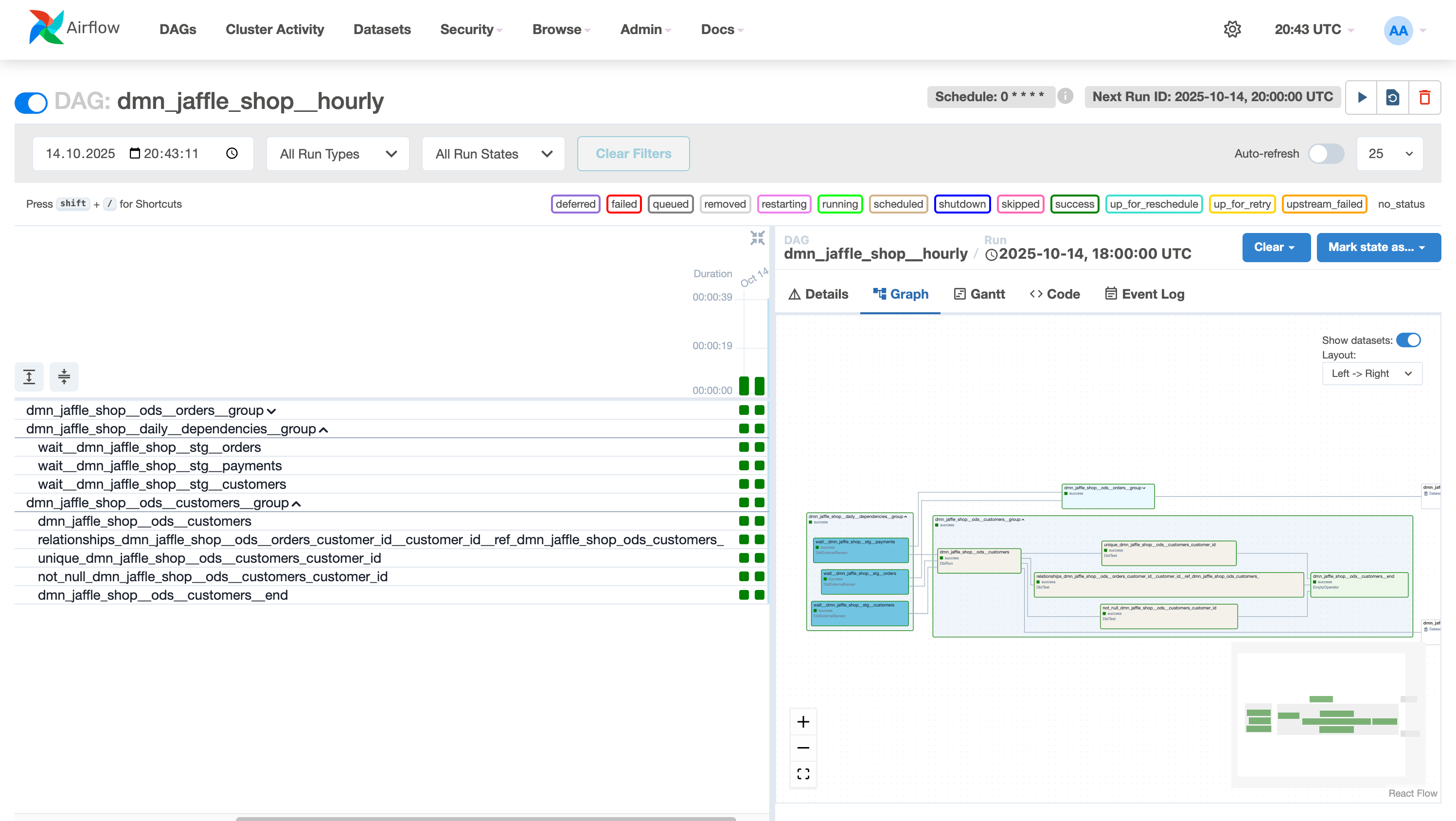
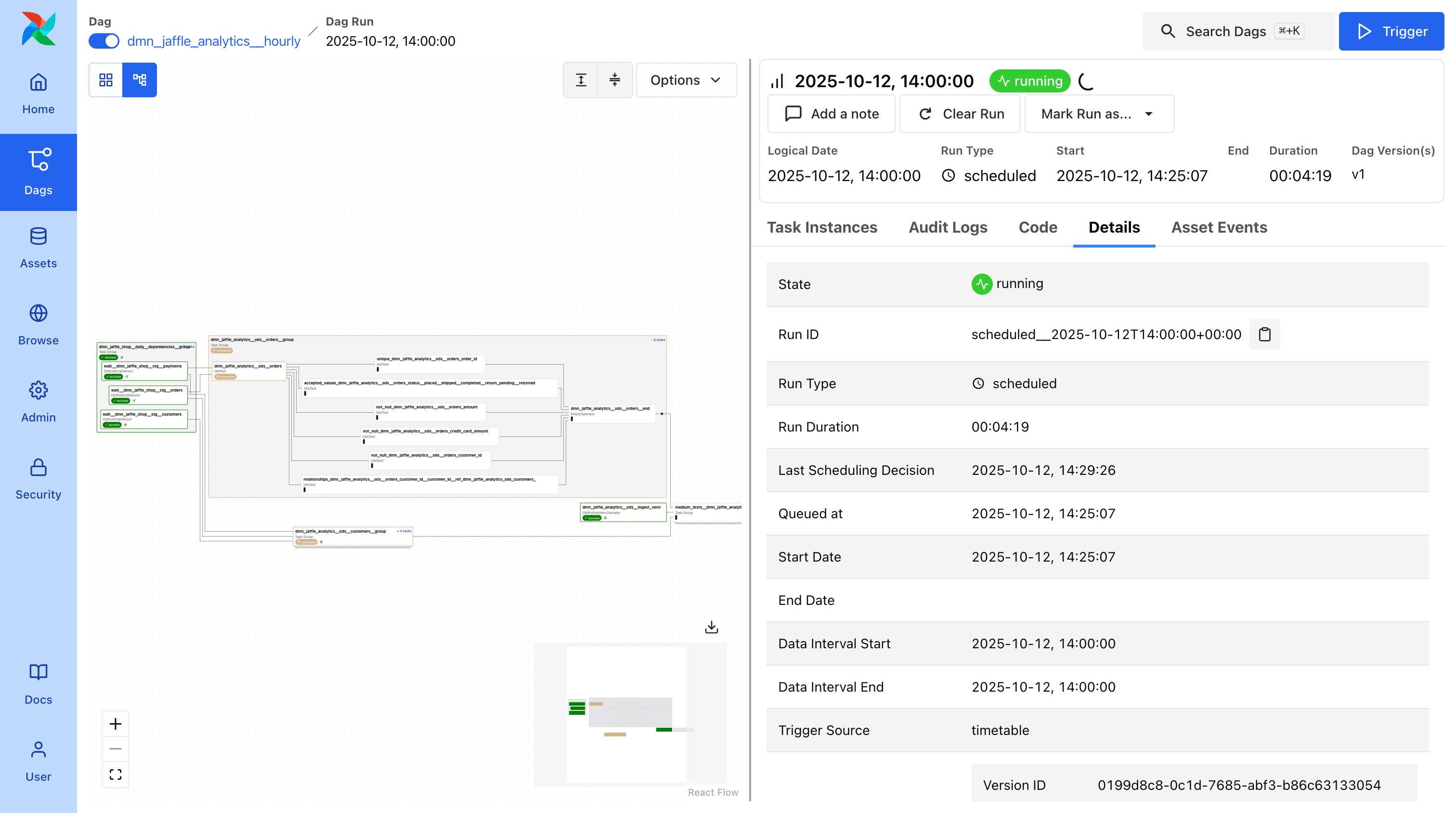
dmp-af runs your dbt models in parallel on Airflow. Each model becomes an independent task while preserving dependencies across domains.
Built for scale. Designed for large dbt projects (1000+ models) and data mesh architecture. Works with any project size.
Why dmp-af?
- Domain-driven architecture - Separate models by domain into different DAGs, run in parallel, perfect for data mesh
- dbt-first design - All configuration in dbt model configs, analytics teams stay in dbt, no Airflow knowledge required
- Flexible scheduling - Multiple schedules per model (
@hourly,@daily,@weekly,@monthly, and more) - Enterprise features - Multiple dbt targets, configurable test strategies, built-in maintenance, Kubernetes support
Installation
To install dmp-af run pip install dmp-af.
To contribute we recommend to use uv to install package dependencies.
Run uv sync --all-packages --all-groups --all-extras to install all dependencies.
dmp-af by Example
All tutorials and examples are located in the examples folder.
To get basic Airflow DAGs for your dbt project, you need to put the following code into your dags folder:
# LABELS: dag, airflow (it's required for airflow dag-processor)
from dmp_af.dags import compile_dmp_af_dags
from dmp_af.conf import Config, DbtDefaultTargetsConfig, DbtProjectConfig

# specify here all settings for your dbt project
config = Config(
    dbt_project=DbtProjectConfig(
        dbt_project_name='my_dbt_project',
        dbt_project_path='/path/to/my_dbt_project',
        dbt_models_path='/path/to/my_dbt_project/models',
        dbt_profiles_path='/path/to/my_dbt_project',
        dbt_target_path='/path/to/my_dbt_project/target',
        dbt_log_path='/path/to/my_dbt_project/logs',
        dbt_schema='my_dbt_schema',
    ),
    dbt_default_targets=DbtDefaultTargetsConfig(default_target='dev'),
    dry_run=False,  # set to True if you want to turn on dry-run mode
)

dags = compile_dmp_af_dags(
    manifest_path='/path/to/my_dbt_project/target/manifest.json',
    config=config,
)
for dag_name, dag in dags.items():
    globals()[dag_name] = dag
In dbt_project.yml you need to set up default targets for all nodes in your project (see example):
sql_cluster: "dev"
daily_sql_cluster: "dev"
py_cluster: "dev"
bf_cluster: "dev"
This will create Airflow DAGs for your dbt project.
Check out the documentation for more details here.
Key Features
Auto-generated DAGs
- Automatically creates Airflow DAGs from your dbt project
- Organizes by domain and schedule
- Handles dependencies across domains
Idempotent runs
- Each model is a separate Airflow task
- Date intervals passed to every run
- Reliable backfills and reruns
Team-friendly
- Analytics teams stay in dbt
- No Airflow DAG writing required
- Infrastructure handled automatically
Requirements
dmp-af is tested with:
| Airflow version | Python versions | dbt-core versions |
|---|---|---|
| 2.6.3 | ≥3.10,<3.12 | ≥1.7,<=1.10 |
| 2.7.3 | ≥3.10,<3.12 | ≥1.7,<=1.10 |
| 2.8.4 | ≥3.10,<3.12 | ≥1.7,<=1.10 |
| 2.9.3 | ≥3.10,<3.13 | ≥1.7,<=1.10 |
| 2.10.5 | ≥3.10,<3.13 | ≥1.7,<=1.10 |
| 2.11.0 | ≥3.10,<3.13 | ≥1.7,<=1.10 |
| 3.0.6 | ≥3.10,<3.13 | ≥1.7,≤1.10 |
| 3.1.3 | ≥3.10,<3.14 | ≥1.7,≤1.10 |
Project Information
About this fork
This project is a fork of Toloka AI BV's original repository. It includes substantial modifications by IJKOS & PARTNERS LTD. This fork is not affiliated with or endorsed by Toloka AI BV.
The original project is licensed under the Apache License 2.0.
Migrating from dbt-af
If you're currently using dbt-af and want to migrate to dmp-af, see our Migration Guide for step-by-step instructions.
Project details
Verified details
These details have been verified by PyPIProject links
GitHub Statistics
Maintainers


Download files
Download the file for your platform. If you're not sure which to choose, learn more about installing packages.
Source Distribution
Built Distribution
Filter files by name, interpreter, ABI, and platform.
If you're not sure about the file name format, learn more about wheel file names.
Copy a direct link to the current filters
File details
Details for the file dmp_af-0.16.0.tar.gz.
File metadata
- Download URL: dmp_af-0.16.0.tar.gz
- Upload date:
- Size: 44.5 kB
- Tags: Source
- Uploaded using Trusted Publishing? Yes
- Uploaded via: twine/6.1.0 CPython/3.13.7
File hashes
| Algorithm | Hash digest | |
|---|---|---|
| SHA256 |
040d4b9db3f83217fec053c22f17addc246394d4cf593e24da15a92553ec9ce8
|
|
| MD5 |
b15fb8f25b82ba165b6776720a1d39e8
|
|
| BLAKE2b-256 |
541a874b34f6a2d224ddc807e54902b4170084513837e589f5f0431ca816318d
|
Provenance
The following attestation bundles were made for dmp_af-0.16.0.tar.gz:
Publisher:
semantic-release.yml on dmp-labs/dmp-af
-
Statement:
-
Statement type:
https://in-toto.io/Statement/v1 -
Predicate type:
https://docs.pypi.org/attestations/publish/v1 -
Subject name:
dmp_af-0.16.0.tar.gz -
Subject digest:
040d4b9db3f83217fec053c22f17addc246394d4cf593e24da15a92553ec9ce8 - Sigstore transparency entry: 702161504
- Sigstore integration time:
-
Permalink:
dmp-labs/dmp-af@86bf470e8c5f85f59c7f807c97425a0e04ff9902 -
Branch / Tag:
refs/heads/main - Owner: https://github.com/dmp-labs
-
Access:
public
-
Token Issuer:
https://token.actions.githubusercontent.com -
Runner Environment:
github-hosted -
Publication workflow:
semantic-release.yml@86bf470e8c5f85f59c7f807c97425a0e04ff9902 -
Trigger Event:
workflow_dispatch
-
Statement type:
File details
Details for the file dmp_af-0.16.0-py3-none-any.whl.
File metadata
- Download URL: dmp_af-0.16.0-py3-none-any.whl
- Upload date:
- Size: 57.6 kB
- Tags: Python 3
- Uploaded using Trusted Publishing? Yes
- Uploaded via: twine/6.1.0 CPython/3.13.7
File hashes
| Algorithm | Hash digest | |
|---|---|---|
| SHA256 |
30d66c1fe083e018c32a0a806812886f0a48c960b43ebdd184e9ddb25bd850c6
|
|
| MD5 |
ecf143515178faca0265787b8cd99339
|
|
| BLAKE2b-256 |
5dbf914d9eb2fed65975c884371ad851d8dd98966eb38f1e7dd37b7772dfcc12
|
Provenance
The following attestation bundles were made for dmp_af-0.16.0-py3-none-any.whl:
Publisher:
semantic-release.yml on dmp-labs/dmp-af
-
Statement:
-
Statement type:
https://in-toto.io/Statement/v1 -
Predicate type:
https://docs.pypi.org/attestations/publish/v1 -
Subject name:
dmp_af-0.16.0-py3-none-any.whl -
Subject digest:
30d66c1fe083e018c32a0a806812886f0a48c960b43ebdd184e9ddb25bd850c6 - Sigstore transparency entry: 702161508
- Sigstore integration time:
-
Permalink:
dmp-labs/dmp-af@86bf470e8c5f85f59c7f807c97425a0e04ff9902 -
Branch / Tag:
refs/heads/main - Owner: https://github.com/dmp-labs
-
Access:
public
-
Token Issuer:
https://token.actions.githubusercontent.com -
Runner Environment:
github-hosted -
Publication workflow:
semantic-release.yml@86bf470e8c5f85f59c7f807c97425a0e04ff9902 -
Trigger Event:
workflow_dispatch
-
Statement type:






