

dNATY
Evolutionary AI Model Compression
8–83% fewer FLOPs (median −56% across 17 real datasets) · accuracy kept · no GPU required




Compress any PyTorch model with one function call. dNATY uses multi-objective evolutionary search (NSGA-II) guided by episodic memory to find smaller, faster architectures — automatically, on a standard CPU.
pip install dnaty
Website · Docs · Benchmarks · Changelog
Quickstart
import torch.nn as nn
import dnaty
from dnaty import compress
from dnaty.experiments.fast_dataset import FastDataset

# 1. Your model — any nn.Module with Linear layers
model = nn.Sequential(
    nn.Flatten(),
    nn.Linear(784, 512), nn.ReLU(),
    nn.Linear(512, 256), nn.ReLU(),
    nn.Linear(256, 10)
)

# 2. Load dataset (cached in RAM — zero I/O across generations)
ds = FastDataset("MNIST", device="cpu", train_subset=10_000)

# 3. Compress
result = compress(model, ds, target_flops=0.5, n_generations=30)

print(result.summary())
# CompressResult | arch=[...] | FLOPs -44% (1,133,056 -> ~633K) | acc=0.977
# (exact numbers vary by seed/subset; run scripts/prove_it.py to reproduce)
The compressed model is a regular nn.Module — drop it into your existing pipeline:
result.model                  # nn.Module, ready for inference
result.accuracy               # 0.977  (example; varies by seed/subset)
result.flops_reduction_pct    # 44.1   (example)
result.arch                   # [301, 226, 32, 128]  ← hidden layer sizes found

# Save / reload
result.save("compressed.pt")
result = dnaty.load("compressed.pt")

# Export to ONNX for edge deployment (no PyTorch needed on the device)
result.export_onnx("model.onnx", input_shape=(784,))

# Measure real CPU latency on your machine
print(result.benchmark_latency((784,)))   # p50/p95/p99 ms + fps
Why dNATY?
The problem: most models ship larger than they need to be. That means slower inference, higher cloud bills, and models too heavy for edge devices (cameras, drones, robots, industrial boxes). Shrinking them by hand is days of trial-and-error with no guarantee you found the best size/accuracy trade-off.
What you get with dNATY:
- Smaller, cheaper models — 8–83% fewer FLOPs across 18 real datasets, accuracy kept
- No GPU — the search runs on CPU in minutes, so it works in CI and on the hardware you already have
- No manual architecture design — point it at a model + dataset, get a deployable
nn.Moduleback - One function call —
compress(model, dataset); export to.pt/.onnx
"Why not just TensorRT or TFLite?" — wrong layer.
Runtimes optimize execution of a fixed architecture. dNATY optimizes the architecture itself, upstream of any runtime. You don't choose between them — you chain them: compress() → export_onnx() → load into TensorRT / TFLite / ONNX Runtime. The savings stack.
Versus other compression techniques
| Method | What it does | Catch |
|---|---|---|
| Quantization | Lower-precision weights (fp32→int8) | Same architecture & op count. Stack it on top of dNATY. |
| Pruning | Zeroes individual weights | Needs sparse runtimes to actually run faster; manual tuning |
| Distillation | Trains a small student model | You design the student + write the training loop |
| DARTS | Gradient-based architecture search | Needs a GPU + hours of config |
| Random NAS | Random architecture sampling | No memory — re-tries bad ideas |
| dNATY | Evolves a smaller architecture, memory-guided | CPU-only, one call |
The engine is episodic memory-guided evolutionary search: operators that helped in past generations get sampled more often, so it consistently finds better compression than random NAS at the same generation budget — no gradients, no GPU.
Measured results
All numbers measured on a standard desktop CPU, validation accuracy on a held-out 20% split, reproducible from scripts in this repo. Full tables, configs, and caveats: dnaty.org/benchmarks.
13 public datasets (n_generations=30, n_pop=15) — top rows:
| Dataset | Samples | FLOPs ↓ | Val acc | Domain |
|---|---|---|---|---|
| Electrical Fault Detect | 12,001 | −83.0% | 99.25% | smart grid sensors |
| Dry Bean Quality | 13,611 | −83.4% | 92.43% | agricultural IoT |
| Predictive Maint. (AI4I) | 10,000 | −83.1% | 96.70% | factory IoT |
| Breast Cancer (UCI) | 569 | −72.6% | 99.56% | clinical tabular |
| Credit Card Fraud (full) | 284,807 | −64.0% | 99.96% | financial anomaly |
| Network Intrusion (NSL-KDD) | 31,490 | −56.3% | 99.46% | edge security |
| HAR Sensors (UCI) | 10,299 | −46.8% | 99.17% | wearables · robotics |
| MNIST (full 70K) | 70,000 | −41.8% | 98.68% | vision · digits |
5 public Kaggle datasets — different sizes, domains, and feature counts. Reproduce: python scripts/benchmark_market_real.py (downloads from Kaggle, ~2 h on CPU).
| Dataset | Rows | Features | FLOPs ↓ | Val acc | Domain |
|---|---|---|---|---|---|
| IBM HR Employee Attrition | 1,470 | 51 | −75.5% | 99.3% | HR / corporate |
| Adult Census Income | 32,561 | 104 | −74.4% | 90.4% | social / financial |
| Air Quality (UCI) | 7,674 | 12 | −45.0% | 91.2% | environmental sensors |
| Diabetes 130-US Hospitals | 101,766 | 119 | −8.0% | 89.3% | clinical / hospital |
| Telco Customer Churn | 7,043 | 45 | +20% ⚠ | 93.2% | telecom |
4 of 5 compressed (median −45%). The Telco case: NSGA-II explored deeper rather than narrower from the [512, 256, 128] baseline — model_grew=True was raised automatically. Passing a wider baseline ([1024, 512, 256]) or increasing target_flops resolves it. This is expected Pareto behavior, not a silent failure.
Compression scales with how oversized the baseline is — dNATY finds the right size, it doesn't force a fixed cut. Lean models get small cuts (correct Pareto behavior); the library warns explicitly when nothing was cut.
Continual learning — 3 benchmarks, 3 seeds each
Split-MNIST (5 tasks, digit pairs) — proof of concept:
| Method | BWT (↑ better) | |
|---|---|---|
| dNATY (balanced replay) | −0.204 | ~5× less forgetting vs EWC |
| EWC (λ=400) | −0.998 | near-total forgetting |
| MLP (no CL) | −0.998 | baseline |
Permuted-MNIST (10 tasks, domain-incremental) and Split-CIFAR-10 (5 tasks, class-incremental) are harder benchmarks with results in results/exp4_* and results/exp5_*. Note: Split-MNIST is a weak benchmark — it is included for comparability with prior work. The harder benchmarks are the primary CL evidence. Full methodology and comparisons to ER-ACE/MAML: METHODOLOGY.md.
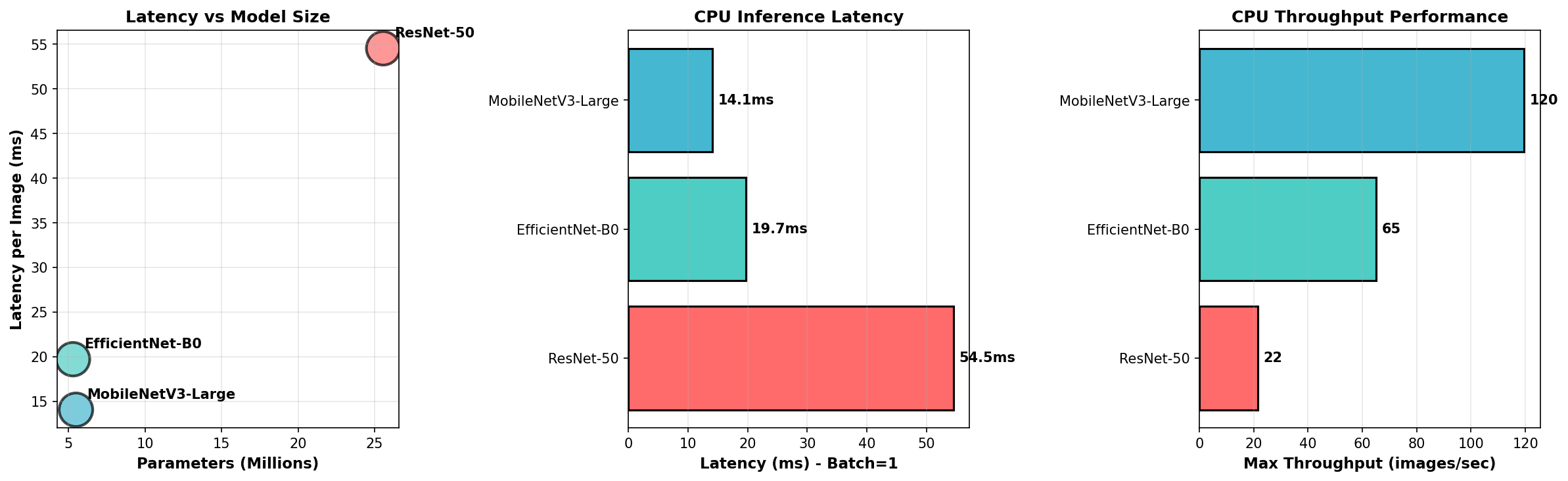
Reproduce: python scripts/prove_it.py (NAS vs random) · python -m dnaty.experiments.exp3_cl (Split-MNIST) · python -m dnaty.experiments.exp4_permuted_mnist (Permuted-MNIST) · python -m dnaty.experiments.exp5_split_cifar10 (Split-CIFAR-10)
API at a glance
| You want to… | Use |
|---|---|
| Compress a tabular/sensor MLP | compress(model, data, target_flops=0.5) |
| Compress a small CNN trained from scratch | compress_cnn(model, loader) (early access — CIFAR-scale classification) |
| Compress the head of a pretrained backbone | compress_with_backbone(resnet, loader, finetune_backbone=True) |
| Thin out conv layers too | prune_conv_channels(model, amount=0.3) |
| Deploy without PyTorch on the device | result.export_onnx("m.onnx", input_shape=...) |
| Save / reload | result.save("m.pt") / dnaty.load("m.pt") |
| Detect data drift in production | DriftDetector().fit(X_train) + ProductionTracker(model, detector) |
| Profile compute before deciding | count_flops(model, input_shape) / flops_by_layer(...) |
| Get the full accuracy/FLOPs trade-off curve | result.pareto_front / result.pareto_front_csv("front.csv") |
| Reuse search knowledge on a related task | result.save_memory("prior.json") → compress(..., warm_start="prior.json") |
Supported backbones for compress_with_backbone: ResNet, MobileNetV2/V3, EfficientNet, VGG, DenseNet, ViT, and custom models with an fc/classifier/head attribute.
Full reference with copy-paste recipes: dnaty.org/docs
Example — pretrained backbone for edge deployment
import torchvision.models as tv
import dnaty

backbone = tv.mobilenet_v2(weights="IMAGENET1K_V1")
dnaty.prune_conv_channels(backbone, amount=0.2)          # optional: thin convs first

result = dnaty.compress_with_backbone(
    backbone, train_loader,
    val_data=val_loader,                                   # held-out: selection + reported accuracy
    target_flops=0.4,
    finetune_backbone=True, finetune_epochs=10,
)
result.export_onnx("mobilenet_edge.onnx", input_shape=(3, 224, 224))
The compressed head is trained on z-scored backbone features, and the z-score travels
with it into result.model — the returned model reproduces result.accuracy, which is
measured on that model in eval mode (on val_data when given).
Deterministic results
result = compress(model, ds, target_flops=0.5, n_generations=30, seed=42)
# Same seed → identical result. The pytest suite gates every release on this.
New in 2.1.0
The full Pareto front, not just one model
compress() returns a single winner, but the search explores a whole
accuracy/FLOPs trade-off curve. That curve is now exposed — pick the point that
fits your device budget instead of accepting one pre-chosen size:
result = compress(model, ds, target_flops=0.5, n_generations=30)

print(result.pareto_summary())
# Pareto front — 6 non-dominated architecture(s):
#   arch=[196, 29, 128]  acc=0.9731  FLOPs=27,400 (-64.2%)  params=14,762
#   arch=[224, 32, 16, 128]  acc=0.9788  FLOPs=29,184 (-61.9%)  params=15,795
#   ...

result.pareto_front           # list of {arch, accuracy, flops, params, flops_reduction_pct}
result.pareto_front_csv("front.csv")   # plot the trade-off curve in your paper
Front accuracies are eval-mode, NAS-phase (un-fine-tuned) numbers for choosing an
operating point; the returned result.model is the fine-tuned winner.
Transferable memory — the search learns your domain
dNATY's engine is episodic memory: it learns which structural mutations help. In 2.1.0 that learned operator prior is transferable. Save it after one run and warm-start the next related task — the search starts biased toward what already worked instead of re-discovering it, so it converges in fewer generations:
# Task A — learn a prior on your first sensor model
r1 = compress(model_a, data_a, target_flops=0.5)
r1.save_memory("sensor_prior.json")

# Task B — a related model/dataset in the same domain, warm-started
r2 = compress(model_b, data_b, target_flops=0.5, warm_start="sensor_prior.json")

# or chain in-process, no disk:
r2 = compress(model_b, data_b, warm_start=r1.export_memory())
warm_start_weight (default 2.0) controls how decisively the prior biases early
generations — 0 ignores it, ≥4 is aggressive. The prior fades as
task-specific evidence accumulates, so it is a head start, not a cage.
Measure the speedup yourself: python scripts/warm_start_demo.py runs cold vs
warm-started on two related tasks and reports generations-to-target. This is
operator-prior transfer between related MLP/tabular tasks — not a claim about
ImageNet-scale conv search.
New in 2.2.0 — Lifelong Edge
Adapt on-device instead of recompressing
A model deployed on edge hardware drifts. result.adapt() learns from the new
data without a cloud retrain and measures how much of the old distribution it
kept, instead of assuming:
result = compress(model, ds, target_flops=0.5)

# Later, on-device, when your monitoring flags drift:
metrics = result.adapt(new_x, new_y)
metrics["acc_after"]        # accuracy on the drifted batch after adapting
metrics["retention_after"]  # accuracy still held on replayed *old* data
Under the hood: a bounded reservoir replay buffer (every sample ever seen has
equal odds of being retained) mixes past data 1:1 into each adaptation, and the
lowest-utility hidden units are reborn first — continual-backprop-style reinit
(Dohare et al., Nature 2024) with zeroed outgoing weights, so reborn units start
silent and no random noise enters the model. effective_rank() and
PlasticityController are exposed for monitoring rank collapse over months of
deployment.
The search learns how to search
v2.1.0 transferred what worked (operator priors). v2.2.0 adds a meta-learned controller that learns when: a contextual bandit sees the search state (progress, best accuracy, size trend, stagnation) and predicts which mutation helps now, learning from every outcome — harmful mutations included:
r1 = compress(model_a, data_a, controller=True)
r2 = compress(model_b, data_b, controller=True,
              controller_policy=r1.controller_policy)  # warm "how-to-search"
The controller is blended with the episodic memory under a trust weight that grows with evidence — cold start behaves exactly like classic dNATY. Validated by unit/functional tests (context-dependent operator choice is verifiably learned); large-scale speedup benchmarks are future work, not a claim.
Federated prior merging (research preview)
Multiple devices, one consensus prior — sharing mutation statistics, never data:
from dnaty import merge_priors
consensus = merge_priors([prior_cam_1, prior_cam_2, prior_cam_3])
result = compress(model, ds, warm_start=consensus)
Scope, stated plainly
Strong: MLPs on tabular/sensor data; classifier heads on frozen CNN/ViT backbones; CPU-only environments. Not yet: full convolutional NAS end-to-end (under development — convs are handled by structural pruning today); transformer/LLM compression; models that are already minimal (no fat → little or no cut, and the library warns you when the model would need to grow).
No comparison against OFA or MnasNet is claimed — those target full conv search spaces on GPUs; dNATY targets CPU-only workflows on a different problem slice.
Installation
pip install dnaty                # stable (recommended)
pip install dnaty==2.1.1         # pin to this release
pip install git+https://github.com/pedrovergueiro/dNaty  # latest from source
Requirements: Python 3.10+, PyTorch 2.0+, NumPy 1.24+
pip install dnaty[dev] # adds pytest, matplotlib, jupyter
Project structure
dNaty/
├── dnaty/
│   ├── compress.py              # public API: compress, compress_cnn,
│   │                            #   compress_with_backbone, prune_conv_channels
│   ├── result.py                # CompressResult (+ Pareto front, save_memory) / load()
│   ├── evolution/evolver.py     # DnatyEvolver / CnnEvolver — NSGA-II search (+ warm_start)
│   ├── core/                    # DynamicMLP, DynamicCNN, Individual, episodic memory + priors
│   ├── operators/               # structural mutation operators (dense + conv)
│   ├── training/local_train.py  # fast local trainer
│   ├── monitoring/              # DriftDetector, ProductionTracker
│   ├── utils/flops_counter.py   # count_flops, flops_by_layer
│   └── experiments/fast_dataset.py  # zero-I/O MNIST/FashionMNIST/CIFAR10 loader
├── scripts/                     # prove_it.py, warm_start_demo.py, benchmark_market_real.py, ...
└── tests/                       # pytest suite (218 tests) — gates every release
Hosted version
Prefer not to run it locally? dnaty.org hosts the same engine with a web UI and REST API — upload a CSV, get a compressed model back. Free tier: 1 training a day, no card.
Citation
@software{vergueiro_dnaty_2026,
  author  = {Vergueiro, Pedro},
  title   = {dNaty: Dynamic Neuro-Adaptive sYstem with evoluTionarY Learning},
  year    = {2026},
  url     = {https://github.com/pedrovergueiro/dNaty},
  version = {2.1.1},
  license = {BSL-1.1}
}
License
Business Source License 1.1 — free for research, academic work, and personal projects. Commercial use requires a license: dnaty.org/commercial · pedrol.vergueiro@gmail.com
1 maintainer

Metadata
1 maintainer
Release files for dnaty 2.2.1
For a detailed explanation of source distributions (sdists) and built distributions (wheels), please see the package formats documentation.
Source distribution (sdist)
| File | Size | Uploaded | |
|---|---|---|---|
| dnaty-2.2.1.tar.gz | 150.9 kB | Details |
Built distribution (wheel)
| File | Interpreter | ABI | Platform | Reset |
|---|---|---|---|---|
| dnaty-2.2.1-py3-none-any.whl | Python 3 | none | any | Details |
Total release size: 264.2 kB
Release files / dnaty-2.2.1.tar.gz
| Download URL | dnaty-2.2.1.tar.gz |
|---|---|
| Size | 150.9 kB |
| Tags | Source |
|
SHA-256 checksum How to use checksums |
75fc0c06c0061a63741418c3b6e4854e966e14ee6562e1b0987f863a5ba3f1a7
|
|
BLAKE2b-256 checksum How to use checksums |
ca8e9e70ff2994d2eb025ac1eee4bd63782e660b58f9b0e12652b5c2f40b3fd2
|
| Upload date | |
|
Uploaded using Trusted Publishing? What is trusted publishing? |
No |
| Uploaded via |
twine/7.0.0 CPython/3.12.3
|
Release files / dnaty-2.2.1-py3-none-any.whl
| Download URL | dnaty-2.2.1-py3-none-any.whl |
|---|---|
| Size | 113.3 kB |
| Tags | Python 3 |
|
SHA-256 checksum How to use checksums |
ce4a2caea56cd2b08542f79a04ffb083093421a8994915e3748407e89d7831ec
|
|
BLAKE2b-256 checksum How to use checksums |
256098df18aec97184d701ce79a2fc80bb71c74a356b53bf9319fb4ee87b6bc5
|
| Upload date | |
|
Uploaded using Trusted Publishing? What is trusted publishing? |
No |
| Uploaded via |
twine/7.0.0 CPython/3.12.3
|














