
DnD Fog






pip install dndfog
Documentation: https://mrthearman.github.io/dndfog/
Source Code: https://github.com/MrThearMan/dndfog/
Create battlemaps for tabletop RPGs, like D&D.
Program is Windows only for now. This is due to the saving and loading widgets being Windows only (using pywin32). You're free to modify the code to add file loading and saving for other platforms.
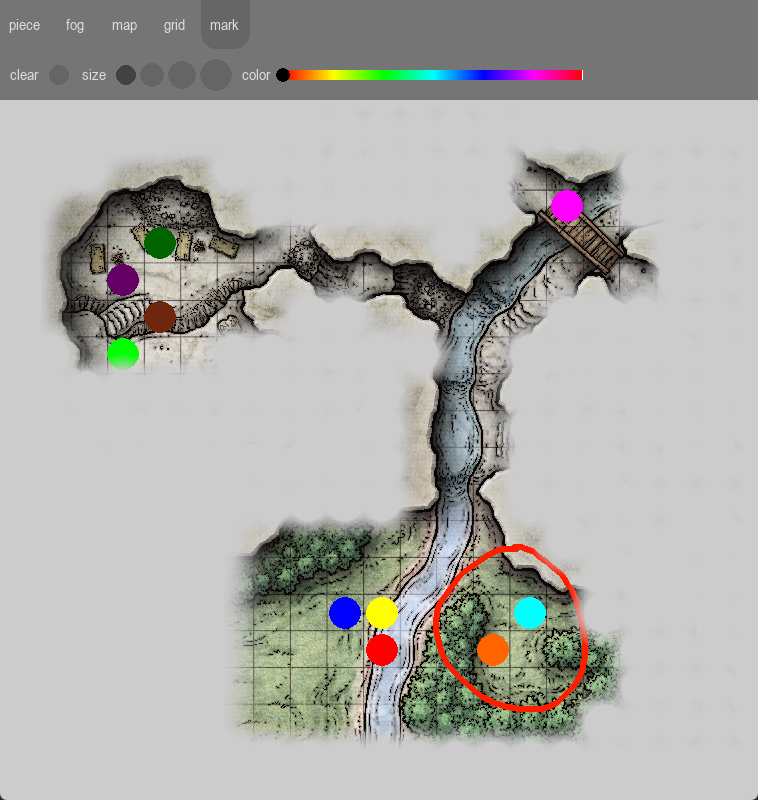
Features
- Infinite grid
- Add and remove a fog of war effect
- Import maps from image files
- Place, move and remove pieces on a grid (can be matched to image grid)
- Place 1x1, 2x2, 3x3, or 4x4 pieces
- Make markings on the map to show areas of effect or point out things to the players
- Save and load file to a single JSON file (no need to keep the image file separately!)
How to use
When installing from pypi, the library should come with a script
named dndfog that you can run. It should be available in your environment if
the Python\Scripts folder is set in PATH. You can also download an EXE from
the GitHub releases.
When the program opens, you need to select an image file to use as a background,
or a JSON data file to load a map from. You can also lauch the program with
a positional argument <filepath> to add an initial file.
The program does not autosave! You have to save (and override) the file yourself!
Keyboard shortcuts
Toolbar:
- Open/close the toolbar:
TAB - Select tool from the toolbar: Quick select with the number keys
1-9or click the tool button withLeft mouse buttonwhen the toolbar is open
Camera:
- Move camera:
Click and drag: Middle mouse button - Zoom in: Any tool except the
gridtool selected from the toolbar +Scroll wheel: Up - Zoom out: Any tool except the
gridtool selected from the toolbar +Scroll wheel: Down
Piece (quick select: 1):
- Add a piece: Select the
piecetool from the toolbar +Right mouse buttonon an empty square - Remove a piece: Select the
piecetool from the toolbar +Right mouse buttonon a piece - Move a piece: Select the
piecetool from the toolbar +Click and drag: Left mouse button
Fog (quick select: 2):
- Add fog: Select the
fogtool from the toolbar +Left mouse button - Remove fog: Select the
fogtool from the toolbar +Right mouse button - Show/hide fog:
F1or the checkbox in thefogtoolbar - Change fog size: Select the size to use from the
sizeselector in thefogtoolbar
Map (quick select: 3):
- Move map image: Select the
maptool from the toolbar +Click and drag: Left mouse button
Grid (quick select: 4):
- Increase gridsize: Select the
gridtool from the toolbar +Scroll wheel: Up - Decrease gridsize: Select the
gridtool from the toolbar +Scroll wheel: Down - Show/hide grid:
F2or the checkbox in thefogtoolbar
Mark (quick select: 5):
- Make markings: Select the
marktool from the toolbar +Click and drag: Left mouse button - Erase markings: Select the
marktool from the toolbar +Click and drag: Right mouse button - Clear markings: Click the
clearbutton in themarktoolbar - Change marker color: Use the color selector in the
marktoolbar
Misc:
- Save file:
CTRL + S(will skip file dialog if json data file already exists) - Save file as:
CTRL + Shift + S(will always open a file dialog) - Open file:
CTRL + O - Quit program: Press the X mutton on the window
Known issues or lacking features
- Matching program gridsize to background gridsize is a bit awkward
- When zooming, the program grid and background map might not stay aligned
- It's hard to keep track of combat, since there is no built-in turn order tracking
- It's too easy to accidentally remove fog you didn't mean to. There should be some way to layer fog, so that only some of it can be removed
- Markings do not scale when zooming
- There is no undo or redo
- There is no way to add pictures to pieces to identify them better
1 maintainer

Metadata
1 maintainer
Release files for dndfog 0.6.5
For a detailed explanation of source distributions (sdists) and built distributions (wheels), please see the package formats documentation.
Source distribution (sdist)
| File | Size | Uploaded | |
|---|---|---|---|
| dndfog-0.6.5.tar.gz | 18.9 kB | Details |
Built distribution (wheel)
| File | Interpreter | ABI | Platform | Reset |
|---|---|---|---|---|
| dndfog-0.6.5-py3-none-any.whl | Python 3 | none | any | Details |
Total release size: 43.8 kB
Release files / dndfog-0.6.5.tar.gz
| Download URL | dndfog-0.6.5.tar.gz |
|---|---|
| Size | 18.9 kB |
| Tags | Source |
|
SHA-256 checksum How to use checksums |
5f23042536ee4868bcd5a948963ecc4b7f99fcbeb020a7eb46c805dc59634ed9
|
|
BLAKE2b-256 checksum How to use checksums |
ff74d81177842de99f25e4bab3820560c29b2e23f8202f2bb3311aecaedaa656
|
| Upload date | |
|
Uploaded using Trusted Publishing? What is trusted publishing? |
No |
| Uploaded via |
poetry/1.6.1 CPython/3.12.0 Windows/11
|
Release files / dndfog-0.6.5-py3-none-any.whl
| Download URL | dndfog-0.6.5-py3-none-any.whl |
|---|---|
| Size | 24.9 kB |
| Tags | Python 3 |
|
SHA-256 checksum How to use checksums |
4046899fc82026def0edf5a3666510937e7a13258072f39f32adab38a8b9b3eb
|
|
BLAKE2b-256 checksum How to use checksums |
f5fae39825e88d715ced9281f42ab12382f0ee86a317e227fa09bf0b9d479242
|
| Upload date | |
|
Uploaded using Trusted Publishing? What is trusted publishing? |
No |
| Uploaded via |
poetry/1.6.1 CPython/3.12.0 Windows/11
|














