
Fast, comprehensive DNS performance testing with DNSSEC validation, DoH/DoT support, and enterprise features.
Verified details
These details have been verified by PyPIProject links
GitHub Statistics
Maintainers

Project description
DNS Benchmark Tool
Fast, comprehensive DNS performance testing
Part of BuildTools - Network Performance Suite
pip install dns-benchmark-tool
dns-benchmark benchmark --use-defaults --formats csv,excel
🎉 1,400+ downloads · 600+ active users 🚀 The web dashboard is now live! Try BuildTools free →
Real Time Tracking
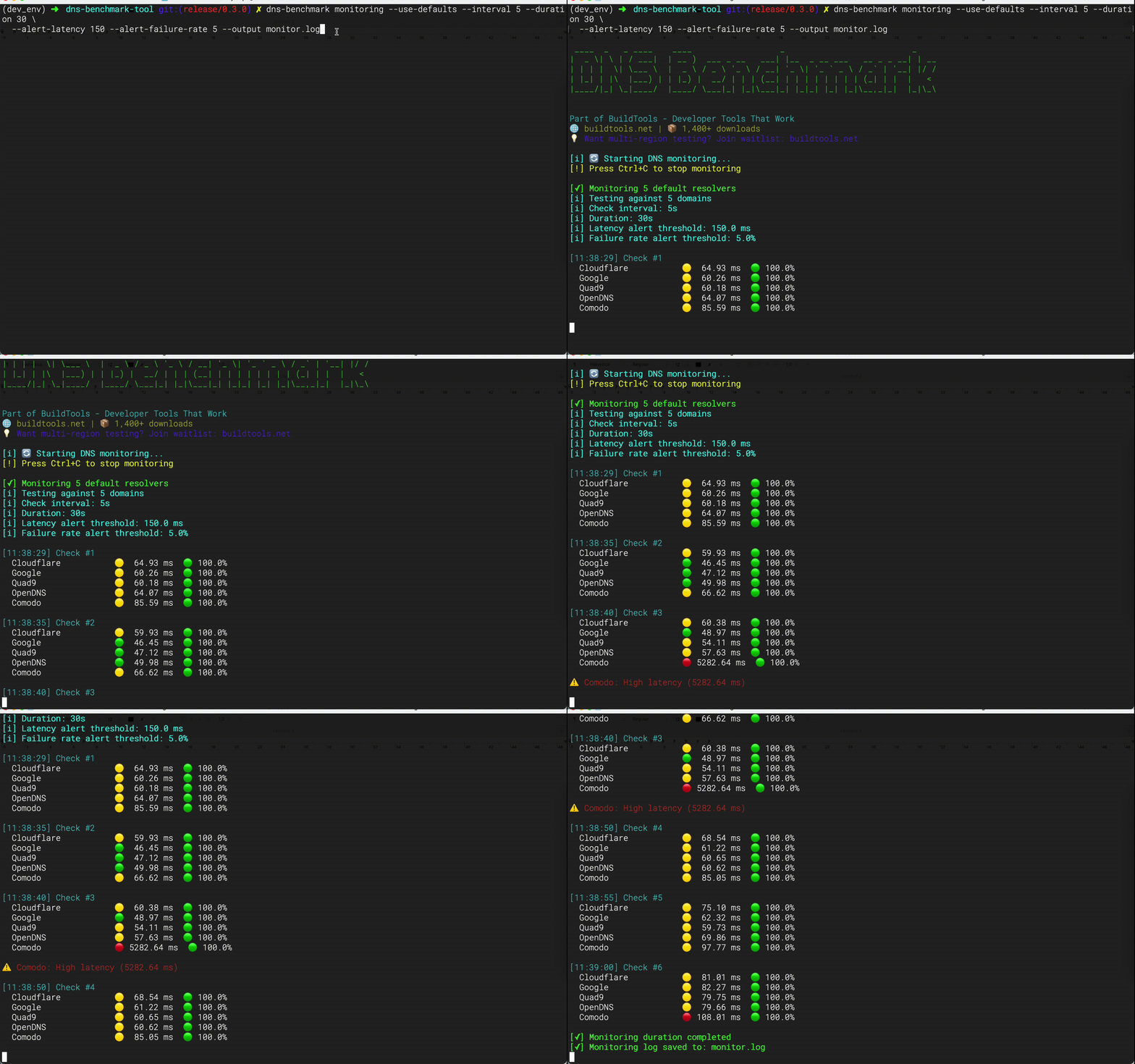
Watch DNS queries in motion
Real Time Tracking — Web UI
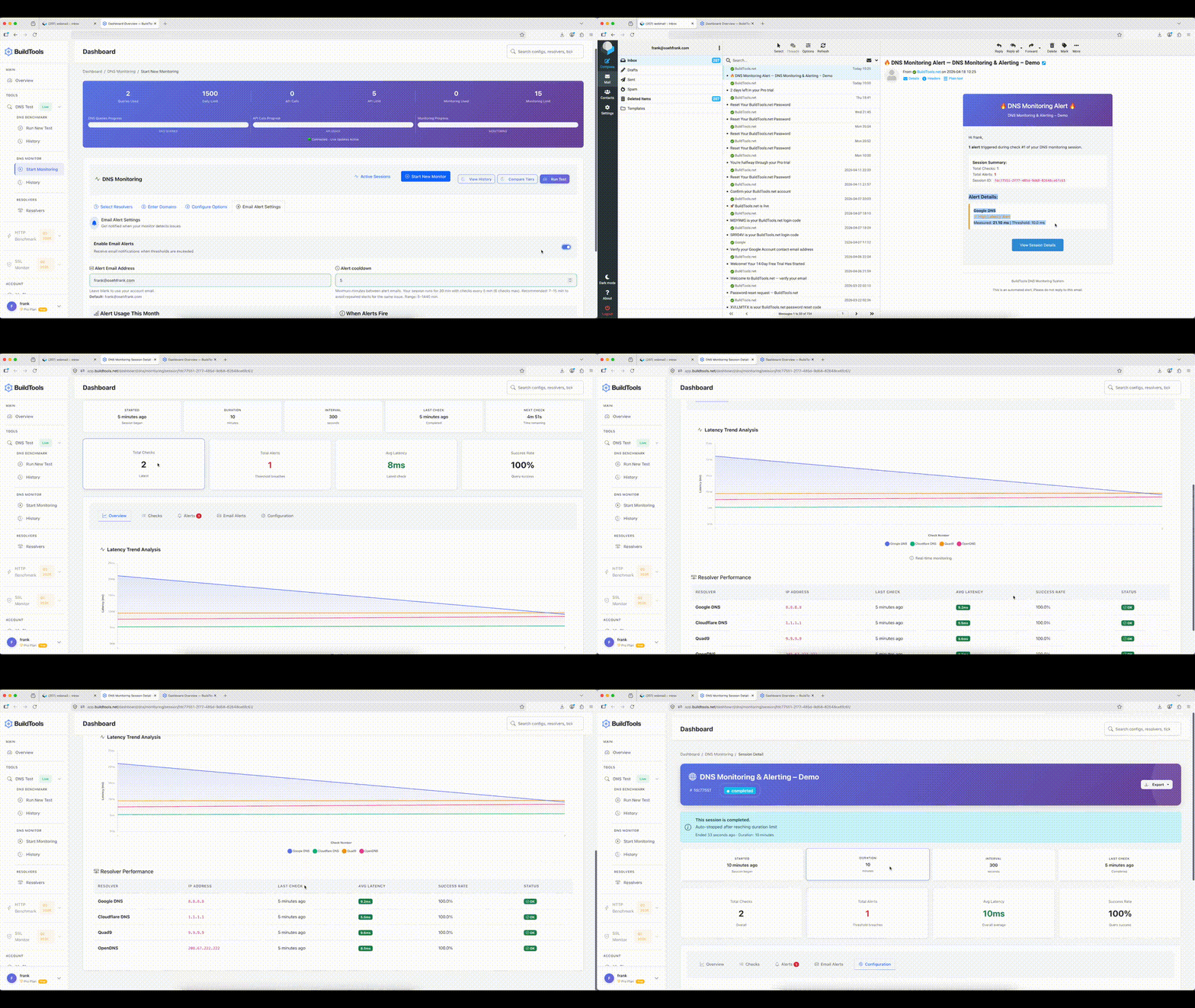
Monitor DNS queries live with email alerts
🎉 What's New in 
We've added three powerful CLI commands and full support for DoH, DoT, and DNSSEC:
- 🚀 top — quick ranking of resolvers by speed and reliability
- 📊 compare — side-by-side benchmarking with detailed statistics and export options
- 🔄 monitoring — continuous performance tracking with alerts and logging
- 🔒 DoH / DoT / DNSSEC — encrypted DNS benchmarking with real latency tradeoff data
# Quick resolver ranking
dns-benchmark top

# Compare resolvers side-by-side
dns-benchmark compare Cloudflare Google Quad9 --show-details

# Run monitoring for 1 hour with alerts
dns-benchmark monitoring --use-defaults --interval 30 --duration 3600 \
  --alert-latency 150 --alert-failure-rate 5 --output monitor.log

# Encrypted DNS
dns-benchmark benchmark \
  --resolvers "Cloudflare,Google" \
  --domains "bing.com,google.com" \
  --doh \
  --doh-url "https://cloudflare-dns.com/dns-query,https://dns.google/dns-query" \
  --iterations 1 \
  --formats csv \
  --output ./doh_results_explicit_urls

dns-benchmark benchmark \
  --resolvers "Cloudflare,Quad9" \
  --domains "cloudflare.com,quad9.net" \
  --dot












⚡ Commands at a Glance
| Command | What it does | Quick example |
|---|---|---|
benchmark |
Full DNS benchmark with exports | dns-benchmark benchmark --use-defaults |
top |
Rank all resolvers by speed | dns-benchmark top --limit 5 |
compare |
Side-by-side resolver comparison | dns-benchmark compare Cloudflare Google Quad9 |
monitoring |
Continuous monitoring with alerts | dns-benchmark monitoring --use-defaults |
Why DNS Benchmarking?
DNS resolution can add 300ms+ to every request. This tool helps you find the fastest resolver for YOUR location.
The Problem:
- DNS adds hidden latency to every request
- Fastest resolver depends on your location
- Security varies wildly (DNSSEC, DoH, DoT)
- Most developers never test their DNS
The Solution:
- Test multiple DNS resolvers side-by-side
- Get statistical analysis (P95, P99, jitter, consistency)
- Validate DNSSEC security
- Compare privacy options (DoH, DoT)
Key Features
🚀 Performance
✅ Async queries let you test 100+ resolvers simultaneously.
✅ Multi‑iteration runs (--iterations 3) provide more accurate results.
✅ Statistical analysis includes P95, P99, jitter, and consistency scores.
✅ Smart caching reuses results with --use-cache.
✅ Warmup options (--warmup or --warmup-fast) ensure accurate tests.
🔒 Security & Encrypted DNS
Three protocols are fully supported — each adds privacy at a latency cost.
| Protocol | Flag | Typical overhead | When to use |
|---|---|---|---|
| Plain UDP | (default) | baseline | Latency benchmarking |
| DNS-over-HTTPS | --doh |
+50–200ms | Privacy, firewall bypass |
| DNS-over-TLS | --dot |
+200–500ms cold, ~50ms warm | Encrypted transport |
| DNSSEC | --dnssec-validate |
+30–100ms | Validating resolver integrity |
⚠️ Tradeoffs
- DoH and DoT add TLS handshake overhead on first query per resolver. Use
--warmup-fastto absorb this before measuring.--dnssec-validaterequests RRSIG records and enforces the AD flag. Only ~33% of common domains are DNSSEC-signed — expectDNSSEC_FAILEDresults on unsigned domains. Latency numbers with and without this flag are not directly comparable.- Results on mobile/hotspot will show 2–5× higher variance than wired ethernet. Use
--iterations 5and compare median latency, not average.
# DoH benchmark — resolvers in db have URLs auto-resolved
dns-benchmark benchmark \
  --resolvers "Cloudflare,Google" \
  --domains "cloudflare.com,google.com" \
  --doh --warmup-fast

# DoH with explicit URLs — must match resolver count 1:1, order matters
dns-benchmark benchmark \
  --resolvers "Cloudflare,Google" \
  --domains "bing.com,google.com" \
  --doh \
  --doh-url "https://cloudflare-dns.com/dns-query,https://dns.google/dns-query" \
  --formats csv \
  --output ./doh_results

# DoT with DNSSEC on signed domains
dns-benchmark benchmark \
  --resolvers "Cloudflare,Quad9" \
  --domains "cloudflare.com,quad9.net" \
  --dot \
  --dnssec-validate

# Rank top resolvers over DoH
dns-benchmark top --doh --limit 5

# Rank top resolvers over DoT by reliability
dns-benchmark top --dot --metric reliability --limit 5

# Compare resolvers over DoH
dns-benchmark compare Cloudflare Google --doh --iterations 3

# Monitor with DoT and latency alerts
dns-benchmark monitoring --use-defaults --dot \
  --interval 60 --alert-latency 300

# DoH + DNSSEC enforced + export
dns-benchmark benchmark --use-defaults --doh --dnssec-validate --formats csv,excel

# DoT + DNSSEC + multiple iterations
dns-benchmark benchmark \
  --resolvers "Cloudflare,Quad9,Google" \
  --domains "cloudflare.com,quad9.net,google.com" \
  --dot \
  --dnssec-validate \
  --iterations 5 \
  --formats excel

# DoH monitoring with explicit URLs
dns-benchmark monitoring \
  --resolvers "Cloudflare,Google" \
  --doh \
  --doh-url "https://cloudflare-dns.com/dns-query,https://dns.google/dns-query" \
  --interval 30 --duration 7200
Early failure examples — these fail immediately before any query runs:
# --doh and --dot are mutually exclusive
dns-benchmark benchmark --use-defaults --doh --dot
# ERROR: --doh and --dot are mutually exclusive.

# --doh-url count must match --resolvers count
dns-benchmark benchmark --resolvers "Cloudflare,Google" --doh \
  --doh-url "https://cloudflare-dns.com/dns-query"
# ERROR: --doh-url has 1 URL(s) but --resolvers has 2 resolver(s). Counts must match.

# Custom IP with --doh requires --doh-url
dns-benchmark benchmark --resolvers "192.168.1.1" --doh
# ERROR: --doh requires a DoH URL for: 192.168.1.1. Use --doh-url to supply them explicitly.
Installation
pip install dns-benchmark-tool

#Verify Installation
dns-benchmark --version
dns-benchmark --help
📄 Optional PDF Export
By default, the tool supports CSV and Excel exports.
PDF export requires the extra dependency weasyprint, which is not installed automatically to avoid runtime issues on some platforms.
Install with PDF support
pip install dns-benchmark-tool[pdf]
Usage
Once installed, you can request PDF output via the CLI:
dns-benchmark --use-defaults --formats pdf --output ./results
If weasyprint is not installed and you request PDF output, the CLI will show:
[-] Error during benchmark: PDF export requires 'weasyprint'. Install with: pip install dns-benchmark-tool[pdf]
⚠️ WeasyPrint Setup (for PDF export)
The DNS Benchmark Tool uses WeasyPrint to generate PDF reports.
If you want PDF export, you need extra system libraries in addition to the Python package.
🛠 Linux (Debian/Ubuntu)
sudo apt install python3-pip libpango-1.0-0 libpangoft2-1.0-0 \
  libharfbuzz-subset0 libjpeg-dev libopenjp2-7-dev libffi-dev
🛠 macOS (Homebrew)
brew install pango cairo libffi gdk-pixbuf jpeg openjpeg harfbuzz
🛠 Windows
Install GTK+ libraries using one of these methods:
-
MSYS2: Download MSYS2, then run:
pacman -S mingw-w64-x86_64-gtk3 mingw-w64-x86_64-libffi
-
GTK+ 64‑bit Installer: Download GTK+ Runtime and run the installer.
Restart your terminal after installation.
✅ Verify Installation
After installing the system libraries, install the Python extra:
pip install dns-benchmark-tool[pdf]
Then run:
dns-benchmark --use-defaults --formats pdf --output ./results
Quick usage
# Run first benchmark
dns-benchmark benchmark --use-defaults

# Custom resolvers and domains
dns-benchmark benchmark --resolvers data/resolvers.json --domains data/domains.txt

# Results saved to ./benchmark_results/
📖 Usage Examples
Basic Usage
# Basic test with progress bars
dns-benchmark benchmark --use-defaults --formats csv,excel

# Basic test without progress bars
dns-benchmark benchmark --use-defaults --formats csv,excel --quiet

# Test with custom resolvers and domains
dns-benchmark benchmark --resolvers data/resolvers.json --domains data/domains.txt

# Quick test with only CSV output
dns-benchmark benchmark --use-defaults --formats csv
Advanced Usage
# Export a machine-readable bundle
dns-benchmark benchmark --use-defaults --json --output ./results

# Test specific record types
dns-benchmark benchmark --use-defaults --formats csv,excel --record-types A,AAAA,MX

# Custom output location and formats
dns-benchmark benchmark \
  --use-defaults \
  --output ./my-results \
  --formats csv,excel,pdf,json

# Include detailed statistics
dns-benchmark benchmark \
  --use-defaults \
  --record-type-stats \
  --error-breakdown

# High concurrency with retries
dns-benchmark benchmark \
  --use-defaults \
  --max-concurrent 200 \
  --timeout 3.0 \
  --retries 3

# Website migration planning
dns-benchmark benchmark \
  --resolvers data/global_resolvers.json \
  --domains data/migration_domains.txt \
  --formats excel,pdf \
  --output ./migration_analysis

# DNS provider selection
dns-benchmark benchmark \
  --resolvers data/provider_candidates.json \
  --domains data/business_domains.txt \
  --formats csv,excel \
  --output ./provider_selection

# Network troubleshooting
dns-benchmark benchmark \
  --resolvers "192.168.1.1,1.1.1.1,8.8.8.8" \
  --domains "problematic-domain.com,working-domain.com" \
  --timeout 10 \
  --retries 3 \
  --formats csv \
  --output ./troubleshooting

# Security assessment
dns-benchmark benchmark \
  --resolvers data/security_resolvers.json \
  --domains data/security_test_domains.txt \
  --formats pdf \
  --output ./security_assessment

# Performance monitoring
dns-benchmark benchmark \
  --use-defaults \
  --formats csv \
  --quiet \
  --output /var/log/dns_benchmark/$(date +%Y%m%d_%H%M%S)
Utilities
# List default resolvers and domains
dns-benchmark list-defaults

# Browse available resolvers
dns-benchmark list-resolvers
dns-benchmark list-resolvers --category privacy
dns-benchmark list-resolvers --format csv

# Browse test domains
dns-benchmark list-domains
dns-benchmark list-domains --category tech

# Generate sample config
dns-benchmark generate-config --output my-config.yaml
dns-benchmark generate-config --category security --output security.yaml
Real-World Use Cases
For Developers & DevOps/SRE:
# Optimize API performance
dns-benchmark benchmark \
  --domains api.myapp.com,cdn.myapp.com \
  --record-types A,AAAA \
  --iterations 10

# CI/CD integration test
dns-benchmark benchmark \
  --resolvers data/ci_resolvers.json \
  --domains data/ci_domains.txt \
  --timeout 2 \
  --formats csv \
  --quiet
For Enterprise IT:
# Corporate network assessment
dns-benchmark benchmark \
  --resolvers data/enterprise_resolvers.json \
  --domains data/corporate_domains.txt \
  --record-types A,AAAA,MX,TXT,SRV \
  --timeout 10 \
  --max-concurrent 25 \
  --retries 2 \
  --formats csv,excel,pdf \
  --output ./enterprise_dns_audit

# Multi-location testing
dns-benchmark benchmark \
  --resolvers data/global_resolvers.json \
  --domains data/international_domains.txt \
  --formats excel \
  --output ./global_performance
For Network Admins:
# Monthly health check (crontab)
0 0 1 * * dns-benchmark benchmark \
  --use-defaults \
  --formats pdf,csv \
  --output /var/reports/dns/
Performance Tips
| Mode | Flags | Purpose |
|---|---|---|
| Quick | --iterations 1 --warmup-fast --timeout 1 |
Fast feedback |
| Thorough | --iterations 3 --use-cache --warmup |
Accurate results |
| CI/CD | --quiet --formats csv --timeout 2 |
Automated testing |
| Large Scale | --max-concurrent 200 --quiet |
100+ resolvers |
⚡ CLI Commands
The DNS Benchmark Tool now includes three specialized commands for different workflows:
🚀 Top
Quickly rank resolvers by speed and reliability.
# Rank resolvers quickly
dns-benchmark top

# Use custom domain list
dns-benchmark top -d domains.txt

# Export results to JSON
dns-benchmark top -o results.json
📊 Compare
Benchmark resolvers side‑by‑side with detailed statistics.
# Compare Cloudflare, Google, and Quad9
dns-benchmark compare Cloudflare Google Quad9

# Compare by IP addresses
dns-benchmark compare 1.1.1.1 8.8.8.8 9.9.9.9

# Show detailed per-domain breakdown
dns-benchmark compare Cloudflare Google --show-details

# Export results to CSV
dns-benchmark compare Cloudflare Google -o results.csv
🔄 Monitoring
Continuously monitor resolver performance with alerts.
# Monitor default resolvers continuously (every 60s)
dns-benchmark monitoring --use-defaults

# Monitor with custom resolvers and domains
dns-benchmark monitoring -r resolvers.json -d domains.txt

# Run monitoring for 1 hour with alerts
dns-benchmark monitoring --use-defaults --interval 30 --duration 3600 \
  --alert-latency 150 --alert-failure-rate 5 --output monitor.log
🌟 Command Showcase
| Command | Purpose | Typical Use Case | Key Options | Output |
|---|---|---|---|---|
| top | Quick ranking of resolvers by speed and reliability | Fast check to see which resolver is best right now | --domains, --record-types, --output |
Sorted list of resolvers with latency & success rate |
| compare | Side‑by‑side comparison of specific resolvers | Detailed benchmarking across chosen resolvers/domains | --domains, --record-types, --iterations, --output, --show-details |
Table of resolvers with latency, success rate, per‑domain breakdown |
| monitoring | Continuous monitoring with alerts | Real‑time tracking of resolver performance over time | --interval, --duration, --alert-latency, --alert-failure-rate, --output, --use-defaults |
Live status indicators, alerts, optional log file |
🌐 BuildTools Web Dashboard — Now Live
CLI stays free forever. The web dashboard is now available at buildtools.net
What's live now (Free + Pro)
- 📊 DNS Benchmark — Visual results, history, powered by this CLI engine
- 🔔 DNS Monitoring — Real-time alerts when your records change
- 🆓 Free tier — Get started immediately, no credit card required
- 💼 Pro at €14/mo — Extended retention and priority support
Coming Q2 2026
- ⚡ HTTP Benchmark — Measure API response times and CDN performance
- 🔒 SSL Monitor — Certificate expiry alerts before issues occur
Coming Q3 2026
- 🌍 Multi-region testing — Test from multiple locations simultaneously
→ Sign up free at buildtools.net
🤝 Contributing
We love contributions! Here's how you can help:
Ways to Contribute
- 🐛 Report bugs - Open an issue
- 💡 Suggest features - Start a discussion
- 📝 Improve docs - README, examples, tutorials
- 🔧 Submit PRs - Bug fixes, features, tests
- ⭐ Star the repo - Help others discover the tool
- 📢 Spread the word - Tweet, blog, share
Code Guidelines
- Follow PEP 8 style guide
- Add tests for new features
- Update documentation
- Keep PRs focused and atomic
🔗 Links & Support
Official
- Website: buildtools.net
- PyPI: dns-benchmark-tool
- GitHub: frankovo/dns-benchmark-tool
Community
- Documentation: Full usage guide, advanced examples, and screenshots are available on GitHub
- Discussions: GitHub Discussions
- Issues: Bug Reports
License
MIT License - see LICENSE file for details.
Built with ❤️ by @frankovo
Part of BuildTools - Network Performance Suite
Project details
Verified details
These details have been verified by PyPIProject links
GitHub Statistics
Maintainers
Release history Release notifications | RSS feed


Download files
Download the file for your platform. If you're not sure which to choose, learn more about installing packages.
Source Distribution
Built Distribution
Filter files by name, interpreter, ABI, and platform.
If you're not sure about the file name format, learn more about wheel file names.
Copy a direct link to the current filters
File details
Details for the file dns_benchmark_tool-1.0.0.tar.gz.
File metadata
- Download URL: dns_benchmark_tool-1.0.0.tar.gz
- Upload date:
- Size: 5.5 MB
- Tags: Source
- Uploaded using Trusted Publishing? Yes
- Uploaded via: twine/6.1.0 CPython/3.13.12
File hashes
| Algorithm | Hash digest | |
|---|---|---|
| SHA256 |
7c5688f82edfe72057782db039e36ddb37be05dc75e0022c7403f45d8c742eb9
|
|
| MD5 |
83235ad92d83468d1883423e6d116e2b
|
|
| BLAKE2b-256 |
ab9fe43cc54e273ce0a90afa86bac2077f6fb5cf13b30087caf09db4a4afac38
|
Provenance
The following attestation bundles were made for dns_benchmark_tool-1.0.0.tar.gz:
Publisher:
pypi.yml on frankovo/dns-benchmark-tool
-
Statement:
-
Statement type:
https://in-toto.io/Statement/v1 -
Predicate type:
https://docs.pypi.org/attestations/publish/v1 -
Subject name:
dns_benchmark_tool-1.0.0.tar.gz -
Subject digest:
7c5688f82edfe72057782db039e36ddb37be05dc75e0022c7403f45d8c742eb9 - Sigstore transparency entry: 1436104400
- Sigstore integration time:
-
Permalink:
frankovo/dns-benchmark-tool@c4173801091e3dd941f7b8ee4247a749dc536bd4 -
Branch / Tag:
refs/tags/v1.0.0 - Owner: https://github.com/frankovo
-
Access:
public
-
Token Issuer:
https://token.actions.githubusercontent.com -
Runner Environment:
github-hosted -
Publication workflow:
pypi.yml@c4173801091e3dd941f7b8ee4247a749dc536bd4 -
Trigger Event:
push
-
Statement type:
File details
Details for the file dns_benchmark_tool-1.0.0-py3-none-any.whl.
File metadata
- Download URL: dns_benchmark_tool-1.0.0-py3-none-any.whl
- Upload date:
- Size: 44.4 kB
- Tags: Python 3
- Uploaded using Trusted Publishing? Yes
- Uploaded via: twine/6.1.0 CPython/3.13.12
File hashes
| Algorithm | Hash digest | |
|---|---|---|
| SHA256 |
02e8e5a52e4f078042e5c0ca1d6d5ff0265686bf92dd91307c2fa99ccf0773b7
|
|
| MD5 |
2aadd2e70cba03d284419d2bcb5a367b
|
|
| BLAKE2b-256 |
9556ec505d35019eb2b2e423a6df99bfa14cd9a7db8de078637d441db31ffb6b
|
Provenance
The following attestation bundles were made for dns_benchmark_tool-1.0.0-py3-none-any.whl:
Publisher:
pypi.yml on frankovo/dns-benchmark-tool
-
Statement:
-
Statement type:
https://in-toto.io/Statement/v1 -
Predicate type:
https://docs.pypi.org/attestations/publish/v1 -
Subject name:
dns_benchmark_tool-1.0.0-py3-none-any.whl -
Subject digest:
02e8e5a52e4f078042e5c0ca1d6d5ff0265686bf92dd91307c2fa99ccf0773b7 - Sigstore transparency entry: 1436104403
- Sigstore integration time:
-
Permalink:
frankovo/dns-benchmark-tool@c4173801091e3dd941f7b8ee4247a749dc536bd4 -
Branch / Tag:
refs/tags/v1.0.0 - Owner: https://github.com/frankovo
-
Access:
public
-
Token Issuer:
https://token.actions.githubusercontent.com -
Runner Environment:
github-hosted -
Publication workflow:
pypi.yml@c4173801091e3dd941f7b8ee4247a749dc536bd4 -
Trigger Event:
push
-
Statement type:






