





What is it?
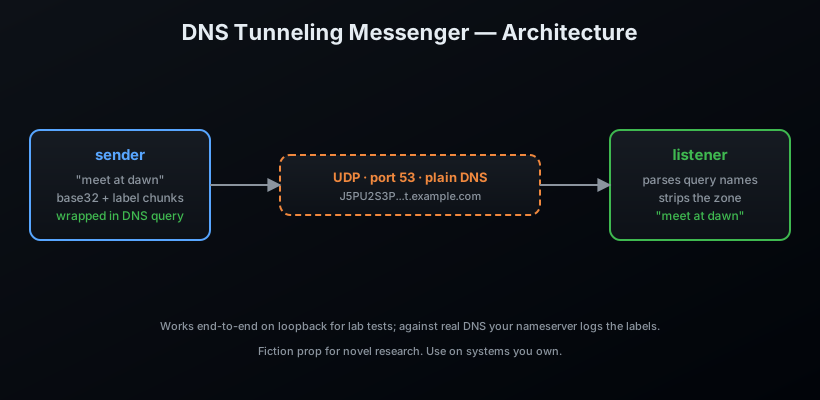
DNS is the one protocol that is always allowed out. Firewalls may block everything else, but something has to resolve names — and that something can carry cargo. DNS Tunneling Messenger encodes a message in base32, slices it into DNS-label-sized chunks, and ships it as subdomains of a zone you control. A listener parses the query names on the other end and reassembles the message.
The protocol itself is boring, standard DNS. The payload is in the names.
Features
- ✉️ Encode any text into a valid dotted DNS name
- 📡 Ship it as a real UDP DNS query (
send) - 👂 Decode it live from the wire (
listen) - 🧩 Handles long messages (automatic 63-char label slicing)
- 📦 Zero dependencies — pure Python standard library
v0.2.0 — protocol hardening & operations toolkit
- 🚦 Traffic shaping (
shaping) — beacon scheduling with jitter profiles (constant / uniform / poisson / bursty), token-bucket rate limiting, and adaptive pacing that backs off on RCODE_REFUSED/SERVFAIL and cautiously recovers on success. - 🧱 Fragmentation strategies (
fragmentation) — fixed-size, label-budget-aware (stay under a fraction of the 253-octet name limit), and priority-queue chunking (control frames first), behind a pluggable strategy registry. - 💾 Session persistence (
persistence) — save/resume client state (pending messages, acked seqs, counters) to versioned, fingerprint-checked JSON so a restart resumes instead of retransmitting. - 🛡️ Replay protection (
replay) — bounded TTL nonce ledger, timestamp-window validation, and a challenge-response handshake riding the existing frame format. - 📈 Benchmarks (
bench) — deterministic codec/name/chunker throughput benchmarks plus per-codec capacity planning and zone-length sweeps. - 🎲 Fuzz suite — seeded random payloads shaken through every layer (codecs, frames, chunking, crypto, packet parser) asserting roundtrip integrity and typed errors, never crashes.
Install
pip install dns-tunnel-messenger
From source:
git clone https://github.com/AnonymoDGH/dns-tunnel-messenger
cd dns-tunnel-messenger
pip install -e .
Quickstart — lab test on loopback
Terminal A (the listener):
dns-tunnel listen --port 5353 --zone t.example.com
# [+] Listening on udp://0.0.0.0:5353 for zone t.example.com
Terminal B (the courier):
dns-tunnel send "meet at dawn, bring the book" \
    --zone t.example.com --server 127.0.0.1 --port 5353
Terminal A prints:
[*] 127.0.0.1 -> meet at dawn, bring the book
CLI reference
| Command | What it does |
|---|---|
dns-tunnel send <msg> --zone <z> [--server] [--port] |
Ship a message as a DNS query |
dns-tunnel listen [--port] [--zone] |
Decode incoming queries live |
dns-tunnel encode <msg> --zone <z> |
Print the encoded dotted name |
dns-tunnel decode --name <n> [--zone <z>] |
Decode a name back to text |
dns-tunnel bench {codec,name,chunker,capacity,all} [--json] |
CPU benchmarks & capacity |
dns-tunnel capacity [--zone <z>] [--sweep] [--json] |
Per-codec throughput table |
dns-tunnel shape-plan <frames> [--profile <p>] [--rate-limit <qps>] |
Print a shaped send timetable |
dns-tunnel session-save <file> --zone <z> |
Save a client session state file |
dns-tunnel session-load <file> [--json] |
Load & verify a session state file |
Shaping a transmission
dns-tunnel shape-plan 20 --profile bursty --interval 1.0 --rate-limit 5 --verbose
# profile=bursty interval=1.0s frames=20
# total=...s effective=... qps  [rate-limited]
Capacity planning
dns-tunnel capacity --zone t.example.com
#   base32       140 B/name      1400.0 B/s
#   base64url    170 B/name      1700.0 B/s
#   hex          111 B/name      1110.0 B/s
How it works
Tests
pip install pytest
pytest
Includes an end-to-end test that ships a real message over loopback UDP.
License
MIT — a fiction research prop. Point it at zones you control and keep the novel's intrigue on the page, not the network.
1 maintainer

Metadata
1 maintainer
Release files for dns-tunnel-messenger 0.2.0
For a detailed explanation of source distributions (sdists) and built distributions (wheels), please see the package formats documentation.
Source distribution (sdist)
| File | Size | Uploaded | Provenance | Actions |
|---|---|---|---|---|
| dns_tunnel_messenger-0.2.0.tar.gz | 101.9 kB | Without provenance | Details for dns_tunnel_messenger-0.2.0.tar.gz |
Built distribution (wheel)
| File | Interpreter | ABI | Platform | Actions Reset |
|---|---|---|---|---|
| dns_tunnel_messenger-0.2.0-py3-none-any.whl | Python 3 | none | any | Details for dns_tunnel_messenger-0.2.0-py3-none-any.whl |
Total release size: 177.0 kB
Release files / dns_tunnel_messenger-0.2.0.tar.gz
| Download URL | dns_tunnel_messenger-0.2.0.tar.gz |
|---|---|
| Size | 101.9 kB |
| Tags | Source |
|
SHA-256 checksum How to use checksums |
a959079473d2eb2eca67aeaca707c6dc0fd9e9f74ecc2c2e809b659885993f28
|
|
BLAKE2b-256 checksum How to use checksums |
7409c7f7e0e754659e50a54fb5e80be9949b99b00f47ac96481e8ebb0c0b54da
|
| Upload date | |
|
Uploaded using Trusted Publishing? What is trusted publishing? |
No |
| Uploaded via |
twine/7.0.0 CPython/3.14.3
|
Release files / dns_tunnel_messenger-0.2.0-py3-none-any.whl
| Download URL | dns_tunnel_messenger-0.2.0-py3-none-any.whl |
|---|---|
| Size | 75.0 kB |
| Tags | Python 3 |
|
SHA-256 checksum How to use checksums |
39a6c66050d19d1d9516dd21cc941983fd4076ae98afe7431d9a157b216f5682
|
|
BLAKE2b-256 checksum How to use checksums |
69f9702b32fde222914058c6aaa99382ad5c2559a46e13bd5514979d4e3c9640
|
| Upload date | |
|
Uploaded using Trusted Publishing? What is trusted publishing? |
No |
| Uploaded via |
twine/7.0.0 CPython/3.14.3
|
Security for dns-tunnel-messenger 0.2.0
Provenance
Provenance describes where a file came from. On PyPI, provenance is shared via attestations, which provide a verifiable record of the build or publishing details. View details, limitations and caveats.
No provenance found
None of the files in this release were uploaded with provenance metadata.
A note on package security
PyPI is a repository for distributing packages, not a service for auditing them. While third-party security researchers and our staff do their best to detect and remove malicious packages, PyPI cannot guarantee the quality, security or suitability of any given package.
To learn more about protecting yourself from malicious actors, visit our package security documentation.














