
dnslens
A cross-platform DNS toolkit for developers and DevOps. Query, trace, propagation checks, benchmarks, health audits, DNSSEC checks, a local DNS server and an HTTP/Prometheus API. One package, one dependency.




Contents
- Why dnslens
- Install
- Quick start
- How it fits together
- Command reference
- DNS server:
dnslens serve - HTTP API:
dnslens api - Recipes
- Use as a Python library
- Output formats and exit codes
- Security notes
- Troubleshooting
- Limitations
- Development and releasing
- License
Why dnslens
| You need to... | Use |
|---|---|
look up records like dig, on Windows too, with JSON output |
dnslens query |
| see exactly where a resolution breaks | dnslens trace |
| know whether a DNS change has reached the world | dnslens propagate |
| block a deploy pipeline until DNS is ready | dnslens wait |
| pick the fastest resolver | dnslens bench |
| check a domain's NS, SOA, mail auth, CAA and DNSSEC | dnslens audit, dnslens dnssec |
| override names for dev/staging/CI, or block ads on a LAN | dnslens serve |
| expose all of this to dashboards and Prometheus | dnslens api |
Design goals: works the same on Windows, Linux and macOS, scriptable (--json, meaningful exit codes), no native tools required (no dig, no nslookup), and safe defaults for the two server components.
Install
pip install dnslens                 # Python 3.9+
pip install "dnslens[doh]"          # adds DNS-over-HTTPS (httpx)
pipx install dnslens                # isolated CLI install
Check it works: dnslens --version or python -m dnslens --version.
Quick start
dnslens query example.com MX                       # dig-like lookup via the OS resolver
dnslens query example.com A -r 1.1.1.1 --short     # only the data
dnslens propagate app.example.com --expect 203.0.113.10
dnslens audit example.com
dnslens serve --record "app.test A 10.0.0.5"       # local DNS server on 127.0.0.1:5353
dnslens api --token secret                         # HTTP API on 127.0.0.1:8053
How it fits together
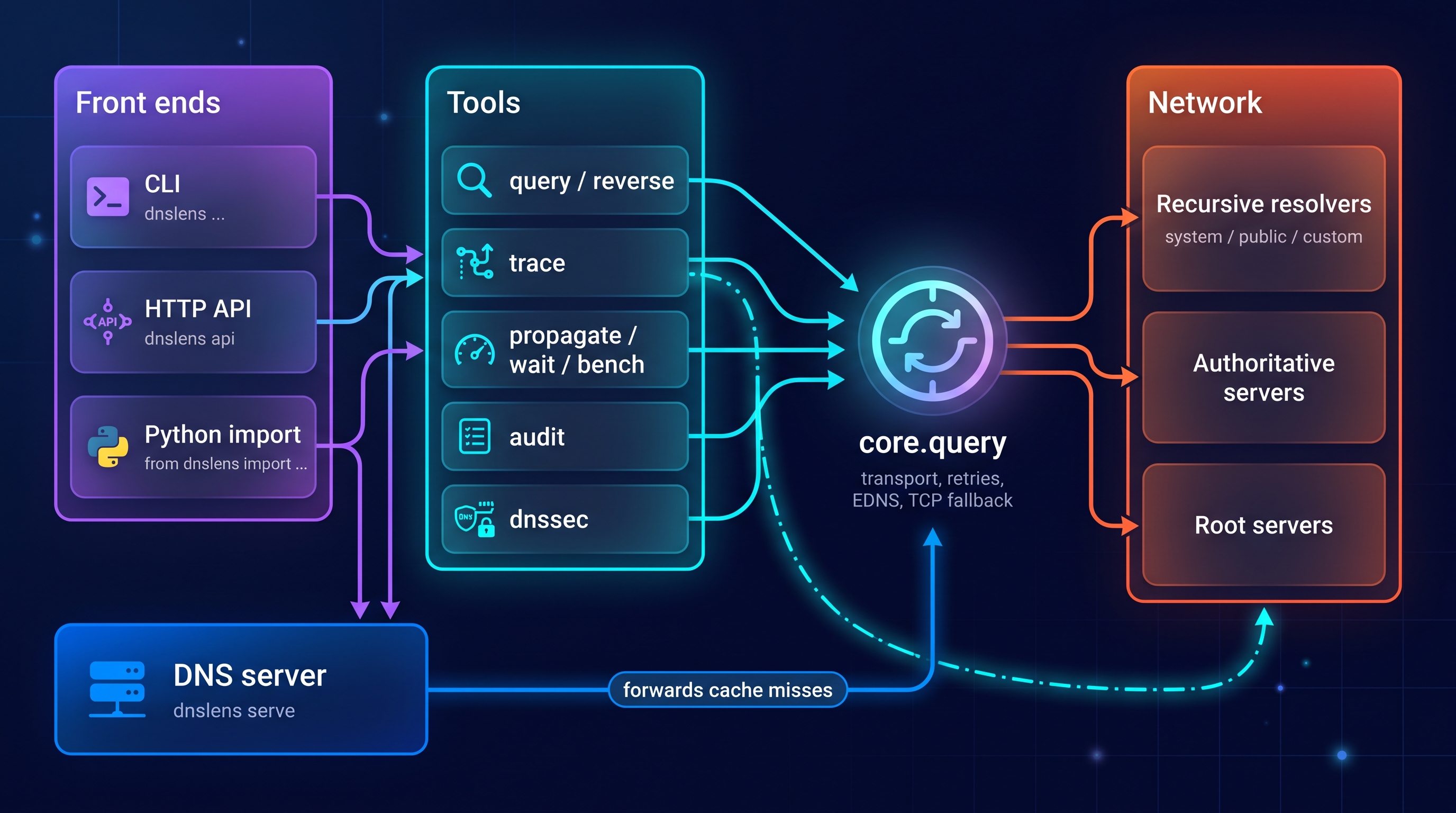
Three front ends share the same tools. Every tool is built on a single query primitive (core.query) that talks to resolvers through dnspython.
flowchart LR
    subgraph FE["Front ends"]
        CLI["CLI<br/>dnslens ..."]
        HTTP["HTTP API<br/>dnslens api"]
        LIB["Python import<br/>from dnslens import ..."]
    end

    subgraph TOOLS["Tools"]
        QRY["query / reverse"]
        TRC["trace"]
        PRP["propagate / wait / bench"]
        AUD["audit"]
        SEC["dnssec"]
    end

    SRV["DNS server<br/>dnslens serve"]
    CORE["core.query<br/>transport, retries, EDNS, TCP fallback"]

    subgraph NET["Network"]
        RES["Recursive resolvers<br/>system / public / custom"]
        AUTH["Authoritative servers"]
        ROOT["Root servers"]
    end

    CLI --> TOOLS
    HTTP --> TOOLS
    LIB --> TOOLS
    CLI --> SRV
    LIB --> SRV
    QRY --> CORE
    PRP --> CORE
    AUD --> CORE
    SEC --> CORE
    TRC --> CORE
    SRV -->|"forwards cache misses"| CORE
    CORE --> RES
    CORE --> AUTH
    TRC --> ROOT
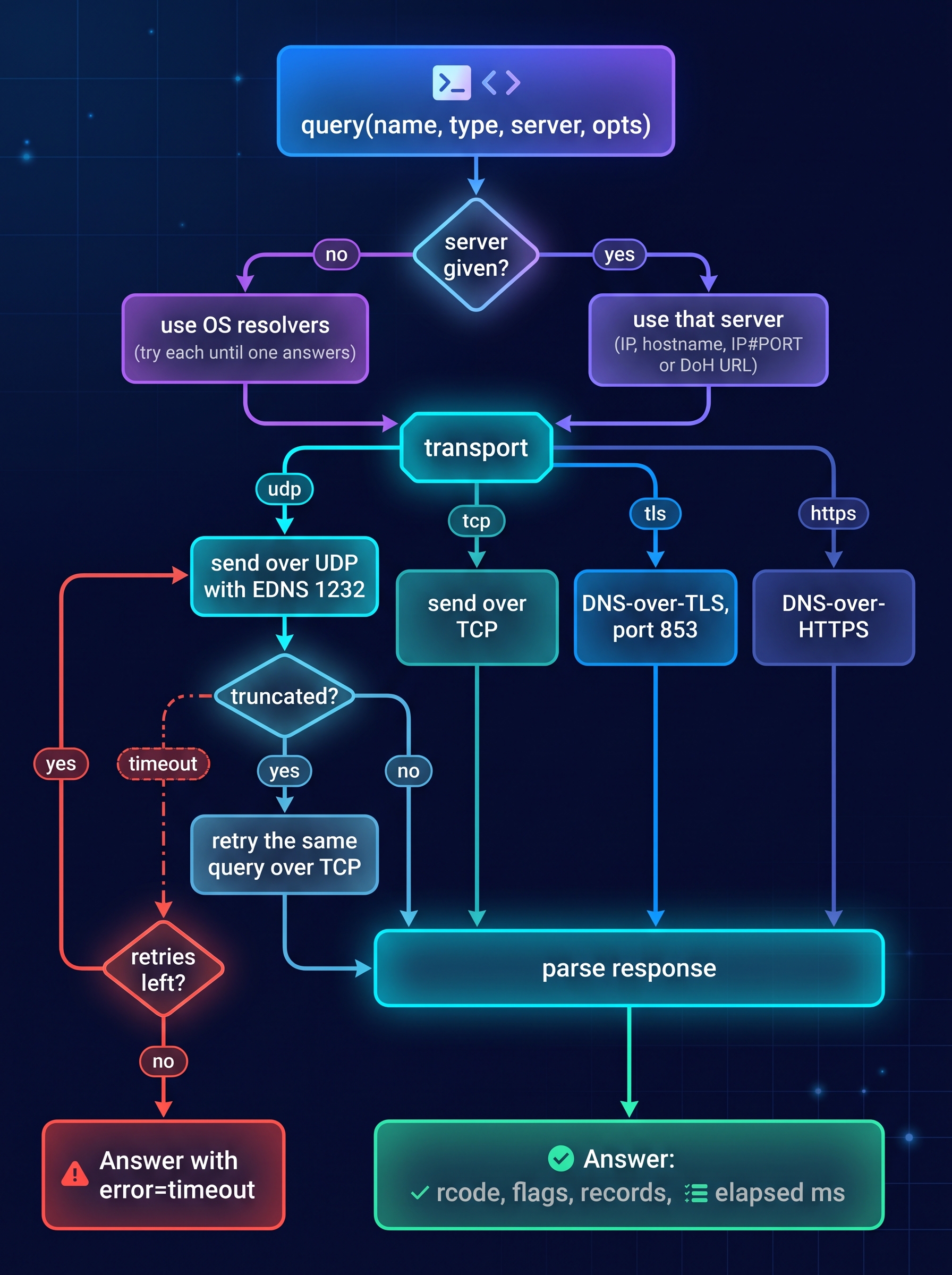
How a single query travels
flowchart TD
    A["query(name, type, server, opts)"] --> B{"server given?"}
    B -- "no" --> C["use OS resolvers<br/>try each until one answers"]
    B -- "yes" --> D["use that server<br/>IP, hostname, IP#PORT or DoH URL"]
    C --> E{"transport"}
    D --> E
    E -- "udp" --> F["send over UDP with EDNS 1232"]
    E -- "tcp" --> G["send over TCP"]
    E -- "tls" --> H["DNS-over-TLS, port 853"]
    E -- "https" --> I["DNS-over-HTTPS"]
    F --> J{"truncated?"}
    J -- "yes" --> K["retry the same query over TCP"]
    J -- "no" --> L["parse response"]
    K --> L
    G --> L
    H --> L
    I --> L
    F -. "timeout" .-> M{"retries left?"}
    M -- "yes" --> F
    M -- "no" --> N["Answer with error=timeout"]
    L --> O["Answer: rcode, flags, records, elapsed ms"]
Command reference
Options shared by most commands
| Option | Default | Meaning |
|---|---|---|
-r, --resolver ADDR |
OS resolvers | Resolver IP, hostname, IP#PORT or DoH URL. NAME=ADDR gives it a label. Repeatable. |
--public |
off | Use the built-in public resolver set (11 resolvers). |
-t, --timeout SEC |
3 |
Per-query timeout. |
--retries N |
1 |
Retries on timeout. |
--transport |
udp |
udp (auto TCP fallback), tcp, tls, https. |
-p, --port N |
by transport | Server port. |
--json |
off | Machine-readable output. |
--no-color |
off | Disable ANSI colour (NO_COLOR is also honoured). |
The built-in public set: Google (2), Cloudflare (2), Quad9, OpenDNS, AdGuard, CleanBrowsing, Verisign, DNS.WATCH, Yandex.
query
dig-like lookup. Several types at once: A,AAAA,MX.
$ dnslens query example.test A,MX -r 127.0.0.1#5401
;; example.test A @ 127.0.0.1#5401  NOERROR  [QR AA RD]  2.6 ms  udp
NAME           TTL  TYPE  DATA
-------------  ---  ----  ----------
example.test.  300  A     192.0.2.11
example.test.  300  A     192.0.2.10

;; example.test MX @ 127.0.0.1#5401  NOERROR  [QR AA RD]  1.4 ms  udp
NAME           TTL  TYPE  DATA
-------------  ---  ----  ---------------------
example.test.  300  MX    10 mail.example.test.
Extra options: --short (data only, ideal for scripts), --dnssec (set the DO bit), --norecurse (clear RD). Exit code is 1 for NXDOMAIN, errors, or no records.
trace
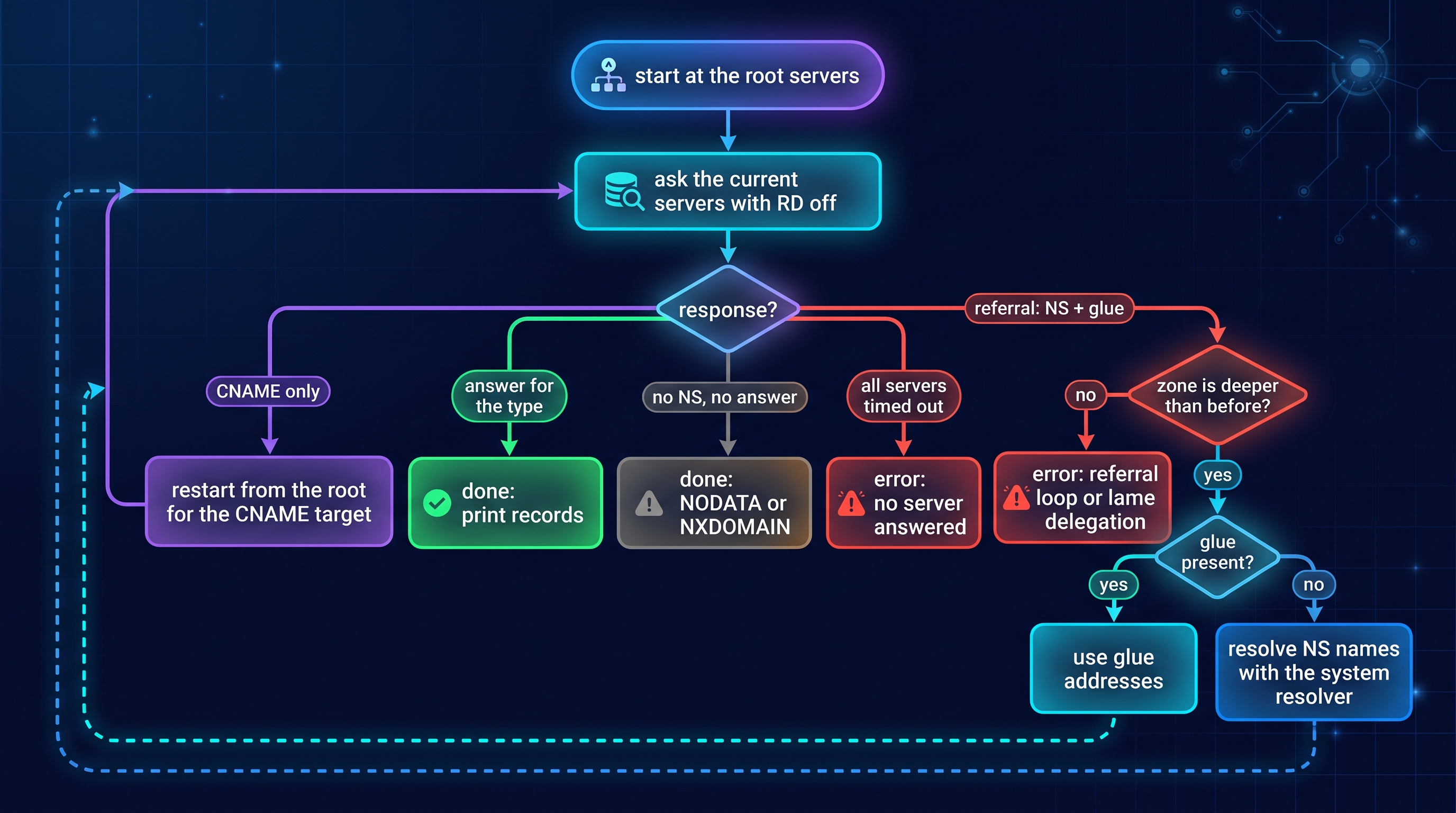
Iterative resolution from the root servers, like dig +trace. Follows referrals, uses glue, resolves glueless nameservers, follows CNAMEs, detects referral loops.
flowchart TD
    S["start at the root servers"] --> Q["ask the current servers<br/>with RD off"]
    Q --> R{"response"}
    R -- "answer for the type" --> D["done: print records"]
    R -- "CNAME only" --> C["restart from the root<br/>for the CNAME target"]
    C --> Q
    R -- "referral: NS + glue" --> P{"zone is deeper<br/>than before?"}
    P -- "no" --> E["error: referral loop<br/>or lame delegation"]
    P -- "yes" --> G{"glue present?"}
    G -- "yes" --> N["use glue addresses"]
    G -- "no" --> L["resolve NS names<br/>with the system resolver"]
    N --> Q
    L --> Q
    R -- "no NS, no answer" --> X["done: NODATA or NXDOMAIN"]
    R -- "all servers timed out" --> F["error: no server answered"]
dnslens trace www.example.com
dnslens trace www.example.com AAAA --json
Each hop shows the zone, the server asked, the round-trip time and the outcome (referral, cname, answer, nodata, nxdomain, error).
propagate
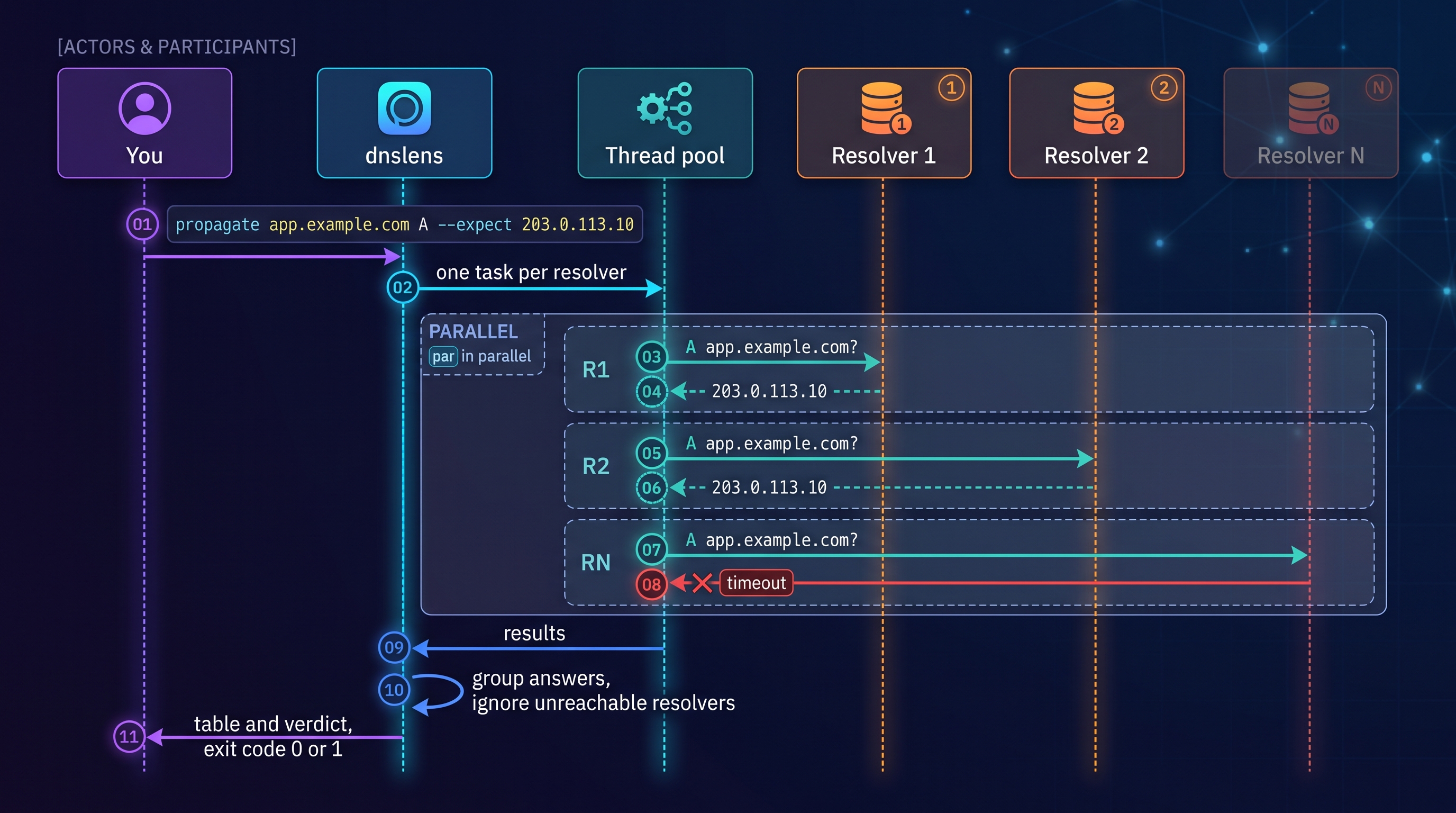
Queries many resolvers in parallel and groups identical answers. Defaults to the public set.
sequenceDiagram
    autonumber
    actor U as You
    participant C as dnslens
    participant P as Thread pool
    participant R1 as Resolver 1
    participant R2 as Resolver 2
    participant RN as Resolver N

    U->>C: propagate app.example.com A --expect 203.0.113.10
    C->>P: one task per resolver
    par in parallel
        P->>R1: A app.example.com?
        R1-->>P: 203.0.113.10
    and
        P->>R2: A app.example.com?
        R2-->>P: 203.0.113.10
    and
        P->>RN: A app.example.com?
        RN--xP: timeout
    end
    P-->>C: results
    C->>C: group answers, ignore unreachable resolvers
    C-->>U: table and verdict, exit code 0 or 1
$ dnslens propagate example.test A -r alpha=127.0.0.1#5401 -r beta=127.0.0.1#5402 --expect 192.0.2.10 --expect 192.0.2.11
RESOLVER  STATE  ANSWER                  TTL  TIME
--------  -----  ----------------------  ---  ----
alpha     OK     192.0.2.10, 192.0.2.11  300  3 ms
beta      OK     192.0.2.10, 192.0.2.11  300  3 ms

2/2 responding resolvers return the expected answer
| Option | Meaning |
|---|---|
--expect VALUE |
Expected record data (repeatable). The answer set must equal it. |
--strict |
Unreachable resolvers count as a failure (default: ignored). |
Success means: all responding resolvers agree (or match --expect). Round-robin and GeoDNS records legitimately differ between resolvers, so use --expect for those.
wait
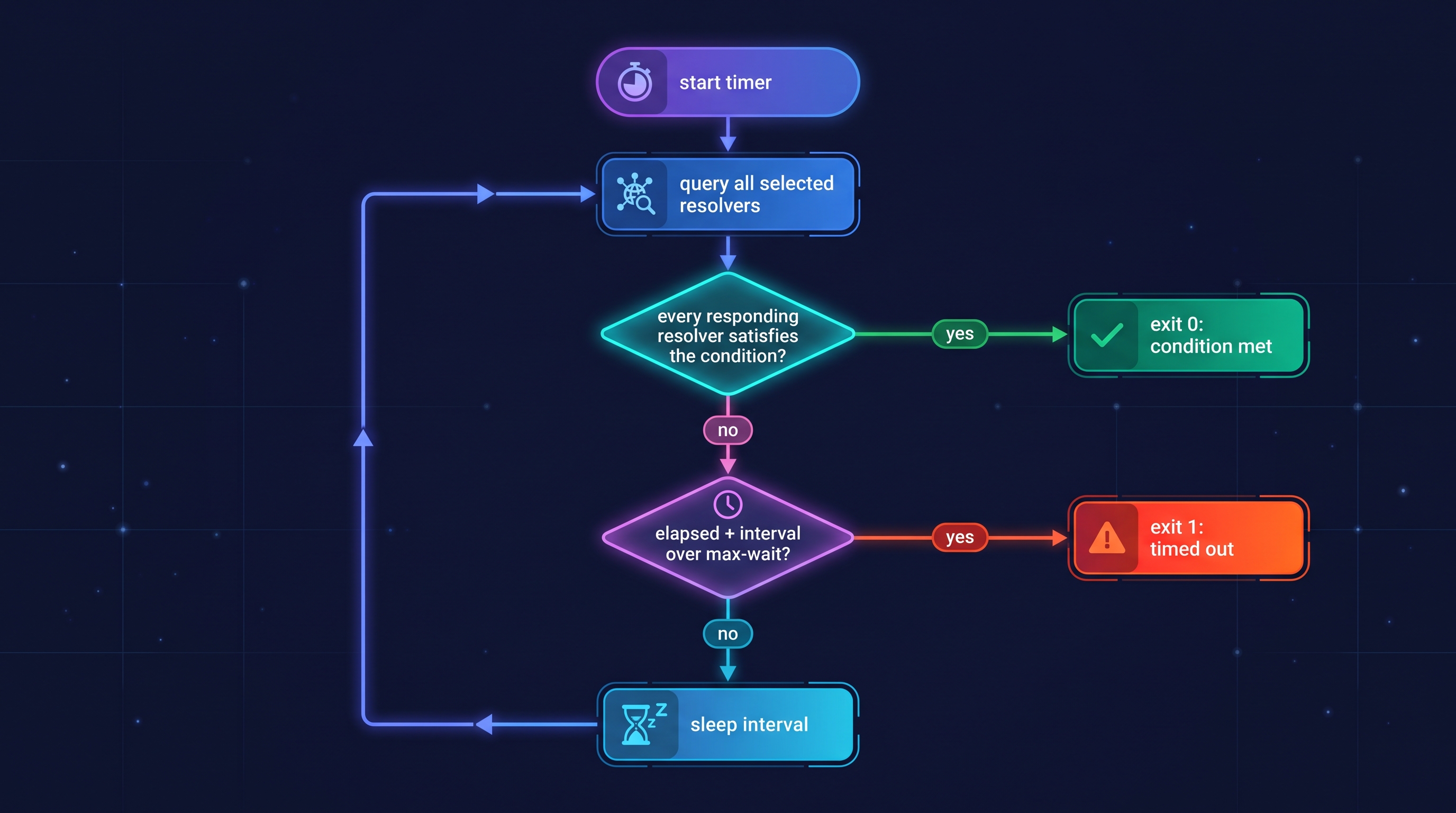
Blocks until DNS reaches a state, then exits 0. Exits 1 on timeout. Progress goes to stderr, so stdout stays clean.
flowchart TD
    A["start timer"] --> B["query all selected resolvers"]
    B --> C{"every responding resolver<br/>satisfies the condition?"}
    C -- "yes" --> D["exit 0: condition met"]
    C -- "no" --> E{"elapsed + interval<br/>over max-wait?"}
    E -- "yes" --> F["exit 1: timed out"]
    E -- "no" --> G["sleep interval"]
    G --> B
dnslens wait app.example.com A --expect 203.0.113.10 --public --max-wait 600
dnslens wait old.example.com A --absent                       # wait until the record is gone
dnslens wait example.com TXT --expect "v=spf1 -all" --subset  # value must be present, others allowed
| Option | Default | Meaning |
|---|---|---|
--expect VALUE |
none | Wanted data. Without it, any non-empty answer satisfies. |
--subset |
off | Expected values only need to be included in the answer. |
--absent |
off | Wait until no records are returned. |
--interval SEC |
5 |
Poll interval. |
--max-wait SEC |
300 |
Give up after this long. |
bench
Latency statistics per resolver, sorted by median.
$ dnslens bench -r alpha=127.0.0.1#5401 -r beta=127.0.0.1#5402 -d example.test -n 20
RESOLVER  OK     LOSS  MIN  AVG  MEDIAN  P95  MAX  ERROR
--------  -----  ----  ---  ---  ------  ---  ---  -----
alpha     20/20  0%    0.6  1.3  1.2     1.9  3.5
beta      20/20  0%    0.6  1.2  1.2     2.0  2.2

times in ms, sorted by median
-d/--domain (repeatable, defaults to five popular domains), -n/--count (default 10), --uncached prepends a random label to each name so you measure real recursion instead of the resolver's cache (NXDOMAIN counts as answered).
audit
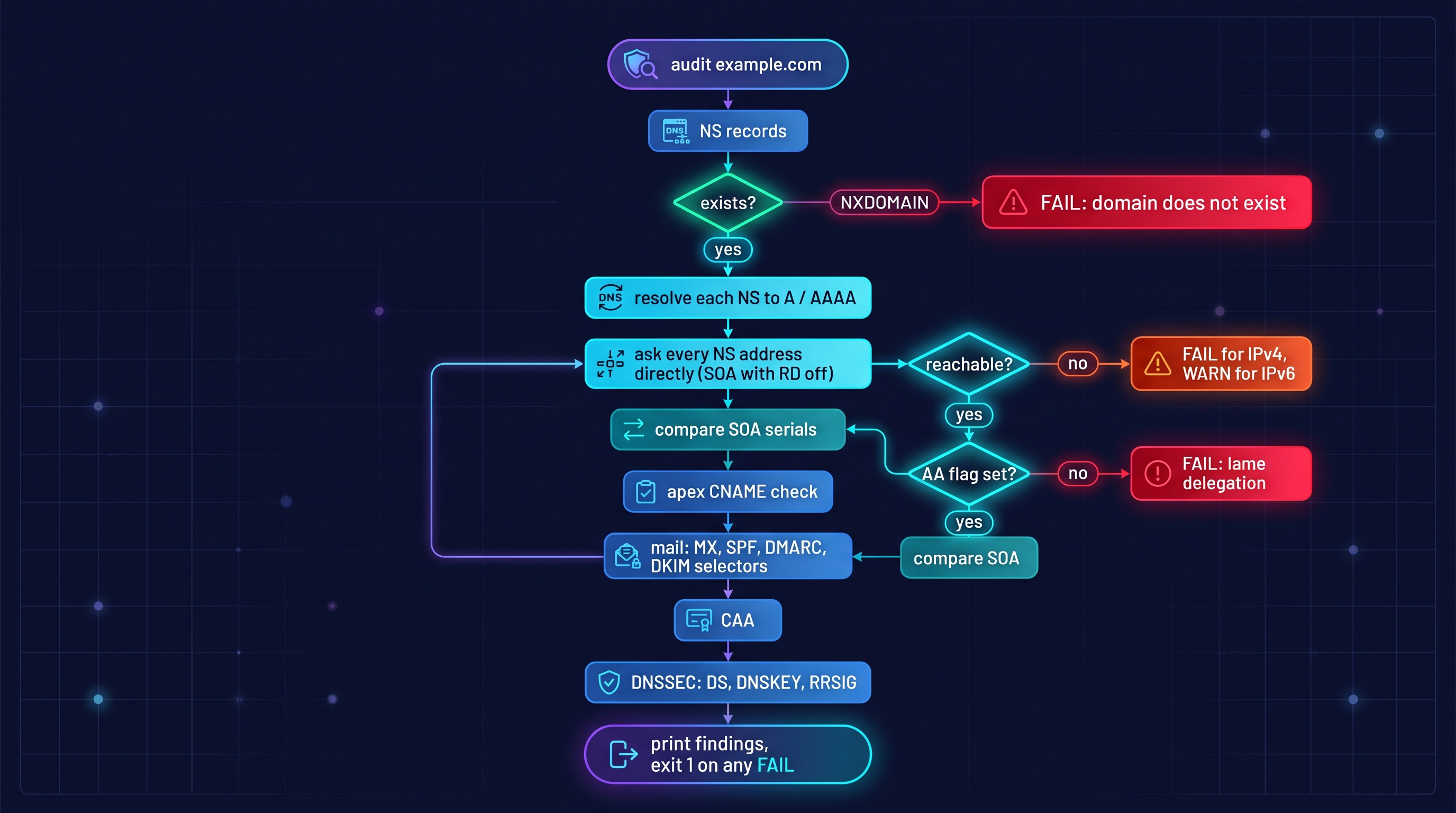
A health check for one domain. Every finding has a level: OK, INFO, WARN or FAIL. The exit code is 1 if any FAIL is present.
flowchart TD
    A["audit example.com"] --> B["NS records"]
    B --> B1{"exists?"}
    B1 -- "NXDOMAIN" --> Z["FAIL: domain does not exist"]
    B1 -- "yes" --> C["resolve each NS to A / AAAA"]
    C --> D["ask every NS address directly<br/>SOA with RD off"]
    D --> D1{"reachable?"}
    D1 -- "no" --> D2["FAIL for IPv4, WARN for IPv6"]
    D1 -- "yes" --> D3{"AA flag set?"}
    D3 -- "no" --> D4["FAIL: lame delegation"]
    D3 -- "yes" --> D5["compare SOA serials"]
    D5 --> E["apex CNAME check"]
    E --> F["mail: MX, SPF, DMARC, DKIM selectors"]
    F --> G["CAA"]
    G --> H["DNSSEC: DS, DNSKEY, RRSIG"]
    H --> I["print findings, exit 1 on any FAIL"]
What it checks:
| Area | Checks |
|---|---|
| Delegation | at least 2 nameservers, every NS has an address, every NS answers authoritatively (lame delegation), IPv6 failures are only warnings |
| SOA | serial identical on all reachable nameservers |
| Apex | CNAME at the zone apex (illegal next to SOA/NS) |
| SPF | present, single record, restrictive ending (-all / ~all / redirect=), flags +all, RFC 7208 10-lookup limit (follows include and redirect) |
| DMARC | present, policy is quarantine or reject (warns on p=none), rua= reporting address |
| DKIM | each --dkim-selector publishes a key |
| CAA | present or not (informational) |
| DNSSEC | see dnssec |
Domains without MX only get INFO for missing SPF/DMARC; domains that receive mail get WARN.
$ dnslens audit example.com --dkim-selector google        # illustrative output
OK    ns     2 nameservers: a.iana-servers.net, b.iana-servers.net
OK    soa    serial 2024081201 consistent on all 4 reachable servers
OK    mx     1 MX record(s)
OK    spf    SPF present with a restrictive policy
OK    spf    1/10 DNS lookups
WARN  dmarc  policy p=none (monitoring only)
FAIL  dkim   selector 'google' not found
INFO  caa    no CAA records (any CA may issue certificates)
OK    dnssec 1 DS record(s) published at parent

1 failure(s), 1 warning(s)
dnssec
Zone-level DNSSEC sanity check (also part of audit).
flowchart TD
    A["dnssec example.com"] --> B["query DS at the parent with DO bit"]
    B --> C{"DS exists?"}
    C -- "no" --> D["INFO: zone is not signed"]
    C -- "yes" --> E["query DNSKEY + RRSIG"]
    E --> F{"DNSKEY served?"}
    F -- "no" --> G["FAIL: validating resolvers will SERVFAIL"]
    F -- "yes" --> H{"a DS digest matches<br/>a published DNSKEY?"}
    H -- "no" --> I["FAIL: broken chain of trust"]
    H -- "yes" --> J["OK: DS matches DNSKEY"]
    J --> K["validate the RRSIG over the DNSKEY set"]
    K --> L{"valid?"}
    L -- "no" --> M["FAIL: invalid signature"]
    L -- "yes" --> N{"expires within 3 days?"}
    N -- "yes" --> O["WARN: signatures expire soon"]
    N -- "no" --> P["OK: signatures valid for N days"]
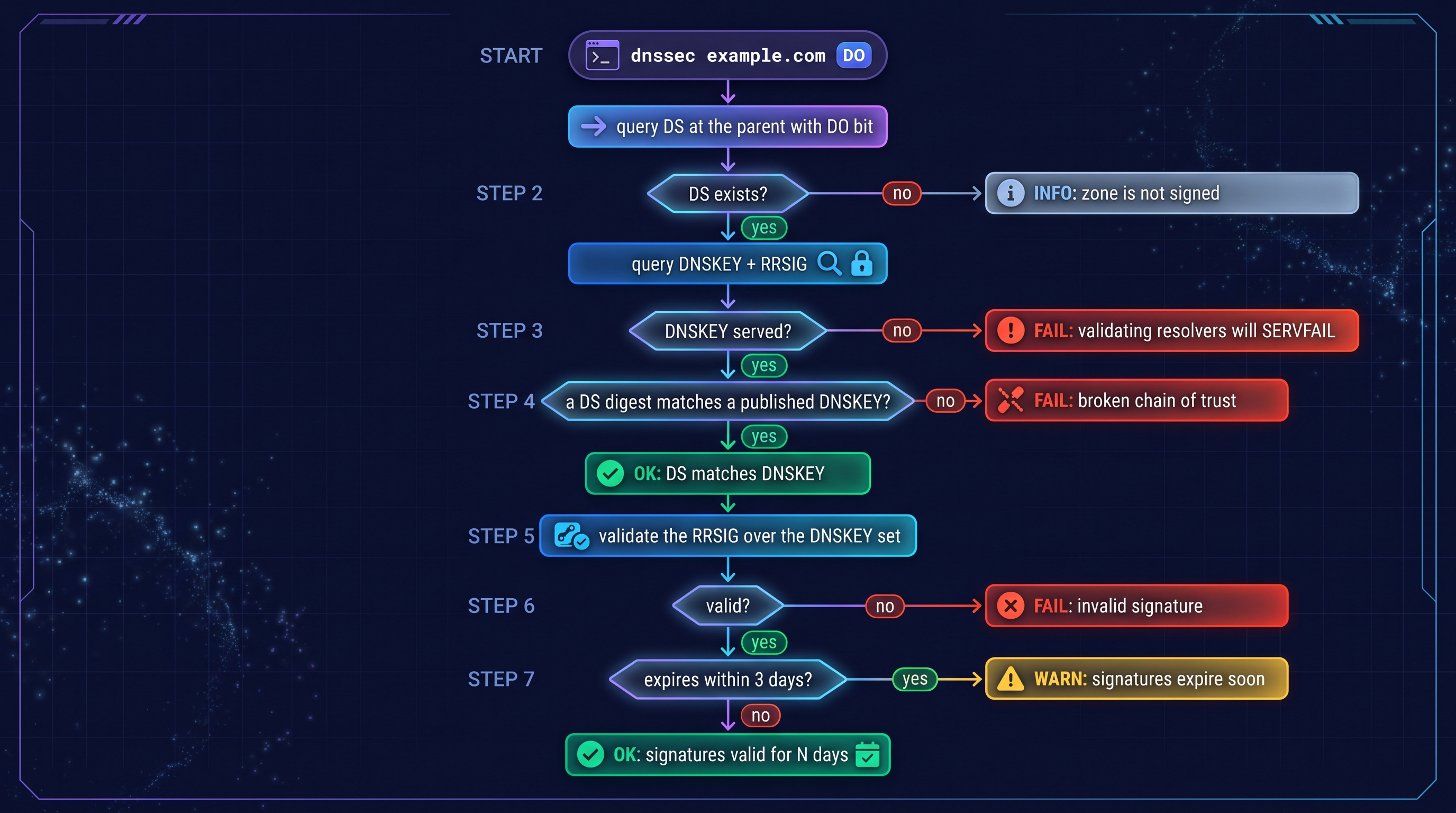
It verifies the zone against its parent's DS record and its own signatures. It does not walk the chain of trust up to the root.
reverse
dnslens reverse 8.8.8.8 is a PTR lookup (IPv4 and IPv6). Exit code 2 for an invalid IP.
DNS server: dnslens serve
A small, dependency-light DNS server (UDP and TCP) for development, staging, CI mocks, split-horizon setups and LAN ad-blocking. It answers from local records, blocks listed domains, and forwards everything else to upstream resolvers with a cache.
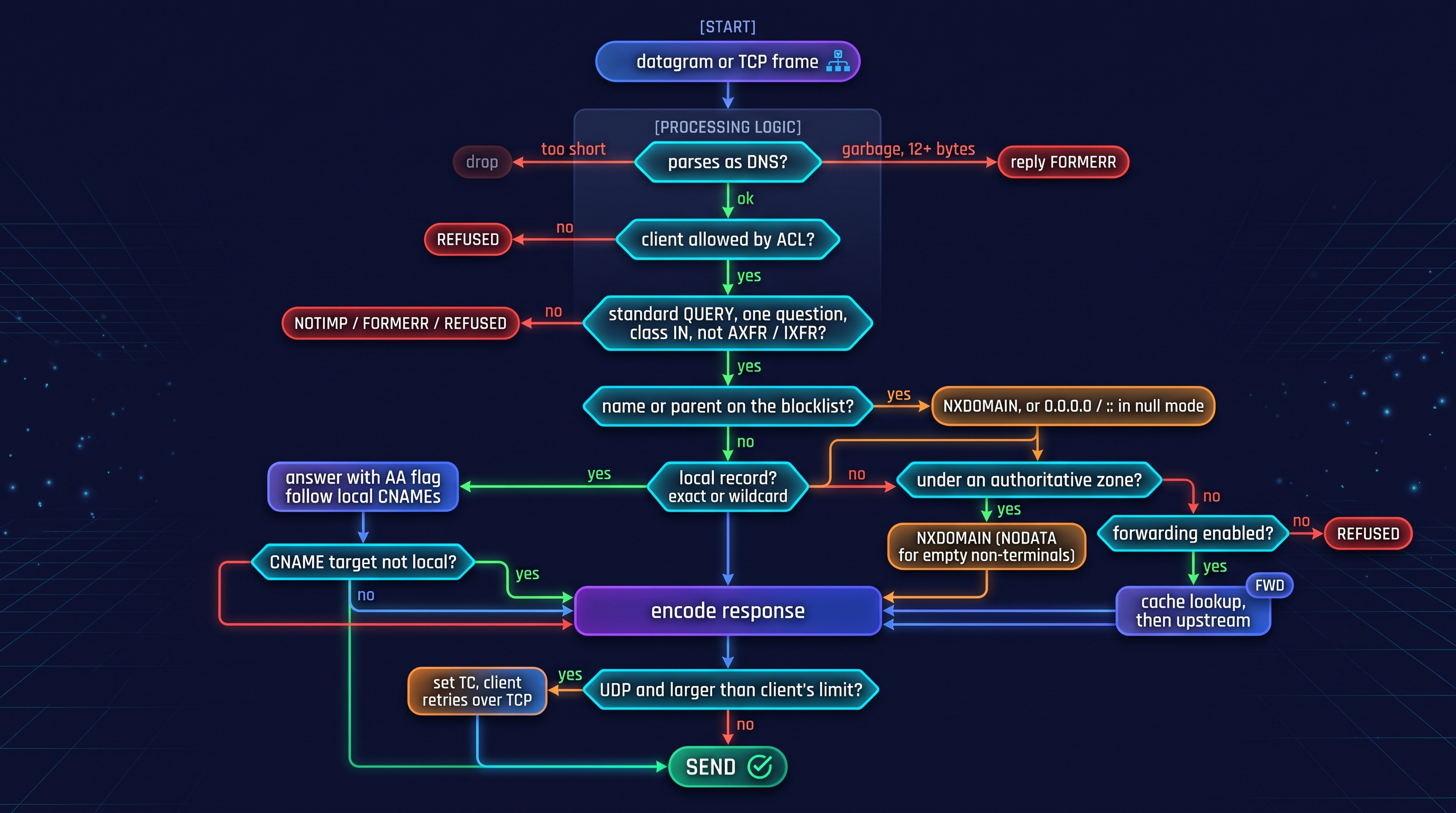
How it decides
flowchart TD
    IN["datagram or TCP frame"] --> P{"parses as DNS?"}
    P -- "too short" --> DROP["drop"]
    P -- "garbage, 12+ bytes" --> FE["reply FORMERR"]
    P -- "ok" --> ACL{"client allowed<br/>by ACL?"}
    ACL -- "no" --> REF["REFUSED"]
    ACL -- "yes" --> OP{"standard QUERY,<br/>one question, class IN,<br/>not AXFR / IXFR?"}
    OP -- "no" --> REF2["NOTIMP / FORMERR / REFUSED"]
    OP -- "yes" --> BL{"name or parent<br/>on the blocklist?"}
    BL -- "yes" --> BM["NXDOMAIN, or 0.0.0.0 / :: in null mode"]
    BL -- "no" --> LOC{"local record?<br/>exact or wildcard"}
    LOC -- "yes" --> LA["answer with AA flag<br/>follow local CNAMEs"]
    LA --> TAIL{"CNAME target<br/>not local?"}
    TAIL -- "yes" --> FWD
    TAIL -- "no" --> OUT
    LOC -- "no" --> AUTHQ{"under an authoritative<br/>zone?"}
    AUTHQ -- "yes" --> NX["NXDOMAIN (NODATA for empty<br/>non-terminals)"]
    AUTHQ -- "no" --> FQ{"forwarding enabled?"}
    FQ -- "no" --> REF3["REFUSED"]
    FQ -- "yes" --> FWD["cache lookup, then upstream"]
    FWD --> OUT["encode response"]
    NX --> OUT
    BM --> OUT
    OUT --> SZ{"UDP and larger than<br/>client's limit?"}
    SZ -- "yes" --> TC["set TC, client retries over TCP"]
    SZ -- "no" --> SEND["send"]
    TC --> SEND
Forwarding and caching
sequenceDiagram
    autonumber
    participant C as Client
    participant S as dnslens serve
    participant K as Cache
    participant U as Upstream resolver

    C->>S: A real.example.com?
    S->>K: lookup (name, type, DO bit)
    K-->>S: miss
    S->>U: A real.example.com? (RD=1)
    U-->>S: 203.0.113.7, TTL 60
    S->>K: store, expires after 60 s
    S-->>C: 203.0.113.7, TTL 60

    Note over C,S: 20 seconds later
    C->>S: A real.example.com?
    S->>K: lookup
    K-->>S: hit, remaining TTL 40
    S-->>C: 203.0.113.7, TTL 40
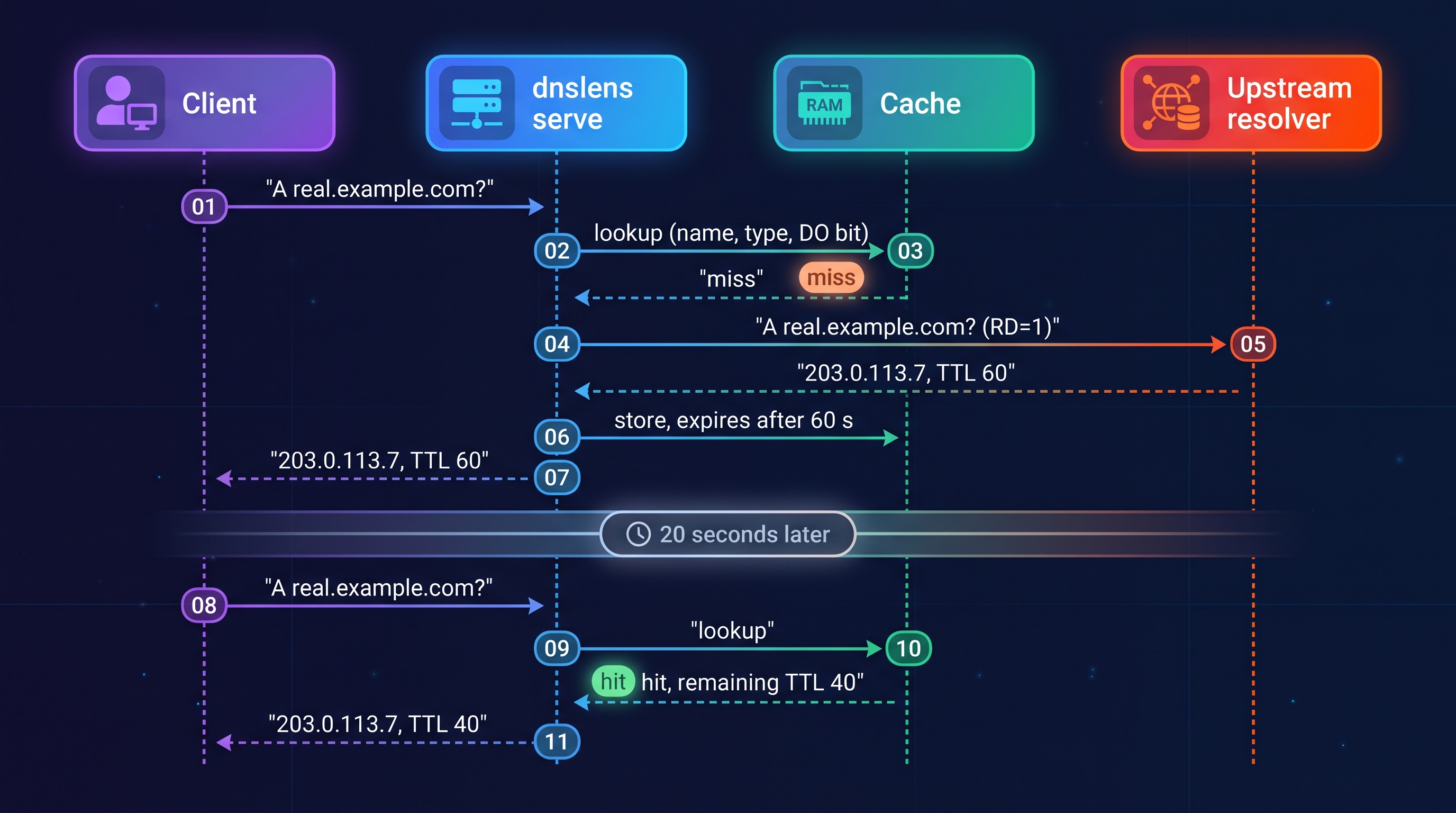
Negative answers (NXDOMAIN / NODATA) are cached using the SOA minimum (30 s if there is none). SERVFAIL and REFUSED are never cached. If the first upstream fails, the next one is tried; if all fail the client gets SERVFAIL.
Running it
dnslens serve -c zone.json --watch --log-queries            # 127.0.0.1:5353
dnslens serve --record "app.test A 10.0.0.5" --record "app.test TXT hello"
dnslens serve --host 0.0.0.0 --port 53 \
              --blocklist hosts.txt --allow 192.168.0.0/16   # LAN resolver (needs root/Administrator)
dnslens query app.test -r 127.0.0.1#5353                      # test it with the client
zone.json
{
  "ttl": 300,
  "authoritative": ["dev.test."],
  "upstream": ["1.1.1.1", "9.9.9.9"],
  "block": ["ads.example.net"],
  "blocklists": ["hosts.txt"],
  "block_mode": "nxdomain",
  "records": {
    "app.dev.test.": {
      "A": ["10.0.0.5", "10.0.0.6"],
      "TXT": "plain text, quoted for you",
      "AAAA": { "ttl": 30, "data": ["fd00::5"] }
    },
    "*.svc.dev.test.": { "A": "10.1.1.1" },
    "www.dev.test.": { "CNAME": "app.dev.test." }
  }
}
Unknown keys, invalid IPs or a CNAME mixed with other types are rejected at load time with a clear message (and keep the old config when --watch is reloading).
Options
| Option | Default | Meaning |
|---|---|---|
--host / -p, --port |
127.0.0.1 / 5353 |
Bind address and UDP+TCP port |
-c, --config FILE |
none | JSON zone/config file |
--record 'NAME TYPE DATA' |
none | Add a record inline (repeatable) |
--authoritative ZONE |
none | NXDOMAIN for unknown names under ZONE instead of forwarding |
--block DOMAIN / --blocklist FILE |
none | Block a domain and its subdomains; hosts-format or one-domain-per-line files |
--block-mode |
nxdomain |
Or null: answer 0.0.0.0 / :: |
--upstream ADDR |
OS resolvers (never itself), else 1.1.1.1 and 9.9.9.9 | Upstream, IP or IP#PORT (repeatable) |
--no-forward |
off | Authoritative-only; REFUSE everything else |
--cache-size / --max-ttl |
10000 / 86400 |
0 disables the cache; TTL ceiling in seconds |
--allow CIDR |
see below | Allowed client networks (repeatable) |
--watch |
off | Hot-reload the config and blocklists when the files change |
--log-queries / -v |
off | Log every query (client, name, type, rcode, source, ms) / debug logging |
--workers |
32 |
UDP worker threads |
Behaviour notes
- Wildcards match at any depth:
*.svc.dev.test.also answersa.b.svc.dev.test. - A CNAME whose target is not local is resolved through the upstream and appended to the answer, so simple stub resolvers work.
- Blocking
example.netalso blocksx.y.example.net. Hosts-file lines like0.0.0.0 ads.testare understood;localhoststyle entries are ignored. - EDNS is supported (payload capped at 1232). DNSSEC records are forwarded only to clients that set the DO bit.
- AXFR / IXFR are refused. Statistics are logged on shutdown.
Pointing machines at it
Operating-system resolver settings cannot specify a port, so for system-wide use run on port 53 (see Troubleshooting) or put it behind a forwarder that supports custom ports (dnsmasq server=127.0.0.1#5353, systemd-resolved drop-ins, Windows NRPT). For per-tool testing, dnslens query -r 127.0.0.1#5353 and dig -p 5353 @127.0.0.1 work directly.
HTTP API: dnslens api
A JSON API over every tool, plus Prometheus-format probes. Pure standard library (http.server), so it has no extra dependencies.
flowchart TD
    REQ["GET /endpoint?params"] --> H{"path"}
    H -- "/healthz" --> OKH["200 status ok<br/>no auth needed"]
    H -- "other" --> AU{"token configured<br/>and valid?"}
    AU -- "no" --> E401["401"]
    AU -- "yes" --> RT{"known route?"}
    RT -- "no" --> E404["404"]
    RT -- "yes" --> SEM{"free slot under<br/>max-concurrent?"}
    SEM -- "no" --> E503["503 busy"]
    SEM -- "yes" --> VAL["validate and clamp parameters"]
    VAL -- "invalid" --> E400["400 with message"]
    VAL -- "ok" --> RUN["run the tool<br/>named resolvers only"]
    RUN --> FMT{"endpoint type"}
    FMT -- "/probe, /metrics" --> PROM["200 Prometheus text"]
    FMT -- "others" --> JSON["200 JSON"]
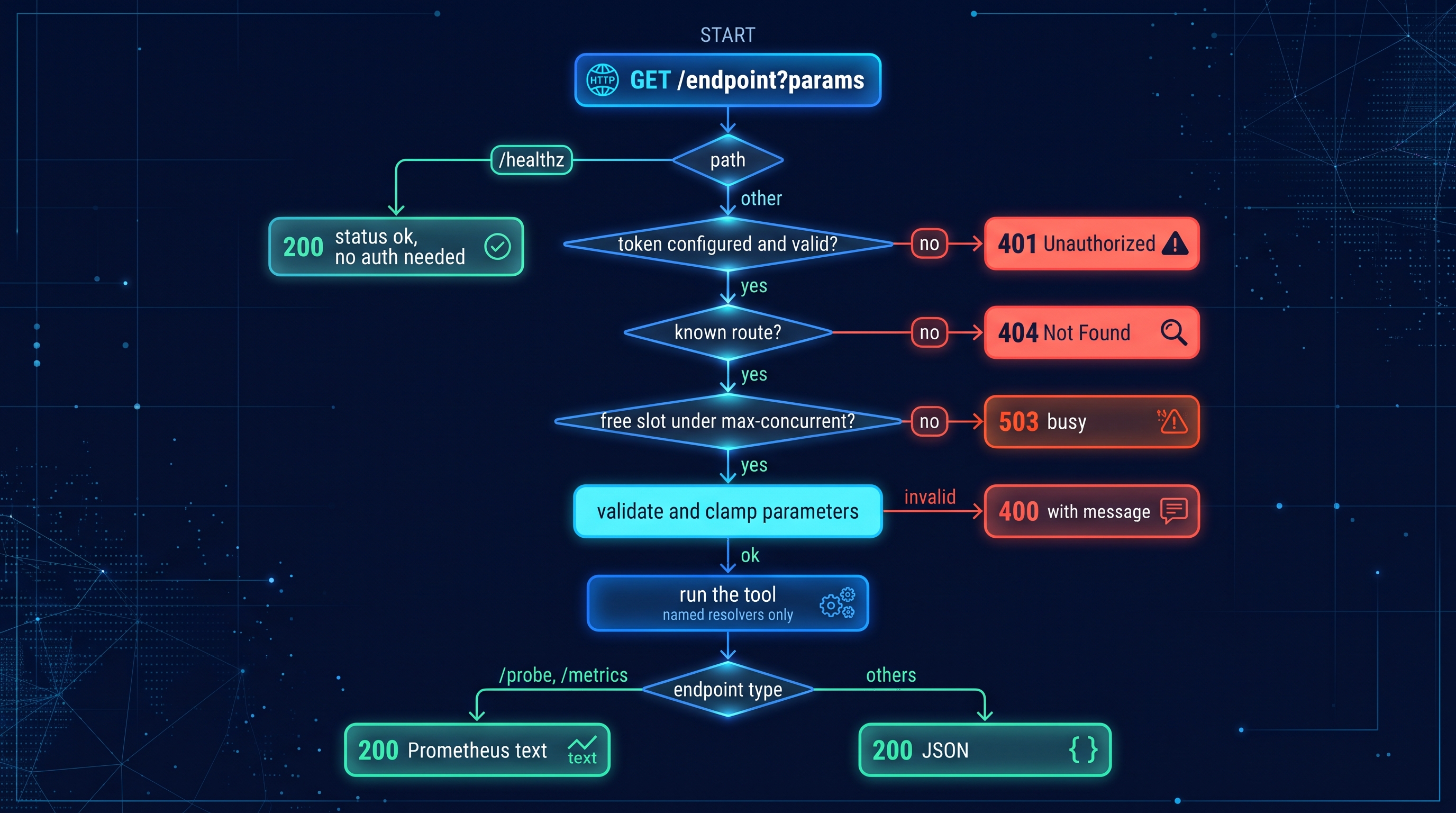
dnslens api --port 8053 --token "$TOKEN" -r internal=10.0.0.2
curl -H "Authorization: Bearer $TOKEN" \
     "localhost:8053/propagate?name=app.example.com&expect=203.0.113.10"
Endpoints
| Endpoint | Parameters |
|---|---|
/query |
name, type (comma list, max 5), resolver, dnssec, norecurse, transport, timeout, retries |
/propagate |
name, type, expect (repeatable), strict, resolver (default: public set) |
/trace |
name, type |
/audit |
domain, dkim_selector (repeatable), resolver |
/dnssec |
domain, resolver |
/bench |
domain (repeatable), count (max 50), uncached, resolver |
/reverse |
ip, resolver |
/probe |
kind=query|propagate|audit|dnssec plus that tool's parameters; returns Prometheus text |
/metrics |
API request counters, durations, in-flight gauge, build info |
/healthz, / |
liveness (always open), endpoint index |
resolver accepts names: google, cloudflare, quad9, opendns, ..., public, system, or anything registered with -r NAME=ADDR. timeout is clamped to 0.2 to 10 seconds, retries to 0 to 2.
Prometheus monitoring
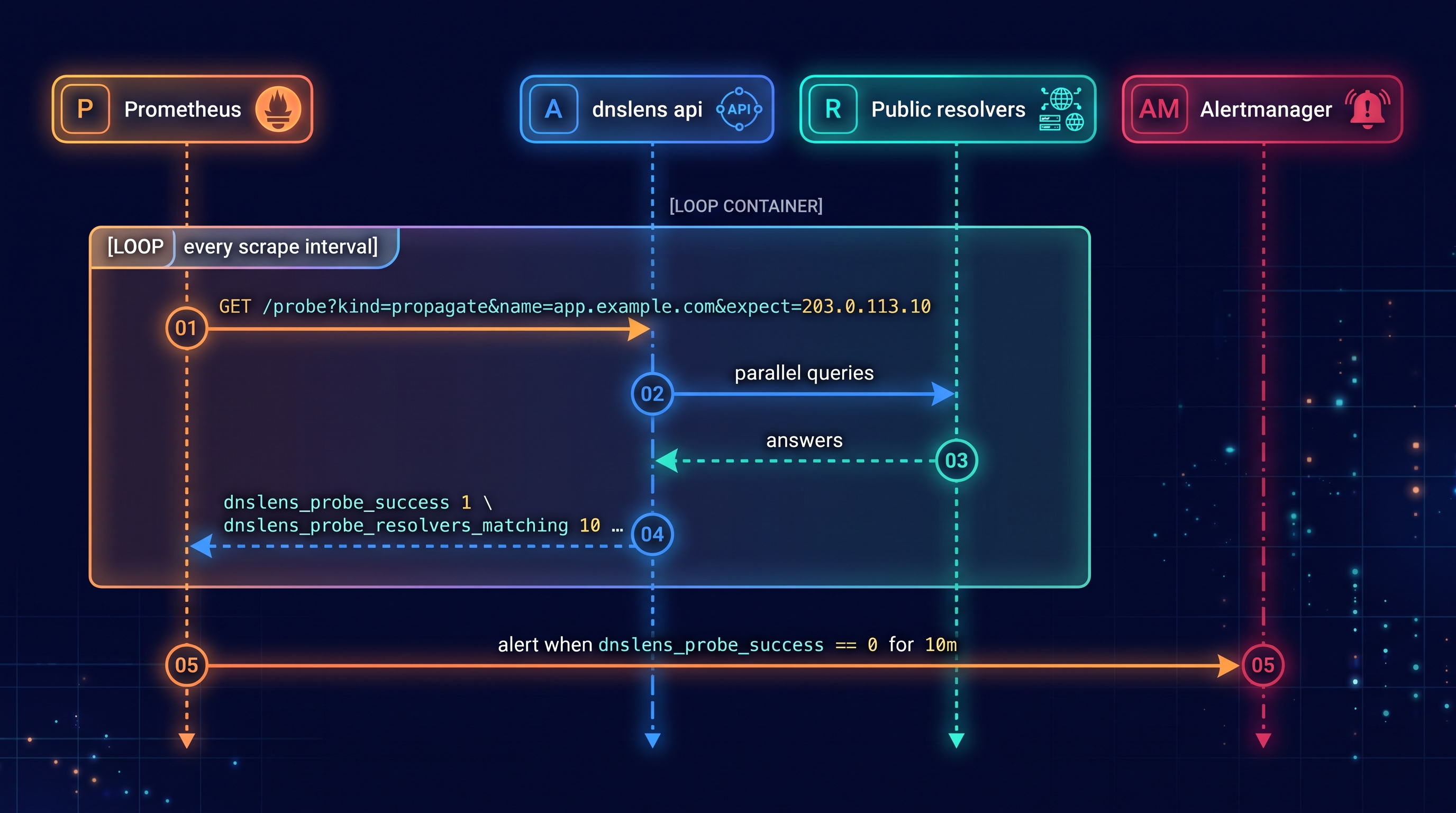
/probe works like the blackbox exporter: Prometheus passes the check as URL parameters and reads the result as metrics.
sequenceDiagram
    autonumber
    participant P as Prometheus
    participant A as dnslens api
    participant R as Public resolvers
    participant AM as Alertmanager

    loop every scrape interval
        P->>A: GET /probe?kind=propagate&name=app.example.com&expect=203.0.113.10
        A->>R: parallel queries
        R-->>A: answers
        A-->>P: dnslens_probe_success 1<br/>dnslens_probe_resolvers_matching 10 ...
    end
    P->>AM: alert when dnslens_probe_success == 0 for 10m
# prometheus.yml
scrape_configs:
  - job_name: dns-propagation
    metrics_path: /probe
    params:
      kind: [propagate]
      name: [app.example.com]
      expect: ["203.0.113.10"]
    authorization: { credentials: "<token>" }
    static_configs:
      - targets: ["localhost:8053"]
Metrics returned by /probe:
kind |
Metrics |
|---|---|
| all | dnslens_probe_success, dnslens_probe_duration_seconds |
query |
dnslens_probe_answer_records, dnslens_probe_dns_seconds |
propagate |
dnslens_probe_resolvers_total, _responding, _matching, dnslens_probe_distinct_answers |
audit, dnssec |
dnslens_probe_failures, dnslens_probe_warnings |
Example alert rule:
- alert: DnsRecordNotPropagated
  expr: dnslens_probe_success{job="dns-propagation"} == 0
  for: 10m
API options
| Option | Default | Meaning |
|---|---|---|
--host / -p, --port |
127.0.0.1 / 8053 |
Bind address and port |
--token TOKEN |
env DNSLENS_API_TOKEN |
Require Authorization: Bearer ... or X-API-Key |
-r, --resolver NAME=ADDR |
none | Register named resolvers; they become the defaults |
--allow-custom-resolver |
off | Let callers pass arbitrary resolver addresses |
-t, --timeout |
3 |
Default per-query timeout |
--max-concurrent |
16 |
Concurrent tool requests before 503 |
Recipes
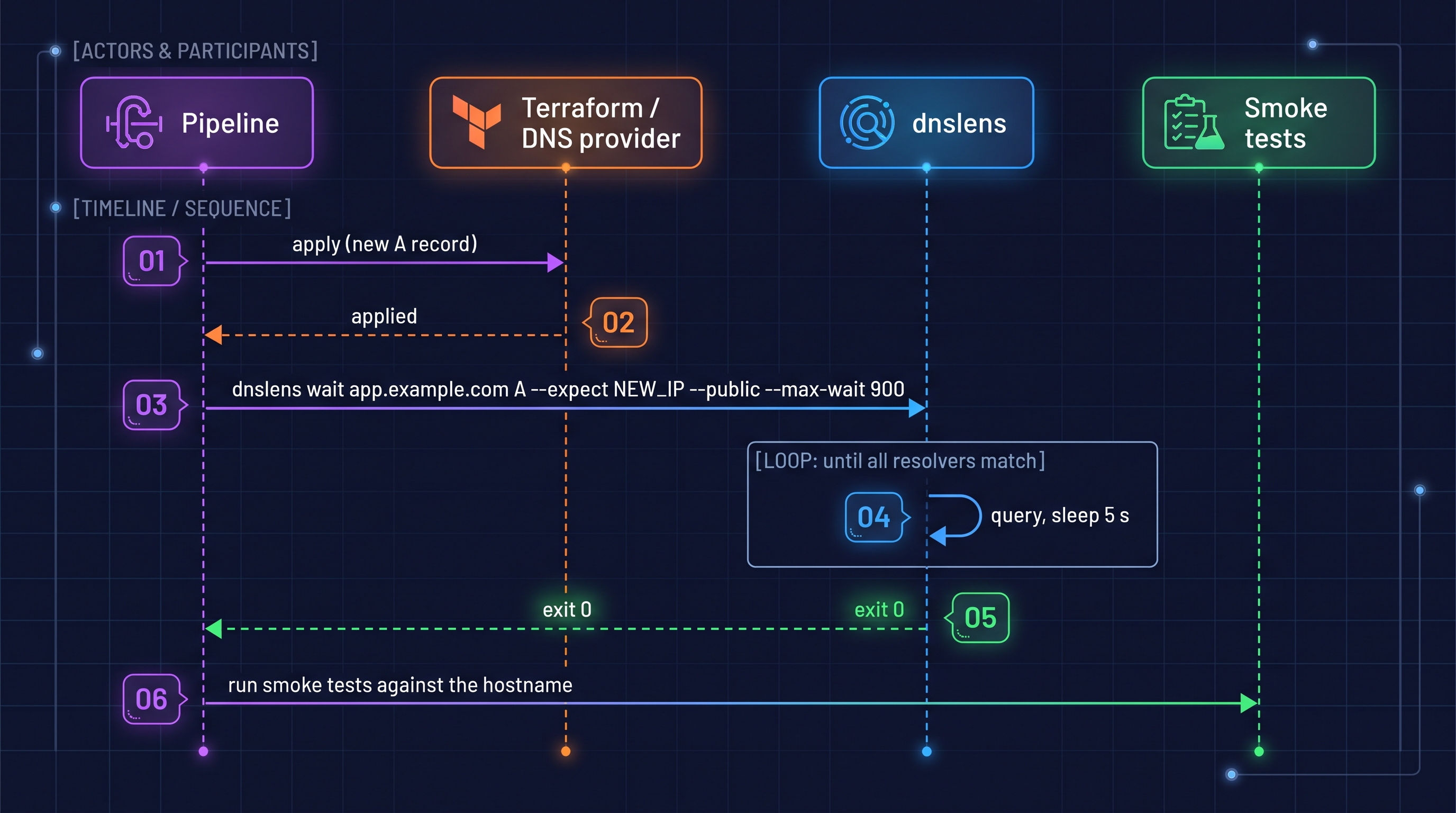
Gate a deployment on DNS (any CI)
sequenceDiagram
    autonumber
    participant D as Pipeline
    participant T as Terraform / DNS provider
    participant L as dnslens
    participant S as Smoke tests

    D->>T: apply (new A record)
    T-->>D: applied
    D->>L: dnslens wait app.example.com A --expect NEW_IP --public --max-wait 900
    loop until all resolvers match
        L->>L: query, sleep 5 s
    end
    L-->>D: exit 0
    D->>S: run smoke tests against the hostname
# GitHub Actions
- run: pip install dnslens
- run: dnslens wait app.example.com A --expect ${{ steps.tf.outputs.ip }} --public --max-wait 900
Mock DNS in tests
Start a throwaway server inside the test run, no root and no network:
import pytest
from dnslens.server import DNSHandler, DNSServer, ServerOptions, build_zone

@pytest.fixture
def dns_server():
    zone = build_zone(records=["api.test A 127.0.0.1", "db.test A 10.0.0.9"])
    handler = DNSHandler(zone, ServerOptions(forward=False))
    with DNSServer(handler, "127.0.0.1", 0) as srv:   # port 0 = any free port
        yield srv.port
Shell and jq
dnslens query example.com A --json | jq -r '.[0].records[].data'
dnslens propagate example.com --json | jq '.groups[] | {values, resolvers}'
dnslens audit example.com --json | jq -e '.ok' >/dev/null || echo "audit failed"
[ "$(dnslens query example.com TXT --short | grep -c spf1)" -eq 1 ]
Find the fastest resolver for this network
dnslens bench --uncached -n 30 --json | jq -r 'sort_by(.median)[0] | "\(.resolver) \(.median) ms"'
Run the server and API as services (Linux, systemd)
# /etc/systemd/system/dnslens-dns.service
[Unit]
Description=dnslens DNS server
After=network-online.target

[Service]
ExecStart=/usr/local/bin/dnslens serve -c /etc/dnslens/zone.json --watch --host 0.0.0.0 --port 53 --allow 192.168.0.0/16
AmbientCapabilities=CAP_NET_BIND_SERVICE
DynamicUser=yes
Restart=on-failure

[Install]
WantedBy=multi-user.target
# /etc/systemd/system/dnslens-api.service
[Service]
Environment=DNSLENS_API_TOKEN=change-me
ExecStart=/usr/local/bin/dnslens api --host 127.0.0.1 --port 8053
DynamicUser=yes
Restart=on-failure
On Windows run them under a service wrapper such as NSSM, or as a scheduled task at startup.
Use as a Python library
Everything the CLI does is importable. All functions return plain dataclasses with a to_dict().
from dnslens.core import PUBLIC_RESOLVERS, QueryOpts, query
from dnslens.tools import propagate, wait
from dnslens.trace import trace
from dnslens.audit import audit
from dnslens.dnssec import check_dnssec

opts = QueryOpts(timeout=2.0, retries=1)

a = query("example.com", "A", "1.1.1.1", opts)
print(a.rcode, a.values(), a.elapsed_ms)          # NOERROR frozenset({'93.184.216.34'}) 12.3

rep = propagate(PUBLIC_RESOLVERS, "example.com", "A", opts, expected=["93.184.216.34"])
print(rep.ok, rep.responders, rep.failed)

ok, _ = wait(PUBLIC_RESOLVERS, "app.example.com", "A", opts,
             expected=["203.0.113.10"], interval=5, max_wait=600)

for f in audit("example.com", None, opts, dkim_selectors=["google"]):
    print(f.level, f.check, f.message)
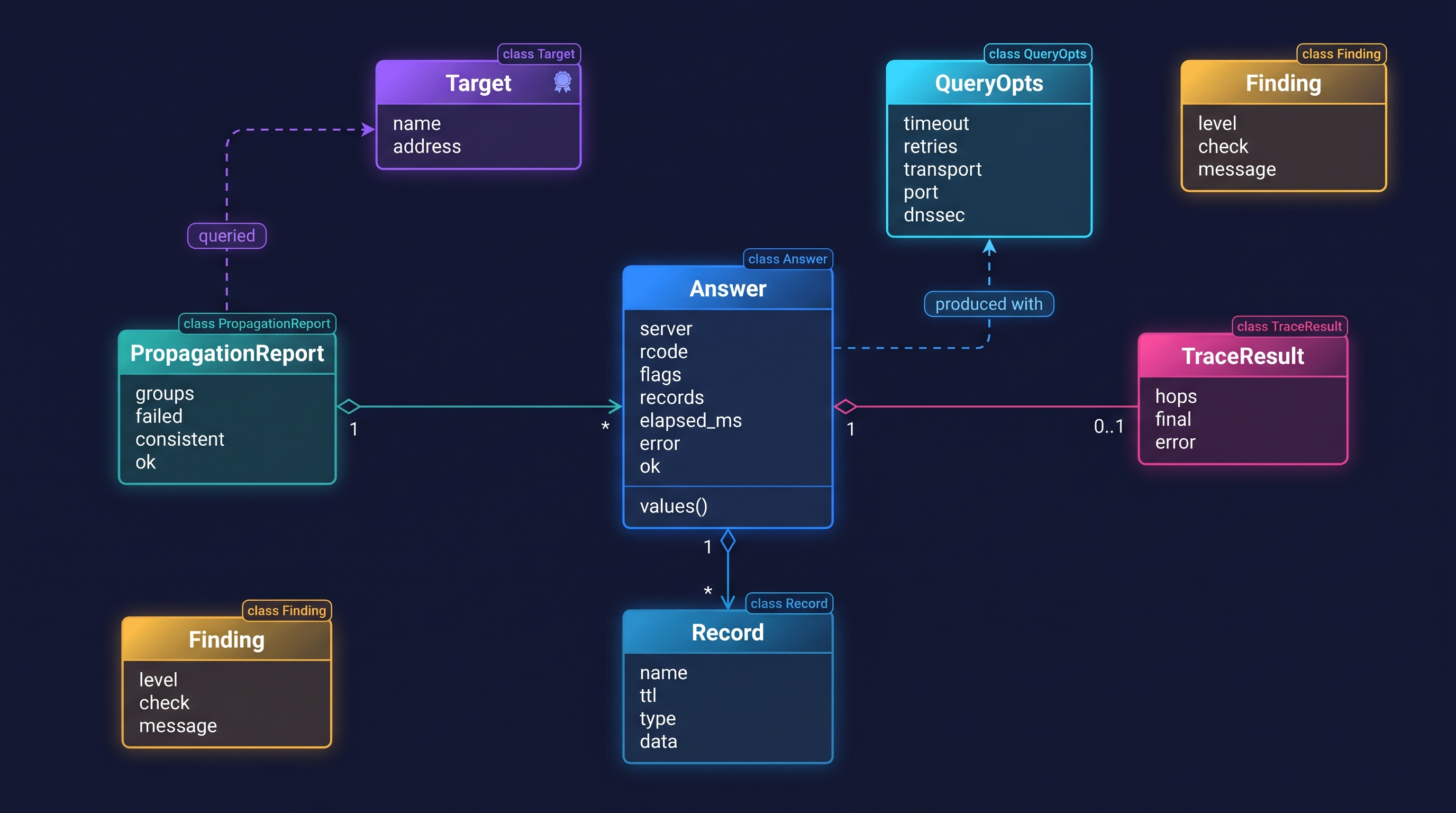
Main types:
classDiagram
    class Target {
        name
        address
    }
    class QueryOpts {
        timeout
        retries
        transport
        port
        dnssec
    }
    class Answer {
        server
        rcode
        flags
        records
        elapsed_ms
        error
        ok
        values()
    }
    class Record {
        name
        ttl
        type
        data
    }
    class PropagationReport {
        groups
        failed
        consistent
        ok
    }
    class Finding {
        level
        check
        message
    }
    class TraceResult {
        hops
        final
        error
    }
    Answer "1" o-- "*" Record
    PropagationReport "1" o-- "*" Answer
    TraceResult "1" o-- "0..1" Answer
    Target <.. PropagationReport : queried
    QueryOpts <.. Answer : produced with
Embedding the servers:
from dnslens.server import DNSHandler, DNSServer, ServerOptions, build_zone
from dnslens.api import ApiConfig, ApiServer

zone = build_zone(records=["app.test A 10.0.0.5"])
with DNSServer(DNSHandler(zone, ServerOptions(forward=False)), "127.0.0.1", 5353), \
     ApiServer(ApiConfig(token="secret"), "127.0.0.1", 8053):
    ...  # both are running on background threads
Output formats and exit codes
--json prints one JSON document per command (a list for multi-resolver commands). Example for query:
[
  {
    "server": "1.1.1.1",
    "qname": "example.com",
    "type": "A",
    "rcode": "NOERROR",
    "flags": "QR RD RA",
    "elapsed_ms": 11.4,
    "transport": "udp",
    "error": null,
    "records": [
      { "name": "example.com.", "ttl": 3600, "type": "A", "data": "93.184.216.34" }
    ],
    "resolver": "system"
  }
]
| Exit code | Meaning |
|---|---|
0 |
success, healthy, condition met |
1 |
check failed: inconsistent or mismatched answers, timeout, FAIL finding, no records, NXDOMAIN, bind error |
2 |
usage or configuration error (bad arguments, invalid zone file, invalid IP) |
130 |
interrupted (Ctrl-C) |
Security notes
servebinds to loopback by default. Binding anywhere else limits clients to private ranges (RFC 1918, ULA, link-local, CGNAT, loopback) unless you pass--allow. Open resolvers are abused for DDoS amplification, so do not expose it to the internet. AXFR/IXFR are refused. There is no rate limiting.apibinds to loopback by default and warns when you bind elsewhere without--token. Token comparison is constant-time. Callers can only use resolvers you registered (plus the public set) unless--allow-custom-resolveris set, which prevents using it to send packets to arbitrary hosts. Inputs are validated and clamped, and concurrency is capped. It speaks plain HTTP: put it behind a TLS reverse proxy if it leaves localhost.- Zone and blocklist files are data only; nothing is executed.
- Reports from
auditandpropagatereveal what public DNS says about a domain. They contain nothing secret, but the API makes your host perform those queries on request.
Troubleshooting
| Symptom | Cause and fix |
|---|---|
cannot bind 0.0.0.0:53: permission denied |
Ports below 1024 need root/Administrator. Linux alternatives: sudo sysctl net.ipv4.ip_unprivileged_port_start=53, or systemd AmbientCapabilities=CAP_NET_BIND_SERVICE, or run on 5353 and redirect. |
cannot bind ...: address already in use on Linux |
systemd-resolved owns 127.0.0.53:53. Bind a specific address (--host 192.168.1.5) or disable its stub listener. |
| Port 53 in use on Windows | Internet Connection Sharing or Hyper-V may hold it. Find it with netstat -ano | findstr :53 and stop the service, or use another port. |
propagate says INCONSISTENT for a CDN hostname |
Round-robin / GeoDNS answers differ legitimately. Use --expect with the full set, or --subset with wait. |
Some public resolvers show FAIL timeout |
Your network blocks UDP/53 to them. They are ignored unless --strict. Try --transport tcp or tls. |
audit reports an unreachable IPv6 nameserver |
Only a WARN: the host may lack IPv6 connectivity. |
--transport https fails with NoDOH |
Install the extra: pip install "dnslens[doh]". |
| Colours look broken in a log file | Colour is only used on a TTY. Set NO_COLOR=1 or pass --no-color. |
Server answers REFUSED |
Your client is outside --allow, or --no-forward is set and the name is not local. |
Limitations
dnssecchecks the zone against its parent DS and its own signatures; it does not validate the chain up to the root, andservedoes not perform DNSSEC validation itself (it passes validation results from the upstream through).serveis not a full recursive resolver or authoritative server: no zone transfers, no dynamic updates, no rate limiting, no DoT/DoH listener, no negative-cache SOA synthesis for local NODATA.- Wildcards match at any depth (a deliberate, dnsmasq-like simplification of RFC 4592).
traceuses a built-in list of root server addresses and IPv4 glue first; an IPv6-only network may need the system resolver for glueless delegations.- Zone files are JSON, not RFC 1035 master files.
Development and releasing
git clone https://github.com/cumulus13/dnslens && cd dnslens
pip install -e ".[dev]"
pytest && ruff check src tests && mypy src
The tests start an in-process fake DNS server on localhost and need no network. CI runs lint, type checks and the tests on Ubuntu, Windows and macOS for Python 3.9 to 3.13.
src/dnslens/
  core.py      query primitive, targets, Answer / Finding types
  tools.py     propagate, wait, bench
  trace.py     iterative resolution from the root
  audit.py     domain health audit (SPF, DMARC, DKIM, delegation, SOA)
  dnssec.py    DS / DNSKEY / RRSIG check
  server.py    DNS server, zone data, cache, reloader
  api.py       HTTP API, probes, metrics
  cli.py       argparse front end
  output.py    tables, colour (Windows-safe)
tests/         fake-server based tests
.github/workflows/  ci.yml, release.yml
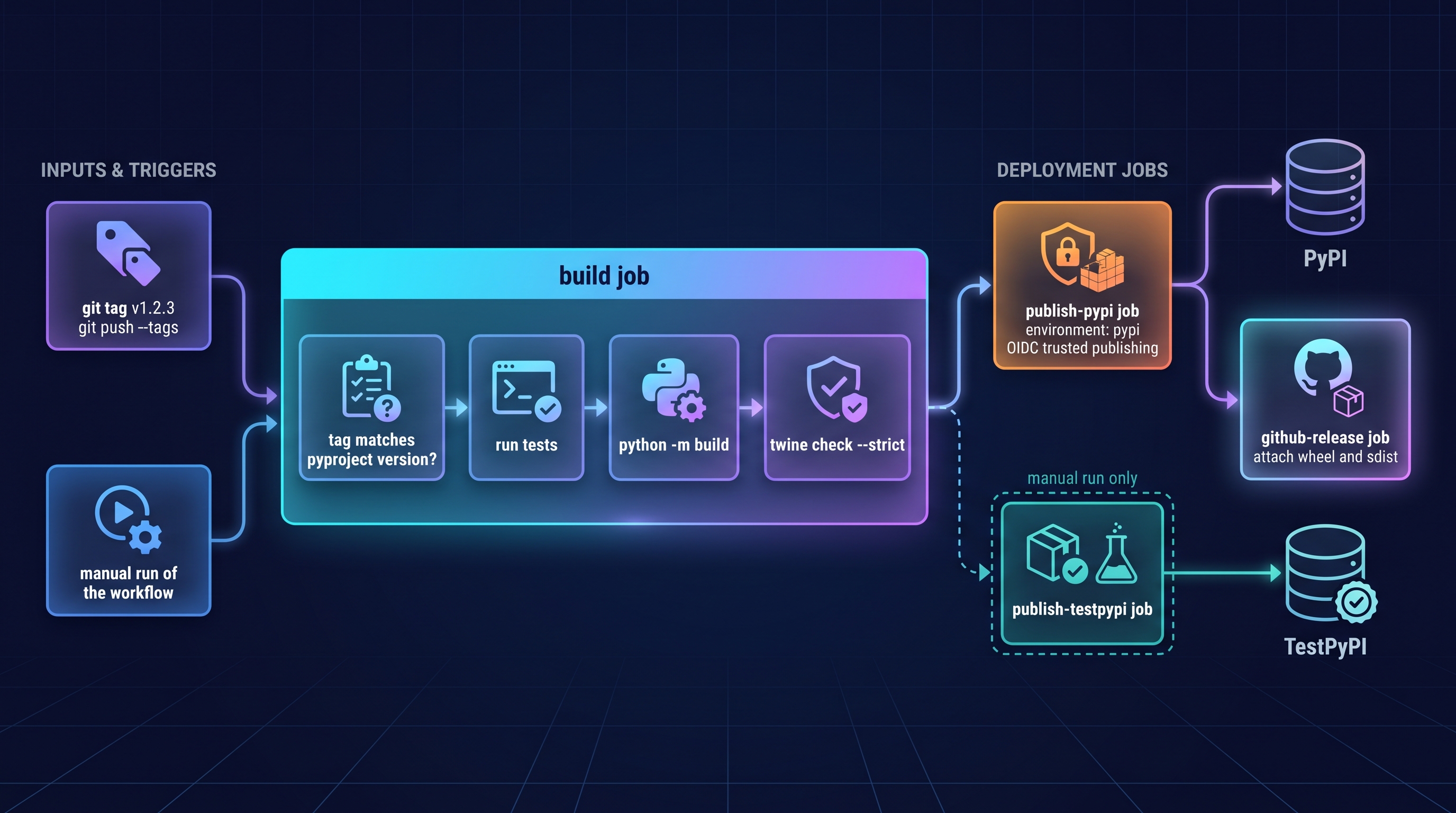
Release pipeline
flowchart LR
    T["git tag v1.2.3<br/>git push --tags"] --> B1
    subgraph BUILD["build job"]
        B1["tag matches<br/>pyproject version?"] --> B2["run tests"] --> B3["python -m build"] --> B4["twine check --strict"]
    end
    B4 --> PUB["publish-pypi job<br/>environment: pypi<br/>OIDC trusted publishing"]
    PUB --> PYPI[("PyPI")]
    PUB --> GH["github-release job<br/>attach wheel and sdist"]
    M["manual run of the workflow"] --> B1
    B4 -. "manual run only" .-> TP["publish-testpypi job"]
    TP --> TPI[("TestPyPI")]
- Bump
versioninpyproject.toml, updateCHANGELOG.md, commit. git tag v1.2.3 && git push --tags. The workflow refuses to publish if the tag and the package version differ.- One-time setup: on PyPI add a pending publisher (project
dnslens, ownercumulus13, repositorydnslens, workflowrelease.yml, environmentpypi) and create the GitHub environmentpypi. Repeat on test.pypi.org with environmenttestpypifor dry runs (run the Release workflow manually). No API tokens are stored anywhere.
License
MIT. See LICENSE.
👤 Author


1 maintainer

Metadata
1 maintainer
Release files for dnslens 1.0.2
For a detailed explanation of source distributions (sdists) and built distributions (wheels), please see the package formats documentation.
Source distribution (sdist)
| File | Size | Uploaded | Provenance | Actions |
|---|---|---|---|---|
| dnslens-1.0.2.tar.gz | 78.3 kB | With provenance | Details for dnslens-1.0.2.tar.gz |
Built distribution (wheel)
| File | Interpreter | ABI | Platform | Actions Reset |
|---|---|---|---|---|
| dnslens-1.0.2-py3-none-any.whl | Python 3 | none | any | Details for dnslens-1.0.2-py3-none-any.whl |
Total release size: 127.4 kB
Release files / dnslens-1.0.2.tar.gz
| Download URL | dnslens-1.0.2.tar.gz |
|---|---|
| Size | 78.3 kB |
| Tags | Source |
|
SHA-256 checksum How to use checksums |
fdf072ea6048d05db7134286a9f2eb41f749261badb549c38a69eb7822437e88
|
|
BLAKE2b-256 checksum How to use checksums |
c63a007f72ac50227c63828efa5eedcb2792f2a1ac36f75e682d5e15747ff0c5
|
| Upload date | |
|
Uploaded using Trusted Publishing? What is trusted publishing? |
Yes |
| Uploaded via |
twine/7.0.0 CPython/3.13.16
|
Provenance
Provenance describes where a file came from. On PyPI, provenance is shared via attestations, which provide a verifiable record of the build or publishing details. View details, limitations and caveats.


PyPI Publish Attestation
PyPI verified that this artifact, at this checksum, originated from the publisher listed below.
Signed by GitHub Actions, verified by PyPI on Nov 1, 2026.
Transparency logRelease files / dnslens-1.0.2-py3-none-any.whl
| Download URL | dnslens-1.0.2-py3-none-any.whl |
|---|---|
| Size | 49.1 kB |
| Tags | Python 3 |
|
SHA-256 checksum How to use checksums |
a248e349ee796fb3ff4d6ffb567fed4ea55bd1d04b4ca19b7ae27c370e6f3a37
|
|
BLAKE2b-256 checksum How to use checksums |
f9719cf5d3eb1dd541038aa0f5c69a72850aa14f96e6971398a6822fd5e64849
|
| Upload date | |
|
Uploaded using Trusted Publishing? What is trusted publishing? |
Yes |
| Uploaded via |
twine/7.0.0 CPython/3.13.16
|
Provenance
Provenance describes where a file came from. On PyPI, provenance is shared via attestations, which provide a verifiable record of the build or publishing details. View details, limitations and caveats.
PyPI Publish Attestation
PyPI verified that this artifact, at this checksum, originated from the publisher listed below.
Signed by GitHub Actions, verified by PyPI on Nov 1, 2026.
Transparency logSecurity for dnslens 1.0.2
Provenance
Provenance describes where a file came from. On PyPI, provenance is shared via attestations, which provide a verifiable record of the build or publishing details. View details, limitations and caveats.
Full provenance
All 2 files in this release have been uploaded with provenance metadata.
Attestation for dnslens-1.0.2.tar.gz
PyPI Publish Attestation
PyPI verified that this artifact, at this checksum, originated from the publisher listed below.
Signed by GitHub Actions, verified by PyPI on Nov 1, 2026.
Transparency logA note on package security
PyPI is a repository for distributing packages, not a service for auditing them. While third-party security researchers and our staff do their best to detect and remove malicious packages, PyPI cannot guarantee the quality, security or suitability of any given package.
To learn more about protecting yourself from malicious actors, visit our package security documentation.














