
Dnsmasq WebConf




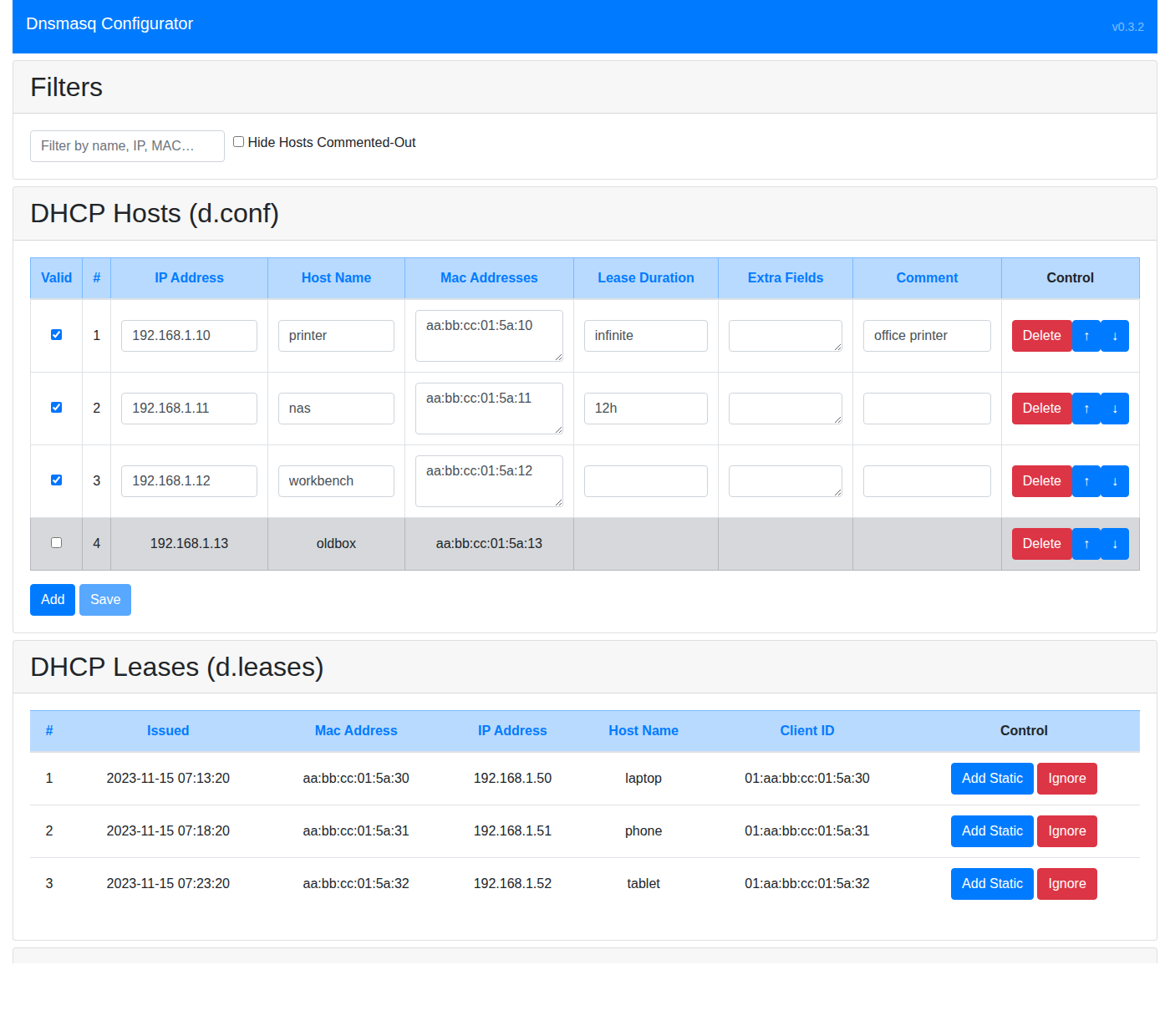
A small web UI for managing static DHCP reservations in dnsmasq — without taking ownership of your config file.
Why this exists
Most dnsmasq front-ends (Pi-hole, router firmwares, config generators) own the
configuration: they generate dnsmasq.conf from their own database, and your
hand-written directives either get moved somewhere else or are lost.
dnsmasq-webconf does the opposite. It reads your existing config file, and when you
save, it rewrites only the dhcp-host= lines you actually changed. Every other
line — your dhcp-range=, your dhcp-option=, your comments, your ordering — is
preserved byte-for-byte.
That makes it useful in one specific situation: you already run dnsmasq, you want to keep managing it as a text file, but you'd rather not hand-edit MAC addresses every time a new device shows up.
If you want an all-in-one DNS/DHCP/ad-blocking appliance, use Pi-hole instead — it is far more capable, and this tool does not try to compete with it. See Alternatives below.
Features
- Static DHCP reservations — add, edit, reorder, comment out, and delete
dhcp-host=entries. - One-click reservation from a live lease — see a device in the DHCP lease table, press Add Static, and it becomes a fixed reservation.
- Blocklist management — the Ignored Hosts table marks a MAC as
ignore, so dnsmasq never answers its DHCP requests. - Per-host notes — comments are round-tripped as
#comments in the config file, so they stay readable when you edit by hand. - Full-page text editor — Edit as Text opens the whole config file for editing by hand, comments and layout included. If the file changed on disk since you opened it, saving warns you and lets you overwrite anyway or reload.
- Read-only views of the DHCP lease table and the system
hostsfile. - Optional reload hook — run
systemctl reload dnsmasq(or anything else) after a successful save. - Pre-save validation — run
dnsmasq --testagainst the staged result before it touches your config; a rejected save changes nothing. - Live lease table — the lease view refreshes periodically, so a newly connected device can be reserved the moment it appears.
- Filter box — type a name, IP, MAC or comment fragment to narrow all tables at once; leaving with unsaved changes asks for confirmation.
- Works on phones — wide tables scroll sideways inside their card instead of squeezing the inputs.
- No database, no build step, no JavaScript toolchain. Two Python dependencies, and all CSS/JS is bundled — it works on an isolated network with no internet access.
Installation
From PyPI (recommended)
pipx install dnsmasq-webconf
# or: uv tool install dnsmasq-webconf
# or, inside a virtualenv: pip install dnsmasq-webconf
On modern Debian/Ubuntu/Raspberry Pi OS,
pip install --useris blocked by PEP 668. Usepipxoruv toolinstead.
With Docker
Pre-built images for linux/amd64 and linux/arm64 are published to GHCR:
docker run --rm -p 8080:8080 \
    --user "$(id -u):$(id -g)" \
    -e DNSMASQ_WEBCONF_AUTH='admin:secret' \
    -v /etc/dnsmasq.more.conf:/etc/dnsmasq.more.conf \
    -v /var/lib/misc/dnsmasq.leases:/var/lib/misc/dnsmasq.leases:ro \
    ghcr.io/akivajp/dnsmasq-webconf:latest
Or build it yourself:
docker build -t dnsmasq-webconf .
docker run --rm -p 8080:8080 \
    --user "$(id -u):$(id -g)" \
    -e DNSMASQ_WEBCONF_AUTH='admin:secret' \
    -v /etc/dnsmasq.more.conf:/etc/dnsmasq.more.conf \
    -v /var/lib/misc/dnsmasq.leases:/var/lib/misc/dnsmasq.leases:ro \
    dnsmasq-webconf
Inside the container, /etc/hosts is the container's own file, not the host's.
Arguments after the image name replace the default 8080 --host 0.0.0.0, so append
8080 --host 0.0.0.0 --hosts '' to hide that table, or mount the host's file with
-v /etc/hosts:/host/hosts:ro and pass --hosts /host/hosts instead.
From source
git clone https://github.com/akivajp/dnsmasq-webconf.git
cd dnsmasq-webconf
pip install -e .
Usage
dnsmasq-webconf --config /etc/dnsmasq.more.conf
Then open http://127.0.0.1:8080.
By default the server listens on loopback only. To expose it on your LAN you must also set credentials:
dnsmasq-webconf --host 0.0.0.0 --auth admin:secret \
    --config /etc/dnsmasq.more.conf \
    --test-command 'dnsmasq --test -C "{path}"' \
    --reload "systemctl reload dnsmasq"
--test-command validates the staged config with dnsmasq itself before it is put in
place: {path} is replaced with the file being validated (quote it as shown), and a
non-zero exit status rejects the save, leaving your existing config untouched. It is
strongly recommended whenever --reload-command is used, so a typo in a MAC address
cannot reach a running dnsmasq.
The lease table auto-refreshes every 30 seconds by default; set
--refresh-interval 0 to disable.
The read-only hosts table shows /etc/hosts; point --hosts at another file, or
pass --hosts '' to hide it.
To avoid putting the password in your shell history or in ps output, use the
environment variable instead of --auth, or pass only the username — you will be
prompted for the password on the terminal:
DNSMASQ_WEBCONF_AUTH='admin:secret' dnsmasq-webconf --host 0.0.0.0 ...
# or:
dnsmasq-webconf --host 0.0.0.0 --auth admin --config /etc/dnsmasq.more.conf
By default the server uses Python's built-in wsgiref (single-threaded). Install the
optional server extra for a threaded server so long-running reload commands don't
stall the UI:
pipx install dnsmasq-webconf[server]
Run dnsmasq-webconf --help for the full option list.
Recommended dnsmasq setup
Point the tool at a dedicated include file rather than your main dnsmasq.conf, so
that a mistake can never take down DNS resolution:
# /etc/dnsmasq.conf
conf-file=/etc/dnsmasq.more.conf
sudo touch /etc/dnsmasq.more.conf
dnsmasq-webconf --config /etc/dnsmasq.more.conf
Running as a service
# /etc/systemd/system/dnsmasq-webconf.service
[Unit]
Description=Dnsmasq WebConf
After=network.target

[Service]
# Needs write access to the config file; adjust to suit your setup.
User=root
Environment=DNSMASQ_WEBCONF_AUTH=admin:secret
ExecStart=/usr/local/bin/dnsmasq-webconf 8080 \
    --host 0.0.0.0 \
    --config /etc/dnsmasq.more.conf \
    --reload "systemctl reload dnsmasq"
# Optional hardening: make everything outside the config file read-only
NoNewPrivileges=true
ProtectSystem=full
ReadWritePaths=/etc/dnsmasq.more.conf
Restart=on-failure

[Install]
WantedBy=multi-user.target
Security
This tool edits the configuration of your network's DHCP server. Anyone who can write to it can hand out arbitrary IP addresses, gateways and DNS servers to every device on your LAN. Please treat access to it accordingly.
- Authentication is off by default, and so is network exposure. The server binds to
127.0.0.1unless you pass--host. Binding to a non-loopback address without--authis refused outright (override with--allow-no-authonly if you know the port is protected some other way). - HTTP Basic auth is not encrypted. On an untrusted network, put the tool behind a
reverse proxy with TLS, or reach it over a VPN / SSH tunnel:
ssh -L 8080:127.0.0.1:8080 your-server. - Writes are CSRF-protected by an
Origincheck, because browsers attach Basic auth credentials automatically. --reload-commandruns through a shell. It is only ever the string you supply on the command line, but do not build it from untrusted input.- Use
--read-onlyif you only want the dashboard views.
Reporting a vulnerability
Please open a security advisory rather than a public issue.
Upgrading from v0.1.x? The default listen address changed from
0.0.0.0to127.0.0.1, and v0.1.x had no authentication at all on its save endpoint. If you ran it on a LAN, assume the config was writable by anyone who could reach the port. See CHANGELOG.md.
How saving works
- The browser sends back only the entries you touched, each tagged with the line number it came from and the original text of that line.
- The server re-reads the config file and, for each changed entry, checks that the line still matches what the browser saw.
- If it matches, that single line is replaced. If it doesn't — because you edited the file by hand, or another session saved first — the write is skipped and reported back to you rather than silently overwriting.
- The result is written to a temporary file in the same directory and moved into place
with
os.replace(), so an interrupted write cannot corrupt your config. The previous contents are kept as<config>.bak(disable with--no-backup).
Deleted entries are written as ##dhcp-host=... rather than being removed, so you can
always recover them by hand.
The text editor (Edit as Text) saves the whole file instead. It remembers a SHA-256
hash of the file as it was when you opened it; if the file has changed since, nothing is
written until you choose Overwrite Anyway. Its saves go through the same
--test-command, .bak and --reload-command steps. The browser's text box turns
Windows (CRLF) line endings into LF, so a file saved from the editor ends up with LF
line endings.
Scope and limitations
This tool deliberately covers a small surface. It only parses and edits
dhcp-host= directives.
Not supported: dhcp-range, dhcp-option, DNS records (address=, cname=), IPv6
reservations, query logs, statistics, and multi-user access control. Lines it does not
understand are preserved untouched, so you can manage them by hand alongside it.
Alternatives
| Project | Best for |
|---|---|
| Pi-hole | An all-in-one DNS/DHCP appliance with ad-blocking. Note that since v6 it generates dnsmasq.conf itself and does not read hand-written ones. |
| OpenWrt LuCI / pfSense / OPNsense | You're already running a router OS — it's built in. |
| dnsmasq-manager | A REST API (no UI) for scripting static leases, with JWT auth and distro packages. |
| dnsmasq-leases-ui | Just viewing the lease table, in a container. |
| nexus-dnsmasq-mgr | A much broader feature set (DNS overrides, PXE boot, dnsmasq --test validation). |
Development
git clone https://github.com/akivajp/dnsmasq-webconf.git
cd dnsmasq-webconf
uv venv && uv pip install -e '.[dev]'
uv run pytest
To refresh the bundled jQuery/Bootstrap files and their checksum manifest:
scripts/update-vendor.sh
Contributions are welcome — please keep the "don't rewrite lines the user didn't change" guarantee intact, and add a test for it.
License
MIT — see LICENSE.
Bundled third-party assets (jQuery, Bootstrap) are MIT licensed; see
dnsmasq_webconf/static/vendor/MANIFEST.txt
for their versions, origins and checksums.
1 maintainer

Metadata
1 maintainer
Release files for dnsmasq-webconf 0.4.0
For a detailed explanation of source distributions (sdists) and built distributions (wheels), please see the package formats documentation.
Source distribution (sdist)
| File | Size | Uploaded | Provenance | Actions |
|---|---|---|---|---|
| dnsmasq_webconf-0.4.0.tar.gz | 124.9 kB | With provenance | Details for dnsmasq_webconf-0.4.0.tar.gz |
Built distribution (wheel)
| File | Interpreter | ABI | Platform | Actions Reset |
|---|---|---|---|---|
| dnsmasq_webconf-0.4.0-py3-none-any.whl | Python 3 | none | any | Details for dnsmasq_webconf-0.4.0-py3-none-any.whl |
Total release size: 236.4 kB
Release files / dnsmasq_webconf-0.4.0.tar.gz
| Download URL | dnsmasq_webconf-0.4.0.tar.gz |
|---|---|
| Size | 124.9 kB |
| Tags | Source |
|
SHA-256 checksum How to use checksums |
091550a512d316c24130a690aa16f2dbabaa74c10888a25d5ee73b302ec6709b
|
|
BLAKE2b-256 checksum How to use checksums |
5cfc6f1b0b8c251299bf63aaba6020681bc115c7d991b071e8930eb67efa06ef
|
| Upload date | |
|
Uploaded using Trusted Publishing? What is trusted publishing? |
Yes |
| Uploaded via |
twine/7.0.0 CPython/3.13.16
|
Provenance
Provenance describes where a file came from. On PyPI, provenance is shared via attestations, which provide a verifiable record of the build or publishing details. View details, limitations and caveats.


PyPI Publish Attestation
PyPI verified that this artifact, at this checksum, originated from the publisher listed below.
Signed by GitHub Actions, verified by PyPI on Oct 24, 2026.
Transparency logRelease files / dnsmasq_webconf-0.4.0-py3-none-any.whl
| Download URL | dnsmasq_webconf-0.4.0-py3-none-any.whl |
|---|---|
| Size | 111.6 kB |
| Tags | Python 3 |
|
SHA-256 checksum How to use checksums |
f0ccdcce04431ae8a7ff928dfa7fa6106a160641d84be3c8561bcfe78619c7ad
|
|
BLAKE2b-256 checksum How to use checksums |
ec40770cf79d4943f5f9c96a1e4d869d0c5e1777cff2abe11482cd544217b358
|
| Upload date | |
|
Uploaded using Trusted Publishing? What is trusted publishing? |
Yes |
| Uploaded via |
twine/7.0.0 CPython/3.13.16
|
Provenance
Provenance describes where a file came from. On PyPI, provenance is shared via attestations, which provide a verifiable record of the build or publishing details. View details, limitations and caveats.
PyPI Publish Attestation
PyPI verified that this artifact, at this checksum, originated from the publisher listed below.
Signed by GitHub Actions, verified by PyPI on Oct 24, 2026.
Transparency logSecurity for dnsmasq-webconf 0.4.0
Provenance
Provenance describes where a file came from. On PyPI, provenance is shared via attestations, which provide a verifiable record of the build or publishing details. View details, limitations and caveats.
Full provenance
Both files in this release have been uploaded with provenance metadata.
Attestation for dnsmasq_webconf-0.4.0.tar.gz
PyPI Publish Attestation
PyPI verified that this artifact, at this checksum, originated from the publisher listed below.
Signed by GitHub Actions, verified by PyPI on Oct 24, 2026.
Transparency logA note on package security
PyPI is a repository for distributing packages, not a service for auditing them. While third-party security researchers and our staff do their best to detect and remove malicious packages, PyPI cannot guarantee the quality, security or suitability of any given package.
To learn more about protecting yourself from malicious actors, visit our package security documentation.














