
A compact library to control the Dobot Magician

Project description
DobotExpress
DobotExpress is a high-level Python-based control framework designed to simplify, accelerate, and scale automation workflows using Dobot Magician. This library is built upon the original DobotDll.dll which is shipped with Dobot Studio whose last release was in 2019.
DobotExpress aims to provide full functionality similar to the DobotStudio. This library was created in the wake of limited functionality of the previous wrapper libraries available out in the open.
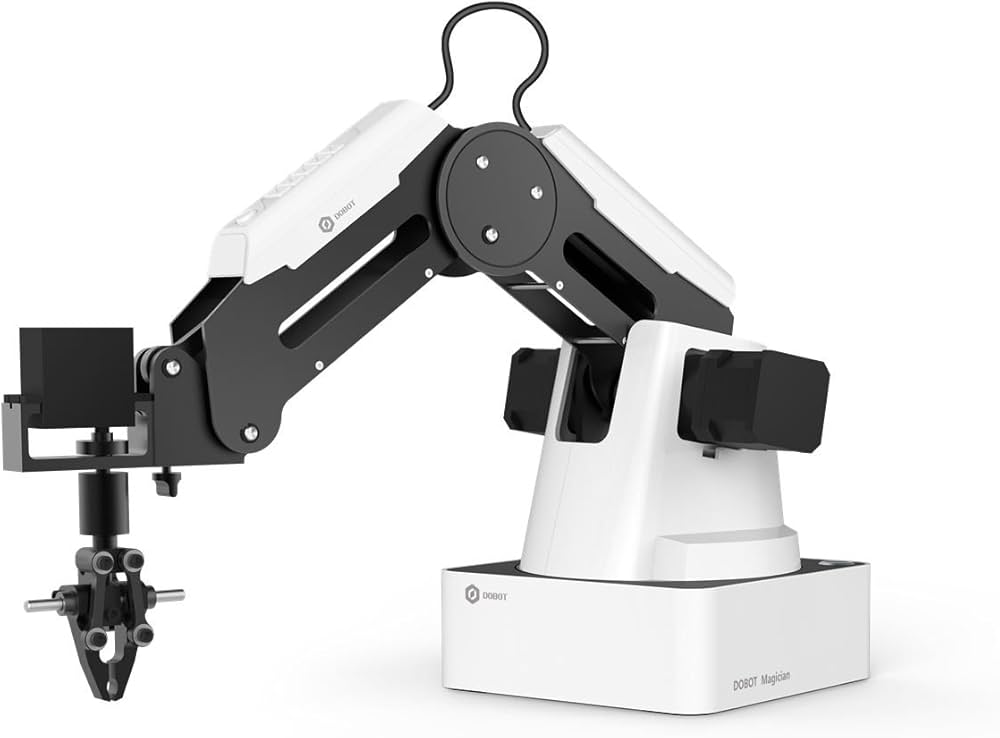
The library is still under development and will be added with more functionalities with time. Here is what a Dobot Magician looks like:
Requirements
- Python 32 bit Architecture
- Visual Studio Redistributable C++
Setting up
Install the package using pip:
pip install dobotexpress
Initialize
dobot = DobotManager()
device = manager.create("COM17")
Basic Concepts
Queue System
Dobot uses what we call a Queue system. MOST of the commands you give, it accomodates in a queue in it's internal buffer. The commands which do this, return a queueIndex, which is basically token number and when that token number is reached the dobot then executes that command. The only use of the queueIndex is when you want to make the dobot wait for a command to happen.
This library currently does not support Alarms, so you need to use DobotStudio to clear any manual alarms.
DobotManager
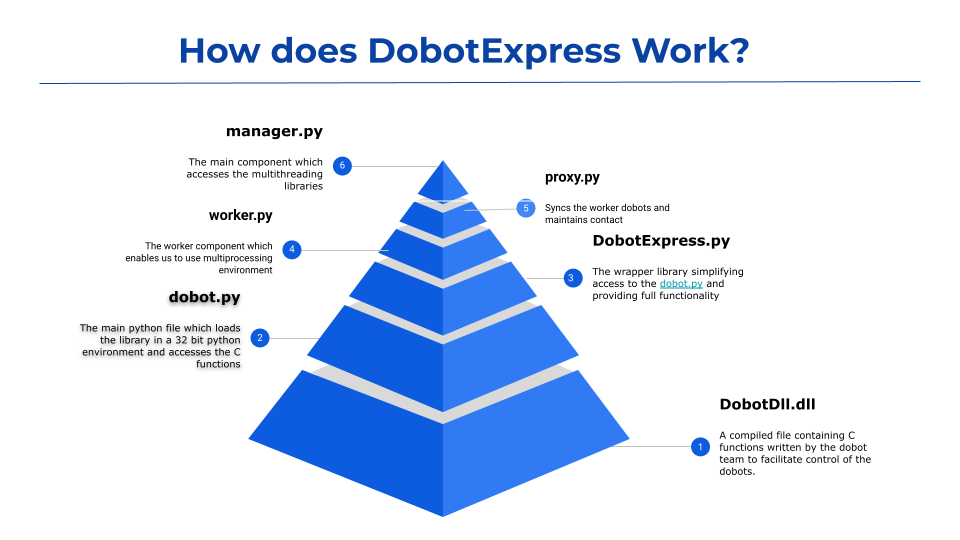
The DobotDll.dll had a limitation where only a single Dobot could be controlled within a Python environment. To overcome this constraint, we introduced DobotManager, which assigns dedicated worker threads to independently initialize and manage multiple Dobot devices.
The diagram below illustrates the internal architecture and workflow of DobotExpress..
Methods
- clearCommands(): To clear the command buffer and stop any execution of queues.
- setCartisianSpeed(velocity, acceleration): To set the speed of dobot when moving with x,y,z and r coordinates.
- setJointSpeed(velocity, acceleration): To set the speed of the joints of the dobot
- getPosition(): To get the position of the x,y,z,r,j1,j2,j3 and j4 coordinates
- enableLinearRail(state): To enable/disable the linear rail. You need to run this before you do any other operation with linear rail.
- getLinearRailPosition(): To get the position of the linear rail.
- goHome(): Homes the dobot with default coordinates
- setHomeCoordinates(x,y,z,r): Sets custom coordinates for the dobot to home. You still need to run goHome() to home the dobot. This just sets the coordinates
- moveXYZ(x,y,z,r): To move the dobot with cartisian coordinates.
- moveJoints(j1,j2,j3,j4): To move the dobot using joint angles
- moveWithMode(PTPMode,a,b,c,d): This method gives you access to the 9 modes of movement, Dobot allows you to do. You can read about this mode in the subsection below.
- setGripperState(enable,state): To control the gripper of the dobot. First parameter turns the gripper on/off and the second parameter controls it's open and closing
- setSuctionState(enable,state):To control the suction of the dobot. First parameter turns the suction on/off and the second parameter controls it's state.
- enableColorSensor(state,port): To enable/disable the color sensor connnected to dobot's one of the GPIO pin. Make sure to give the exact pin number written against the GPIO number on the dobot. GPIO Number ≠ Pin number
- enableIRSensor(state,port): To enable/disable the IR sensor connnected to dobot's one of the GPIO pin. Make sure to give the exact pin number written against the GPIO number on the dobot. GPIO Number ≠ Pin number
- readIRSensor(): To read IR Sensor value, make sure to enable IR sensor first.
- readColorSensor(): To read color sensor value, make sure to enable the color sensor first
- makeToWait(queueIndex): Make the dobot wait for the completion of a command.
- moveConveyer(distance): Move the conveyer of the dobot connected to the stepper motor.
About
This library was developed at the IEOR Lab, IIT Bombay, by Aditya Roy to enable control of Dobot robotic systems and to support research into their capabilities and applications.
Release history Release notifications | RSS feed


Download files
Download the file for your platform. If you're not sure which to choose, learn more about installing packages.
Source Distribution
Built Distribution
Filter files by name, interpreter, ABI, and platform.
If you're not sure about the file name format, learn more about wheel file names.
Copy a direct link to the current filters
File details
Details for the file dobotexpress-0.1.1.tar.gz.
File metadata
- Download URL: dobotexpress-0.1.1.tar.gz
- Upload date:
- Size: 5.2 MB
- Tags: Source
- Uploaded using Trusted Publishing? No
- Uploaded via: twine/6.2.0 CPython/3.14.2
File hashes
| Algorithm | Hash digest | |
|---|---|---|
| SHA256 |
e552c2e246ca6384c5d0860a65a201c477b59eaa90751f0c8b1a56e10e22ed80
|
|
| MD5 |
caa6ba857e1c2fc719443d2ed17a2ec2
|
|
| BLAKE2b-256 |
27028d9066eb1ee3a6f5451f1a621147ab215b15228325b3878b29030714452e
|
File details
Details for the file dobotexpress-0.1.1-py3-none-any.whl.
File metadata
- Download URL: dobotexpress-0.1.1-py3-none-any.whl
- Upload date:
- Size: 3.3 MB
- Tags: Python 3
- Uploaded using Trusted Publishing? No
- Uploaded via: twine/6.2.0 CPython/3.14.2
File hashes
| Algorithm | Hash digest | |
|---|---|---|
| SHA256 |
f0b641fce0e375146b4a07a733af62b02f5fc190bbe6def9d3bcd556a0ead7da
|
|
| MD5 |
bcf4243269375f2838c75a42b8d98589
|
|
| BLAKE2b-256 |
07abdd17d231e5da7e47bb6f8b4fce740343f7ab57fc5bab5b7556ae87625d4b
|






