



Focus on writing your code, let LLMs write the documentation for you.
With just a few keystrokes in your terminal by using OpenAI or 100% local LLMs without any data leaks.
Built with langchain, treesitter, lama.cpp and ollama
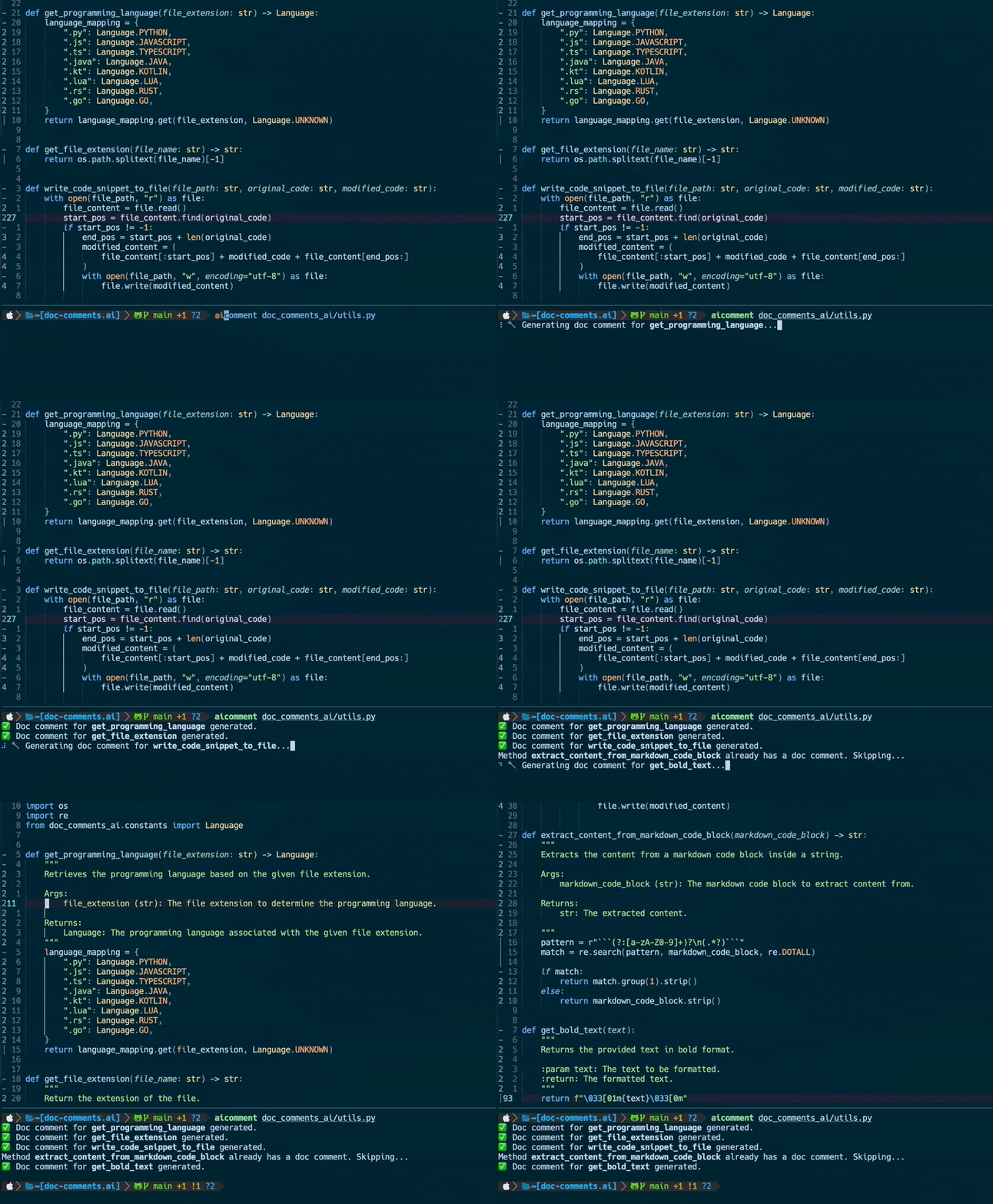
✨ Features
- 📝 Generate documentation comment blocks for all methods in a file
- e.g. Javadoc, JSDoc, Docstring, Rustdoc etc.
- ✍️ Generate inline documentation comments in method bodies
- 🌳 Treesitter integration
- 💻 Local LLM support
- 🌐 Azure OpenAI support
[!NOTE]
Documentation will only be added to files without unstaged changes, so nothing is overwritten.
🚀 Usage
Create documentations for any method in a file specified by <RELATIVE_FILE_PATH> with GPT-3.5-Turbo model:
aicomment <RELATIVE_FILE_PATH>
Create also documentation comments in the method body:
aicomment <RELATIVE_FILE_PATH> --inline
Guided mode, confirm documentation generation for each method:
aicomment <RELATIVE_FILE_PATH> --guided
Use GPT-4 model:
aicomment <RELATIVE_FILE_PATH> --gpt4
Use GPT-3.5-Turbo-16k model:
aicomment <RELATIVE_FILE_PATH> --gpt3_5-16k
Use Azure OpenAI:
aicomment <RELATIVE_FILE_PATH> --azure-deployment <DEPLOYMENT_NAME>
Use local Llama.cpp:
aicomment <RELATIVE_FILE_PATH> --local_model <MODEL_PATH>
Use local Ollama:
aicomment <RELATIVE_FILE_PATH> --ollama-model <OLLAMA_MODEL>
[!NOTE]
How to download models from huggingface for local usage see Local LLM usage
[!NOTE]
If very extensive and descriptive documentations are needed, consider using GPT-4/GPT-3.5 Turbo 16k or a similar local model.
[!IMPORTANT]
The results by using a local LLM will highly be affected by your selected model. To get similar results compared to GPT-3.5/4 you need to select very large models which require a powerful hardware.
📚 Supported Languages
- Python
- Typescript
- Javascript
- Java
- Rust
- Kotlin
- Go
- C++
- C
- C#
- Haskell
📋 Requirements
- Python >= 3.9
📦 Installation
Install in an isolated environment with pipx:
pipx install doc-comments-ai
If you are facing issues using pipx uou can also install directly from source through PyPI with
pip install doc-comments-ai
However, it is recommended to use pipx instead to benefit from isolated environments for the dependencies.
For further help visit the Troubleshooting section.
1. OpenAI usage
Create your personal OpenAI API key and add it as $OPENAI_API_KEY to your environment with:
export OPENAI_API_KEY = <YOUR_API_KEY>
2. Azure OpenAI usage
Add the following variables to your environment:
export AZURE_API_BASE = "https://<your-endpoint.openai.azure.com/"
export AZURE_API_KEY = <YOUR_AZURE_OPENAI_API_KEY>
export AZURE_API_VERSION = "2023-05-15"
3. Local LLM usage with Llama.cpp
When using a local LLM no API key is required. On first usage of --local_model you will be asked for confirmation to intall llama-cpp-python with its dependencies.
The installation process will take care of the hardware-accelerated build tailored to your hardware and OS. For further details see:
installation-with-hardware-acceleration
To download a model from huggingface for local usage the most convenient way is using the huggingface-cli:
huggingface-cli download TheBloke/CodeLlama-13B-Python-GGUF codellama-13b-python.Q5_K_M.gguf
This will download the codellama-13b-python.Q5_K_M model to ~/.cache/huggingface/.
After the download has finished the absolute path of the .gguf file is printed to the console which can be used as the value for --local_model.
[!IMPORTANT]
Sincellama.cppis used the model must be in the.ggufformat.
🛟 Troubleshooting
-
During installation with
pipx
Make sure the rust compiler is installed on your system from here.pip failed to build package: tiktoken Some possibly relevant errors from pip install: error: subprocess-exited-with-error error: can't find Rust compiler
🌟 Contributing
If you are missing a feature or facing a bug don't hesitate to open an issue or raise a PR. Any kind of contribution is highly appreciated!
1 maintainer

Metadata
1 maintainer
Release files for doc-comments-ai 0.1.18
For a detailed explanation of source distributions (sdists) and built distributions (wheels), please see the package formats documentation.
Source distribution (sdist)
| File | Size | Uploaded | |
|---|---|---|---|
| doc_comments_ai-0.1.18.tar.gz | 13.5 kB | Details |
Built distribution (wheel)
| File | Interpreter | ABI | Platform | Reset |
|---|---|---|---|---|
| doc_comments_ai-0.1.18-py3-none-any.whl | Python 3 | none | any | Details |
Total release size: 33.2 kB
Release files / doc_comments_ai-0.1.18.tar.gz
| Download URL | doc_comments_ai-0.1.18.tar.gz |
|---|---|
| Size | 13.5 kB |
| Tags | Source |
|
SHA-256 checksum How to use checksums |
69459deddcb89441af3e27960e182d0cc76716a2cdcad3a9549f73a1715a1de9
|
|
BLAKE2b-256 checksum How to use checksums |
057a32f40486b86e7acc3029f4c13d2572777fdfa5487d2e87abdd6659716258
|
| Upload date | |
|
Uploaded using Trusted Publishing? What is trusted publishing? |
No |
| Uploaded via |
poetry/2.0.1 CPython/3.9.21 Linux/6.8.0-1020-azure
|
Release files / doc_comments_ai-0.1.18-py3-none-any.whl
| Download URL | doc_comments_ai-0.1.18-py3-none-any.whl |
|---|---|
| Size | 19.7 kB |
| Tags | Python 3 |
|
SHA-256 checksum How to use checksums |
a7150f8eac0597ca597dc88b6fe04b65ea5fbfe877e804e36799129aa4e36793
|
|
BLAKE2b-256 checksum How to use checksums |
c7bdd2fc366a4302410fff542ce5e74e2fb778223ebe5a14d889c2765d121691
|
| Upload date | |
|
Uploaded using Trusted Publishing? What is trusted publishing? |
No |
| Uploaded via |
poetry/2.0.1 CPython/3.9.21 Linux/6.8.0-1020-azure
|














