
 doc-control




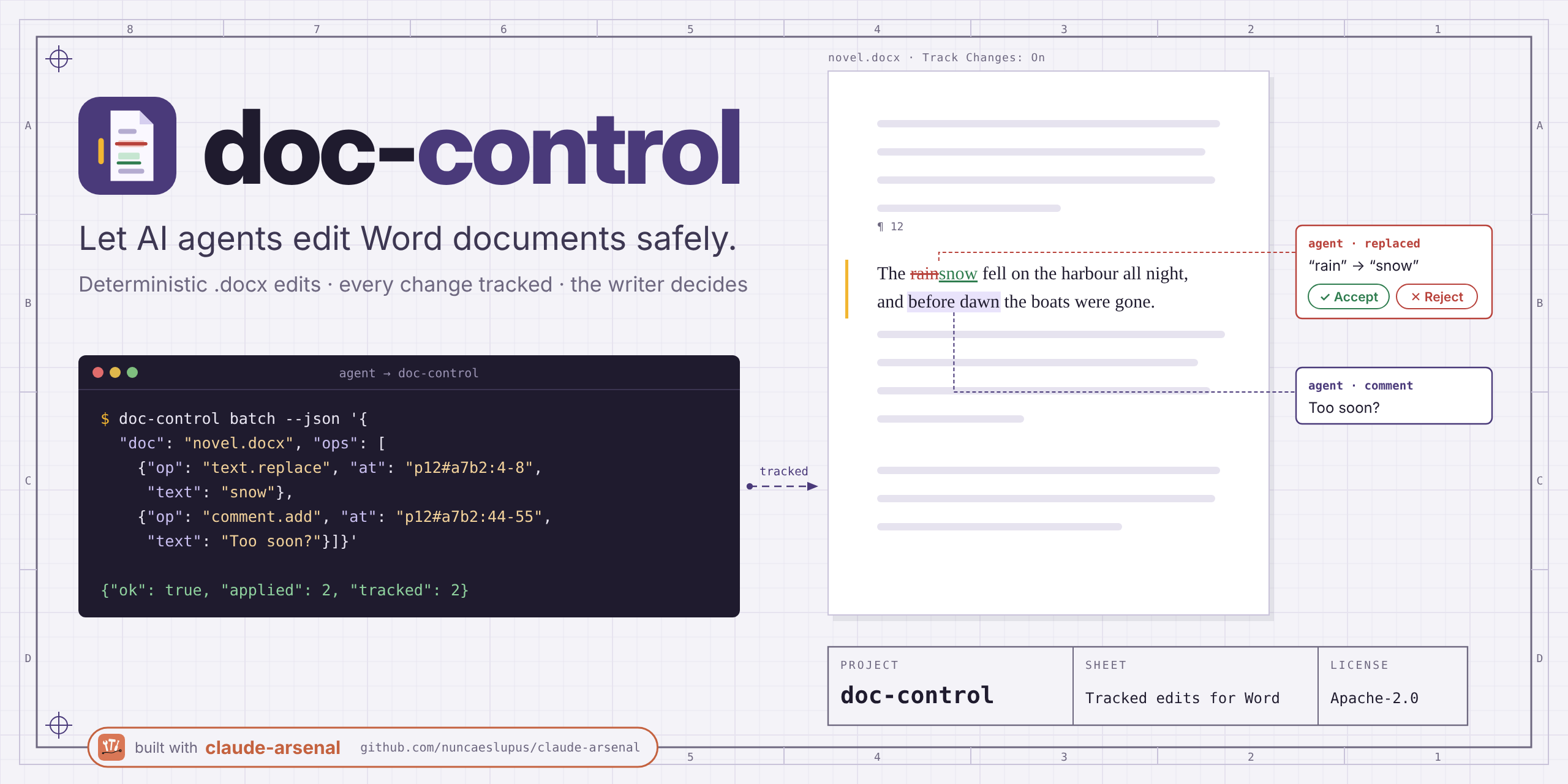
Lets AI agents edit Word documents as tracked changes the writer can accept or reject.
An agent asked to fix a .docx usually rewrites the file and hopes nothing else moved.
This tool gives it a deterministic interface instead: read the document by paragraph
address, then send edits that land as tracked changes and comments, with a backup,
verification and undo on every write. It works on closed files and, through LibreOffice
Writer or Microsoft Word on Windows, on the document the writer has open. There is no AI
inside: the agent decides, the writer approves.
Not yet stable: the API may still change.
Quick start
Python (the version in pyproject.toml), no other dependencies.
pip install doc-control            # or run without installing: uvx doc-control ...
doc-control text.find --json '{"doc": "story.docx", "query": "rain"}'
For live control of Word on Windows install doc-control[live] (adds pywin32);
LibreOffice needs no extra package.
Install without Python (Windows)
Every release on the latest release page carries a Claude Desktop extension and an installer. Both install for the current user, need no admin rights, work with any Claude account (the free plan included) and drive Microsoft Word live. Full guide (checksums, updates, uninstalling): docs/install-windows.md.
Claude Desktop extension (.mcpb)
- Download
doc-control-X.Y.Z-windows-x64.mcpbfrom the latest release. - Drag the file onto Claude Desktop's Settings > Extensions page and click Install.
Claude Desktop warns that the extension can access everything on your computer; every local extension gets that warning. Double-clicking the file does not install it.
Installer (-setup.exe), for the command line
- Download
doc-control-X.Y.Z-windows-x64-setup.exefrom the latest release. - Double-click it.
- If Windows SmartScreen says "Windows protected your PC", click More info, then Run anyway (the installer is not code-signed).
- Click Install, Next and Finish, and open a new terminal:
doc-control server.capabilitiesworks there.
Example
A two-paragraph story.docx. Find a word, then replace it and comment on the next
paragraph in one batch (long envelopes trimmed with ...; the rest is actual output):
$ doc-control text.find --json '{"doc": "story.docx", "query": "rain"}'
{"api": "1.0", "ok": true, "op": "text.find", ..., "result": {"matches": [{"at": "p1#bfa780f9:4-8",
 "text": "rain", "context": "The rain had not stopped since Tuesday…"}], "total": 1, ...}}

$ doc-control doc.batch --json '{"doc": "story.docx", "ops": [
    {"op": "text.replace", "at": "p1#bfa780f9:4-8", "text": "snow"},
    {"op": "comment.add", "at": "p2#f8b24a64", "text": "Which window?"}]}'
{"api": "1.0", "ok": true, "op": "doc.batch", ..., "result": {"applied": 2, "dry_run": false,
 "preview": [{"op": 0, "at": "p1#bfa780f9:4-8", "before": "rain", "after": "snow"},
             {"op": 1, "at": "p2#f8b24a64", "before": "Ana closed the window and waited.",
              "after": "(comment c0 by Claude: Which window?)"}],
 ..., "author": "Claude", "backup": ".../.doc-control/story.docx/backups/20261020T091845Z-0ff4dc24.docx",
 "op_id": "h-000001"}, "warnings": [], "next": null}

$ doc-control review.list --json '{"doc": "story.docx"}'
{..., "result": {"totals": {"comments": 1, "insert": 0, "delete": 0, "replace": 1, ...},
 "paragraphs": [{"at": "p1#c6f909ff", "text": "The snow had not stopped since Tuesday.",
   "changes": [{"type": "replace", "ids": ["1", "2"], "author": "Claude", "old": "rain", "new": "snow", ...}]},
  {"at": "p2#f8b24a64", "text": "Ana closed the window and waited.",
   "comments": [{"id": "0", "author": "Claude", "text": "Which window?", "quote": "Ana closed the window and waited.", ...}]}]}, ...}
Word shows the replacement as a tracked deletion and insertion and the comment in the margin. Reusing the old address after the edit fails instead of guessing:
$ doc-control text.replace --json '{"doc": "story.docx", "at": "p1#bfa780f9:4-8", "text": "fog"}'
{"api": "1.0", "ok": false, "op": "text.replace", "error": {"code": "STALE_ADDRESS",
 "message": "p1#bfa780f9 no longer matches the document",
 "hint": "Re-read the paragraph (para.get) or resolve its anchor, then retry.",
 "details": {"address": "p1#bfa780f9", "current": "p1#c6f909ff"}}}
Use with AI agents
MCP server
doc-control mcp serves 60+ operations as MCP tools over stdio, one tool per
operation (doc.batch becomes doc_batch), with the same JSON Schemas and response
envelope as the CLI. Every tool declares an outputSchema; a successful call also
returns the envelope as structuredContent. Standard library only.
{
  "mcpServers": {
    "doc-control": { "command": "uvx", "args": ["doc-control", "mcp"] }
  }
}
For live Word on Windows use "args": ["--from", "doc-control[live]", "doc-control", "mcp"],
or install the .mcpb extension above. live_places also ships an MCP Apps UI
(a ui:// page) whose buttons call live_select.
| Group | Tools |
|---|---|
| Read | doc_outline, para_list, para_get, para_locate, text_find, doc_stats, doc_segment, review_list, comment_list, revision_list |
| Edit (tracked) | doc_batch, text_replace, para_insert, para_delete, comment_add, note_add, term_rename, table_row_insert, table_row_delete |
| Review | revision_accept, revision_reject, doc_diff, doc_compare |
| Layout and fields | layout_get, layout_apply, field_list, field_update, toc_insert, caption_add, xref_add, index_mark, index_insert |
| Styles | style_*, styleset_* |
| Safety | history_list, history_undo, history_restore, history_search, ... |
| Live window | live_status, live_open, live_select, live_places, live_save, live_close, ... |
| Discovery | server_capabilities, server_help, recipe_list, recipe_run |
server_help with {"op": "<name>"} returns any operation's schema and summary.
From the CLI
An agent can drive the CLI directly. It never prompts and reads stdin only with
--json -. It prints exactly one JSON envelope on stdout: {"ok": true, "result": ...}
or {"ok": false, "error": {"code", "message", "hint", "details"}}.
Exit codes: 0 success, 1 operation error, 2 usage error (unknown operation or
invalid request). Error codes are listed in docs/errors.md.
The intended loop: read (doc.outline, para.list, text.find), build one doc.batch,
run it with "dry_run": true to get the preview, apply it, and point the writer to
Word's Review pane. history.undo reverts a write.
How it works
- Addresses, not offsets.
p12#a7b2a7b2:4-10is paragraph 12, its text fingerprint and a character range. A changed paragraph givesSTALE_ADDRESSwith the current address.anchor.create/anchor.resolvefind a passage again after edits. - Every content change is tracked, authored by
DOC_CONTROL_AUTHOR(defaultClaude). For an edit the writer already approved, the text-editing operations andhistory.restoretake"tracked": false(file engine only). - Safety layer: lock-file and on-disk change detection, backup before every write, read-back verification, automatic restore on failure, an operation log with undo.
- File and live engines, one API. The file engine edits a closed
.docxwith the Python standard library, rewriting only the parts it touches; reads also accept.txt,.mdand.odt. The live engine drives the open document in LibreOffice Writer or Word (Windows, COM). - Recipes propose fix batches (Spanish typography, quotes, dashes, spacing, empty
paragraphs):
recipe.list, thenrecipe.runreturns a batch to review and apply.
Usage
Operations are named resource.action; any single edit operation runs as a one-edit
doc.batch. doc-control server.help <op> prints an operation's schema. From Python:
from doc_control import api

with api.open("Novela.docx") as doc:
    for p in doc.paragraphs(normalized=True, pages=True):
        print(p["at"], p["style_name"], p["page"], p["text"][:40])
    chapters = doc.run("doc.segment", {"unit": "chapters"})["chapters"]
Notes, headers, footers and tables
Reads cover the body unless stories adds "notes" (footnotes, endnotes) or
"headers" (headers, footers). Those paragraphs carry prefixed addresses
(fn3/p1#0c9e0c9e, hdr1.default/...) that edits accept.
doc-control para.list --json '{"doc": "Tesis.docx", "stories": ["body", "notes"]}'
doc-control text.replace --json '{"doc": "Tesis.docx", "at": "fn3/p1#0c9e0c9e:4-10", "text": "2019"}'
doc-control note.add --json '{"doc": "Tesis.docx", "at": "p40#c0ffee00:17", "kind": "footnote", "text": "Ver el cap. 2."}'
doc-control table.row.insert --json '{"doc": "Tesis.docx", "table": 1, "after_row": 2, "cells": ["a", "b"]}'
Page layout and fields
layout.get returns the page plan per section (start, break, numbering, header and
footer per kind); layout.apply brings the document to a plan in the same shape. This
one gives a novel an unnumbered title page, then starts chapter 1 on a right-hand page
numbered 1, with the chapter title in odd headers and the book title in even ones:
doc-control layout.apply --json '{"doc": "Novela.docx", "untracked": true, "plan": {
  "version": 1, "two_sided": true, "mirror_margins": true,
  "sections": [
    {"from": "p1#ea7412aa", "break": "nextPage",
     "numbering": {"shown": false, "start": 1, "format": "lowerRoman"},
     "header": {"default": "", "even": ""}, "footer": {"default": "", "even": ""}},
    {"from": "p2#5fac7aad", "break": "oddPage",
     "numbering": {"shown": true, "start": 1, "format": "decimal"},
     "header": {"default": "{chapter}", "even": "La casa del río"},
     "footer": {"default": "{PAGE}", "even": "{PAGE}"}}]}}'
{PAGE}, {NUMPAGES} and {chapter} become fields. Breaks and numbering are tracked;
new header parts and two-sided settings cannot be tracked in Word, hence
untracked: true. Try "dry_run": true first. field.list, toc.insert,
caption.add, xref.add and index.insert handle fields; field.update refreshes them
through headless LibreOffice.
Live: the document the writer has open
doc-control live.open --json '{"doc": "Novela.docx"}'
doc-control doc.batch --json '{"doc": "Novela.docx", "engine": "live", "ops": [
  {"op": "comment.add", "at": "p40#c0ffee00", "text": "¿Seguro?"}]}'
doc-control live.close --json '{"doc": "Novela.docx", "save": true}'
Live doc.batch takes comment.add, text.replace and para.insert. Without a usable
app it answers ENGINE_UNAVAILABLE with the reason; live.status lists the apps found
and, for LibreOffice, the Python its UNO bridge needs. Closing never drops unsaved work.
Environment
| Variable | Effect |
|---|---|
DOC_CONTROL_AUTHOR |
Author of tracked changes and comments (default Claude) |
DOC_CONTROL_STORE |
appdata keeps backups and history in the user store instead of .doc-control/ beside the document |
DOC_CONTROL_STORE_DIR |
Store root override |
DOC_CONTROL_HOME |
User store and recipes folder |
DOC_CONTROL_UPDATE_CHECK |
1 asks GitHub Releases at most once a day and reports a newer version in server.capabilities; never downloads anything |
Everything runs locally. With the update check off (the default), nothing leaves the machine.
What it is not
- Not an AI: no model calls, no judgment. It executes what the agent sends.
- No live control on macOS yet; live
doc.batchcovers only some edit types. - An index is built by Word (F9); citation fields are never changed.
Documentation
- Operation reference and error reference, generated from the code
- Windows install
- Checking results in real Word
- Design decisions
Development
uv sync
make check     # ruff, mypy, pytest, hygiene script
Work is planned as gated tasks with claude-arsenal;
see CLAUDE.md.
Related projects
- claude-arsenal — spec-driven Claude Code workflow and gated task queue.
- drawspec — declarative diagram spec → clean SVG/PNG/text, writable by LLMs; MCP server included.
- literary-critic — LLM manuscript analysis the way a professional editor would.
- integral-job-search — candidate-centred job search run in Claude Code.
License
MIT — see LICENSE.
1 maintainer

Metadata
1 maintainer
Release files for doc-control 0.10.0
For a detailed explanation of source distributions (sdists) and built distributions (wheels), please see the package formats documentation.
Source distribution (sdist)
| File | Size | Uploaded | Provenance | |
|---|---|---|---|---|
| doc_control-0.10.0.tar.gz | 803.3 kB | With provenance | Details |
Built distribution (wheel)
| File | Interpreter | ABI | Platform | Reset |
|---|---|---|---|---|
| doc_control-0.10.0-py3-none-any.whl | Python 3 | none | any | Details |
Total release size: 1.3 MB
Release files / doc_control-0.10.0.tar.gz
| Download URL | doc_control-0.10.0.tar.gz |
|---|---|
| Size | 803.3 kB |
| Tags | Source |
|
SHA-256 checksum How to use checksums |
1c702af7a9c4820809b6803b49caed0643f4867a0d74ec921697918589239fdd
|
|
BLAKE2b-256 checksum How to use checksums |
ec91ceb86ab47dcce3c7999a33955cfc9d7bba5fb3e02c6282a61d8885e5a8a5
|
| Upload date | |
|
Uploaded using Trusted Publishing? What is trusted publishing? |
Yes |
| Uploaded via |
twine/7.0.0 CPython/3.13.14
|
Provenance
Provenance describes where a file came from. On PyPI, provenance is shared via attestations, which provide a verifiable record of the build or publishing details. View details, limitations and caveats.


PyPI Publish Attestation
PyPI verified that this artifact, at this checksum, originated from the publisher listed below.
Signed by GitHub Actions, verified by PyPI on Oct 20, 2026.
Transparency logRelease files / doc_control-0.10.0-py3-none-any.whl
| Download URL | doc_control-0.10.0-py3-none-any.whl |
|---|---|
| Size | 498.6 kB |
| Tags | Python 3 |
|
SHA-256 checksum How to use checksums |
12b6f373eb5af6424840984ea622c0970b35b12dbf0a2826be0c5a6b271f835f
|
|
BLAKE2b-256 checksum How to use checksums |
94938db580b89530009c320b582fa7acfab27865ed8504970a784b36856b36c2
|
| Upload date | |
|
Uploaded using Trusted Publishing? What is trusted publishing? |
Yes |
| Uploaded via |
twine/7.0.0 CPython/3.13.14
|
Provenance
Provenance describes where a file came from. On PyPI, provenance is shared via attestations, which provide a verifiable record of the build or publishing details. View details, limitations and caveats.
PyPI Publish Attestation
PyPI verified that this artifact, at this checksum, originated from the publisher listed below.
Signed by GitHub Actions, verified by PyPI on Oct 20, 2026.
Transparency logSecurity for doc-control 0.10.0
Provenance
Provenance describes where a file came from. On PyPI, provenance is shared via attestations, which provide a verifiable record of the build or publishing details. View details, limitations and caveats.
Full provenance
All 2 files in this release have been uploaded with provenance metadata.
Attestation for doc_control-0.10.0.tar.gz
PyPI Publish Attestation
PyPI verified that this artifact, at this checksum, originated from the publisher listed below.
Signed by GitHub Actions, verified by PyPI on Oct 20, 2026.
Transparency logA note on package security
PyPI is a repository for distributing packages, not a service for auditing them. While third-party security researchers and our staff do their best to detect and remove malicious packages, PyPI cannot guarantee the quality, security or suitability of any given package.














