
A zero-shot document classifier.

Project description
DocClassifier




Introduction

DocClassifier is a document image classification system based on Metric Learning technology, inspired by the challenges faced by traditional classifiers in handling the rapid increase in document types and their definitional ambiguities. It adopts the PartialFC feature learning architecture and integrates techniques such as CosFace and ArcFace, allowing the model to perform accurate classification without a large number of predefined categories. By expanding the dataset and incorporating ImageNet-1K and CLIP models, we enhanced performance and increased the model's adaptability and scalability. The model is trained using PyTorch, infers on ONNXRuntime, and supports conversion to the ONNX format for deployment across different platforms. Our testing showed the model achieved over 90% accuracy, with fast inference speed and the ability to quickly add new document types, meeting the needs of most application scenarios.
Documentation
Given the extensive usage instructions and settings explanations for this project, we only summarize the "Model Design" section here.
For more details, please refer to the DocClassifier Documents.
Installation
via PyPI
-
Install the package from PyPI:
pip install docclassifier-docsaid
-
Verify the installation:
python -c "import docclassifier; print(docclassifier.__version__)"
-
If the version number is displayed, the installation was successful.
via Git Clone
-
Clone this repository:
git clone https://github.com/DocsaidLab/DocClassifier.git
-
Install the wheel package:
pip install wheel
-
Build the wheel file:
cd DocClassifier
python setup.py bdist_wheel
-
Install the built wheel file:
pip install dist/docclassifier_docsaid-*-py3-none-any.whl
Model Design
Creating a comprehensive model involves multiple adjustments and design iterations.
First Generation Model
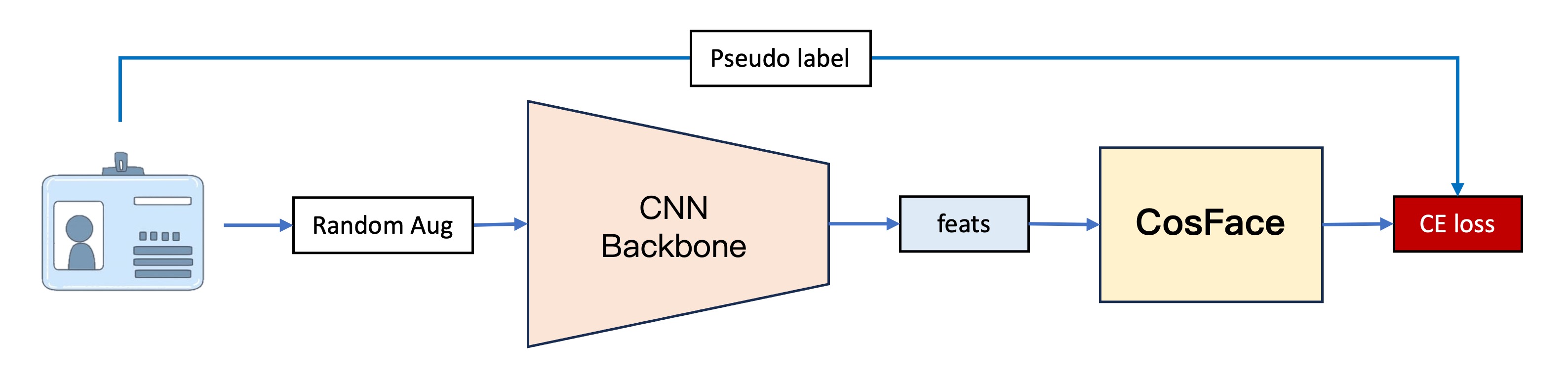
The first-generation model, our earliest version, has a basic architecture divided into four parts:
-
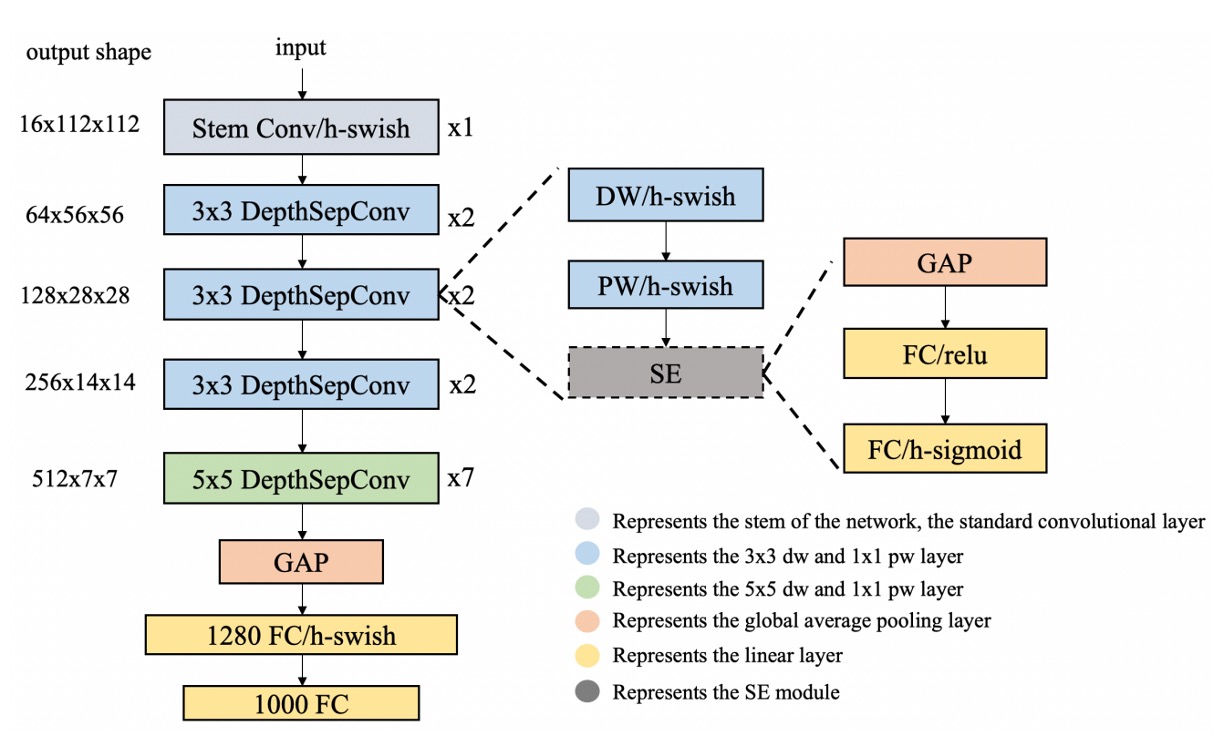
Feature Extraction
This part converts images into vectors using PP-LCNet as the feature extractor.
The input image is a 128 x 128 RGB image, which outputs a 256-dimensional vector after feature extraction.
-
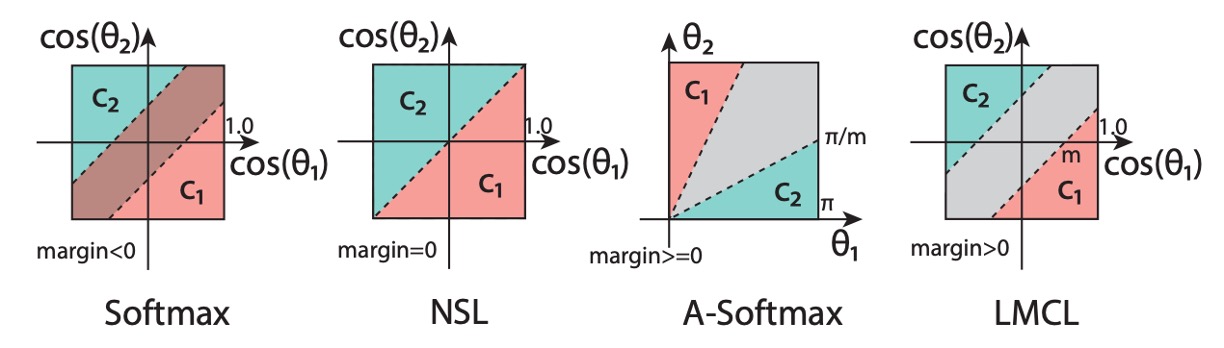
CosFace
To test the effectiveness of metric learning, we directly used CosFace, skipping traditional classifiers. CosFace introduces a margin parameter to the softmax loss function, enhancing the model's ability to distinguish different classes during training.
-
Dataset
To train the model, we created a simple web crawler to collect document images.
Approximately 650 different documents, mostly credit cards from major banks, were gathered.
This dataset is available here: UniquePool.
-
Training
We used PyTorch for model training, considering each image as a separate class to ensure the model could identify subtle differences between documents. However, this approach required data augmentation due to the limited number of original images (only one per class).
We used Albumentations for data augmentation to increase the dataset size.
The first-generation model validated our concept but revealed issues in practical applications:
-
Stability
The model was unstable, sensitive to environmental changes, and document distortions during alignment significantly impacted performance.
-
Performance
The model struggled with similar documents, indicating poor feature learning and difficulty distinguishing between different documents.
Our conclusion: The model was overfitting!
Second Generation Model
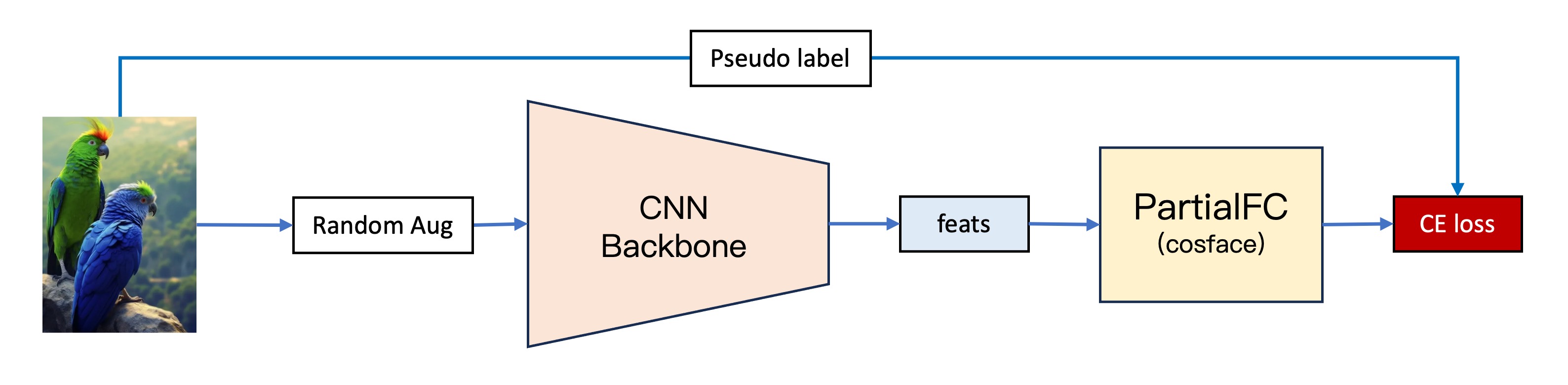
The second-generation model introduced several improvements:
-
More Data
We expanded the dataset by including Indoor Scene Recognition from MIT, adding 15,620 images of 67 different indoor scenes.
-
Using PartialFC
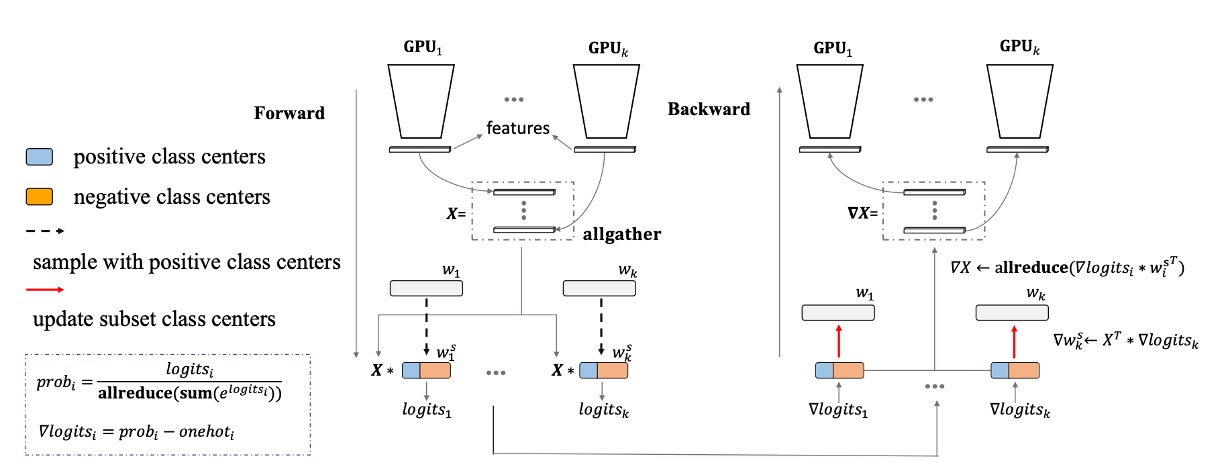
As class numbers increased, we encountered the issue of large classification heads. PartialFC was introduced, demonstrating that sampling only 10% of classes during Softmax-based loss function training retained accuracy.
-
More Data Augmentation
To combat overfitting, we augmented the dataset by defining each image's transformations (rotations, flips, and crops) as separate classes, expanding the dataset to (15,620 + 650) x 24 = 390,480 images (classes).
-
Switching to ImageNet-1K
We replaced Indoor Scene Recognition with ImageNet-1K, providing 1,281,167 images across 1,000 classes. This solved the overfitting issue by significantly increasing data diversity.
Third Generation Model
To achieve more stable models, we integrated new techniques:
-
CLIP
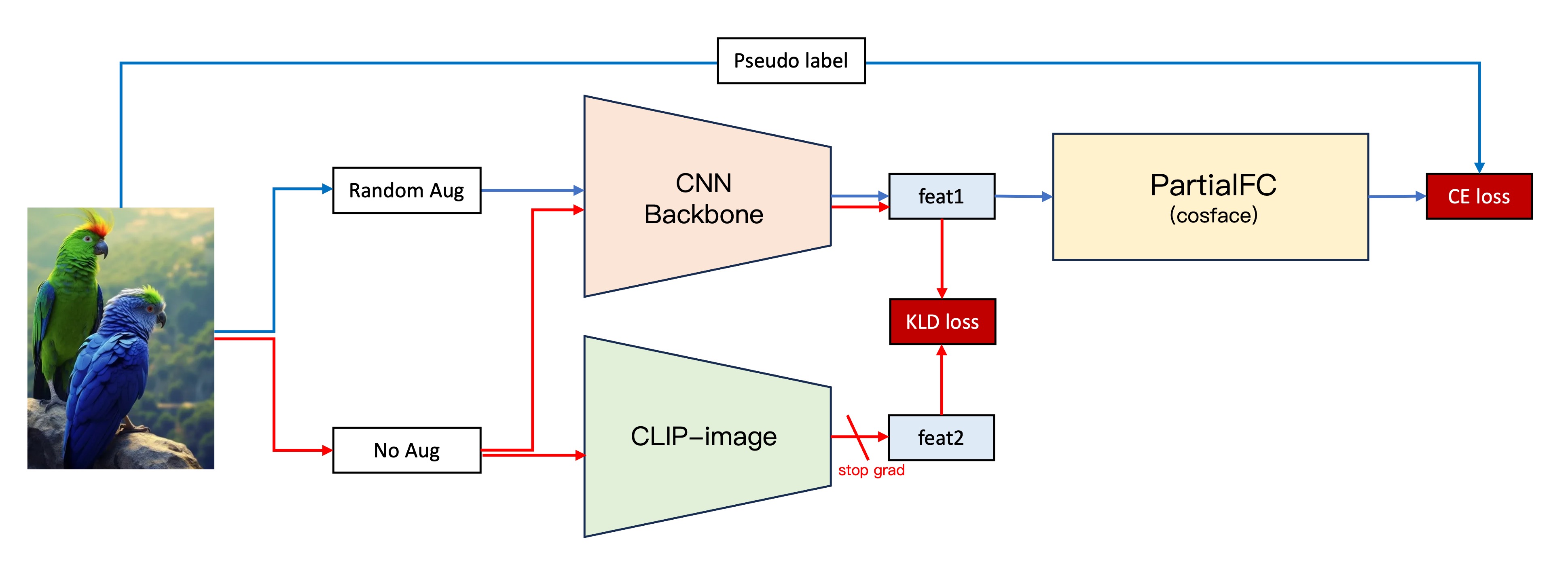
Inspired by OpenAI's CLIP, we aligned our model's features with CLIP's more robust feature vectors.
The process:
- Maintain the second-generation architecture.
- Extract image features using our CNN backbone and CLIP-Image branch.
- Compute the KLD loss between the two feature vectors.
- Integrate the KLD loss into the original loss function, freezing CLIP-Image branch parameters.
This approach significantly improved stability and validation dataset performance by nearly 5%.
-
Stacking Normalization Layers
Experimenting with different normalization layers, we found a combination of BatchNorm and LayerNorm yielded the best results, enhancing performance by around 5%.
self.embed_feats = nn.Sequential(
    nn.Linear(in_dim_flatten, embed_dim, bias=False),
    nn.LayerNorm(embed_dim),
    nn.BatchNorm1d(embed_dim),
    nn.Linear(embed_dim, embed_dim, bias=False),
    nn.LayerNorm(embed_dim),
    nn.BatchNorm1d(embed_dim),
)
Conclusion
The third-generation model achieved significant improvements in stability and performance, showing satisfactory results in practical applications.
We consider the project's phase objectives met and hope our findings will benefit others.
Citation
We appreciate the work of those before us, which greatly contributed to our research.
If you find our work helpful, please cite our repository:
@misc{lin2024docclassifier,
  author = {Kun-Hsiang Lin, Ze Yuan},
  title = {DocClassifier},
  year = {2024},
  publisher = {GitHub},
  url = {https://github.com/DocsaidLab/DocClassifier},
  note = {GitHub repository}
}
Release history Release notifications | RSS feed


Download files
Download the file for your platform. If you're not sure which to choose, learn more about installing packages.
Source Distributions
Built Distribution
Filter files by name, interpreter, ABI, and platform.
If you're not sure about the file name format, learn more about wheel file names.
Copy a direct link to the current filters
File details
Details for the file docclassifier_docsaid-0.10.0-py3-none-any.whl.
File metadata
- Download URL: docclassifier_docsaid-0.10.0-py3-none-any.whl
- Upload date:
- Size: 2.4 MB
- Tags: Python 3
- Uploaded using Trusted Publishing? No
- Uploaded via: twine/6.0.1 CPython/3.10.16
File hashes
| Algorithm | Hash digest | |
|---|---|---|
| SHA256 |
cccad99c523d7e16ba48a4c246f28a69ced5e0246962c6b12cbd09cfe3d1ed33
|
|
| MD5 |
819b9d6b6e60528c917bdcec3498de2d
|
|
| BLAKE2b-256 |
151dc2e44871a24a1b56f826758bb05083fc4c31397e400a2324c52f17e0cfd1
|






