
Next-generation dbt documentation site generator
Verified details
These details have been verified by PyPIProject links
GitHub Statistics
Maintainers

Project description

docglow
Next-generation documentation site generator for dbt™ Core projects.
Live Demo · Website · PyPI · Changelog





Why Docglow?
Over 60,000 teams use dbt Core without access to dbt Cloud's documentation features. The built-in dbt docs serve generates a dated, hard-to-navigate static site that doesn't scale.
Docglow replaces it with a modern, interactive single-page application — and it works with any dbt Core project out of the box.
- No dbt Cloud required — generate and serve docs locally or deploy anywhere
- Unlimited models, unlimited viewers — no seat caps, no model limits
- Zero configuration — just point it at a dbt project with compiled artifacts and go
- Interactive lineage explorer — drag, filter, and trace upstream/downstream dependencies visually
- Project health scoring — get a coverage report for descriptions, tests, and documentation completeness
Switching from dbt docs serve? See the migration guide for a side-by-side comparison and step-by-step instructions.
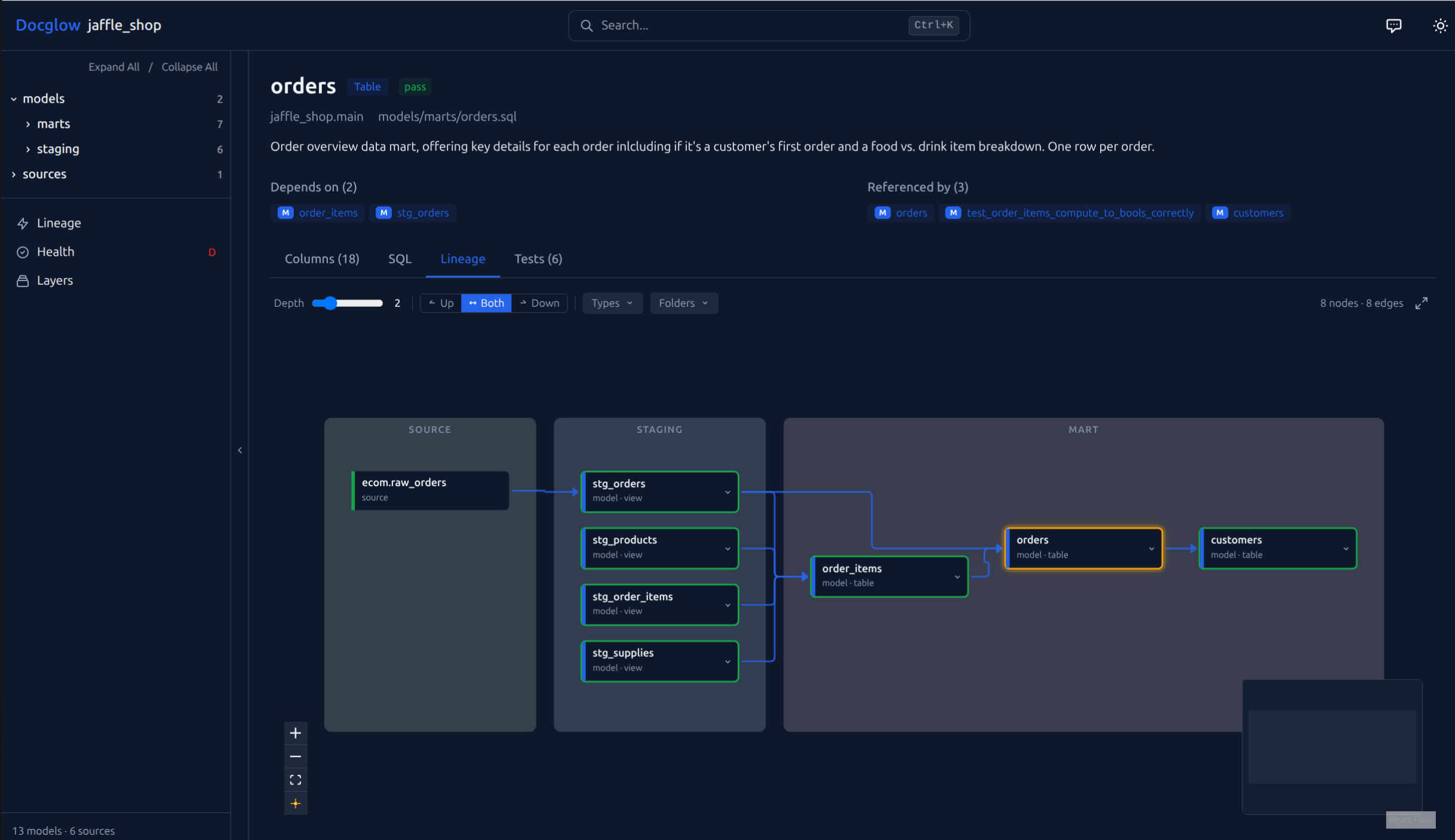
Interactive lineage explorer — layer-grouped DAG with upstream/downstream filtering, depth control, and folder grouping
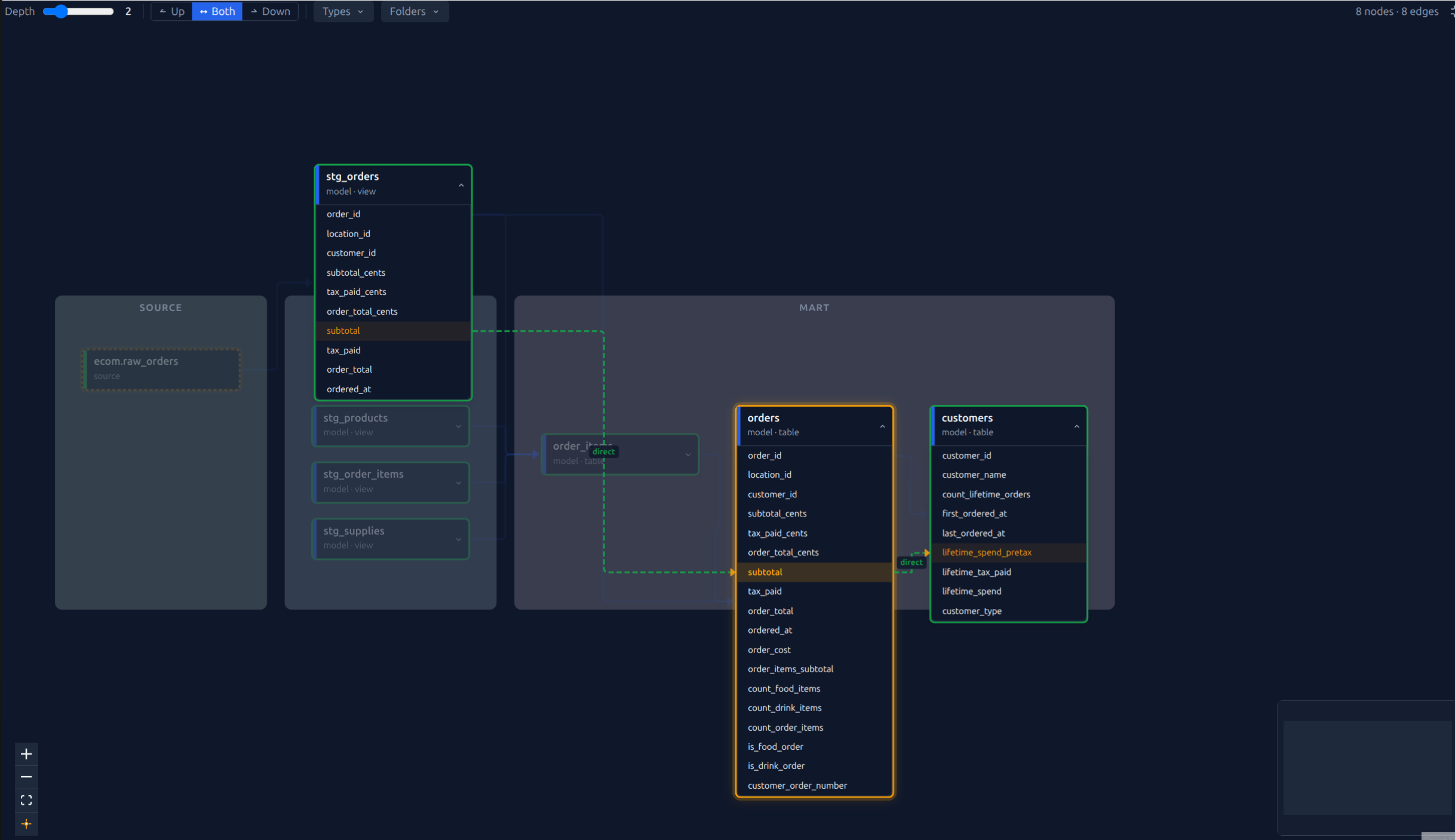
Column-level lineage — expand nodes to trace individual columns across models with transformation labels (direct, derived, aggregated)
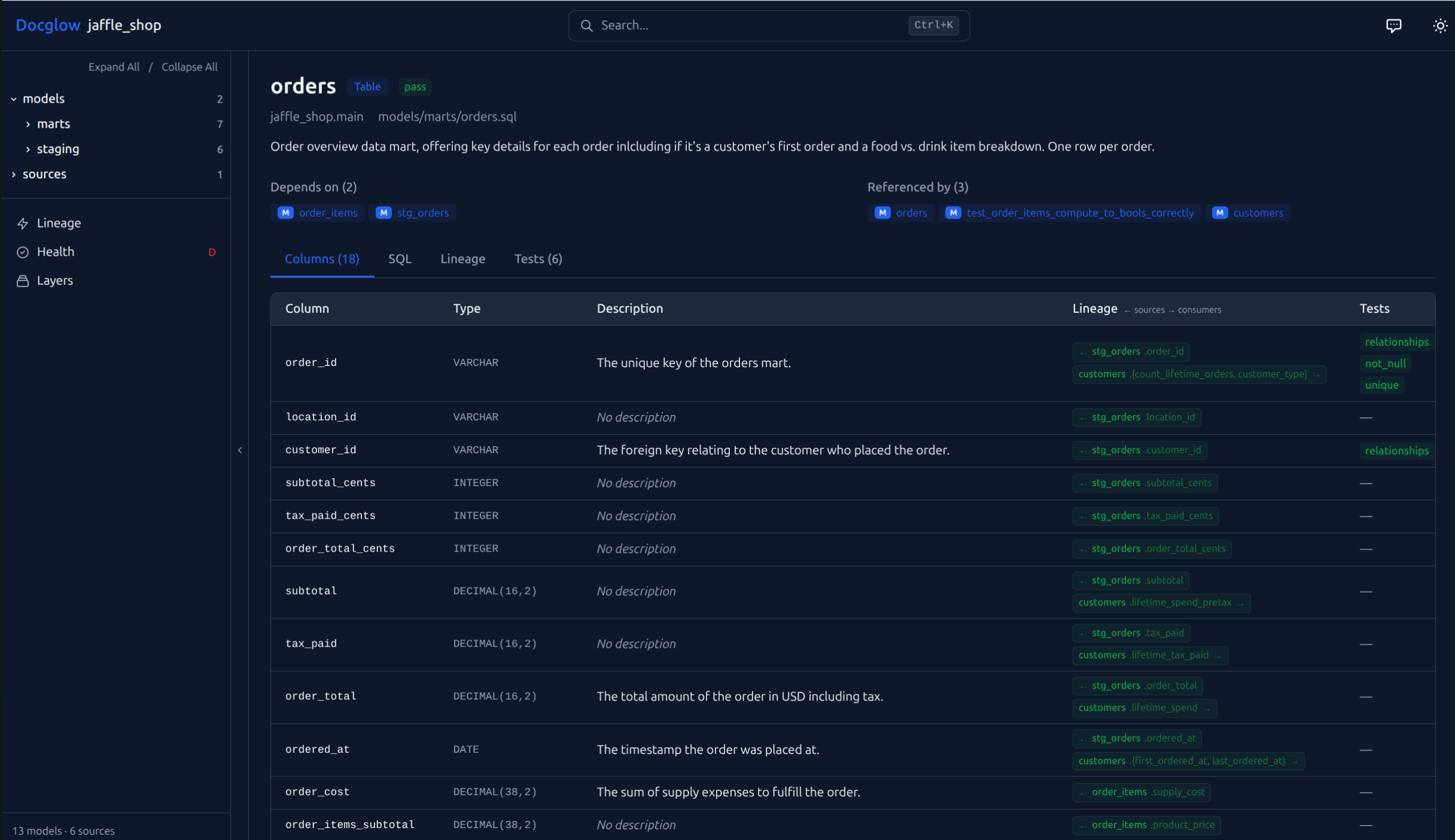
Column table with lineage — view types, descriptions, tests, and upstream/downstream dependencies for every column. Click a lineage badge to jump directly to that column in the linked model.
Install
pip install docglow
Try It in 60 Seconds
pip install docglow
git clone https://github.com/docglow/docglow.git
cd docglow
docglow generate --project-dir examples/jaffle-shop --output-dir ./demo-site
docglow serve --dir ./demo-site
This uses the bundled jaffle_shop example project with pre-built dbt artifacts.
Quick Start
# Generate the site from your dbt project
docglow generate --project-dir /path/to/dbt/project --output-dir ./site

# Serve locally
docglow serve --dir ./site
Features
- Interactive lineage explorer — drag, filter, and explore upstream/downstream dependencies with configurable depth and layer visualization
- Column-level documentation — searchable column tables with descriptions, types, and test status
- Project health score — coverage metrics for descriptions, tests, and documentation completeness (details)
- Full-text search — instant search across all models, sources, and columns
- Single static site — no backend required, deploy anywhere (S3, GitHub Pages, Netlify, etc.)
- Dark mode — auto, light, and dark themes (follows system preference by default)
CLI Commands
| Command | Description |
|---|---|
docglow generate |
Generate the documentation site from dbt artifacts |
docglow serve |
Serve the generated site locally |
docglow health |
Show project health score and coverage metrics |
docglow mcp-server |
Start MCP server for AI editor integration |
docglow init |
Generate a starter docglow.yml configuration file |
docglow profile |
Run column-level profiling (requires docglow[profiling]) |
Single-File Mode
Generate a completely self-contained HTML file — no server needed:
docglow generate --project-dir /path/to/dbt --static
# Open target/docglow/index.html directly in your browser
The entire site (data, styles, JavaScript) is embedded in one file. Perfect for sharing via email, Slack, or committing to a repository.
Configuration
Add a docglow.yml to your dbt project root for optional customization (layer definitions, display settings, etc.). Docglow works out of the box without any configuration — just point it at a dbt project with compiled artifacts in target/.
Generate a starter config with all options documented:
docglow init
Theme
Docglow supports three themes: auto (follows system preference), light, and dark.
docglow generate --theme dark
Or in docglow.yml:
theme: dark # auto | light | dark
AI Editor Integration (MCP)
Docglow includes a Model Context Protocol server that exposes your dbt project to AI editors like Claude Code, Cursor, and Copilot.
Add to your editor's MCP config (e.g. ~/.claude.json):
{
  "mcpServers": {
    "docglow": {
      "command": "docglow",
      "args": ["mcp-server", "--project-dir", "/path/to/dbt/project"]
    }
  }
}
The server provides 9 tools: model/source lookup, lineage traversal, health scores, undocumented/untested discovery, cross-model column search, and full-text search. No API keys or network access required — it runs locally over stdio.
CI/CD Deployment
Use Docglow as a CI quality gate with the --fail-under flag:
# .github/workflows/docs.yml
- name: Check documentation health
  run: docglow health --project-dir . --fail-under 75

- name: Generate and deploy docs
  run: docglow generate --project-dir . --output-dir ./site
For large projects, add --slim to strip SQL source from the output and reduce payload size by 40–60%.
See the CI/CD Deployment Guide for complete walkthroughs covering GitHub Pages, S3, GitLab CI, health score thresholds, and enterprise private Pages.
Ready-to-copy workflow files: GitHub Pages (recommended), S3, and PR health check.
Pre-commit
Add Docglow's health check to your existing pre-commit workflow:
# .pre-commit-config.yaml
repos:
  - repo: https://github.com/docglow/docglow
    rev: v0.5.1
    hooks:
      - id: docglow-health
        args: ['--fail-under', '75']
Requirements
- Python 3.10+
- A dbt project with
target/manifest.json(rundbt compileordbt runfirst) - See Compatibility for supported dbt versions and adapters
License
MIT
dbt is a trademark of dbt Labs, Inc. Docglow is not affiliated with or endorsed by dbt Labs.
Project details
Verified details
These details have been verified by PyPIProject links
GitHub Statistics
Maintainers
Release history Release notifications | RSS feed


Download files
Download the file for your platform. If you're not sure which to choose, learn more about installing packages.
Source Distribution
Built Distribution
Filter files by name, interpreter, ABI, and platform.
If you're not sure about the file name format, learn more about wheel file names.
Copy a direct link to the current filters
File details
Details for the file docglow-0.5.1.tar.gz.
File metadata
- Download URL: docglow-0.5.1.tar.gz
- Upload date:
- Size: 297.4 kB
- Tags: Source
- Uploaded using Trusted Publishing? Yes
- Uploaded via: twine/6.1.0 CPython/3.13.7
File hashes
| Algorithm | Hash digest | |
|---|---|---|
| SHA256 |
19c6c4b8d6e6da3c287a3a1d26859d957b06318d83976743848844f02dce992f
|
|
| MD5 |
b90d5771780c03ff22f80e8e780372d3
|
|
| BLAKE2b-256 |
6659e72705bb877ccbc570759311edf9b2f111c6b83bac9f235ab3279f0eaedb
|
Provenance
The following attestation bundles were made for docglow-0.5.1.tar.gz:
Publisher:
publish.yml on docglow/docglow
-
Statement:
-
Statement type:
https://in-toto.io/Statement/v1 -
Predicate type:
https://docs.pypi.org/attestations/publish/v1 -
Subject name:
docglow-0.5.1.tar.gz -
Subject digest:
19c6c4b8d6e6da3c287a3a1d26859d957b06318d83976743848844f02dce992f - Sigstore transparency entry: 1204384738
- Sigstore integration time:
-
Permalink:
docglow/docglow@370445a5d072ecbd8d8e18e72bdf8768b3e5ecf7 -
Branch / Tag:
refs/tags/v0.5.1 - Owner: https://github.com/docglow
-
Access:
public
-
Token Issuer:
https://token.actions.githubusercontent.com -
Runner Environment:
github-hosted -
Publication workflow:
publish.yml@370445a5d072ecbd8d8e18e72bdf8768b3e5ecf7 -
Trigger Event:
release
-
Statement type:
File details
Details for the file docglow-0.5.1-py3-none-any.whl.
File metadata
- Download URL: docglow-0.5.1-py3-none-any.whl
- Upload date:
- Size: 325.5 kB
- Tags: Python 3
- Uploaded using Trusted Publishing? Yes
- Uploaded via: twine/6.1.0 CPython/3.13.7
File hashes
| Algorithm | Hash digest | |
|---|---|---|
| SHA256 |
5decf32e753f1f2c206e2882fb5dfe18e2f155a21a57ff6f4595f1eedf3eb3cc
|
|
| MD5 |
d42f1ed4df1a6040240d3cd79e5c18db
|
|
| BLAKE2b-256 |
9ce7f7318fac1707b8b51766187ce0394daae62cf79938cca1f03d6f3762f5ee
|
Provenance
The following attestation bundles were made for docglow-0.5.1-py3-none-any.whl:
Publisher:
publish.yml on docglow/docglow
-
Statement:
-
Statement type:
https://in-toto.io/Statement/v1 -
Predicate type:
https://docs.pypi.org/attestations/publish/v1 -
Subject name:
docglow-0.5.1-py3-none-any.whl -
Subject digest:
5decf32e753f1f2c206e2882fb5dfe18e2f155a21a57ff6f4595f1eedf3eb3cc - Sigstore transparency entry: 1204384743
- Sigstore integration time:
-
Permalink:
docglow/docglow@370445a5d072ecbd8d8e18e72bdf8768b3e5ecf7 -
Branch / Tag:
refs/tags/v0.5.1 - Owner: https://github.com/docglow
-
Access:
public
-
Token Issuer:
https://token.actions.githubusercontent.com -
Runner Environment:
github-hosted -
Publication workflow:
publish.yml@370445a5d072ecbd8d8e18e72bdf8768b3e5ecf7 -
Trigger Event:
release
-
Statement type:






