
Docker Status MQTT Home Assistant
Monitor and control your Docker containers through Home Assistant via MQTT.
Overview
This container publishes the status of your Docker containers to an MQTT broker and creates Home Assistant switch entities for each container. It allows you to:
- Monitor container states (running/stopped) in real-time
- Track container resource metrics (CPU, memory, network, disk I/O)
- Control containers (start/stop) directly from Home Assistant
- Filter which containers to monitor using include/exclude lists
- Auto-exclude the monitoring container itself from the list
- Connect to local or remote Docker hosts via SSH
Originally created for Unraid servers but works with any Docker host.
Multi-Architecture Support
This image supports multiple architectures:
- linux/amd64 (x86_64) - Intel/AMD processors
- linux/arm64 (aarch64) - ARM64 processors (Raspberry Pi 4, Apple Silicon, etc.)
Docker will automatically pull the correct image for your architecture.
Quick Start
docker run -d \
  --name docker-status-mqtt \
  -v /var/run/docker.sock:/var/run/docker.sock \
  -e MQTT_SERVER=YOUR_MQTT_IP \
  -e MQTT_USER=YOUR_MQTT_USER \
  -e MQTT_PASSWORD=YOUR_MQTT_PASSWORD \
  pcarorevuelta/docker-status-mqtt-homeassistant
Configuration
Environment Variables
| Variable | Description | Default | Required |
|---|---|---|---|
MQTT_SERVER |
MQTT broker IP/hostname | - | Yes |
MQTT_USER |
MQTT username | - | No |
MQTT_PASSWORD |
MQTT password | - | No |
MQTT_PORT |
MQTT broker port | 1883 | No |
PUBLISH_INTERVAL |
Status update interval (seconds) | 60 | No |
INCLUDE_ONLY |
Comma-separated container names to monitor | - | No |
EXCLUDE_ONLY |
Comma-separated container names to exclude | - | No |
ENABLE_METRICS |
Enable container metrics (CPU, memory, network, disk) | false | No |
Note: The monitoring container automatically excludes itself from the list to prevent self-monitoring.
SSH Mode (Remote Docker Host)
| Variable | Description | Default | Required |
|---|---|---|---|
SSH_HOST |
Remote Docker host IP/hostname | - | No* |
SSH_PORT |
SSH port | 22 | No |
SSH_USER |
SSH username | - | No* |
SSH_PASSWORD |
SSH password | - | No* |
*Required only for SSH mode
Usage Examples
Local Docker Socket (Default)
docker run -d \
  --name docker-status-mqtt \
  -v /var/run/docker.sock:/var/run/docker.sock \
  -e MQTT_SERVER=192.168.1.100 \
  -e MQTT_USER=homeassistant \
  -e MQTT_PASSWORD=mypassword \
  pcarorevuelta/docker-status-mqtt-homeassistant
Enable Container Metrics
docker run -d \
  --name docker-status-mqtt \
  -v /var/run/docker.sock:/var/run/docker.sock \
  -e MQTT_SERVER=192.168.1.100 \
  -e ENABLE_METRICS=true \
  pcarorevuelta/docker-status-mqtt-homeassistant
Remote Docker via SSH
docker run -d \
  --name docker-status-mqtt \
  -e SSH_HOST=192.168.1.50 \
  -e SSH_USER=root \
  -e SSH_PASSWORD=rootpassword \
  -e MQTT_SERVER=192.168.1.100 \
  -e MQTT_USER=homeassistant \
  -e MQTT_PASSWORD=mypassword \
  pcarorevuelta/docker-status-mqtt-homeassistant
Filter Containers
# Monitor only specific containers
docker run -d \
  --name docker-status-mqtt \
  -v /var/run/docker.sock:/var/run/docker.sock \
  -e MQTT_SERVER=192.168.1.100 \
  -e INCLUDE_ONLY=plex,sonarr,radarr \
  pcarorevuelta/docker-status-mqtt-homeassistant

# Exclude specific containers
docker run -d \
  --name docker-status-mqtt \
  -v /var/run/docker.sock:/var/run/docker.sock \
  -e MQTT_SERVER=192.168.1.100 \
  -e EXCLUDE_ONLY=watchtower,portainer \
  pcarorevuelta/docker-status-mqtt-homeassistant
Docker Compose
services:
  docker-status-mqtt-homeassistant:
    image: pcarorevuelta/docker-status-mqtt-homeassistant
    container_name: docker-status-mqtt
    restart: unless-stopped
    volumes:
      - /var/run/docker.sock:/var/run/docker.sock
    environment:
      - MQTT_SERVER=192.168.1.100
      - MQTT_USER=homeassistant
      - MQTT_PASSWORD=mypassword
      - PUBLISH_INTERVAL=30
      - ENABLE_METRICS=true
Home Assistant Integration
Once running, the container will:
- Automatically create MQTT switch entities for each Docker container
- Publish container states to
homeassistant/switch/{container_name}/state - Listen for commands on
homeassistant/switch/{container_name}/set
The switches will appear in Home Assistant under MQTT integration with the ability to:
- View current container state (on = running, off = stopped)
- Start/stop containers by toggling the switch
Home Assistant UI Example
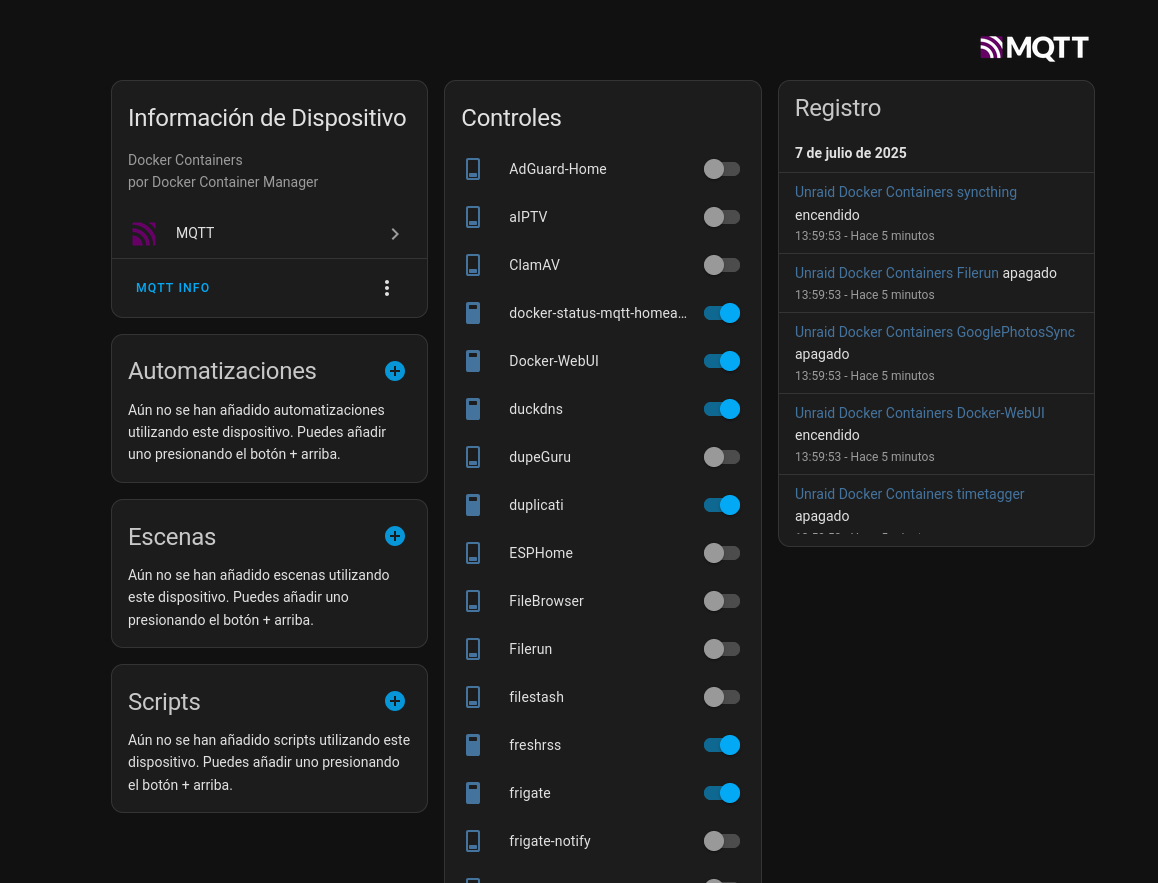
Example showing Docker containers as controllable switches in Home Assistant's MQTT integration
MQTT Topics
Container Control (Switch Entities)
- State:
homeassistant/switch/{entity_prefix}{container}/state - Command:
homeassistant/switch/{entity_prefix}{container}/set - Config:
homeassistant/switch/{entity_prefix}{container}/config(auto-discovery)
Container Metrics (Sensor Entities)
When ENABLE_METRICS=true, additional sensor entities are created:
- CPU Usage:
homeassistant/sensor/{entity_prefix}{container}_cpu/state(%) - Memory Usage:
homeassistant/sensor/{entity_prefix}{container}_memory/state(%) - Memory Usage (MB):
homeassistant/sensor/{entity_prefix}{container}_memory_usage/state(MB) - Network RX:
homeassistant/sensor/{entity_prefix}{container}_network_rx/state(MB) - Network TX:
homeassistant/sensor/{entity_prefix}{container}_network_tx/state(MB) - Disk Read:
homeassistant/sensor/{entity_prefix}{container}_disk_read/state(MB) - Disk Write:
homeassistant/sensor/{entity_prefix}{container}_disk_write/state(MB)
Health Checks
The container includes comprehensive health checks that validate:
- MQTT Connectivity: Verifies connection to the MQTT broker
- Docker API Access: Tests the active connection method (socket/SSH/local commands)
- Process Health: Confirms the main service is running
- Service Activity: Checks for recent heartbeat updates
The health check automatically detects and validates only the active Docker connection mode.
Health checks run every 60 seconds with a 30-second timeout. The container is considered unhealthy after 3 consecutive failures.
You can manually run the health check:
docker exec container_name uv run healthcheck.py
Or check the container health status:
docker inspect --format='{{.State.Health.Status}}' container_name
Troubleshooting
Permission Denied Error (Docker Socket)
If you get a "Permission denied" error when accessing the Docker socket:
For Unraid users:
- Make sure you're running the container as root (default behavior)
- Verify the Docker socket path is correct:
/var/run/docker.sock:/var/run/docker.sock
For other systems:
# Option 1: Run with user matching docker group
docker run -d \
  --name docker-status-mqtt \
  --user $(id -u):$(getent group docker | cut -d: -f3) \
  -v /var/run/docker.sock:/var/run/docker.sock \
  -e MQTT_SERVER=YOUR_MQTT_IP \
  pcarorevuelta/docker-status-mqtt-homeassistant

# Option 2: Add your user to docker group
sudo usermod -aG docker $USER
MQTT Connection Issues
- Verify MQTT broker is accessible from the container
- Check MQTT credentials are correct
- Ensure MQTT_SERVER uses IP address or resolvable hostname
Support
- GitHub: https://github.com/pcaro/docker-status-mqtt-homeassistant
- Issues: https://github.com/pcaro/docker-status-mqtt-homeassistant/issues
Development
Using .env file
For development, you can use a .env file instead of environment variables:
- Copy
.env.exampleto.env - Fill in your configuration
- Run with:
docker run -d --name docker-status-mqtt --env-file .env pcarorevuelta/docker-status-mqtt-homeassistant
Contributing
Pull requests are welcome. For major changes, please open an issue first to discuss what you would like to change.
License
MIT
1 maintainer

Metadata
1 maintainer
Release files for docker-status-mqtt-homeassistant 0.4.3
For a detailed explanation of source distributions (sdists) and built distributions (wheels), please see the package formats documentation.
Source distribution (sdist)
| File | Size | Uploaded | |
|---|---|---|---|
| docker_status_mqtt_homeassistant-0.4.3.tar.gz | 249.8 kB | Details |
Built distribution (wheel)
| File | Interpreter | ABI | Platform | Reset |
|---|---|---|---|---|
| docker_status_mqtt_homeassistant-0.4.3-py3-none-any.whl | Python 3 | none | any | Details |
Total release size: 508.2 kB
Release files / docker_status_mqtt_homeassistant-0.4.3.tar.gz
| Download URL | docker_status_mqtt_homeassistant-0.4.3.tar.gz |
|---|---|
| Size | 249.8 kB |
| Tags | Source |
|
SHA-256 checksum How to use checksums |
7fb0589a2bafa15305bcccefd8dcfce7830a4926fffa6d6e0eaad4b1e1992ae5
|
|
BLAKE2b-256 checksum How to use checksums |
07f4fed5d587469a9ef9044b63fae181ec7285006c1b30f8dfeeb9b673fbd078
|
| Upload date | |
|
Uploaded using Trusted Publishing? What is trusted publishing? |
Yes |
| Uploaded via |
twine/6.1.0 CPython/3.13.7
|
Provenance
Provenance describes where a file came from. On PyPI, provenance is shared via attestations, which provide a verifiable record of the build or publishing details. View details, limitations and caveats.


PyPI Publish Attestation
PyPI verified that this artifact, at this checksum, originated from the publisher listed below.
Signed by GitHub Actions, verified by PyPI on Feb 10, 2026.
Transparency logRelease files / docker_status_mqtt_homeassistant-0.4.3-py3-none-any.whl
| Download URL | docker_status_mqtt_homeassistant-0.4.3-py3-none-any.whl |
|---|---|
| Size | 258.4 kB |
| Tags | Python 3 |
|
SHA-256 checksum How to use checksums |
490aa4c0c62d7d9f309410a607a3797876f2a1d676b7a8d3ff2cacce1952b641
|
|
BLAKE2b-256 checksum How to use checksums |
84b7cb249968e6b4cf55c1e65994c647d022151d524848a76ae7dfde9d95def5
|
| Upload date | |
|
Uploaded using Trusted Publishing? What is trusted publishing? |
Yes |
| Uploaded via |
twine/6.1.0 CPython/3.13.7
|
Provenance
Provenance describes where a file came from. On PyPI, provenance is shared via attestations, which provide a verifiable record of the build or publishing details. View details, limitations and caveats.
PyPI Publish Attestation
PyPI verified that this artifact, at this checksum, originated from the publisher listed below.
Signed by GitHub Actions, verified by PyPI on Feb 10, 2026.
Transparency log













