
Dockerpal
A terminal UI for exploring and cleaning up Docker: browse images, containers,
networks and volumes, inspect them, and act on many at once without typing a
single docker command.
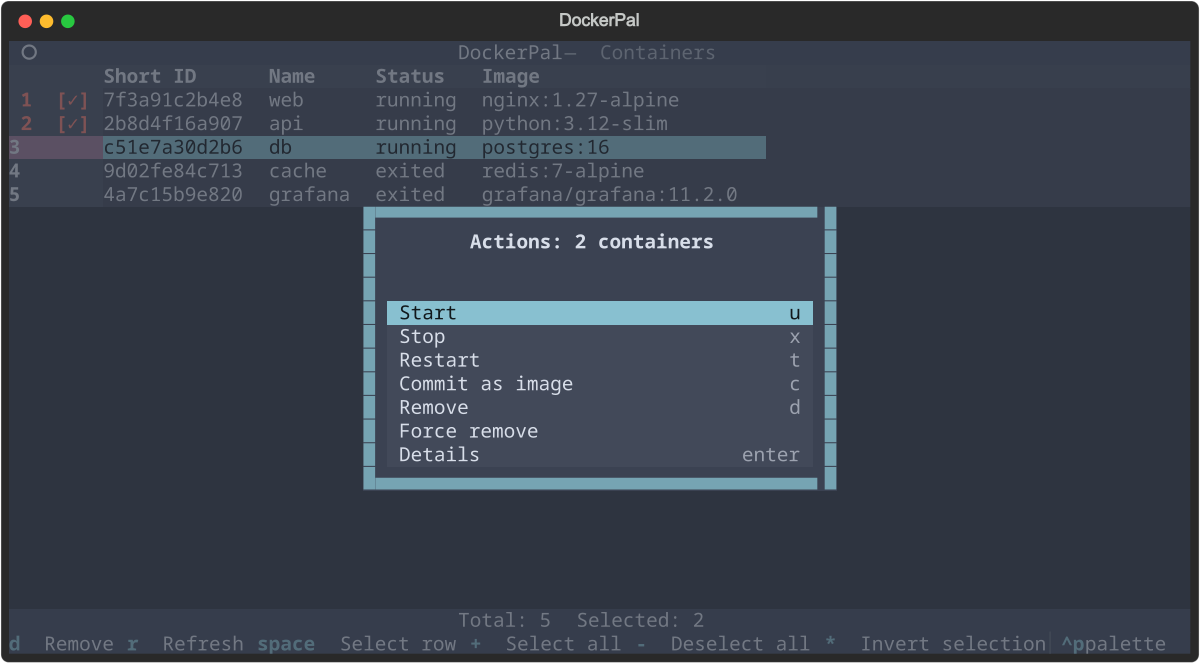
It is built for the job docker image ls | grep ... | awk ... | xargs docker rmi
usually gets thrown at: find the things you care about, tick off the ones you
want, and do something to all of them.
- Every resource in one place — images, containers, networks and volumes, switched from a sidebar.
- Multi-select that sticks — mark rows with
Space, and the selection follows the items through searching, filtering and refreshing. - Search as you type —
/filters the list on any column. - Actions menu —
ashows what the current screen can do, applied to the selection, with confirmation before anything is removed. - Inspect and take away — full JSON for any resource, copied to the clipboard or written to a file, plus an approximate Dockerfile rebuilt from an image's history.
- Keyboard first — vi-style movement throughout, and every key is listed in the footer.
Install
pipx install dockerpal
Or into a virtualenv:
python -m venv .venv
source .venv/bin/activate
pip install dockerpal
Then run it:
dockerpal
Requirements: Python 3.11+, and a Docker daemon this user can reach — the
usual /var/run/docker.sock, or wherever DOCKER_HOST points. If your user is
not in the docker group, dockerpal starts up and tells you what went wrong
rather than leaving you guessing. dockerpal --version prints the version.
Keys
Movement and selection work the same on every screen.
| Key | Action |
|---|---|
s |
Toggle the sidebar; Enter opens the highlighted screen |
j / k |
Move down / up |
f / b |
Page down / up |
gg / G |
Jump to top / bottom |
Space |
Select / deselect the row under the cursor |
+ / - / * |
Select all / deselect all / invert selection (visible rows only) |
/ |
Search — see below |
a |
Actions menu for this screen |
Enter |
Show the JSON details of the row under the cursor |
d / Delete |
Remove the selection (or the cursor row) after confirmation |
r |
Refresh the list |
Esc |
Close the sidebar, else clear an active filter, else go back or quit |
q |
Quit |
Containers add u start, x stop, t restart — each applied to the whole
selection — and c to commit the container under the cursor as a new image.
In the details view, y copies and e exports; Esc goes back.
Actions menu
a lists what the current screen can do, with the shortcut for each. It acts on
the selection, or on the row under the cursor when nothing is selected, and the
title says which — Actions: 3 containers.
| Screen | Actions |
|---|---|
| Images | Remove, Force remove, Export JSON, Export Dockerfile, Details |
| Containers | Start, Stop, Restart, Commit as image, Remove, Force remove, Details |
| Networks | Remove, Details |
| Volumes | Remove, Force remove, Details |
Force remove is menu-only and has no shortcut, so it cannot be hit by
accident. Commit as image asks for a name (defaulting to
<container>:latest) and works on the cursor row, since one image needs one
name.
Search
/ filters the list as you type, matching any column case-insensitively — an
image ID, part of a tag, a container status. Enter keeps the filter and
returns to the table, Esc abandons it.
While rows are hidden the footer shows the query and the counts, as in
Total: 7/63 Selected: 2 /nginx. Esc on the table then clears the filter;
pressing it again quits. Selecting inside a filter and clearing it keeps your
marks, so you can build a selection across several searches and then act on it
once.
Inspecting, copying and exporting
Enter shows a resource's full JSON, syntax highlighted. There, y copies the
selected text — or the whole document when nothing is selected — and e writes
it to a file.
Images can also be exported straight from the actions menu, over a whole
selection: Export JSON for the metadata and Export Dockerfile for an
approximate Dockerfile. Files land in the current directory, named after the
resource (nginx_1.27-alpine.json), and nothing is ever overwritten — an
existing file gets a -1, -2 sibling.
Docker does not store the Dockerfile an image was built from, so the
reconstruction comes from the commands recorded for each layer. Dockerpal
undoes the formatting docker keeps them in, turning
RUN |1 V=1 /bin/sh -c apk add git # buildkit back into RUN apk add git and
EXPOSE map[80/tcp:{}] into EXPOSE 80/tcp. ADD/COPY contents are not in
the image and BuildKit records less than the classic builder did, so treat the
result as documentation rather than something to rebuild from.
Copying uses the platform's clipboard helper — wl-copy (Wayland), xclip or
xsel (X11), pbcopy (macOS), clip.exe (WSL) — and also emits an OSC 52
escape sequence, which is what reaches the clipboard over ssh or inside tmux.
With none of those installed only the escape sequence is sent, and the app says
so.
Development
python -m venv .venv
source .venv/bin/activate
pip install -r requirements.txt pytest pytest-asyncio -e .
pytest
The tests drive the real UI through Textual's test pilot against an in-memory
stand-in for the Docker SDK (tests/fakes.py), so the suite needs no daemon and
touches neither your containers nor your clipboard.
Status
Early days — it does what is described above and little more, and the interface may still change. Bug reports and ideas are welcome at the issue tracker.
License
MIT — see LICENSE.
1 maintainer

Metadata
1 maintainer
Release files for dockerpal 0.0.27
For a detailed explanation of source distributions (sdists) and built distributions (wheels), please see the package formats documentation.
Source distribution (sdist)
| File | Size | Uploaded | |
|---|---|---|---|
| dockerpal-0.0.27.tar.gz | 29.2 kB | Details |
Built distribution (wheel)
| File | Interpreter | ABI | Platform | Reset |
|---|---|---|---|---|
| dockerpal-0.0.27-py3-none-any.whl | Python 3 | none | any | Details |
Total release size: 47.7 kB
Release files / dockerpal-0.0.27.tar.gz
| Download URL | dockerpal-0.0.27.tar.gz |
|---|---|
| Size | 29.2 kB |
| Tags | Source |
|
SHA-256 checksum How to use checksums |
30a8911b8ddffd8204c60c7ae4bec669ddbbea1508091859320d500c93a3afa3
|
|
BLAKE2b-256 checksum How to use checksums |
080ff572cf3e0e9180f2ce931932b4d175f1b5fc7720dd2ebd8126cd97698795
|
| Upload date | |
|
Uploaded using Trusted Publishing? What is trusted publishing? |
No |
| Uploaded via |
twine/3.7.1 importlib_metadata/9.0.1 pkginfo/1.13 requests/2.34.2 requests-toolbelt/1.0.0 tqdm/4.70.1 CPython/3.11.6
|
Release files / dockerpal-0.0.27-py3-none-any.whl
| Download URL | dockerpal-0.0.27-py3-none-any.whl |
|---|---|
| Size | 18.5 kB |
| Tags | Python 3 |
|
SHA-256 checksum How to use checksums |
f45a564a2d2b85b4e05aafc0e72f7479a6fdfa554193630578754cc46bbb9e61
|
|
BLAKE2b-256 checksum How to use checksums |
dc90a73231134b830f12aa9d43d480e399f4f67fd215d845f6f2098cc475c1f2
|
| Upload date | |
|
Uploaded using Trusted Publishing? What is trusted publishing? |
No |
| Uploaded via |
twine/3.7.1 importlib_metadata/9.0.1 pkginfo/1.13 requests/2.34.2 requests-toolbelt/1.0.0 tqdm/4.70.1 CPython/3.11.6
|














