














What is DockSec?
DockSec is an OWASP Lab Project that bridges the gap between complex security scan results and actionable developer fixes. It integrates industry-standard scanners (Trivy, Hadolint, Docker Scout) with AI to provide context-aware security analysis.
Instead of overwhelming you with a list of 200+ CVEs, DockSec:
- Prioritizes what actually affects your specific container setup.
- Explains vulnerabilities in plain English, not just security jargon.
- Suggests specific fixes for your Dockerfile.
- Generates professional, interactive security reports for your team.
Everything scans locally; the only thing that ever leaves your machine is the (secret-redacted) file content sent to the AI provider you choose - and with a local model or scan-only mode, nothing leaves at all. See Data flow and privacy.
How It Works
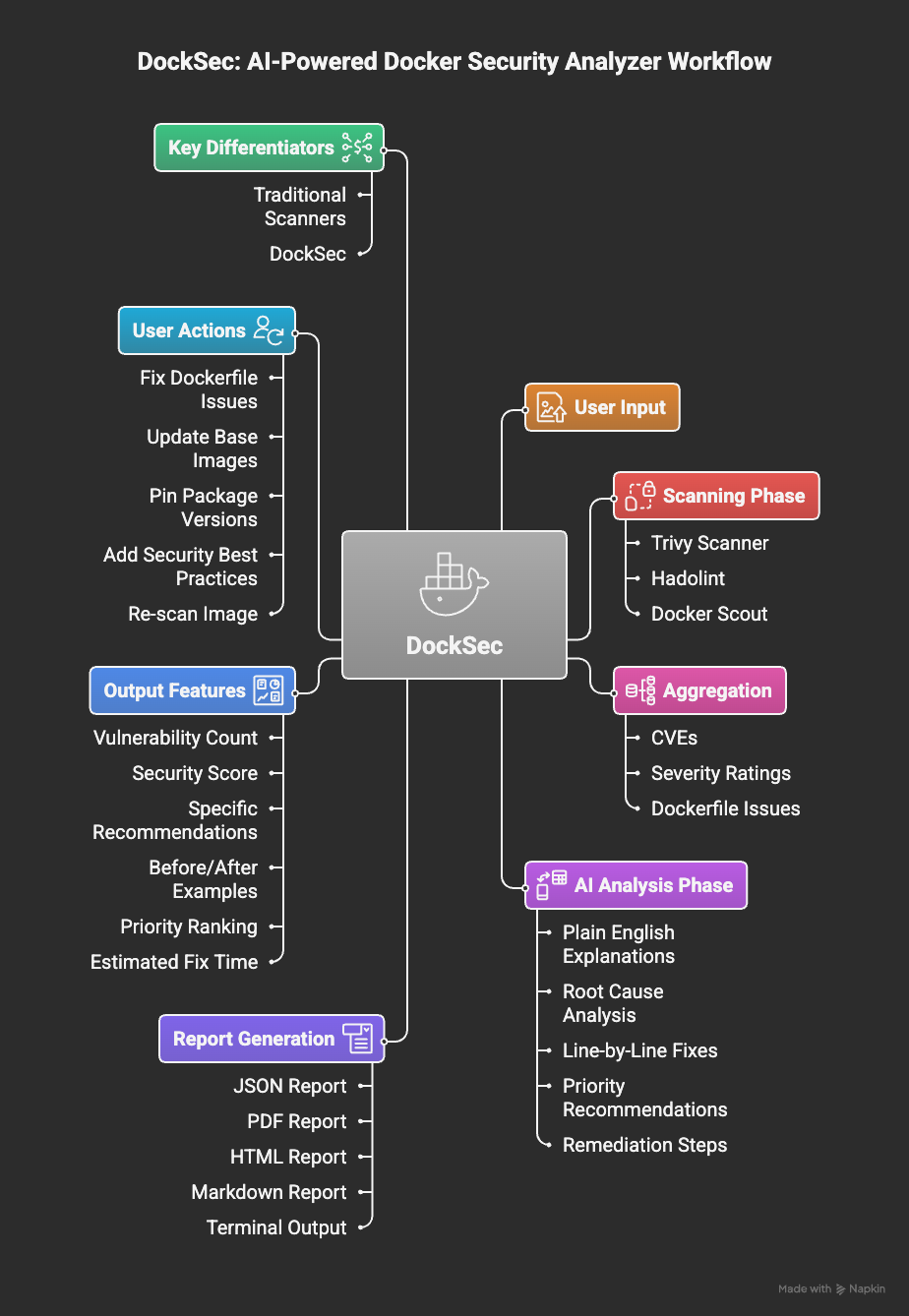
DockSec workflow: from scanning to actionable insights
DockSec follows a five-stage pipeline:
- Scan: Runs Trivy (image vulnerabilities and Dockerfile misconfigurations), Hadolint, and Docker Scout locally on your environment.
- Prioritize: Ranks every CVE finding by severity combined with its EPSS exploitation likelihood, so the list is ordered by what to fix first rather than by what was found first.
- Correlate: Detects exploit chains where separate findings combine into one attack path - a credentialed database that an internet-facing service can reach is a chain, not two unrelated findings. With an API key, an AI pass reasons over the full scan output to rank, explain, and extend this.
- Recommend: Produces copy-and-run fix commands and concrete Dockerfile or compose changes, and states how many findings they resolve.
- Report: Exports actionable results as HTML, PDF, JSON, CSV, Markdown, SARIF, and CycloneDX SBOM.
Getting Started
1. Prerequisites
DockSec orchestrates local scanners, so it needs:
| Requirement | Needed for | Install |
|---|---|---|
| Python 3.12+ | DockSec itself | python.org |
| Trivy | All scans (required) | brew install trivy or Trivy docs |
| Hadolint | Dockerfile linting | brew install hadolint or Hadolint docs |
| Docker | Image scans (-i) |
Docker docs |
Or let DockSec install Trivy and Hadolint for you:
python -m docksec.setup_external_tools
2. Install DockSec
# Full install with AI analysis support (recommended)
pip install "docksec[ai]"

# Or the slim, scan-only core (no LLM dependencies, no API key needed)
pip install docksec
3. Run your first scan
No API key needed for local scanning:
docksec Dockerfile --scan-only
Every scan ends with a result summary: a severity table, a 0-100 security score with a
rating, a "Quick take" action block, the generated reports (saved to
~/.docksec/results/ by default), and a suggested next command.
4. Enable AI analysis
AI analysis explains findings and suggests fixes. Pick a provider, set its API key, and run:
# OpenAI (default provider)
export OPENAI_API_KEY="sk-..."
docksec Dockerfile

# Anthropic Claude
export ANTHROPIC_API_KEY="sk-ant-..."
docksec Dockerfile --ai-only --provider anthropic --model claude-sonnet-5

# Google Gemini
export GOOGLE_API_KEY="..."
docksec Dockerfile --ai-only --provider google

# Ollama (fully local, no API key, data never leaves your machine)
docksec Dockerfile --ai-only --provider ollama --model llama3.1
Each provider has a sensible default model (OpenAI: gpt-4o, Anthropic:
claude-haiku-4-5, Google: gemini-1.5-pro, Ollama: llama3.1), so --model is
optional. To avoid repeating flags, set environment variables (or put them in a .env
file in the directory you run from - DockSec loads it automatically):
export LLM_PROVIDER=anthropic
export LLM_MODEL=claude-sonnet-5
docksec Dockerfile
Before any content is sent to an AI provider, secret-looking values (passwords, tokens, API keys, private key blocks) are masked automatically. See Data flow and privacy.
5. Or run the container image (nothing to install)
The published image bundles pinned versions of Trivy and Hadolint, so there is nothing to install and nothing to configure:
docker run --rm -v "$PWD:/github/workspace" \
  -e INPUT_DOCKERFILE=Dockerfile \
  -e INPUT_SCAN_ONLY=true \
  ghcr.io/owasp/docksec:latest
Published multi-arch (amd64 and arm64) on every release. Pin to a specific
version (ghcr.io/owasp/docksec:2026.9.21) or a minor series
(ghcr.io/owasp/docksec:2026.9) rather than latest in CI. Every image carries
a build provenance attestation:
gh attestation verify oci://ghcr.io/owasp/docksec:latest --repo OWASP/DockSec
The image reads the same INPUT_* variables as the GitHub Action, so any Action
input works here: INPUT_IMAGE, INPUT_COMPOSE, INPUT_SEVERITY,
INPUT_FAIL_ON, INPUT_FORMAT, INPUT_SARIF, INPUT_OUTPUT_DIR. Write reports
somewhere on the mount to keep them after the container exits:
docker run --rm -v "$PWD:/github/workspace" \
  -e INPUT_COMPOSE=docker-compose.yml \
  -e INPUT_SCAN_ONLY=true \
  -e INPUT_FORMAT=json,html \
  -e INPUT_OUTPUT_DIR=/github/workspace/docksec-reports \
  ghcr.io/owasp/docksec:latest
6. Or use the GitHub Action
- name: Run DockSec AI Scanner
  uses: OWASP/DockSec@v2026.9.21
  with:
    dockerfile: 'Dockerfile'
    openai_api_key: ${{ secrets.OPENAI_API_KEY }}
Common Commands
# Scan Dockerfile + Docker image (AI + scanners)
docksec Dockerfile -i myapp:latest

# Scan a Docker Compose file and all its services
docksec --compose docker-compose.yml

# Scan only a Docker image
docksec --image-only -i myapp:latest

# Fast local scan, no AI, no API key
docksec Dockerfile --scan-only

# Choose which severity levels the image scan reports (default: CRITICAL,HIGH)
docksec -i myapp:latest --image-only --severity CRITICAL,HIGH,MEDIUM

# Fail the build (exit 1) if any finding is HIGH or above
docksec -i myapp:latest --image-only --fail-on high

# Write only the report formats you want, to a directory of your choice
docksec Dockerfile --scan-only --format json,html --output-dir ./reports

# Write a Markdown report for posting directly into a pull request comment
docksec Dockerfile --scan-only --format markdown

# Print results as JSON to stdout for scripts and CI pipelines
docksec -i myapp:latest --image-only --json

# Write a SARIF report for GitHub Code Scanning
docksec Dockerfile --scan-only --sarif

# Write a CycloneDX SBOM of an image for supply-chain tooling
docksec --image-only -i myapp:latest --sbom

# Fully offline scan: local Trivy DB, no network, no AI
docksec --image-only -i myapp:latest --offline

# Save today's findings as a baseline, then only gate on new findings later
docksec -i myapp:latest --image-only --baseline .docksec-baseline.json --update-baseline
docksec -i myapp:latest --image-only --baseline .docksec-baseline.json --fail-on high

# Suppress triaged findings with an auditable ignore file
docksec -i myapp:latest --image-only --ignore-file .docksec-ignore.yml

# Force a fresh scan, bypassing the results cache
docksec -i myapp:latest --image-only --no-cache

# Install AI-assistant skill files (Claude Code, Cursor, Copilot, and more)
docksec install-skill

# Output control
docksec Dockerfile --scan-only --quiet                  # warnings, errors, summary only
docksec Dockerfile --scan-only --verbose                # INFO-level diagnostics on stderr
docksec Dockerfile --scan-only --verbose --log-file logs/docksec.log
docksec Dockerfile --scan-only --compact-output         # shorter per-finding output
docksec Dockerfile --no-color                           # also honors NO_COLOR

# Apply the mechanical Dockerfile fixes (keeps a .bak, re-scans, shows the delta)
docksec Dockerfile --scan-only --fix --dry-run          # print the diff, change nothing
docksec Dockerfile --scan-only --fix

# Rank findings by severity alone, with no EPSS lookup and no network call
docksec Dockerfile --scan-only --no-epss

# Treat a scan that could not complete as a failure, not a pass
docksec Dockerfile --scan-only --fail-on high --incomplete-policy fail
Configuration file
Commit a .docksec.yml at the root of your repository and the whole team - and
every CI job - scans under the same policy, instead of each developer passing
their own flags.
# yaml-language-server: $schema=https://owasp.org/DockSec/docksec-config-schema.json
severity: CRITICAL,HIGH
fail_on: HIGH
formats: [json, html]
output_dir: ./security-reports

rules:
  disabled:
    - compose-missing-healthcheck
Every setting is optional; anything you leave out falls back to the environment
variable and then to the built-in default. A full annotated example is in
examples/.docksec.yml.
Precedence
Highest priority first:
CLI flag > environment variable > .docksec.yml > built-in default
So a committed severity: LOW is still overridden by --severity CRITICAL on
the command line, and by DOCKSEC_DEFAULT_SEVERITY in the environment.
Discovery
DockSec looks for .docksec.yml (or .docksec.yaml) in the working directory
and then walks up to the repository root, so a service in a monorepo
subdirectory inherits the policy committed at the top level. The search stops at
the directory containing .git, so it never picks up a file from outside the
repository.
--config FILEuses a specific file instead of searching.--no-configignores any config file, for reproducible CI runs.
The config file in force is shown in the scan banner, so it is always clear which policy was applied.
Settings
| Setting | Equivalent flag | Notes |
|---|---|---|
severity |
--severity |
Severity levels for the image scan |
fail_on |
--fail-on |
CI gate threshold |
formats |
--format |
List form: [json, html] |
output_dir |
--output-dir |
Report destination |
provider |
--provider |
openai, anthropic, google, ollama |
model |
--model |
Model name for the provider |
offline |
--offline |
No network; skips AI and Docker Scout |
skip_ai_scoring |
--skip-ai-scoring |
Deprecated and ignored; scoring is always deterministic |
no_redact |
--no-redact |
Do not mask secrets before the AI call |
no_cache |
--no-cache |
Bypass the scan cache |
ignore_file |
--ignore-file |
Waiver file path |
baseline |
--baseline |
Baseline file path |
rules.disabled |
- | Rule IDs to switch off entirely |
An invalid config file - an unknown key, a bad severity - is a hard error that
exits 2 rather than a warning, so a broken policy file can never cause a scan
to run under rules the team did not commit.
Editor autocomplete
The # yaml-language-server: comment on the first line gives completion and
inline validation in VS Code and JetBrains editors. The schema is published at
docs/docksec-config-schema.json and can be
regenerated with docksec --print-config-schema.
Disabling rules
rules.disabled switches a check off entirely, everywhere - it is removed
before scoring, reports, --json, and the --fail-on gate. Use it for checks
that do not apply to your environment. For individual findings your team has
triaged and accepted, prefer the waiver file,
whose entries carry a reason and an expiry date and so stay auditable.
CI/CD Integration
Exit codes
DockSec uses CI-friendly exit codes so builds and shells can react to results:
| Code | Meaning |
|---|---|
0 |
Success, no findings at or above --fail-on |
1 |
Findings at or above the --fail-on threshold |
2 |
Usage or argument error |
3 |
Tool or runtime error (scan failed, image not found, missing tools) |
--fail-on gates on every structured finding: image vulnerabilities, Dockerfile
misconfigurations, and compose misconfigurations. When --fail-on is below the
requested --severity, the scan severity is widened automatically so the gate can
observe those findings.
Incomplete scans
If a scanner cannot run, results may be missing findings rather than genuinely
clean. DockSec reports that as a detection gap in the Coverage block and in
--json under scan_info.completeness. Use --incomplete-policy fail to exit 3
in that case, so CI cannot pass on a scan that did not finish:
docksec Dockerfile --incomplete-policy fail
Priority: what to fix first
Every CVE finding is scored against EPSS, which estimates the probability it will be exploited in the next 30 days. Combining that with severity gives four tiers:
| Tier | Meaning |
|---|---|
| Fix Now | Critical or high severity, and in the top 10% of CVEs by exploitation likelihood |
| Fix Soon | Critical or high severity, but exploitation is less common |
| Monitor | Lower severity, but actively exploited |
| Low Priority | Lower severity, exploitation uncommon |
This is the only network call DockSec makes outside the AI pass, and it is
deliberately narrow: only CVE IDs are sent - no image names, no file contents,
no paths. Scores are cached for 24 hours. --offline and --no-epss disable it,
and any failure falls back to severity-only ranking rather than failing the scan.
Exploit chains
A per-service view reports findings one at a time. DockSec also reports where separate findings combine into a single attack path:
Exploit chains
  [HIGH] 'web' is internet-facing and can reach 'db' with a committed credential
      services: web, db
      combines: compose-plaintext-secret-env, compose-no-network-segmentation
      'web' accepts connections from outside the host and shares the default
      network with 'db'. 'db' is not exposed directly, but its credential is in
      the compose file, so compromising 'web' yields authenticated access to it.
      Neither service looks critical on its own.
      break it: Put 'db' on its own network that 'web' does not join, or move
      POSTGRES_PASSWORD to a Docker secret.
Chain detection is rule-based, so it works with --scan-only, offline, and with
no API key, and returns the same answer every run. The AI pass ranks and extends
it rather than being required for it. Chains also appear in --json under
exploit_chains.
See the exploit chains guide for the full list and the compose rule reference for every rule they combine.
Fix commands
Scans end with concrete commands rather than a list of identifiers, and a plain statement of how many findings they resolve:
Fix commands
  > apt-get install --only-upgrade -y libgnutls30=3.7.9-2+deb12u7
      CRITICAL - 3.7.9-2+deb12u4 -> 3.7.9-2+deb12u7  (CVE-2026-33845 +6)

Dockerfile changes
  - [CRITICAL] Move the secret out of ENV; inject it at runtime (line 4)
  - [HIGH] Add a non-root USER before CMD/ENTRYPOINT (line 7)

Applying all of the above resolves 37 of 93 finding(s); 56 have no mechanical fix yet.
Machine-readable output
--json prints a single JSON object to stdout (scan info, vulnerabilities, severity
counts, and any AI findings) instead of the human-readable summary, so it can be piped
straight into other tools:
docksec -i myapp:latest --image-only --json | jq '.severity_counts'
With --json alone, no report files are written; combine it with --format to write
files and print JSON in the same run. All human-readable messages move to stderr in
--json mode, so stdout only ever contains the JSON payload.
Report formats
--format accepts a comma-separated list of file outputs:
| Format | What you get |
|---|---|
json |
A .json file with scan metadata, severity counts, and the full vulnerability list (same shape as the --json stdout payload, but written to disk). |
csv |
A .csv table of findings (ID, severity, package, version, title, and related fields). |
pdf |
A printable PDF summary with scan info, scores, and vulnerability details. |
html |
A styled HTML report for browsing results in a browser. |
markdown |
A .md report that renders natively in pull request comments and CI job summaries. Opt-in: not written unless requested. |
json, csv, pdf, and html are written by default; add markdown explicitly to
get it.
CSV with zero findings: if a scan reports no vulnerabilities but csv is in your
--format list, DockSec still writes a CSV file containing only the column headers.
That is intentional (the export is valid, not a failed write) so downstream tools can
rely on a stable schema even on clean scans.
For stdout JSON and piping into other tools, see Machine-readable output
above. For CI and GitHub Code Scanning, use --sarif (see the next section); SARIF is
separate from --format and is always emitted when requested.
SARIF output for GitHub Code Scanning
--sarif writes a SARIF 2.1.0 report alongside the other report formats. Upload it
with the standard github/codeql-action/upload-sarif action to see findings annotated
directly on pull requests and in the Security tab:
- name: Run DockSec
  uses: OWASP/DockSec@v2026.9.21
  with:
    dockerfile: 'Dockerfile'
    sarif: 'true'

- name: Upload SARIF to GitHub Code Scanning
  uses: github/codeql-action/upload-sarif@v3
  if: always()
  with:
    sarif_file: ~/.docksec/results
if: always()is important: without it, the upload step is skipped whenever--fail-oncauses DockSec to exit non-zero, losing the findings exactly when they matter most.
Baseline / ratchet mode
--baseline FILE lets you adopt --fail-on on an existing project without a wall of
pre-existing findings blocking every build. Run once with --update-baseline to snapshot
today's findings, then commit the baseline file; from then on, --fail-on only gates on
findings that aren't already in the baseline:
# Snapshot current findings (does not gate)
docksec -i myapp:latest --image-only --baseline .docksec-baseline.json --update-baseline

# Later runs only fail on NEW findings above the threshold
docksec -i myapp:latest --image-only --baseline .docksec-baseline.json --fail-on high
Findings are matched by vulnerability ID, target, and package name, so the baseline stays
valid as unrelated findings come and go. Re-run with --update-baseline whenever you want
to accept the current state as the new baseline.
Ignoring findings (waivers)
--ignore-file FILE suppresses individual findings a team has triaged and accepted.
Unlike the baseline (a point-in-time snapshot), the ignore file is an explicit,
reviewable list where every entry carries a reason and an optional expiry date.
If a .docksec-ignore.yml file exists in the current directory, it is picked up
automatically.
# .docksec-ignore.yml
ignores:
  - id: CVE-2023-45853              # Trivy vulnerability ID or DockSec rule ID
    reason: "zlib CVE; code path not reachable, vendor fix pending"
    expires: 2026-12-31              # optional; entry stops applying after this date
  - id: compose-missing-healthcheck
    reason: "healthchecks are handled by the orchestrator"
Suppressed findings are removed before scoring, reports, --json output, and the
--fail-on gate. Expired entries stop applying automatically (with a warning), and
entries without a reason are flagged so waivers stay auditable. Commit the file to
version control so suppressions are reviewed like any other change.
Reports
Report formats
By default every scan writes four report files; use --format to pick a subset:
- html: An interactive, visually clean web report: severity cards, score rating, full vulnerability table with fixed versions, and the complete AI findings.
- pdf: A portable, presentation-ready document.
- json: Full, machine-readable scan data (same shape as
--jsonstdout output). - csv: A spreadsheet-ready table of individual vulnerabilities.
- markdown: A lightweight, readable report (severity summary + vulnerability table with fixed versions) that renders natively in pull request comments and CI job summaries. Opt-in: add
markdownto--format; it is not written by default.
Note on CSV behavior: with zero vulnerabilities, DockSec still writes a header-only CSV (column names, no rows) so downstream automation never breaks on a missing or empty file. This is intentional.
CycloneDX SBOM
--sbom writes a CycloneDX software bill of materials (<image>.cdx.json) of the
scanned image, listing every package component plus known vulnerabilities. The BOM is
produced by Trivy's native exporter (so it is spec-compliant) and DockSec stamps itself
into the tool metadata. Feed it into Dependency-Track, GitHub's dependency graph, or any
other SBOM consumer:
docksec --image-only -i myapp:latest --sbom
--sbom needs a single image (-i), so it is skipped for compose runs. Like --sarif,
it is independent of --format.
Data flow and privacy
DockSec is designed so you always know what leaves your machine:
- Scanning is fully local. Trivy, Hadolint, and the security score run on your machine. Image contents are never uploaded anywhere by DockSec.
- AI analysis sends only the scanned file. When the AI pass runs, the Dockerfile or compose file content (plus a short summary of vulnerability counts for scoring) is sent to the LLM provider you configured. Nothing else is transmitted.
- Secrets are redacted before they leave. Secret-looking values (passwords,
tokens, API keys, private key blocks) in the file are masked before the content is
sent to the AI provider. Key names stay visible so exposed credentials are still
flagged. Use
--no-redactto opt out. - Fully local AI is supported. Use
--provider ollamato keep the AI analysis on your own hardware, or--scan-only/--offlineto skip AI entirely. - No telemetry. DockSec collects no usage data and phones home to nothing.
Offline mode
--offline runs a scan with no network access. It uses the Trivy vulnerability database
already on disk (no DB update) and skips the AI analysis and the Docker Scout advanced
scan, both of which require network. This is the simplest way to scan in an air-gapped or
locked-down environment:
docksec --image-only -i myapp:latest --offline
Make sure the Trivy DB has been downloaded at least once (any prior online scan does
this) before relying on --offline.
Scan results cache
Image scan results are cached (default: 24 hours, override with
DOCKSEC_CACHE_TTL_HOURS) and keyed by the image's content digest, so a rebuilt tag
such as a reused :latest always gets a fresh scan. Use --no-cache (or
DOCKSEC_USE_CACHE=false) to bypass the cache for a run.
Pulling images that are not local
Scanning an image that is not present locally pulls it first. A compose stack routinely names images the machine has never pulled, and without this every one of those services is reported as unscanned.
Set DOCKSEC_PULL_MISSING_IMAGES=false to turn this off and fail instead, which
is worth doing on a metered connection or a shared runner. --offline never
pulls, regardless of this setting.
AI-assistant skills (install-skill)
docksec install-skill writes DockSec usage instructions into the well-known context
files for popular AI coding assistants, so an assistant working in your repo knows how to
invoke DockSec:
docksec install-skill
This creates or updates:
.claude/commands/docksec.md(Claude Code slash command/docksec).cursor/rules/docksec.mdc(Cursor)AGENTS.md(Codex CLI),GEMINI.md(Gemini CLI).github/copilot-instructions.md(GitHub Copilot)
The files are plain text you can review and commit; nothing is executed. Re-running the command updates the DockSec section in place instead of duplicating it.
Features
- Smart Analysis: AI explains what vulnerabilities mean for your specific setup.
- Multi-LLM Support: OpenAI, Anthropic Claude, Google Gemini, or local models via Ollama.
- Privacy First: Secret values are redacted before any content reaches an AI provider, scanning is fully local, and there is no telemetry.
- Docker Compose Scanning: Detect orchestration-level misconfigurations and scan all services in a compose file.
- Deep Integration: Combines Trivy (vulnerabilities), Hadolint (linting), and Docker Scout.
- Security Scoring: A 0-100 score with a rating to track your security posture over time.
- Rich Formats: HTML (interactive), PDF, JSON, CSV, SARIF, and CycloneDX SBOM.
- CI/CD Ready:
--fail-onexit codes, baseline/ratchet mode, auditable waivers, JSON-to-stdout, and a GitHub Action on the Marketplace. - Offline Mode: Scan fully air-gapped (
--offline) using the local Trivy database. - AI-Assistant Skills:
docksec install-skillteaches Claude Code, Cursor, Copilot, and others how to run DockSec in your repo.
How DockSec Compares
| Capability | DockSec | Trivy (standalone) | Snyk Container | Aikido |
|---|---|---|---|---|
| License and cost | Free, open source (MIT) | Free, open source (Apache 2.0) | Commercial (limited free tier) | Commercial (limited free tier) |
| Governance | OWASP Lab Project, vendor neutral | Open source, maintained by Aqua | Single vendor | Single vendor |
| Detects CVEs and Dockerfile misconfigurations | Yes | Yes | Yes | Yes |
| Explains findings in plain English | Yes (AI-written context and impact) | No (raw CVE data) | Partial (severity and fix hints) | Partial (AI summaries in platform) |
| Contextual Dockerfile remediation | Yes (specific rewrites with explanation) | No (detection only) | Yes (base image upgrade advice, fix PRs) | Yes (AI AutoFix PRs) |
| Docker Compose (multi-service) scanning | Yes (orchestration checks and per-service scan) | Partial (config scan, no per-service fan-out) | Partial | Partial |
| Baseline / ratchet mode (fail only on new findings) | Yes | No | Partial (platform policies) | Partial (platform policies) |
| Auditable per-finding waivers with reasons and expiry | Yes | Partial (.trivyignore, no reasons enforced) | Partial (platform policies) | Partial (platform policies) |
| CI-native output (SARIF for GitHub Code Scanning) | Yes | Yes | Yes | Yes |
| SBOM export (CycloneDX) | Yes (--sbom) |
Yes | Yes | Yes |
| AI-assistant skill install (Claude Code, Cursor, Copilot) | Yes (install-skill) |
No | No | No |
| Runs fully offline / air-gapped | Yes (local LLM via Ollama, scan-only mode, no API key) | Scanning only (no remediation layer) | No (cloud platform) | No (hosted platform) |
| Your image data stays on your network | Yes | Yes | No | No |
| Bring your own LLM / model choice | Yes (OpenAI, Anthropic, Gemini, or local Ollama) | Not applicable | No (proprietary AI) | No (proprietary AI) |
| Self-hostable, no platform deployment | Yes | Yes | No | No |
| Vendor lock-in | None | None | Yes | Yes |
| Security score (0-100) and multi-format reports | Yes | Partial (machine formats, no remediation report) | Partial (dashboard reports) | Partial (dashboard reports) |
DockSec is the only one of these that pairs contextual Dockerfile remediation with a fully open source, OWASP-governed, locally runnable design. Snyk and Aikido offer capable AI remediation, but only as commercial cloud platforms that send your data to their service. Trivy is open source and local but stops at detection and does not help you fix anything. DockSec fills the gap for developers and for regulated or air-gapped teams who need both the fix guidance and full control of their data, at no cost.
Applying fixes automatically
--fix applies the mechanical subset of the suggested Dockerfile changes,
re-scans, and reports the delta:
docksec Dockerfile --scan-only --fix --dry-run   # print the diff, change nothing
docksec Dockerfile --scan-only --fix             # apply, keeping a .bak
Applied 4 change(s)
  - added --no-install-recommends on line(s) 2  [DS029]
  - converted ADD to COPY on line(s) 3  [DL3020]
  - replaced 'USER root' with 'USER appuser' on line 5  [DS002]
  - inserted a placeholder HEALTHCHECK before line 6  [DS026]

Original saved to Dockerfile.bak
Dockerfile findings: 7 -> 2 (5 resolved)
It is deliberately conservative. It will not choose a base image version, move a
secret, convert an ADD that fetches a URL or unpacks an archive, or edit a
compose file - those are reported under "Needs review" instead. It also refuses
to edit a file with uncommitted changes unless --force is given, so git is
always in a position to undo the change.
Documentation
| Guide | What it covers |
|---|---|
| Evaluation guide | 15-minute assessment, including what DockSec does not do |
| Exploit chains | Cross-service attack paths, and their limits |
| Compose rule reference | All 17 rules: what each catches, and when keeping it is reasonable |
| CI integration | Jenkins, GitLab, Azure Pipelines, pre-commit |
| Examples | Ten Dockerfiles and compose stacks with their expected findings |
| Case studies | Real scans of official images, with the numbers |
Roadmap
See ROADMAP.md for where DockSec is heading: registry scanning without a local Docker daemon, a repo-level policy config file, Jenkins/GitLab/Azure DevOps templates, an official container image, Kubernetes and Helm scanning, and more. Feedback and votes on priorities are welcome in issues and on OWASP Slack.
Contributing
DockSec thrives on community contributions. Whether you are a developer, designer, or security enthusiast, there are many ways to get involved:
- Code Contributions: Fix bugs or add new features.
- Documentation: Improve guides or create tutorials.
- Issue Reporting: Identify and report bugs.
- Feedback: Share your experience and suggestions.
To get started, check out our Contributing Guidelines, Code of Conduct, and Sponsorship Guide.
Leaders and Community
DockSec is led by a dedicated team committed to making container security accessible:
- Advait Patel - Project Lead
- Arkadii Yakovets - Project Co-lead
Find us here:
- OWASP Project Page: owasp.org/DockSec/
- OWASP Slack: #project-docksec
- PyPI: pypi.org/project/docksec/
- Issues: Report a bug
- Changelog: CHANGELOG.md
Built by Advait Patel and the OWASP community.
1 maintainer

Metadata
1 maintainer
Release files for docksec 2026.9.21
For a detailed explanation of source distributions (sdists) and built distributions (wheels), please see the package formats documentation.
Source distribution (sdist)
| File | Size | Uploaded | |
|---|---|---|---|
| docksec-2026.9.21.tar.gz | 215.6 kB | Details |
Built distribution (wheel)
| File | Interpreter | ABI | Platform | Reset |
|---|---|---|---|---|
| docksec-2026.9.21-py3-none-any.whl | Python 3 | none | any | Details |
Total release size: 349.1 kB
Release files / docksec-2026.9.21.tar.gz
| Download URL | docksec-2026.9.21.tar.gz |
|---|---|
| Size | 215.6 kB |
| Tags | Source |
|
SHA-256 checksum How to use checksums |
4653ee95472b5c777374446a57583bda14311512b573a412f2d7d0600dee8d41
|
|
BLAKE2b-256 checksum How to use checksums |
ef3499700cb07b1996493dbeaf1f2c30944b0568ff15175418dfcbd62b8bad83
|
| Upload date | |
|
Uploaded using Trusted Publishing? What is trusted publishing? |
No |
| Uploaded via |
twine/6.1.0 CPython/3.13.13
|
Release files / docksec-2026.9.21-py3-none-any.whl
| Download URL | docksec-2026.9.21-py3-none-any.whl |
|---|---|
| Size | 133.5 kB |
| Tags | Python 3 |
|
SHA-256 checksum How to use checksums |
b6548e23c3b6557af9bca312639e0a2f00e73666b2a279caa6b722d1d46b9457
|
|
BLAKE2b-256 checksum How to use checksums |
ae88f3ca90cb4818a42c20448d8582a4fab19d3efe0d8f96a2af78c6898d9e9e
|
| Upload date | |
|
Uploaded using Trusted Publishing? What is trusted publishing? |
No |
| Uploaded via |
twine/6.1.0 CPython/3.13.13
|














