
docksurf
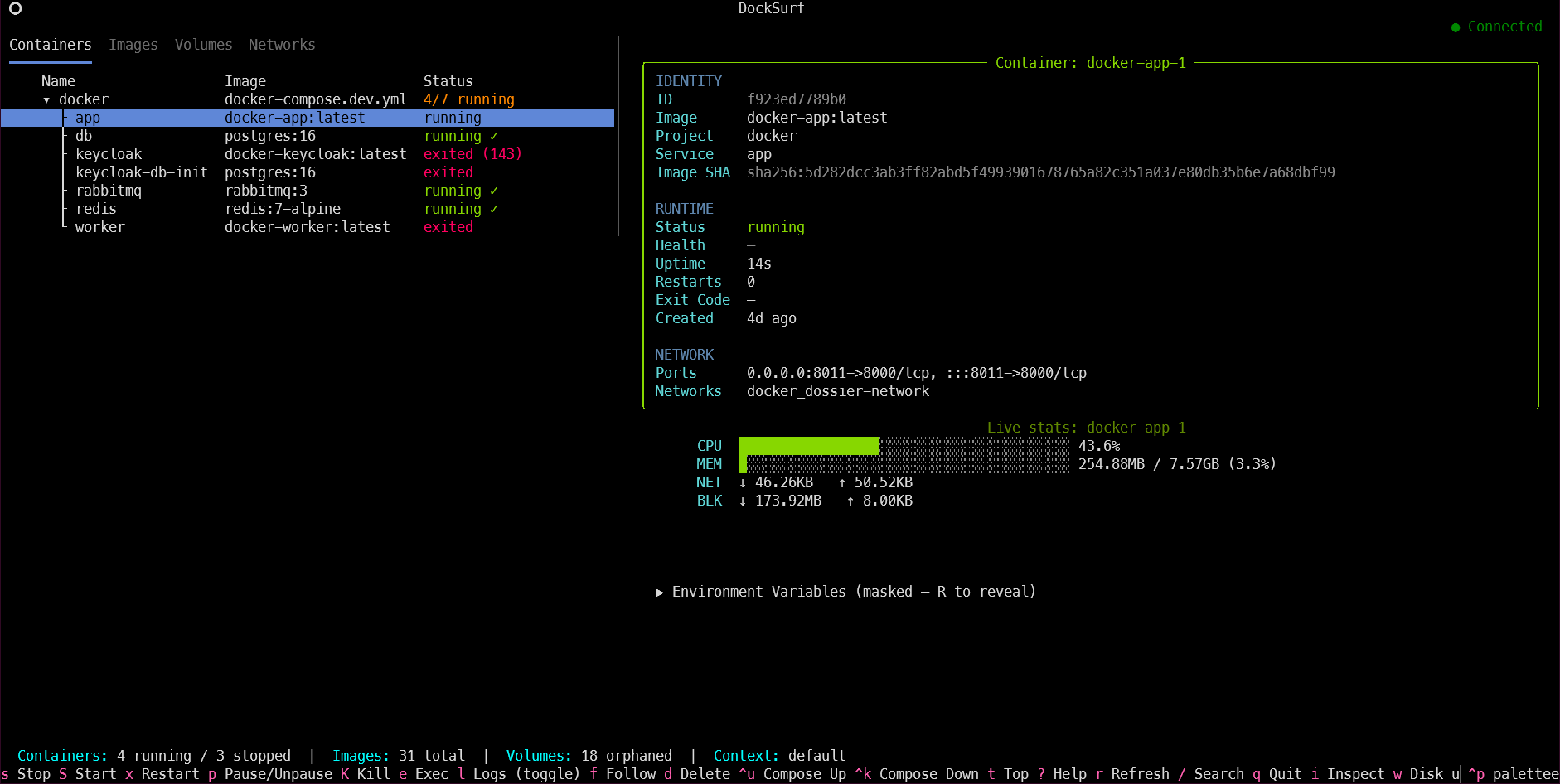
A keyboard-driven terminal UI for visualising and managing Docker resources like containers, images, volumes, and networks. Compose-aware and live: it reacts to Docker events on its own and streams real time resource usage, so you're observing, not polling. No GUI, no browser tab.
Docs: Quickstart · Full keybindings reference · Changelog
Highlights
- Live by default — the tables auto-refresh on
docker events(container start/stop/die, image pull/delete, …);ris a manual reload. - Local or remote — honours your active
docker contexton startup: local, Docker Desktop, Colima, or a remote host over SSH/TCP. - Docker Compose aware — containers grouped by project into a collapsible tree, with project-wide up/down/stop/start/restart, colour-coded per-service logs, and
Bto rebuild + recreate a single service in place. - Live resource stats — CPU %, memory, network and block I/O streamed into the detail pane for the selected running container.
- Full lifecycle control — pause/unpause and kill sit alongside stop/start/restart, so a
stopthat hangs on its 10s timeout never needs the CLI. - Multi-select + bulk actions — mark rows on any tab and stop/start/remove them as a batch; ideal for cleaning up after a test run.
- Inspect & prune — the full raw
docker inspectJSON for any resource in a searchable modal, plus a one-key menu to prune stopped containers, dangling images, unused volumes/networks, or everything at once. - Full image/volume/network CRUD — pull, tag, and layer-history for images; create + size-on-disk for volumes; create + connect/disconnect for networks (see Tabs).
- Power-user exec & copy — a custom exec command with a chosen user,
docker cpin/out of a container, and an on-demanddocker topprocess snapshot, all via quick prompts. - Full control log viewer — live follow, in-log search, timestamps, configurable tail/
--since, and mouse drag-to-select text to copy (Ctrl+C). - Operational signals at a glance — colour-coded health, uptime and restart count, plus recent health-check probe output in the detail pane.
- Disk usage — a
docker system dfbreakdown (per-type size + reclaimable) on demand. - In-app context switching — list and switch Docker contexts from inside the TUI (
D), remembered across restarts. - Auto-reconnect — if the daemon goes down mid-session, DockSurf reconnects and refreshes on its own the moment it's back.
Requirements
- A reachable Docker daemon (local, or a remote one via
docker context) - Python 3.11+ and
uv— not needed if you're using the standalone binary - The
dockerCLI onPATH— only needed for exec-shell (e/E), Compose project actions (u/k), and file copy (C); everything else uses the SDK. DockSurf degrades gracefully if it's absent.
Install
See QUICKSTART.md for install + first steps in under 2 minutes.
From PyPI:
pip install docksurf
docksurf
Or run it without installing, via uvx:
uvx docksurf
Standalone binary (no Python/pip/uv required) — download the file for your OS from the latest release:
- Linux:
docksurf-linux-x86_64 - macOS (Apple Silicon):
docksurf-macos-arm64 - macOS (Intel):
docksurf-macos-x86_64 - Windows:
docksurf-windows-x86_64.exe
chmod +x docksurf-linux-x86_64   # or the macOS binary you downloaded
mv docksurf-linux-x86_64 /usr/local/bin/docksurf
docksurf
On Windows, just run the .exe directly — no chmod/mv step needed.
From source (for development, or to run an unreleased change):
git clone <repo>
cd docksurf

uv venv && source .venv/bin/activate
uv pip install -e .

docksurf
Or without installing:
uv run python -m docksurf_py.app
Releases
Published to PyPI via a tag-triggered GitHub Actions workflow (.github/workflows/publish.yml): pushing a vX.Y.Z tag builds the package and publishes it using PyPI Trusted Publishing (OIDC — no stored credentials), gated behind a manual approval step. See CHANGELOG.md for what's in each release.
Keybindings
The essentials — full reference (per-tab keys, log pane, Compose header behaviour) lives in KEYBINDINGS.md.
| Key | Action |
|---|---|
? |
Help screen — every keybinding, in-app |
r |
Refresh all Docker data |
/ |
Search / filter the active tab |
↑/↓, Tab |
Navigate rows / switch tabs |
1-4 |
Jump directly to Containers / Images / Volumes / Networks |
s/S/x |
Stop / start / restart (Containers tab) |
e |
Exec shell into the focused container |
l |
Toggle log viewer |
space |
Mark for a bulk action |
d |
Delete the selected — or marked — resource(s) |
i |
Inspect (raw docker inspect JSON) |
P |
Prune menu |
D |
Switch Docker context |
q |
Quit |
Tabs
Every tab has a leading mark column (space to toggle) for multi-select + bulk actions — see Keybindings.
Containers — all containers (running and stopped), grouped by Compose project into a collapsible tree, with standalone containers below. Columns: name (with a colour-coded status dot) and image. The detail pane adds status, health, uptime, restart count, ports, networks, env vars, health-probe history, live CPU/mem/net/block-IO stats, and an on-demand docker top snapshot (t). For a Compose service, B rebuilds and recreates just that container, streamed live.
Images — all images, tagged as In Use, Unused, or Dangling. Detail pane shows size, created date, architecture, and which containers reference the image. Pull new images with live progress (+), view per-layer history (h), retag (y), and one-key mark-all-dangling for bulk cleanup (a).
Volumes — all volumes, tagged as In Use or Orphaned. Detail pane shows mountpoint, driver, labels, and attached containers. Create volumes (+) and pull on-demand per-volume size on disk (b).
Networks — all networks with driver and scope. Detail pane shows driver, scope, subnet, gateway, and each attached container's IP/MAC within the network. Create networks (+) and connect/disconnect containers (v/m).
Architecture
Strict layering: models.py and constants.py are leaf modules nothing imports into. All Docker I/O lives in docker/ (via the Docker SDK for Python) behind a DockerService protocol, so it's swappable in tests. widgets/ is presentation-only, with no Docker knowledge. renderer/, actions/, search.py, and observability.py compose into the app itself — table rendering, resource actions, search, and live stats/docker top — driven by a single per-tab resource registry rather than branching on resource type throughout.
How data is fetched
DockSurf talks to Docker through the SDK (docker-py), not the CLI — with three sanctioned exceptions, all guarded on the docker CLI being present: interactive exec-shell (needs a real TTY), Compose project actions (docker-py has no Compose support), and file copy (docker cp semantics aren't worth reproducing over the SDK's raw tar archives).
Resource lists are fetched in parallel on every refresh and kept live via docker events (debounced, selection-preserving); stats and logs stream straight from the SDK, with a Compose project's logs merged and colour-coded per service.
Docker contexts — local and remote
DockSurf connects to whatever daemon your active Docker context points at (matching the docker CLI's precedence: DOCKER_HOST → active context → default socket). That doesn't have to be your local machine, and — since context switching now happens in-app — it doesn't require restarting DockSurf either.
Creating a context is still a docker CLI step (DockSurf lists and switches contexts, it doesn't create them):
# A context pointing at a remote Linux host over SSH — any host with a
# reachable Docker daemon and SSH access works: a cloud VM, a bare-metal
# box, a Raspberry Pi, a home server.
docker context create prod --docker "host=ssh://user@prod.example.com"

# Or over plain TCP, if the daemon's API is exposed that way
docker context create staging --docker "host=tcp://staging.example.com:2375"
Switching contexts from inside DockSurf — press D to list every context docker context ls knows about and pick one. This is in-app only: it never runs docker context use, so it doesn't touch ~/.docker/config.json or repoint any other terminal's docker/docker compose — DockSurf just opens its own connection to the chosen context's daemon. The choice is remembered across restarts (~/.local/share/docksurf/state.json).
Auto-reconnect — if the daemon your active context points at goes down mid-session (VM reboot, daemon restart, network blip), the status bar flags it immediately (● <reason>) and DockSurf retries on its own every couple of seconds, reconnecting and refreshing the moment it's back — no restart, no manual r.
Works with any endpoint that speaks the Docker Engine API — a plain Linux daemon, Docker Desktop, Colima, Rancher Desktop, or a remote host over SSH/TCP. Managed platforms without that API can't be reached this way even with a custom context.
Logging
App logs are written to ~/.local/share/docksurf/docksurf.log — never to stdout (which belongs to the TUI). Useful for debugging refresh errors, failed Docker API calls, container/Compose action results, and stream lifecycle events.
Changelog
See CHANGELOG.md for release history.
1 maintainer

Metadata
1 maintainer
Release files for docksurf 0.3.0
For a detailed explanation of source distributions (sdists) and built distributions (wheels), please see the package formats documentation.
Source distribution (sdist)
| File | Size | Uploaded | Provenance | Actions |
|---|---|---|---|---|
| docksurf-0.3.0.tar.gz | 264.8 kB | With provenance | Details for docksurf-0.3.0.tar.gz |
Built distribution (wheel)
| File | Interpreter | ABI | Platform | Actions Reset |
|---|---|---|---|---|
| docksurf-0.3.0-py3-none-any.whl | Python 3 | none | any | Details for docksurf-0.3.0-py3-none-any.whl |
Total release size: 396.9 kB
Release files / docksurf-0.3.0.tar.gz
| Download URL | docksurf-0.3.0.tar.gz |
|---|---|
| Size | 264.8 kB |
| Tags | Source |
|
SHA-256 checksum How to use checksums |
b2de4b4fc06f046243422ccfcd25e8423c0fd9246518f5d63704c79a7a0c0713
|
|
BLAKE2b-256 checksum How to use checksums |
ce90f9f06f7b64ef3285045ba1a4d1485098c21beb99e56b4d1de2779f001520
|
| Upload date | |
|
Uploaded using Trusted Publishing? What is trusted publishing? |
Yes |
| Uploaded via |
twine/6.1.0 CPython/3.13.14
|
Provenance
Provenance describes where a file came from. On PyPI, provenance is shared via attestations, which provide a verifiable record of the build or publishing details. View details, limitations and caveats.


PyPI Publish Attestation
PyPI verified that this artifact, at this checksum, originated from the publisher listed below.
Signed by GitHub Actions, verified by PyPI on Jul 23, 2026.
Transparency logRelease files / docksurf-0.3.0-py3-none-any.whl
| Download URL | docksurf-0.3.0-py3-none-any.whl |
|---|---|
| Size | 132.1 kB |
| Tags | Python 3 |
|
SHA-256 checksum How to use checksums |
e110ad764813b4c447e4fea7481a97186def1d913a3730299df65be83c972a37
|
|
BLAKE2b-256 checksum How to use checksums |
c1fd4f1754342dd56889b758b5236f7d2a53307f685e6e814fe05d8a88585cc3
|
| Upload date | |
|
Uploaded using Trusted Publishing? What is trusted publishing? |
Yes |
| Uploaded via |
twine/6.1.0 CPython/3.13.14
|
Provenance
Provenance describes where a file came from. On PyPI, provenance is shared via attestations, which provide a verifiable record of the build or publishing details. View details, limitations and caveats.
PyPI Publish Attestation
PyPI verified that this artifact, at this checksum, originated from the publisher listed below.
Signed by GitHub Actions, verified by PyPI on Jul 23, 2026.
Transparency logSecurity for docksurf 0.3.0
Provenance
Provenance describes where a file came from. On PyPI, provenance is shared via attestations, which provide a verifiable record of the build or publishing details. View details, limitations and caveats.
Full provenance
All 2 files in this release have been uploaded with provenance metadata.
Attestation for docksurf-0.3.0.tar.gz
PyPI Publish Attestation
PyPI verified that this artifact, at this checksum, originated from the publisher listed below.
Signed by GitHub Actions, verified by PyPI on Jul 23, 2026.
Transparency logA note on package security
PyPI is a repository for distributing packages, not a service for auditing them. While third-party security researchers and our staff do their best to detect and remove malicious packages, PyPI cannot guarantee the quality, security or suitability of any given package.
To learn more about protecting yourself from malicious actors, visit our package security documentation.














