DocQA: An easy way to extract information from documents
DocQA is a library and command-line tool that makes it easy to analyze semi-structured and unstructed documents (PDFs, scanned images, etc.) using advanced machine learning. You simply point DocQA at one or more documents and specify a question you want to ask. DocQA is created by the team at Impira which is a market leading solution for working with documents.
Quickstart (CLI)
To install docqa, you can simply run pip install docqa. This will install the command line tool as well as the library.
If you want to run OCR on images, then you must also install the tesseract library:
- Mac OS X:
brew install tesseract - Ubuntu:
apt install tesseract-ocr
docqa scan allows you to ask one or more questions to a single document or directory of files. For example, you can
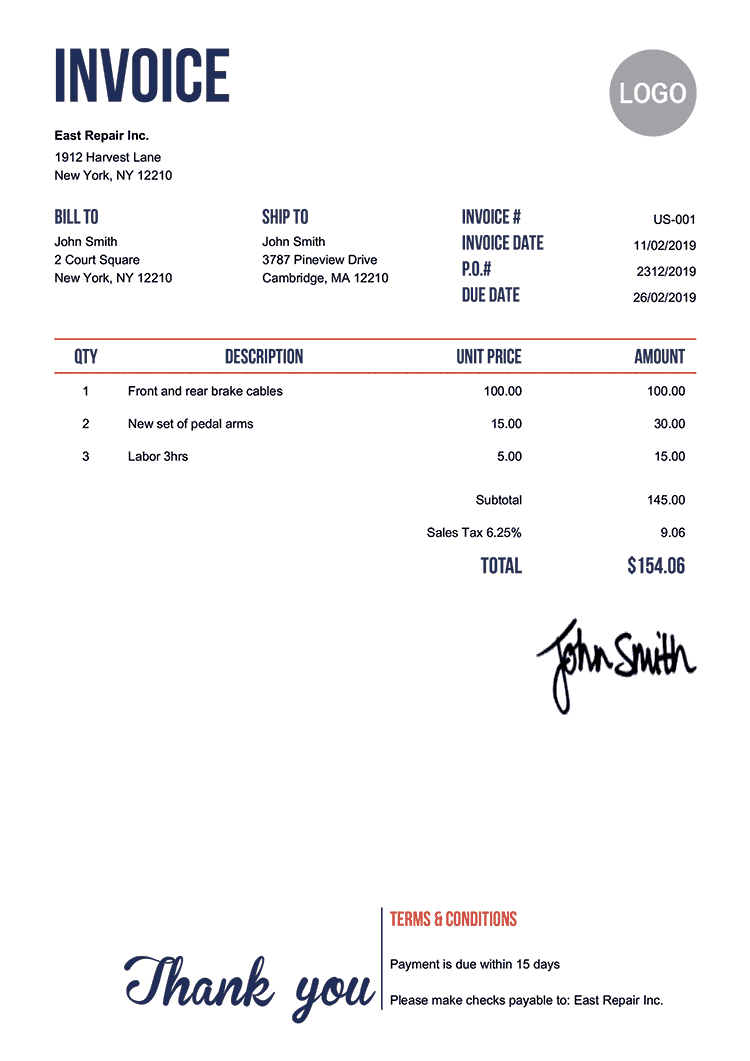
find the invoice number https://templates.invoicehome.com/invoice-template-us-neat-750px.png with
$ docqa scan "What is the invoice number?" https://templates.invoicehome.com/invoice-template-us-neat-750px.png
If you have a folder of documents on your machine, you can run something like
$ docqa scan "What is the effective date?" /path/to/contracts/folder
to determine the effective data of every document in the folder.
Quickstart (Library)
DocQA can also be used as a library. It contains two basic abstractions: (1) a DocumentQuestionAnswering pipeline
that makes it simple to ask questions of documents and (2) a Document abstraction that can parse various types of documents
to feed into the pipeline.
>>> from docqa import document, pipeline
>>> p = pipeline.get_pipeline()
>>> doc = document.load_document("/path/to/document.pdf")
>>> for q in ["What is the invoice number?", "What is the invoice total?"]:
...     print(q, p(question=q, **doc.context))
Use cases
DocQA excels at a number of use cases involving structured, semi-structured, or unstructured documents. You can ask questions about invoices, contracts, forms, emails, letters, receipts, and many more. We will continue evolving the model, offer more modeling options, and expanding the set of supported documents. We welcome feedback, requests, and of course contributions to help achieve this vision.
How it works
Under the hood, docqa uses a pre-trained zero-shot language model, based on LayoutLM, that has been fine-tuned for a question-answering task. The model is trained using a combination of SQuAD2.0 and DocVQA which make it particularly well suited for complex visual question answering tasks on a wide variety of documents. The underlying model is also published on HuggingFace as impira/layoutlm-document-qa which you can access directly.
Limitations
DocQA is intended to have a small install footprint and be simple to work with. As a result, it has some limitations:
- Models must be pre-trained. Although DocQA uses a zero-shot model that can adapt based on the question you provide, it does not learn from your data.
- Support for images and PDFs. Currently DocQA supports images and PDFs, with or without embedded text. It does not support word documents, emails, spreadsheets, etc.
- Scalar text outputs. DocQA only produces text outputs (answers). It does not support richer scalar types (i.e. it treats numbers and dates as strings) or tables.
Where to go from here
DocQA is a swiss army knife tool for working with documents and experiencing the power of modern machine learning. You can use it just about anywhere, including behind a firewall on sensitive data, and test it with a wide variety of documents. Our hope is that DocQA enables many creative use cases for document understanding by making it simple and easy to ask questions from your documents.
If you find yourself wondering how to achieve higher accuracy, work with more file types, teach the model with your own data, have a human-in-the-loop workflow, or query the data you're extracting, then do not fear -- you are running into the challenges that every organization does while putting document AI into production. The Impira platform is designed to solve these problems in an easy and intuitive way. Impira comes with a QA model that is additionally trained on proprietary datasets and can achieve 95%+ accuracy out-of-the-box for most use cases. It also has an intuitive UI that enables subject matter experts to label and improve the models, as well as an API that makes integration a breeze. Please sign up for the product or reach out to us for more details.
Acknowledgements
DocQA would not be possible without the contributions of many open source projects:
and many others!
License
This project is licensed under the MIT license.
It contains code that is copied and adapted from transformers (https://github.com/huggingface/transformers), which is Apache 2.0 licensed. Files containing this code have been marked as such in their comments.
1 maintainer

Metadata
1 maintainer
Release files for docqa 0.0.3
For a detailed explanation of source distributions (sdists) and built distributions (wheels), please see the package formats documentation.
Source distribution (sdist)
| File | Size | Uploaded | |
|---|---|---|---|
| docqa-0.0.3.tar.gz | 19.8 kB | Details |
Built distribution (wheel)
| File | Interpreter | ABI | Platform | Reset |
|---|---|---|---|---|
| docqa-0.0.3-py3-none-any.whl | Python 3 | none | any | Details |
Total release size: 40.3 kB
Release files / docqa-0.0.3.tar.gz
| Download URL | docqa-0.0.3.tar.gz |
|---|---|
| Size | 19.8 kB |
| Tags | Source |
|
SHA-256 checksum How to use checksums |
b420aa0eafd9b4eb9bdbef7cb3723d709d2ccba775d61e8fa082b8fa5be7ba57
|
|
BLAKE2b-256 checksum How to use checksums |
4e10cec6d73f20576332652e6472fd8dac39f072e6908401a2aefb4383fcce0c
|
| Upload date | |
|
Uploaded using Trusted Publishing? What is trusted publishing? |
No |
| Uploaded via |
twine/4.0.1 CPython/3.10.5
|
Release files / docqa-0.0.3-py3-none-any.whl
| Download URL | docqa-0.0.3-py3-none-any.whl |
|---|---|
| Size | 20.5 kB |
| Tags | Python 3 |
|
SHA-256 checksum How to use checksums |
ecf81d8a4a00a8479f141b0a94fa2d8ad5e9359e6d6fa04b8218eb054699aee7
|
|
BLAKE2b-256 checksum How to use checksums |
674fa69853dc5fca2a8cd963b1d7dbef9d8d3e3ecea021fd5741106cba788739
|
| Upload date | |
|
Uploaded using Trusted Publishing? What is trusted publishing? |
No |
| Uploaded via |
twine/4.0.1 CPython/3.10.5
|